
What am I doing wrong?

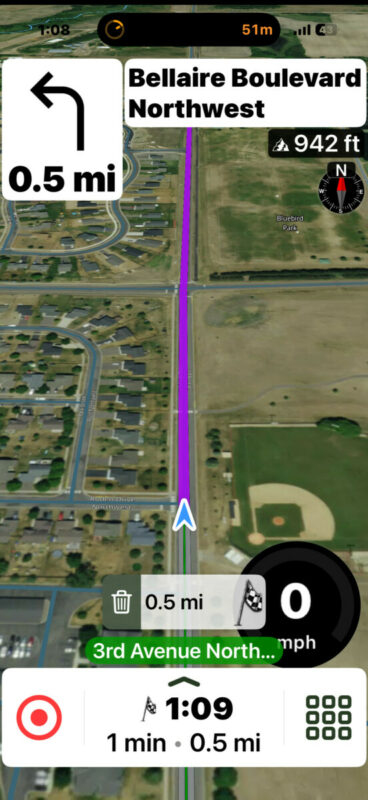
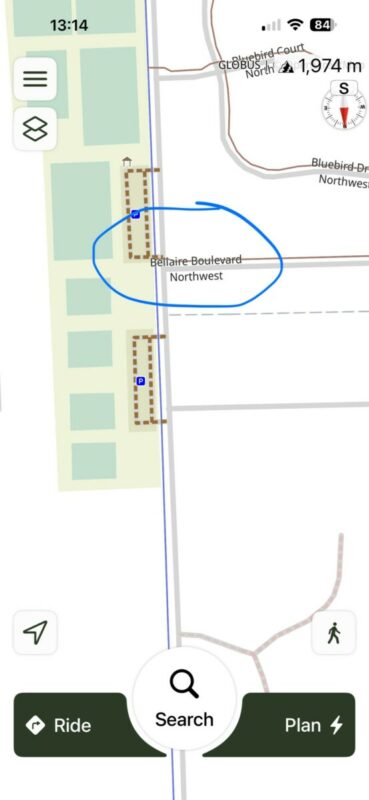
Quote from MNVespaRider on 16.04.2026, 12:57Hey everybody, after downloading the app, it looked really cool, so I subscribed for the year. I went out for my first ride today. I'm having some pretty serious problems, and I'm wondering what I might be doing wrong. I went to some known destinations. The route seemed to agree with past experience, but when returning, I had some weird routing. While the app was showing a left turn on the map, the audio is telling me to turn right on a different street. When going through a town, it routed me around a particular block, even though there was absolutely no reason to do this. Coming back the other way it did it on the opposite side (see image). Again, I kept going, and it immediately rerouted to just going straight. There were several erroneous audio commands to turn (some in the opposite direction), which were incorrect. When getting close to home, it told me to turn right on Bellaire Boulevard, then arriving at. 123 Eagle Street, my actual destination. I was turning right on Eagle Street, not Belairre Blvd. It knew my destination was on Eagle Street, but referred to it by the incorrect street name. While this might be a database error, how did it get me to the right address? I've attached some screenshots. Apologies, but adding the images seemingly messed up the formatting. One of them shows the weird detour, and the other one shows the turn onto the wrong street name. The thing that's most troubling are the erroneous directions in the seemingly opposite directions I heard, but only the audio (the map showed the correct turn). In other words, I was expecting a left turn, but it would tell me to make a right turn. Then, after a few seconds, it seemed to verbalize the correct directions. Additionally, I have the display speed limit selected, but never saw a speed limit on any road (35-65 MPH). I'm using the "scooter setting" as it has a speed cap as I ride a Vespa. Thank in advance!
paul
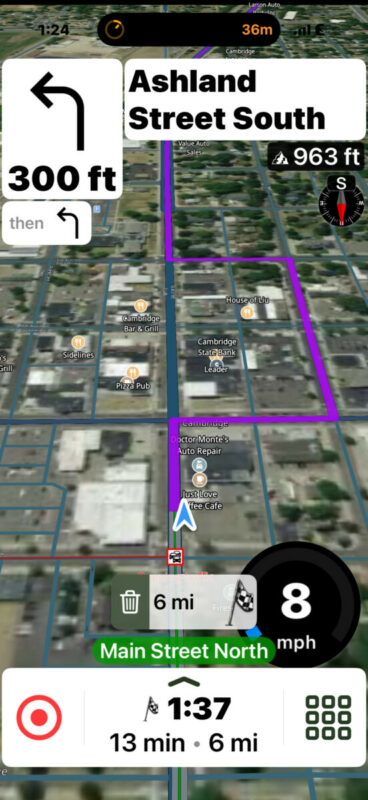
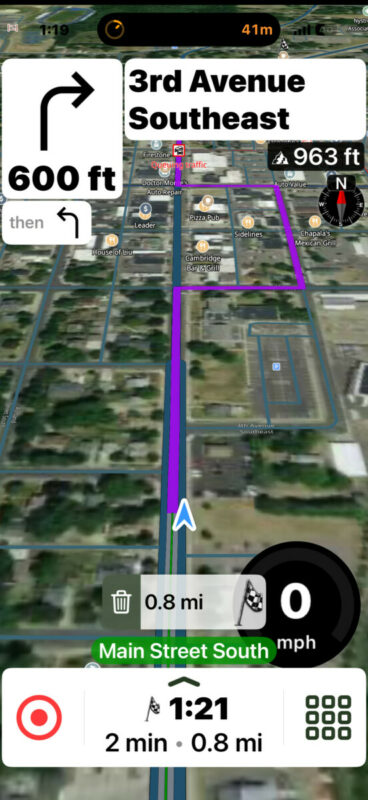
Hey everybody, after downloading the app, it looked really cool, so I subscribed for the year. I went out for my first ride today. I'm having some pretty serious problems, and I'm wondering what I might be doing wrong. I went to some known destinations. The route seemed to agree with past experience, but when returning, I had some weird routing. While the app was showing a left turn on the map, the audio is telling me to turn right on a different street. When going through a town, it routed me around a particular block, even though there was absolutely no reason to do this. Coming back the other way it did it on the opposite side (see image). Again, I kept going, and it immediately rerouted to just going straight. There were several erroneous audio commands to turn (some in the opposite direction), which were incorrect. When getting close to home, it told me to turn right on Bellaire Boulevard, then arriving at. 123 Eagle Street, my actual destination. I was turning right on Eagle Street, not Belairre Blvd. It knew my destination was on Eagle Street, but referred to it by the incorrect street name. While this might be a database error, how did it get me to the right address? I've attached some screenshots. Apologies, but adding the images seemingly messed up the formatting. One of them shows the weird detour, and the other one shows the turn onto the wrong street name. The thing that's most troubling are the erroneous directions in the seemingly opposite directions I heard, but only the audio (the map showed the correct turn). In other words, I was expecting a left turn, but it would tell me to make a right turn. Then, after a few seconds, it seemed to verbalize the correct directions. Additionally, I have the display speed limit selected, but never saw a speed limit on any road (35-65 MPH). I'm using the "scooter setting" as it has a speed cap as I ride a Vespa. Thank in advance!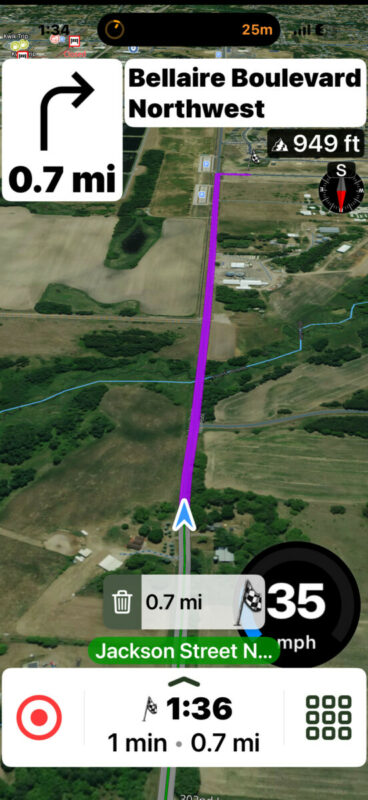
paul

Quote from Guido on 16.04.2026, 13:44Hi Paul,
Thanks for taking the time to write. I appreciate it.
So... I've looked into this.
The first one is a map data issue. Scenic uses OpenStreetMap (OSM) as its data source. According to OSM, this street it called Bellaire Boulevard Northwest from the start, while in reality (according to Google Maps), it's Eagle street, which later becomes Bellaire Boulevard Northwest. Map data issues are unfortunately out of our control. If you want you can report, or even fix these issues: https://scenic.app/help/reporting-map-errors/
Regarding the strange block in stead of just sending you straight... from your nickname, I'm assuming you selected moto-scooter (Vespa) routing. I tried this myself, and indeed, the moto-scooter routing will guide you around Main Street. I don't have access to the internal working of the moto-scooter routing algorithm, but I do know it prefers lower class roads to higher class roads.
In the map data, Main Street is tagged as a "tertiary" road class and having 2 lanes ( https://www.openstreetmap.org/way/770992130#map=18/45.571153/-93.224101&layers=D ).
Ashland Street has the lower "residential" road class and no #lane tags (assumes just 1 lane) (https://www.openstreetmap.org/way/18113145#map=16/45.56781/-93.22535&layers=D).
So that's why it prefers Ashland street.I think this is also the reason for the wrong instruction here:
I think this is a bug in the routing framework. Even though the routing algorithm doesn't want you to continue on Main Street, it should still instruct you to turn right here. But it's not. It's just assuming that you "know" to not go on Main Street, which obviously is wrong. I'll need to report this to our framework provider.
Meanwhile, what you can do, is select "shortest" mode under the moto-scooter routing.
Hope this helps/explains. If not, please let me know if you have other questions. Happy to help.
Best regards and ride safe,
Guido
Hi Paul,
Thanks for taking the time to write. I appreciate it.
So... I've looked into this.
The first one is a map data issue. Scenic uses OpenStreetMap (OSM) as its data source. According to OSM, this street it called Bellaire Boulevard Northwest from the start, while in reality (according to Google Maps), it's Eagle street, which later becomes Bellaire Boulevard Northwest. Map data issues are unfortunately out of our control. If you want you can report, or even fix these issues: https://scenic.app/help/reporting-map-errors/
Regarding the strange block in stead of just sending you straight... from your nickname, I'm assuming you selected moto-scooter (Vespa) routing. I tried this myself, and indeed, the moto-scooter routing will guide you around Main Street. I don't have access to the internal working of the moto-scooter routing algorithm, but I do know it prefers lower class roads to higher class roads.
In the map data, Main Street is tagged as a "tertiary" road class and having 2 lanes ( https://www.openstreetmap.org/way/770992130#map=18/45.571153/-93.224101&layers=D ).
Ashland Street has the lower "residential" road class and no #lane tags (assumes just 1 lane) (https://www.openstreetmap.org/way/18113145#map=16/45.56781/-93.22535&layers=D).
So that's why it prefers Ashland street.
I think this is also the reason for the wrong instruction here:
I think this is a bug in the routing framework. Even though the routing algorithm doesn't want you to continue on Main Street, it should still instruct you to turn right here. But it's not. It's just assuming that you "know" to not go on Main Street, which obviously is wrong. I'll need to report this to our framework provider.
Meanwhile, what you can do, is select "shortest" mode under the moto-scooter routing.
Hope this helps/explains. If not, please let me know if you have other questions. Happy to help.
Best regards and ride safe,
Guido
Quote from MNVespaRider on 16.04.2026, 13:50Hi Guido!
Thank you for your prompt reply! You provide great support. I had a feeling that it had something to do with the database, although it's puzzling that it took me off Main Street for one block and then put me right back on Main Street. I will definitely change my routing to shortest. One of the things that still puzzles me, although I wasn't able to do any screen captures, because I was riding, was the situation in which I had an upcoming left turn, which was showing on the map, but I received an audio instruction to make a right turn, and then the correct audio instruction to make a left turn. This seems to happen shortly after I've made a previous turn. I'll make the turn, receive an erroneous audio direction, and then receive the correct direction shortly thereafter. Since I knew where I was, I ignored it, but I can see how this might be an issue if I'm navigating unfamiliar spaces. I'll make the change to the app and go for another ride. Any idea why it's not showing the speed limits? I checked, and I have that all selected. I understand that every road doesn't have speed limits listed in the database, but I was all over the place and didn't see a single speed limit. Again, thank you!
Hi Guido!
Thank you for your prompt reply! You provide great support. I had a feeling that it had something to do with the database, although it's puzzling that it took me off Main Street for one block and then put me right back on Main Street. I will definitely change my routing to shortest. One of the things that still puzzles me, although I wasn't able to do any screen captures, because I was riding, was the situation in which I had an upcoming left turn, which was showing on the map, but I received an audio instruction to make a right turn, and then the correct audio instruction to make a left turn. This seems to happen shortly after I've made a previous turn. I'll make the turn, receive an erroneous audio direction, and then receive the correct direction shortly thereafter. Since I knew where I was, I ignored it, but I can see how this might be an issue if I'm navigating unfamiliar spaces. I'll make the change to the app and go for another ride. Any idea why it's not showing the speed limits? I checked, and I have that all selected. I understand that every road doesn't have speed limits listed in the database, but I was all over the place and didn't see a single speed limit. Again, thank you!

Quote from johansw on 16.04.2026, 15:32It used to be necessary to toggle Show speedometer as well as Show speed limit to be able to see Speed limit.
It used to be necessary to toggle Show speedometer as well as Show speed limit to be able to see Speed limit.
Quote from MNVespaRider on 16.04.2026, 15:34Hi, thanks for the tip. It's a beautiful day here in Minnesota, I'll give it another ride after dinner.
Hi, thanks for the tip. It's a beautiful day here in Minnesota, I'll give it another ride after dinner.
Quote from MNVespaRider on 16.04.2026, 15:39Guido,
I visited the website to try to correct the map. I don't see a way to "split" a road into different names. I think I know what happened. This is a new road, that used to be farmland about 5 years ago. Bellaire began at the first stop sign (first intersection on Eagle St). What I need to do is change the name of the road at the stop sign, but I don't know how. I did try to make it edit on the map, but asked a experienced editor to review what I did, to make sure I wasn't corrupting the database. Appreciate the advice!
Paul
Guido,
I visited the website to try to correct the map. I don't see a way to "split" a road into different names. I think I know what happened. This is a new road, that used to be farmland about 5 years ago. Bellaire began at the first stop sign (first intersection on Eagle St). What I need to do is change the name of the road at the stop sign, but I don't know how. I did try to make it edit on the map, but asked a experienced editor to review what I did, to make sure I wasn't corrupting the database. Appreciate the advice!
Paul
Quote from Guido on 17.04.2026, 08:29Hi Paul,
That’s the correct way indeed. If you are not sure you can either ask an editor to review or just leave a comment. 👍.
Cheers and thanks,
Guido
Hi Paul,
That’s the correct way indeed. If you are not sure you can either ask an editor to review or just leave a comment. 👍.
Cheers and thanks,
Guido


