Quote from
Kev450 on 10.08.2026, 15:04
Hello,
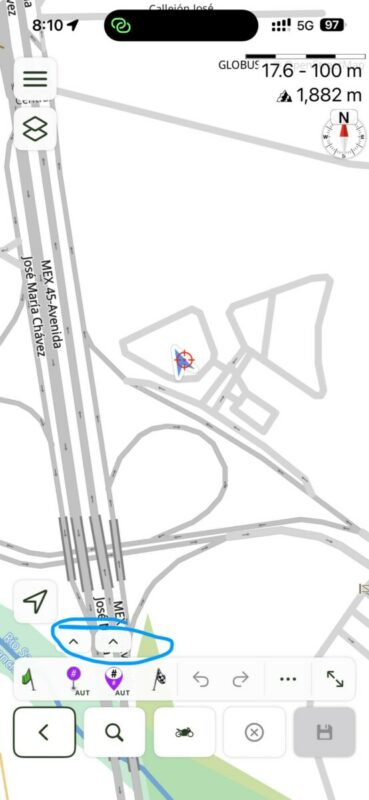
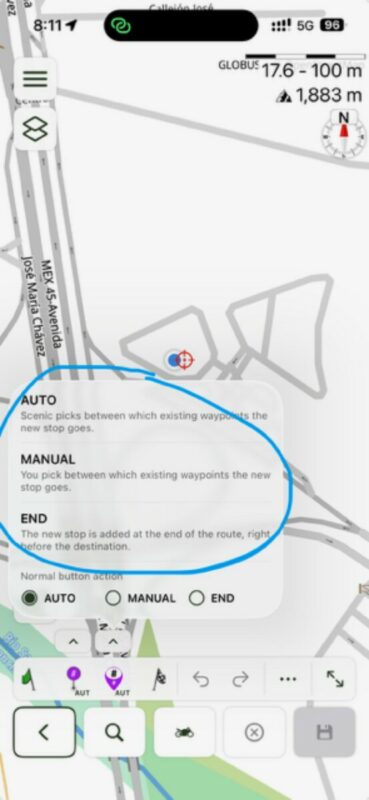
I don’t know yet if I like the new layout but thankfully the 2 little arrows icon somewhat brings back the old planning layout to the bottom but there is one major irritation for me, the new Auto/Manual/End, just why?? It was so easy in previous version to simply press and hold and have it “manual”, now i have to waste time back and forth to change from Auto to Manual and then Manual back to Auto… seriously??? 😐 As a route planner this is quite annoying and time wasting! Please bring back the “press and hold” behaviour for the waypoints and stops while still being in “Auto” if some see the need to have them separate. Have a look https://youtu.be/6sIWEzaCZgA
Edit: I also noticed the “Auto” is misbehaving compared to previous version, I didn’t have to put so many waypoints between stops, now i have to make sure i put enough https://youtu.be/FdovFvyhwXg
Hello,
I don’t know yet if I like the new layout but thankfully the 2 little arrows icon somewhat brings back the old planning layout to the bottom but there is one major irritation for me, the new Auto/Manual/End, just why?? It was so easy in previous version to simply press and hold and have it “manual”, now i have to waste time back and forth to change from Auto to Manual and then Manual back to Auto… seriously??? 😐 As a route planner this is quite annoying and time wasting! Please bring back the “press and hold” behaviour for the waypoints and stops while still being in “Auto” if some see the need to have them separate. Have a look https://youtu.be/6sIWEzaCZgA
Edit: I also noticed the “Auto” is misbehaving compared to previous version, I didn’t have to put so many waypoints between stops, now i have to make sure i put enough https://youtu.be/FdovFvyhwXg