
v4.40 Broke Useful Zoom Levels on Custom Maps

Quote from Lost Roadie on 19.06.2026, 17:05Hello Guido,
One of the main features of Scenic I have found to be incredibly useful is the ability to make custom maps and why I'm a passionate promoter of this app anytime I can.
It really sets this app apart from the rest.
I spent a lot of time curating a couple of custom maps that perfectly suits my needs for off tarmac and small road exploring, both in SE Asia and in North America. My main focus is navigating what are considered in the Scenic road description as tracks (forest roads, outdoor recreation), Lv 6 and Lv 7 roads.
Up until v4.40 the visible zoom level for these roads was 9, now it is 13. The update notes states it "fixed" zoom levels for these roads but now the thing I found the most useful for planning and wandering off the beaten path is gone. I have to be zoomed way in and scroll scroll scroll to see if a road or trail goes through, like any other map app. I would say a more accurate description would be broke zoom levels, not fixed.
Please, bring back the road zoom levels for customs maps and let us decide what we want to see.
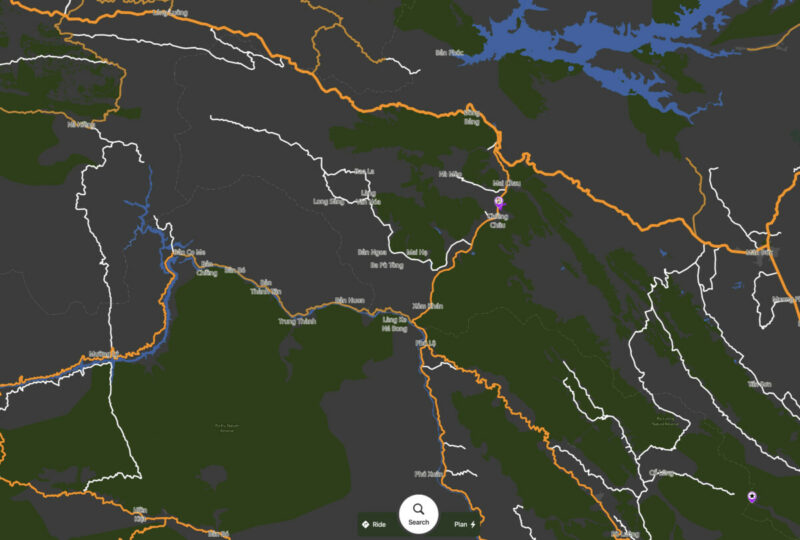
This shows the new maps levels, even though my map still shows level 9, it is forced to be 13.
Now with 4.40
Before 4.40, luckily I had some old screen shots posted on ADVrider showing how awesome the customs map options were for exploring and planning on back roads.
before
Now with 4.40
Hello Guido,
One of the main features of Scenic I have found to be incredibly useful is the ability to make custom maps and why I'm a passionate promoter of this app anytime I can.
It really sets this app apart from the rest.
I spent a lot of time curating a couple of custom maps that perfectly suits my needs for off tarmac and small road exploring, both in SE Asia and in North America. My main focus is navigating what are considered in the Scenic road description as tracks (forest roads, outdoor recreation), Lv 6 and Lv 7 roads.
Up until v4.40 the visible zoom level for these roads was 9, now it is 13. The update notes states it "fixed" zoom levels for these roads but now the thing I found the most useful for planning and wandering off the beaten path is gone. I have to be zoomed way in and scroll scroll scroll to see if a road or trail goes through, like any other map app. I would say a more accurate description would be broke zoom levels, not fixed.
Please, bring back the road zoom levels for customs maps and let us decide what we want to see.
This shows the new maps levels, even though my map still shows level 9, it is forced to be 13.
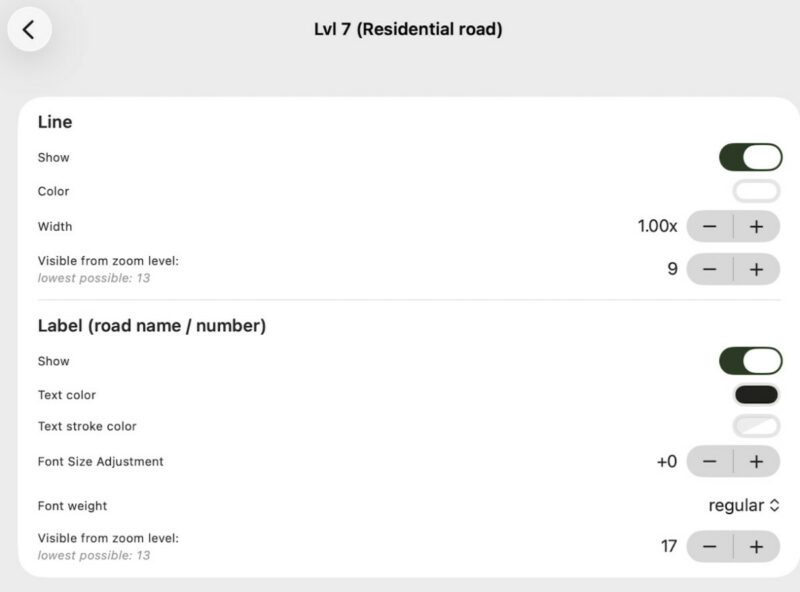
Now with 4.40
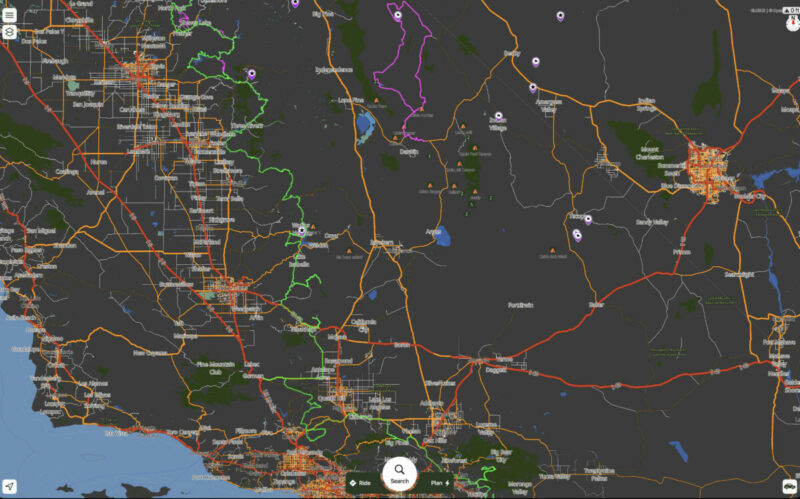
Before 4.40, luckily I had some old screen shots posted on ADVrider showing how awesome the customs map options were for exploring and planning on back roads.
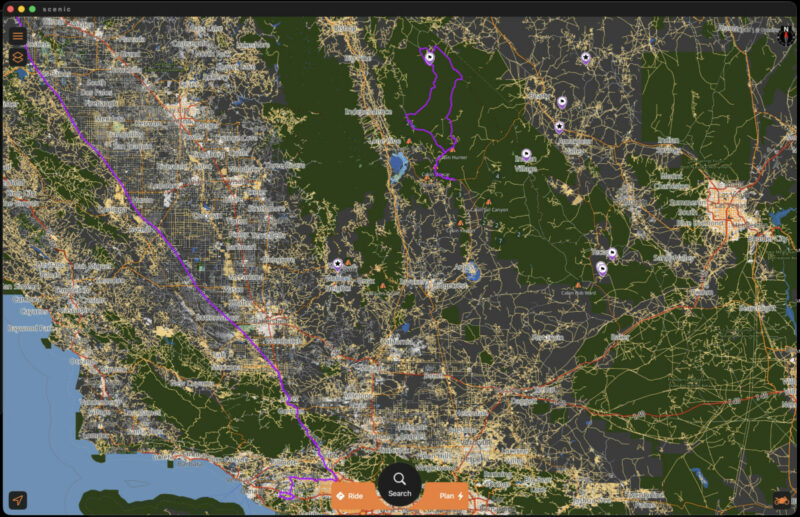
before
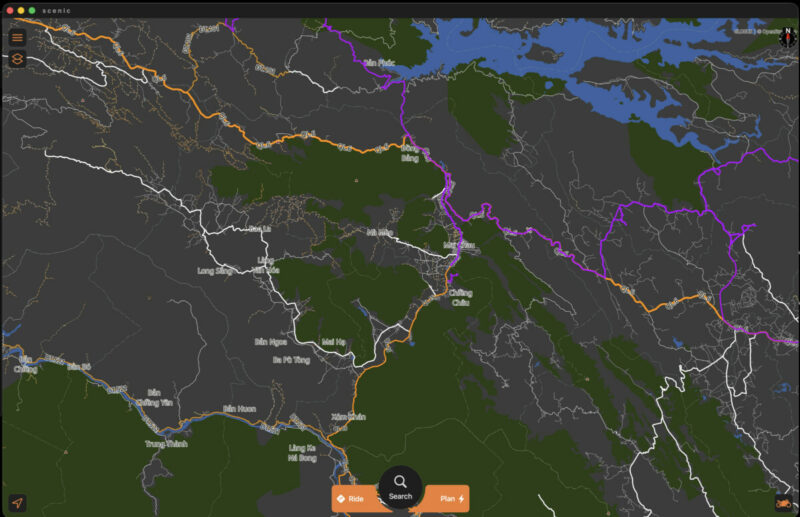
Now with 4.40


Quote from Guido on 19.06.2026, 18:36I had to “fix” this because of this issue: https://scenic.app/forum/topic/map-style-issue/#postid-16027
However, if they were showing before then maybe something else is wrong, or the map provider decided to change in what map tiles these roads are included.
I’ll investigate further.
I had to “fix” this because of this issue: https://scenic.app/forum/topic/map-style-issue/#postid-16027
However, if they were showing before then maybe something else is wrong, or the map provider decided to change in what map tiles these roads are included.
I’ll investigate further.
Quote from Lost Roadie on 24.06.2026, 08:43Thank you for the reply Guido.
As the screenshots show something has certainly changed in the zoom levels. The zoom levels for forests have also changed, which is not as important but is there.
The issue in the thread you linked is recent and seems like a symptom of this change, maybe not a cause. It seems like you needed to change the available zoom level numbers to reflect what was now available. Recently the zoom levels changed, perhaps by the map provider or Scenic's access to the map tiles, which in turn looks like it caused that issue the other thread is about, since I have shown these minor roads previously have been shown at zoom levels down to 9 from the start of v.4 and custom maps.
For me, the custom map options and how it displays is by far the most important feature with Scenic that makes it the best mapping app available.
Thank you for looking into this and hopefully finding a solution to restore the functionality of what we had just a month ago. New features are cool but keeping all the previous features we use is a foundation for a great app.
Thank you for the reply Guido.
As the screenshots show something has certainly changed in the zoom levels. The zoom levels for forests have also changed, which is not as important but is there.
The issue in the thread you linked is recent and seems like a symptom of this change, maybe not a cause. It seems like you needed to change the available zoom level numbers to reflect what was now available. Recently the zoom levels changed, perhaps by the map provider or Scenic's access to the map tiles, which in turn looks like it caused that issue the other thread is about, since I have shown these minor roads previously have been shown at zoom levels down to 9 from the start of v.4 and custom maps.
For me, the custom map options and how it displays is by far the most important feature with Scenic that makes it the best mapping app available.
Thank you for looking into this and hopefully finding a solution to restore the functionality of what we had just a month ago. New features are cool but keeping all the previous features we use is a foundation for a great app.
Quote from Guido on 24.06.2026, 09:05Just got a reply from the map provider yesterday. They removed the lvl6 and lvl7 roads from the 9-12 map tiles to reduce the file size of offline maps. I'm trying to convince them to add it back. At least lvl6. I think those are the roads you are most interested in. Lvl7 are residential roads.
Just got a reply from the map provider yesterday. They removed the lvl6 and lvl7 roads from the 9-12 map tiles to reduce the file size of offline maps. I'm trying to convince them to add it back. At least lvl6. I think those are the roads you are most interested in. Lvl7 are residential roads.
Quote from Lost Roadie on 24.06.2026, 09:32Thanks again for the reply, it's great news you have some info and are working to a solution.
It would make sense by the description that residential roads would not be as important but what I've found while digging into the custom map settings is the classifications is that lv7 residential roads can be commonly misclassified.
Sometimes lv6, lv7 and tracks (recreational, forest service roads) are all exactly the same type of rural roads with no buildings or people living near them in various countries.
Having all roads set to a level 9 detail and adjusting the line width was the way I found to give me a complete overview of everything while zoomed out.
Either way, getting details back would be awesome!
Thanks again for the reply, it's great news you have some info and are working to a solution.
It would make sense by the description that residential roads would not be as important but what I've found while digging into the custom map settings is the classifications is that lv7 residential roads can be commonly misclassified.
Sometimes lv6, lv7 and tracks (recreational, forest service roads) are all exactly the same type of rural roads with no buildings or people living near them in various countries.
Having all roads set to a level 9 detail and adjusting the line width was the way I found to give me a complete overview of everything while zoomed out.
Either way, getting details back would be awesome!


