
Strange looping

Quote from Windsortenor on 13.08.2026, 05:37I am trying to make a fairly straight forward route from point A to point B. I am putting in waypoints along the way (including some stops). For some reason (starting this morning), Scenic is making loops from waypoint to waypoint instead of just following the road. I have “avoid unpaved and highways” selected. This is not new. This is how I have always created my routes.
In the photo uploaded…Stop 1 was waypoint 6 until I added 7 and 8. It then changed the waypoint numbers and looped around. If I change the STOP to a waypoint it seems to be fine. Also, I have to make many more waypoints to the destination or it starts looping between waypoints. Very frustrating to say the least.
Any suggestions? Thank you in advance.
I am trying to make a fairly straight forward route from point A to point B. I am putting in waypoints along the way (including some stops). For some reason (starting this morning), Scenic is making loops from waypoint to waypoint instead of just following the road. I have “avoid unpaved and highways” selected. This is not new. This is how I have always created my routes.
In the photo uploaded…Stop 1 was waypoint 6 until I added 7 and 8. It then changed the waypoint numbers and looped around. If I change the STOP to a waypoint it seems to be fine. Also, I have to make many more waypoints to the destination or it starts looping between waypoints. Very frustrating to say the least.
Any suggestions? Thank you in advance.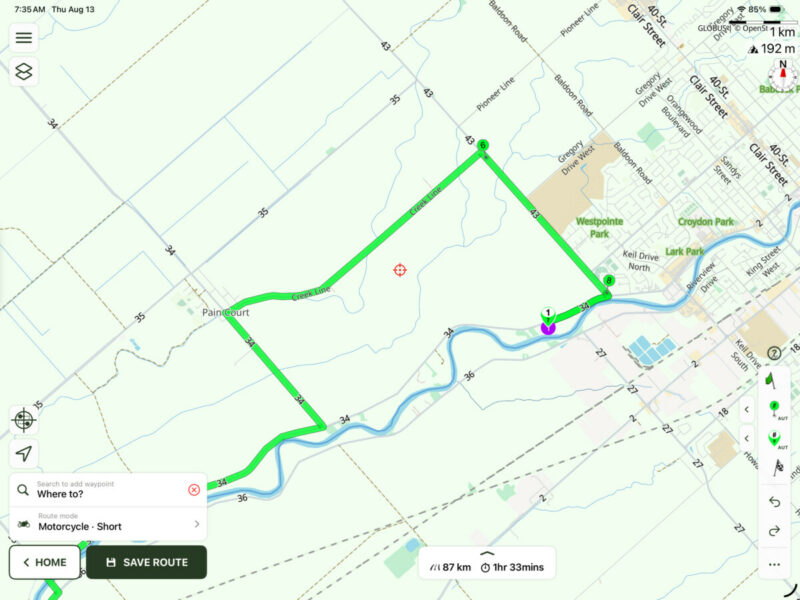

Quote from Guido on 13.08.2026, 05:55When you drop a waypoint the default mode of the button is “auto”. Try tapping the little arrow buttons next to the waypoint button. The descriptions in the pop-up should explain it.
When you drop a waypoint the default mode of the button is “auto”. Try tapping the little arrow buttons next to the waypoint button. The descriptions in the pop-up should explain it.
Quote from Windsortenor on 13.08.2026, 10:20I am not sure what has happened. I saved my original route using the multitude of way points to stop the looping thing from happening. Shut down the software, came back to it a few hours later and now, it is not looping at all, using the same routing but fewer waypoints (like it “used” to do). So, it’s all magic to me!
Thanks for the advice!
I am not sure what has happened. I saved my original route using the multitude of way points to stop the looping thing from happening. Shut down the software, came back to it a few hours later and now, it is not looping at all, using the same routing but fewer waypoints (like it “used” to do). So, it’s all magic to me!
Thanks for the advice!

Quote from Papa smurf1 on 14.08.2026, 09:59I am experiencing the looping also. I get to a point say 15 to 18 waypoints and it either recalculated my start point or it loops back to start. Also have seen anytime you get close to a road you were traveling on and got off to explore it loops back to that road automatically. PLEASE go back to the way vías and stops were added. Cannot understand how an app can get released the way this was changed to and not work properly. Used to love this app but in last couple days of trying to use it it is imposible to use.
I am experiencing the looping also. I get to a point say 15 to 18 waypoints and it either recalculated my start point or it loops back to start. Also have seen anytime you get close to a road you were traveling on and got off to explore it loops back to that road automatically. PLEASE go back to the way vías and stops were added. Cannot understand how an app can get released the way this was changed to and not work properly. Used to love this app but in last couple days of trying to use it it is imposible to use.
Quote from Guido on 14.08.2026, 10:07Guys. Nothing functionally changed. The only thing that really changed is that we had 2 buttons to add vias and 2 buttons to add stops. Now we only have 1 for each, but we have chevron buttons next to them. In the old UI, the most right buttons added vias/stops at the end, as the last waypoint . The 2 left ones used an auto-placement mode, determining between which existing waypoints the new via should go. That's the default now, but you can change the default.
You were using the most right ones in the old UI I'm assuming. If you want that functionality. Tap the chevron button and select "END" for Normal Button Action.
Here's more info: https://scenic.app/forum/topic/new-svenic-ui/
Guys. Nothing functionally changed. The only thing that really changed is that we had 2 buttons to add vias and 2 buttons to add stops. Now we only have 1 for each, but we have chevron buttons next to them. In the old UI, the most right buttons added vias/stops at the end, as the last waypoint . The 2 left ones used an auto-placement mode, determining between which existing waypoints the new via should go. That's the default now, but you can change the default.
You were using the most right ones in the old UI I'm assuming. If you want that functionality. Tap the chevron button and select "END" for Normal Button Action.
Here's more info: https://scenic.app/forum/topic/new-svenic-ui/


