Strange detours/vias in turn by turn directions.

Quote from Paul86911 on 05.06.2026, 17:33Hello,
I've had this problem before but today it seemed especially difficult.
I did a 50 mile trip from the start to a destination and set curvy roads as an option. While using turn by turn nav, Scenic would often try to route me off the main route, down a side street or small road, only to get back on the main route. In some cases it would want to send me down a side street 1000m, only to do a U turn and get back on the main route.
Am I doing something wrong in how I configure the trip? Is this a routing bug?
I was using the latest version of the app on iOS and using it in Carplay.
Thanks.
Hello,
I've had this problem before but today it seemed especially difficult.
I did a 50 mile trip from the start to a destination and set curvy roads as an option. While using turn by turn nav, Scenic would often try to route me off the main route, down a side street or small road, only to get back on the main route. In some cases it would want to send me down a side street 1000m, only to do a U turn and get back on the main route.
Am I doing something wrong in how I configure the trip? Is this a routing bug?
I was using the latest version of the app on iOS and using it in Carplay.
Thanks.

Quote from Guido on 05.06.2026, 17:41Sounds like it’s trying to send you back to a missed waypoint. Have a look here to understand the detour behaviour and how to automatically or manually skip waypoints: https://scenic.app/help/detour-behaviour-scenic/
Sounds like it’s trying to send you back to a missed waypoint. Have a look here to understand the detour behaviour and how to automatically or manually skip waypoints: https://scenic.app/help/detour-behaviour-scenic/
Quote from Paul86911 on 05.06.2026, 20:37Thanks for the reply Guido.
In some cases, I could see the reroute coming up on the map before I got there. As mentioned, it was trying to route me down a side street and then it would have me do a u turn. Since I was riding, it was difficult to follow these perfectly on the Carplay screen, but I definitely saw at least some of them coming up. This was good as I could avoid them and it would then continue giving directions towards the destination.
I've seen this behavior with Rever also, so I wonder if it's something to do with the map provider.
I'll read through your link and give it a try.
Thanks for the reply Guido.
In some cases, I could see the reroute coming up on the map before I got there. As mentioned, it was trying to route me down a side street and then it would have me do a u turn. Since I was riding, it was difficult to follow these perfectly on the Carplay screen, but I definitely saw at least some of them coming up. This was good as I could avoid them and it would then continue giving directions towards the destination.
I've seen this behavior with Rever also, so I wonder if it's something to do with the map provider.
I'll read through your link and give it a try.
Quote from Guido on 06.06.2026, 14:14There can actually be two reasons for this:1) If you use curvy routing, these can be added by the via points that the curvy routing ads. They will already be there during planning. TIP: After you generate a curvy route, zoom in on the map and drag the map following the route line, and check for any of those strange “side legs”. If they are there they are mostly caused by a via points try removing or moving the via point.2) If they are not there during planning then you probably missed a via point. If that happens Scenic will relentlessly try to send you back to that waypoint until it’s skipped automatically or manually, like mentioned above. https://scenic.app/help/detour-behaviour-scenic/
Quote from Paul86911 on 13.06.2026, 16:42I had the problem again today and found something in the route that might be useful.
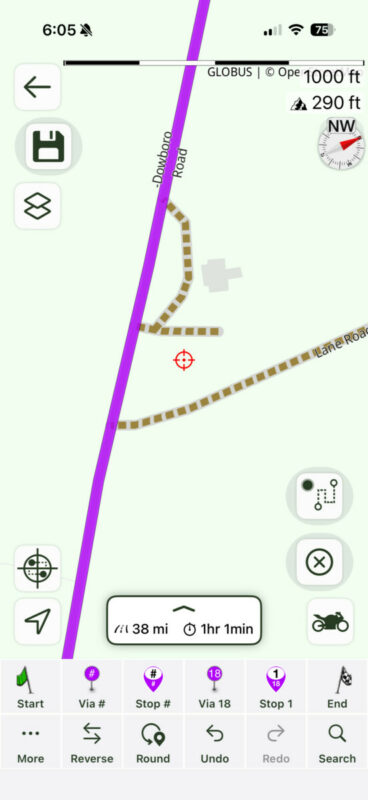
The screenshot shows part of my route with the purple being the route and the green dotted route being the detours I'm experiencing. So, when I'm riding, the navigation instructions will tell me to ride down that side road, then turn around and go back to the main route. I did not see via points on these detours while riding.
Is there a setting that will prevent these?
If it's helpful, I could email you the start and stop points
I had the problem again today and found something in the route that might be useful.
The screenshot shows part of my route with the purple being the route and the green dotted route being the detours I'm experiencing. So, when I'm riding, the navigation instructions will tell me to ride down that side road, then turn around and go back to the main route. I did not see via points on these detours while riding.
Is there a setting that will prevent these?
If it's helpful, I could email you the start and stop points