
Standard v Curvy routes.

Quote from sniffer on 05.05.2026, 06:56Hi. So I have been trying to use Scenic for around three years now but I'm getting to the point of giving up. I set a route on curvy and ask for no unpaved roads or motorways. Even with the new maps provider I always end up with weird doglegs heading to nowhere and more often than not end up down some single track gravely road with grass growing down the middle. This might be ok if you're on an adventure bike but I'm on a sport tourer. Most of the ride will seem fine until I get that dreaded turn right and I'm doing 15mph trying to keep the bike upright, flinging stones at my radiator.
I recently tried Calimoto to see if it was the same. Set to Winding (not Twisty) all the roads were fine on the trip and no doglegs. When I got home, I used two phones to compare routes between Scenic and Calimoto. I found Scenic set to Standard (adventure) was almost identical to Calimoto Winding. So, my question is, should I be using Standard mode for my rides to avoid these farm tracks and doglegs. I really want to like Scenic but it's getting to the point I dread whats ahead. Even the guy I ride with jokes it’s a good job he has an adventure bike when I'm using Scenic.
Hi. So I have been trying to use Scenic for around three years now but I'm getting to the point of giving up. I set a route on curvy and ask for no unpaved roads or motorways. Even with the new maps provider I always end up with weird doglegs heading to nowhere and more often than not end up down some single track gravely road with grass growing down the middle. This might be ok if you're on an adventure bike but I'm on a sport tourer. Most of the ride will seem fine until I get that dreaded turn right and I'm doing 15mph trying to keep the bike upright, flinging stones at my radiator.
I recently tried Calimoto to see if it was the same. Set to Winding (not Twisty) all the roads were fine on the trip and no doglegs. When I got home, I used two phones to compare routes between Scenic and Calimoto. I found Scenic set to Standard (adventure) was almost identical to Calimoto Winding. So, my question is, should I be using Standard mode for my rides to avoid these farm tracks and doglegs. I really want to like Scenic but it's getting to the point I dread whats ahead. Even the guy I ride with jokes it’s a good job he has an adventure bike when I'm using Scenic.

Quote from Guido on 05.05.2026, 09:13Sorry to hear about your bad experience.
Regarding the doglegs... are these legs already there during planning, or do they appear during navigation? If they appear during navigation, you might have missed a waypoint. If that happens, Scenic relentlessly try to guide you back (which could create U-turns, small loops, etc). Have a look here for more info on how to avoid and how to manually skip waypoints: https://scenic.app/help/detour-behaviour-scenic/
Regarding standard (adventurous) vs curvy... The standard routing has the advantage that it does not add additional waypoints. This will definitely reduce the risk of 'doglegs' if they are appearing during navigation due to a missed via point. With the slider all the way towards adventurous, bigger roads will be avoided in favor of smaller roads. If it gives you winding roads in your area that's great, but this is more a coincidence resulting from the kind of roads in your area I'm guessing, because there is no curviness taken into account with the standard routing.
Sorry to hear about your bad experience.
Regarding the doglegs... are these legs already there during planning, or do they appear during navigation? If they appear during navigation, you might have missed a waypoint. If that happens, Scenic relentlessly try to guide you back (which could create U-turns, small loops, etc). Have a look here for more info on how to avoid and how to manually skip waypoints: https://scenic.app/help/detour-behaviour-scenic/
Regarding standard (adventurous) vs curvy... The standard routing has the advantage that it does not add additional waypoints. This will definitely reduce the risk of 'doglegs' if they are appearing during navigation due to a missed via point. With the slider all the way towards adventurous, bigger roads will be avoided in favor of smaller roads. If it gives you winding roads in your area that's great, but this is more a coincidence resulting from the kind of roads in your area I'm guessing, because there is no curviness taken into account with the standard routing.
Quote from sniffer on 08.05.2026, 04:43Hi, the doglegs appear before navigation. If I do it from home before a ride I can fly through the route and delete the dogleg via points before setting off. But if we are setting off from a destination to somewhere else, I don't really have time to be going along the route trying to find and delete them.
If the standard (adventure) routing just avoids the bigger roads rather than motorcycle orientated rides, I may as well use Waze set to motorcycle which gives me the same thing (no motorways, mainly A and B roads) and gives much better driver information, like road closures, police and even potholes. And its free. My subscription runs till Oct so will keep trying different setting till then. Thanks.
Hi, the doglegs appear before navigation. If I do it from home before a ride I can fly through the route and delete the dogleg via points before setting off. But if we are setting off from a destination to somewhere else, I don't really have time to be going along the route trying to find and delete them.
If the standard (adventure) routing just avoids the bigger roads rather than motorcycle orientated rides, I may as well use Waze set to motorcycle which gives me the same thing (no motorways, mainly A and B roads) and gives much better driver information, like road closures, police and even potholes. And its free. My subscription runs till Oct so will keep trying different setting till then. Thanks.
Quote from TabascoADV on 08.05.2026, 06:07I'm a new user that started only because of the AA beta and find the same thing.
When I test-plan on routes that I know well in my local area, it gives me a dozen dead-end doglegs that I have to go delete. It also doesn't choose what I know to be the curvy/beauty route. I tried points that I know have some of the most beautiful and curvy routes in the United States on them such as Beartooth Pass in Montana/Wyoming and it routed me around it on Interstate 90 to Bozeman from Red Lodge. That's just one example. My local area in the Colorado Rockies, it routed me on one of the straightest and most boring highways in the state to get from Conifer, CO to Durango, CO and it took a half hour to work through all the waypoint adjustments just to get it to route on something worth riding.
I've tried many different variations until my eyes blurred and it became excruciatingly frustrating to use and when I saw the doglegs and dead-ends, that's when I stopped and came here only to find this thread. I'm not the only one I guess.
Ah well, I'll keep an eye on it but it's not a fun tool.
I'm a new user that started only because of the AA beta and find the same thing.
When I test-plan on routes that I know well in my local area, it gives me a dozen dead-end doglegs that I have to go delete. It also doesn't choose what I know to be the curvy/beauty route. I tried points that I know have some of the most beautiful and curvy routes in the United States on them such as Beartooth Pass in Montana/Wyoming and it routed me around it on Interstate 90 to Bozeman from Red Lodge. That's just one example. My local area in the Colorado Rockies, it routed me on one of the straightest and most boring highways in the state to get from Conifer, CO to Durango, CO and it took a half hour to work through all the waypoint adjustments just to get it to route on something worth riding.
I've tried many different variations until my eyes blurred and it became excruciatingly frustrating to use and when I saw the doglegs and dead-ends, that's when I stopped and came here only to find this thread. I'm not the only one I guess.
Ah well, I'll keep an eye on it but it's not a fun tool.
Quote from R1200CL on 10.05.2026, 13:14I’m new to Scenic too. Had these dogleg / dead end issue. I think the issue is basically caused by the use of the recommended detour setting. Don’t use it. Use the last option don’t recalculate. And enable skip waypoint button on map.
I’m new to Scenic too. Had these dogleg / dead end issue. I think the issue is basically caused by the use of the recommended detour setting. Don’t use it. Use the last option don’t recalculate. And enable skip waypoint button on map.
Quote from R1200CL on 10.05.2026, 13:42Hi guys. Hope this one convinces everyone to stay on Scenic. (Android next month)
https://claude.ai/public/artifacts/3d889390-7d53-4ad3-a4f6-1da2e846ca93
Copy the link into a browser works probably best b
Hi guys. Hope this one convinces everyone to stay on Scenic. (Android next month)
https://claude.ai/public/artifacts/3d889390-7d53-4ad3-a4f6-1da2e846ca93
Copy the link into a browser works probably best b
Quote from TabascoADV on 10.05.2026, 15:42I already uninstalled it. Not a fun tool, too many work-arounds and certainly not worth paying for.
I already uninstalled it. Not a fun tool, too many work-arounds and certainly not worth paying for.
Quote from sniffer on 13.05.2026, 01:09I really do want to like Scenic, which is why I have paid for it for three years. I am just getting sick of been told to turn off into dead end routes or some gravel/grass lined single track road. It just spoils the entire day out. Sometimes the app will reroute ok if I pass a road I know is unsuitable and other times it just wants to take me back and try and force me to take the off-road route.
I have tried different settings and route options with mixed outcomes. Just when you think something works, the next ride throws a spanner at you. I've tried four different motorcycle apps in the last year and to be honest none are perfect. I have lost count of the amount of times I have switched back to Waze to get home.
I really do want to like Scenic, which is why I have paid for it for three years. I am just getting sick of been told to turn off into dead end routes or some gravel/grass lined single track road. It just spoils the entire day out. Sometimes the app will reroute ok if I pass a road I know is unsuitable and other times it just wants to take me back and try and force me to take the off-road route.
I have tried different settings and route options with mixed outcomes. Just when you think something works, the next ride throws a spanner at you. I've tried four different motorcycle apps in the last year and to be honest none are perfect. I have lost count of the amount of times I have switched back to Waze to get home.

Quote from Karlchen on 13.05.2026, 02:07Hallo,
Seit ich meine Tour vor der Fahrt überprüfe, ist mir das nicht mehr passiert, und das liegt mindetens 2 Jahre zurück.
Wenn ich mit Kurviger eine Tour erstelle und in Scenic übertrage, ist die Tour nie gleich, kann man aber ohne großen Aufwand anpassen.
Will Scenic in einer Sackgasse, lösche ich den Wegepunkt. Gefällt mir die Straße nicht, setze ich einen Wegepunkt.
Jede Navi App macht Fehler. Wenn ich blind losfahre, bin ich auch selbst Schuld.
Ich bin mehrmals mit Scenic Touren um die 1.000 km gefahren ohne schlechte Straßen.
Ich will keine andere App haben.
Ich hatte Kurviger + versucht und bin schnell wieder zurück auf Kuviger ohne + um nur zu planen.
Hier warte ich auf eine Alternative am Windows PC von Senic.
Ich nutze IOS.
Das ist meine persönliche Meinung.
Guido, macht weiter so.............
(Und bitte mit Prio das automatische Umfahren von Stau's und gesperrten Straßen)
Beste Grüße
Karlchen IOS
Hallo,
Seit ich meine Tour vor der Fahrt überprüfe, ist mir das nicht mehr passiert, und das liegt mindetens 2 Jahre zurück.
Wenn ich mit Kurviger eine Tour erstelle und in Scenic übertrage, ist die Tour nie gleich, kann man aber ohne großen Aufwand anpassen.
Will Scenic in einer Sackgasse, lösche ich den Wegepunkt. Gefällt mir die Straße nicht, setze ich einen Wegepunkt.
Jede Navi App macht Fehler. Wenn ich blind losfahre, bin ich auch selbst Schuld.
Ich bin mehrmals mit Scenic Touren um die 1.000 km gefahren ohne schlechte Straßen.
Ich will keine andere App haben.
Ich hatte Kurviger + versucht und bin schnell wieder zurück auf Kuviger ohne + um nur zu planen.
Hier warte ich auf eine Alternative am Windows PC von Senic.
Ich nutze IOS.
Das ist meine persönliche Meinung.
Guido, macht weiter so.............
(Und bitte mit Prio das automatische Umfahren von Stau's und gesperrten Straßen)
Beste Grüße
Karlchen IOS
Quote from Guido on 13.05.2026, 10:45Thank you Karlchen!
I also understand the frustration mentioned above. The truth is that, at the moment, this is (mostly, but not all) out of our control. Some of these doglegs are caused by wrong map data, others are caused by the routing algorithm. Both out of our control, although we do always relay these message to our routing provider and they are constantly applying improvements.
Some of them however, (maybe most of them) are caused by how our curvy routing provider (Kurviger) works together with Scenic. This IS something that we are working on improving. I can't say too much about it yet, but stay tuned.
Meanwhile, the only thing I can recommend is basically what Karlchen mentions above:
- When you generate a curvy route or round trip, before you start navigating it (or before you save it), check it first for doglegs. Delete, move or add via points to make it as you want.
- Get familiar with the Detour Behaviour settings and how to skip waypoints. This will help you recognize very fast (before its too late) if you missed a waypoint, and how to resolve it easily should it happen: https://scenic.app/help/detour-behaviour-scenic/Tips for creating routes from scratch (so not curvy routing which adds waypoints to make the route curvy):
- Start with dropping the start and destination. Then add your stops (where you actually want to stop).
- Then add via points on roads you want to take if the route is not already taking them.
- Use as little waypoints as possible. Only the ones you need to shape the route.
- Don't place waypoints on intersections, but rather AFTER intersections. When placed on intersections Scenic has to guess which road it is and sometimes it guesses wrong creating a dogleg.I hope this helps.
As for the web based planner. It's in active development at the moment. We're aiming for Q4 this year. Maybe Q3. Just to show you this is not an empty comments, here is a screenshot of the planner in its current development state.
Thank you Karlchen!
I also understand the frustration mentioned above. The truth is that, at the moment, this is (mostly, but not all) out of our control. Some of these doglegs are caused by wrong map data, others are caused by the routing algorithm. Both out of our control, although we do always relay these message to our routing provider and they are constantly applying improvements.
Some of them however, (maybe most of them) are caused by how our curvy routing provider (Kurviger) works together with Scenic. This IS something that we are working on improving. I can't say too much about it yet, but stay tuned.
Meanwhile, the only thing I can recommend is basically what Karlchen mentions above:
- When you generate a curvy route or round trip, before you start navigating it (or before you save it), check it first for doglegs. Delete, move or add via points to make it as you want.
- Get familiar with the Detour Behaviour settings and how to skip waypoints. This will help you recognize very fast (before its too late) if you missed a waypoint, and how to resolve it easily should it happen: https://scenic.app/help/detour-behaviour-scenic/
Tips for creating routes from scratch (so not curvy routing which adds waypoints to make the route curvy):
- Start with dropping the start and destination. Then add your stops (where you actually want to stop).
- Then add via points on roads you want to take if the route is not already taking them.
- Use as little waypoints as possible. Only the ones you need to shape the route.
- Don't place waypoints on intersections, but rather AFTER intersections. When placed on intersections Scenic has to guess which road it is and sometimes it guesses wrong creating a dogleg.
I hope this helps.
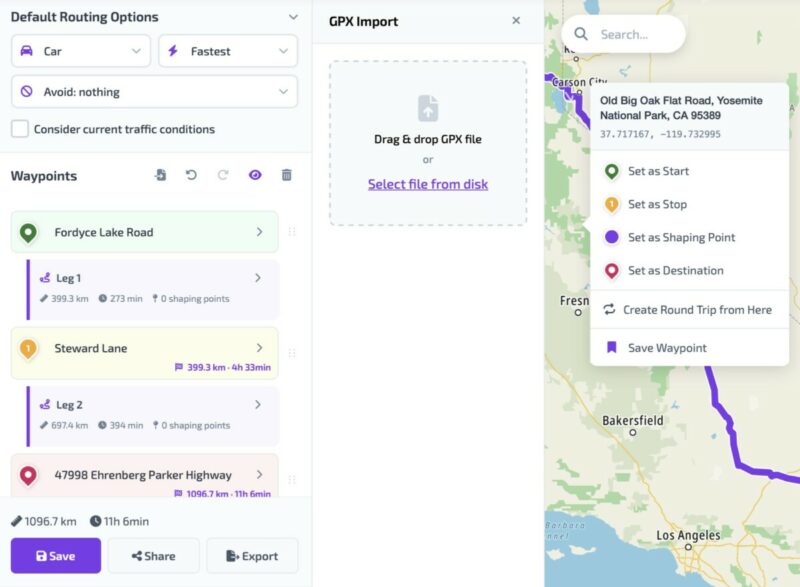
As for the web based planner. It's in active development at the moment. We're aiming for Q4 this year. Maybe Q3. Just to show you this is not an empty comments, here is a screenshot of the planner in its current development state.
Quote from Karlchen on 16.06.2026, 00:47Quote from Guido on 13.05.2026, 10:45Thank you Karlchen!
I also understand the frustration mentioned above. The truth is that, at the moment, this is (mostly, but not all) out of our control. Some of these doglegs are caused by wrong map data, others are caused by the routing algorithm. Both out of our control, although we do always relay these message to our routing provider and they are constantly applying improvements.
Some of them however, (maybe most of them) are caused by how our curvy routing provider (Kurviger) works together with Scenic. This IS something that we are working on improving. I can't say too much about it yet, but stay tuned.
Meanwhile, the only thing I can recommend is basically what Karlchen mentions above:
- When you generate a curvy route or round trip, before you start navigating it (or before you save it), check it first for doglegs. Delete, move or add via points to make it as you want.
- Get familiar with the Detour Behaviour settings and how to skip waypoints. This will help you recognize very fast (before its too late) if you missed a waypoint, and how to resolve it easily should it happen: https://scenic.app/help/detour-behaviour-scenic/Tips for creating routes from scratch (so not curvy routing which adds waypoints to make the route curvy):
- Start with dropping the start and destination. Then add your stops (where you actually want to stop).
- Then add via points on roads you want to take if the route is not already taking them.
- Use as little waypoints as possible. Only the ones you need to shape the route.
- Don't place waypoints on intersections, but rather AFTER intersections. When placed on intersections Scenic has to guess which road it is and sometimes it guesses wrong creating a dogleg.I hope this helps.
As for the web based planner. It's in active development at the moment. We're aiming for Q4 this year. Maybe Q3. Just to show you this is not an empty comments, here is a screenshot of the planner in its current development state.
Hallo Guido,
gibt es inzwischen einen neuen Stand zum Thema wir arbeiten an einer Verbesserung wie kurvige Strecken entstehen?
Beste Grüße
Karlchen
Quote from Guido on 13.05.2026, 10:45Thank you Karlchen!
I also understand the frustration mentioned above. The truth is that, at the moment, this is (mostly, but not all) out of our control. Some of these doglegs are caused by wrong map data, others are caused by the routing algorithm. Both out of our control, although we do always relay these message to our routing provider and they are constantly applying improvements.
Some of them however, (maybe most of them) are caused by how our curvy routing provider (Kurviger) works together with Scenic. This IS something that we are working on improving. I can't say too much about it yet, but stay tuned.
Meanwhile, the only thing I can recommend is basically what Karlchen mentions above:
- When you generate a curvy route or round trip, before you start navigating it (or before you save it), check it first for doglegs. Delete, move or add via points to make it as you want.
- Get familiar with the Detour Behaviour settings and how to skip waypoints. This will help you recognize very fast (before its too late) if you missed a waypoint, and how to resolve it easily should it happen: https://scenic.app/help/detour-behaviour-scenic/Tips for creating routes from scratch (so not curvy routing which adds waypoints to make the route curvy):
- Start with dropping the start and destination. Then add your stops (where you actually want to stop).
- Then add via points on roads you want to take if the route is not already taking them.
- Use as little waypoints as possible. Only the ones you need to shape the route.
- Don't place waypoints on intersections, but rather AFTER intersections. When placed on intersections Scenic has to guess which road it is and sometimes it guesses wrong creating a dogleg.I hope this helps.
As for the web based planner. It's in active development at the moment. We're aiming for Q4 this year. Maybe Q3. Just to show you this is not an empty comments, here is a screenshot of the planner in its current development state.
Hallo Guido,
gibt es inzwischen einen neuen Stand zum Thema wir arbeiten an einer Verbesserung wie kurvige Strecken entstehen?
Beste Grüße
Karlchen
Quote from Paul86911 on 19.06.2026, 12:29I'm having the same problem and I'm not at all surprised that the problem is the map/routing provider. I say this because Rever (which wasn't great for other reasons) has the exact same problem.
That said, the BMW connected app does not and it actually does a good job of picking curvy routes in my area. I believe BMW uses Tom Tom.
Guido, could you tell us who you use for maps and is it the same as Rever?
Thanks
I'm having the same problem and I'm not at all surprised that the problem is the map/routing provider. I say this because Rever (which wasn't great for other reasons) has the exact same problem.
That said, the BMW connected app does not and it actually does a good job of picking curvy routes in my area. I believe BMW uses Tom Tom.
Guido, could you tell us who you use for maps and is it the same as Rever?
Thanks
Quote from Dae on 19.06.2026, 13:13Quote from Paul86911 on 19.06.2026, 12:29Guido, could you tell us who you use for maps and is it the same as Rever?
Thanks
Scenic uses OSM mapping
Quote from Paul86911 on 19.06.2026, 12:29Guido, could you tell us who you use for maps and is it the same as Rever?
Thanks
Scenic uses OSM mapping


