
Scenic 4 Speed Cameras Feature

Quote from HighPeakRider on 24.01.2026, 07:02For me a fixed camera works OK, average I get a warning that only stays on the screen for a few seconds then nothing more.
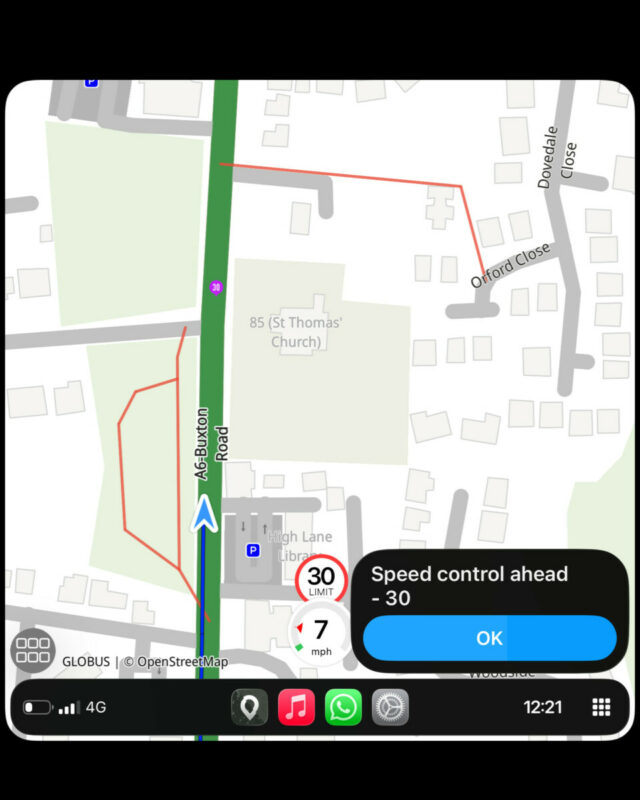
For me a fixed camera works OK, average I get a warning that only stays on the screen for a few seconds then nothing more.
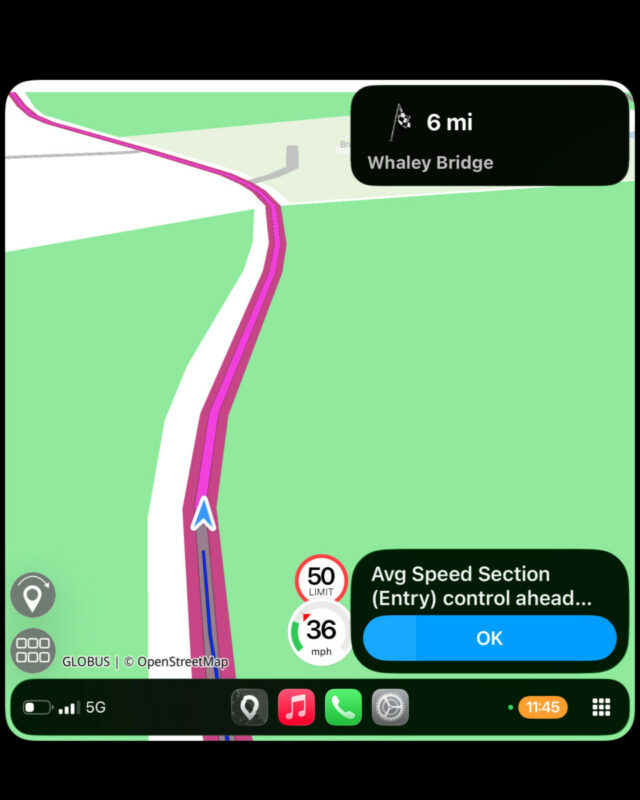

Quote from GB on 24.01.2026, 07:46That’s what I got. Guido I did load the beta version but went to use it today and instead of the route being direction of travel it was at 45 degrees so I reverted back to the original version
That’s what I got. Guido I did load the beta version but went to use it today and instead of the route being direction of travel it was at 45 degrees so I reverted back to the original version

Quote from Guido on 24.01.2026, 10:43@highpeakrider are you using beta version or App Store version?
@GB. Strange. I didn’t toch that logic. Maybe performance problem… I’ll have a look.
@highpeakrider are you using beta version or App Store version?
@GB. Strange. I didn’t toch that logic. Maybe performance problem… I’ll have a look.
Quote from HighPeakRider on 24.01.2026, 11:05Quote from Guido on 24.01.2026, 10:43@highpeakrider are you using beta version or App Store version?
@GB. Strange. I didn’t toch that logic. Maybe performance problem… I’ll have a look.
I'm on the App Store version.......
Quote from Guido on 24.01.2026, 10:43@highpeakrider are you using beta version or App Store version?
@GB. Strange. I didn’t toch that logic. Maybe performance problem… I’ll have a look.
I'm on the App Store version.......
Quote from Rdl on 27.01.2026, 11:53Guido,
Is it possible to move the speed (and maximum speed) indicators, currently in the bottom right corner of the screen, to the left top of the screen. This way you see the warning of a camera and the current speed in one glance. Now I see the camera warning + maximum speed on the top of the screen, and then have to refocus on bottom left of the screen to see the speed I'm traveling.
Also, and I've asked this before, can you make the speed (and maximum speed) indicators larger, they are difficult to read with my old eyes. I would be happy with a user configurable option, similar to the size of the text and icons which can already be configured.
One last request, is it possible to show the camera's and speed info without selecting 'Ride' mode. I mean, just switch on the app, and it shows speed and camera's.
Regarding SCDB.INFO, if I visit the website it shows the features of the database, the second feature says the database includes 'mobile speed' camera's. Is that a mistake on their website, or does it require some additional implementation in Scenic.
Rudi
PS: many many thanks for this update, I've been waiting for a very long time for this, and I am now switching back to scenic, been using another app until now because of the lack of speed camera's.
Guido,
Is it possible to move the speed (and maximum speed) indicators, currently in the bottom right corner of the screen, to the left top of the screen. This way you see the warning of a camera and the current speed in one glance. Now I see the camera warning + maximum speed on the top of the screen, and then have to refocus on bottom left of the screen to see the speed I'm traveling.
Also, and I've asked this before, can you make the speed (and maximum speed) indicators larger, they are difficult to read with my old eyes. I would be happy with a user configurable option, similar to the size of the text and icons which can already be configured.
One last request, is it possible to show the camera's and speed info without selecting 'Ride' mode. I mean, just switch on the app, and it shows speed and camera's.
Regarding SCDB.INFO, if I visit the website it shows the features of the database, the second feature says the database includes 'mobile speed' camera's. Is that a mistake on their website, or does it require some additional implementation in Scenic.
Rudi
PS: many many thanks for this update, I've been waiting for a very long time for this, and I am now switching back to scenic, been using another app until now because of the lack of speed camera's.
Quote from Guido on 27.01.2026, 13:52Hi Rudi,
Is it possible to move the speed (and maximum speed) indicators, currently in the bottom right corner of the screen, to the left top of the screen. This way you see the warning of a camera and the current speed in one glance. Now I see the camera warning + maximum speed on the top of the screen, and then have to refocus on bottom left of the screen to see the speed I'm traveling.
Of course everything is possible. In this case it's more a matter of is it really worth it / does it justify the amount of time it would take to make this change compared to the advantages it would bring. And also, how important/urgent is this, and to how many people is this important. Weighing all these things, I'd say that this is not very important if I'm honest.
At the moment, in the top right corner there is the elevation, the compass, the map scale and, if in landscape, a battery indicator and current time. All these are optional elements that can be enabled/disabled in Settings > Map Settings. I would have to add the speed indicator to these elements, or switch position of this panel with the speed indicator. Both options sound easy, but in practice they are quite a lot of work as I'd need to make sure this works on all screen sizes, landscape and portrait, and on CarPlay (left-hand-drive, right-hand-drive, CarPlay with button bar at the bottom). All in all quite a big chunk of work.
Also, and I've asked this before, can you make the speed (and maximum speed) indicators larger, they are difficult to read with my old eyes. I would be happy with a user configurable option, similar to the size of the text and icons which can already be configured.
I'll see if I can add this in one of the next updates. This is a relatively easy change. Keep your eye out for an option to increase size under Settings > Finetuning in one of the next updates.
One last request, is it possible to show the camera's and speed info without selecting 'Ride' mode. I mean, just switch on the app, and it shows speed and camera's.
That's not possible at the moment, but I'll add it to the list.
Regarding SCDB.INFO, if I visit the website it shows the features of the database, the second feature says the database includes 'mobile speed' camera's. Is that a mistake on their website, or does it require some additional implementation in Scenic.
This requires additional implementation in Scenic. The fixed speed cameras are in a static database that updates every now and then. The mobile speed cameras need to be retrieved from the SCDB site at the moment you are driving (and keep it updated as mobile cameras change very frequently). On top of that, SCDB requires that if you add mobile speed cameras you also need to add a camera reporting feature (so that you can report new mobile cameras and report if an earlier reported camera is still there). That's a considerable amount of work. On top of that, mobile camera reports from SCDB are mostly focused in just a few countries, so it wouldn't be for the entire world.
Hi Rudi,
Is it possible to move the speed (and maximum speed) indicators, currently in the bottom right corner of the screen, to the left top of the screen. This way you see the warning of a camera and the current speed in one glance. Now I see the camera warning + maximum speed on the top of the screen, and then have to refocus on bottom left of the screen to see the speed I'm traveling.
Of course everything is possible. In this case it's more a matter of is it really worth it / does it justify the amount of time it would take to make this change compared to the advantages it would bring. And also, how important/urgent is this, and to how many people is this important. Weighing all these things, I'd say that this is not very important if I'm honest.
At the moment, in the top right corner there is the elevation, the compass, the map scale and, if in landscape, a battery indicator and current time. All these are optional elements that can be enabled/disabled in Settings > Map Settings. I would have to add the speed indicator to these elements, or switch position of this panel with the speed indicator. Both options sound easy, but in practice they are quite a lot of work as I'd need to make sure this works on all screen sizes, landscape and portrait, and on CarPlay (left-hand-drive, right-hand-drive, CarPlay with button bar at the bottom). All in all quite a big chunk of work.
Also, and I've asked this before, can you make the speed (and maximum speed) indicators larger, they are difficult to read with my old eyes. I would be happy with a user configurable option, similar to the size of the text and icons which can already be configured.
I'll see if I can add this in one of the next updates. This is a relatively easy change. Keep your eye out for an option to increase size under Settings > Finetuning in one of the next updates.
One last request, is it possible to show the camera's and speed info without selecting 'Ride' mode. I mean, just switch on the app, and it shows speed and camera's.
That's not possible at the moment, but I'll add it to the list.
Regarding SCDB.INFO, if I visit the website it shows the features of the database, the second feature says the database includes 'mobile speed' camera's. Is that a mistake on their website, or does it require some additional implementation in Scenic.
This requires additional implementation in Scenic. The fixed speed cameras are in a static database that updates every now and then. The mobile speed cameras need to be retrieved from the SCDB site at the moment you are driving (and keep it updated as mobile cameras change very frequently). On top of that, SCDB requires that if you add mobile speed cameras you also need to add a camera reporting feature (so that you can report new mobile cameras and report if an earlier reported camera is still there). That's a considerable amount of work. On top of that, mobile camera reports from SCDB are mostly focused in just a few countries, so it wouldn't be for the entire world.
Quote from Rdl on 27.01.2026, 14:14Regarding the first point, I don't agree with you (if allowed). The other apps I use all gather the speed info and that makes it easier/quicker/safer to read the info, same happens in my car. A swap of the top right corner info with the bottom right corner info sounds as a good workaround. If it will help you, I will gladly test this for you in my iPhone/iPad/Mac/CarPlay setups, and if you make it a user configuration it wont harm much if it does not work in all known & unknown setups.
Thanks for considering the larger speed indication.
The other items I understand, less important for me anyhow. The mobile camera's might take a few more moons to implement.
Regarding the first point, I don't agree with you (if allowed). The other apps I use all gather the speed info and that makes it easier/quicker/safer to read the info, same happens in my car. A swap of the top right corner info with the bottom right corner info sounds as a good workaround. If it will help you, I will gladly test this for you in my iPhone/iPad/Mac/CarPlay setups, and if you make it a user configuration it wont harm much if it does not work in all known & unknown setups.
Thanks for considering the larger speed indication.
The other items I understand, less important for me anyhow. The mobile camera's might take a few more moons to implement.
Quote from Guido on 27.01.2026, 14:18I don't agree nor disagree that it could be safer. I just don't have the time/priority for this at the moment. Hope you understand.
I don't agree nor disagree that it could be safer. I just don't have the time/priority for this at the moment. Hope you understand.
Quote from blackhawk1618 on 28.01.2026, 12:31Quote from Guido on 12.01.2026, 11:43Speed cams not showing on the map (@marts & @blackhawk1618 & @darrens )
Two things going on.
(1) I thought I had the world coverage package from SCDB, but I "only" had North America, Europe and Oceania. That explains why the cameras are not showing in UAE (@blackhawk1618). I'v inquired for the costs of the world package. Depending on the additional cost I'll add it. Scenic has very few users outside NA, EU and Oceania so need to determine if it's financially viable.
For the cameras not showing in Australia & NZ... I'm afraid that's really cameras not being in the SCDB database. Over time this will be better I suppose, but it's not something I can control. If you have some time on your hand you could report the cameras to SCDB yourself: https://www.scdb.info/en/report/
(2) Bug when displaying cameras on the map on CarPlay. That's a bug I will address for the next update.Hello @guidomm
I just wanted to follow up if there is any update regarding expanding the Speed Camera coverage to other regions. I understand the cost factor in this decision but limiting the feature to certain regions also limits Scenic app growth potential. It would be great if you consider other regional support for this feature which can attract more users who expect full-featured app and turn this into a growth opportunity rather than additional expense. I personally believe that full regional coverage for Speed Cameras with a modest marketing effort, could encourage wider adoption of Scenic app over time and help expand the user base beyond the current core market.
No pressure at all, would love to hear if there is any progress or updated thoughts on this. Thanks
Quote from Guido on 12.01.2026, 11:43Speed cams not showing on the map (@marts & @blackhawk1618 & @darrens )
Two things going on.
(1) I thought I had the world coverage package from SCDB, but I "only" had North America, Europe and Oceania. That explains why the cameras are not showing in UAE (@blackhawk1618). I'v inquired for the costs of the world package. Depending on the additional cost I'll add it. Scenic has very few users outside NA, EU and Oceania so need to determine if it's financially viable.
For the cameras not showing in Australia & NZ... I'm afraid that's really cameras not being in the SCDB database. Over time this will be better I suppose, but it's not something I can control. If you have some time on your hand you could report the cameras to SCDB yourself: https://www.scdb.info/en/report/
(2) Bug when displaying cameras on the map on CarPlay. That's a bug I will address for the next update.
Hello @guidomm
I just wanted to follow up if there is any update regarding expanding the Speed Camera coverage to other regions. I understand the cost factor in this decision but limiting the feature to certain regions also limits Scenic app growth potential. It would be great if you consider other regional support for this feature which can attract more users who expect full-featured app and turn this into a growth opportunity rather than additional expense. I personally believe that full regional coverage for Speed Cameras with a modest marketing effort, could encourage wider adoption of Scenic app over time and help expand the user base beyond the current core market.
No pressure at all, would love to hear if there is any progress or updated thoughts on this. Thanks
Quote from Guido on 28.01.2026, 12:36Next version will have world coverage. If you want to join the beta let me know your scenic nickname and I'll give you access. The beta already has world coverage.
Next version will have world coverage. If you want to join the beta let me know your scenic nickname and I'll give you access. The beta already has world coverage.
Quote from blackhawk1618 on 28.01.2026, 12:53Quote from Guido on 28.01.2026, 12:36Next version will have world coverage. If you want to join the beta let me know your scenic nickname and I'll give you access. The beta already has world coverage.
Excellent that's great news. Thanks @guidomm for your continued support on the app.
I would like to stay on the App Store version for now but I'm very excited for the next version update.Thanks again!
Quote from Guido on 28.01.2026, 12:36Next version will have world coverage. If you want to join the beta let me know your scenic nickname and I'll give you access. The beta already has world coverage.
Excellent that's great news. Thanks @guidomm for your continued support on the app.
I would like to stay on the App Store version for now but I'm very excited for the next version update.
Thanks again!

Quote from Marts on 28.01.2026, 16:45Yesterday I had to go to the city. It's picking up the established fixed speed cameras correctly.
Just a question though: What types of cameras are people being alerted to? For example this speed camera alert said "traffic control" which I thought is an odd name for it? What other terms are being used?
Thanks.
Yesterday I had to go to the city. It's picking up the established fixed speed cameras correctly.
Just a question though: What types of cameras are people being alerted to? For example this speed camera alert said "traffic control" which I thought is an odd name for it? What other terms are being used?
Thanks.
Quote from Guido on 28.01.2026, 16:56Are you sure about this? I searched the entire codebase and "traffic control" is not used anywhere.
Are you sure about this? I searched the entire codebase and "traffic control" is not used anywhere.
Quote from Marts on 28.01.2026, 17:16Quote from Guido on 28.01.2026, 16:56Are you sure about this? I searched the entire codebase and "traffic control" is not used anywhere.
Now you've got me second guessing myself. Unfortunately I can't take a screen shot of what I saw but that's what I remember seeing.
Quote from Guido on 28.01.2026, 16:56Are you sure about this? I searched the entire codebase and "traffic control" is not used anywhere.
Now you've got me second guessing myself. Unfortunately I can't take a screen shot of what I saw but that's what I remember seeing.
Quote from HighPeakRider on 01.02.2026, 09:53In CarPlay when on split screen you can't see the camera warning.
When I got home to finish the ride the camera warning was still on the screen miles after.
In CarPlay when on split screen you can't see the camera warning.
When I got home to finish the ride the camera warning was still on the screen miles after.
Quote from Jimmy999 on 03.02.2026, 23:11Are we getting Aussie speed cameras warning. No legal issues here with warning apps.
https://www.scdb.info/en/countrycameralist/AUS/
Are we getting Aussie speed cameras warning. No legal issues here with warning apps.
Quote from HighPeakRider on 04.02.2026, 10:56Quote from Jimmy999 on 03.02.2026, 23:11Are we getting Aussie speed cameras warning. No legal issues here with warning apps.
https://www.scdb.info/en/countrycameralist/AUS/
Quote from Guido on 28.01.2026, 12:36Next version will have world coverage
Quote from Jimmy999 on 03.02.2026, 23:11Are we getting Aussie speed cameras warning. No legal issues here with warning apps.
Next version will have world coverage
Quote from Marts on 04.02.2026, 16:47Quote from Jimmy999 on 03.02.2026, 23:11Are we getting Aussie speed cameras warning. No legal issues here with warning apps.
https://www.scdb.info/en/countrycameralist/AUS/
Scenic is working here in Oz. Not all speed cameras are in the database, however. I don't know how long they take to update it but a number of new point-to-point cams aren't in it that I've seen, so far.
Quote from Jimmy999 on 03.02.2026, 23:11Are we getting Aussie speed cameras warning. No legal issues here with warning apps.
Scenic is working here in Oz. Not all speed cameras are in the database, however. I don't know how long they take to update it but a number of new point-to-point cams aren't in it that I've seen, so far.
Quote from blackhawk1618 on 09.02.2026, 16:11Hello @guidomm
I want to check when the next App update will be available for IOS, as it has been over a month since the last release.
Hello @guidomm
I want to check when the next App update will be available for IOS, as it has been over a month since the last release.
Quote from blackhawk1618 on 12.02.2026, 16:25Hello @guidomm
Excellent App update, thanks for that!
I went on a long ride (around 260 km). Everything worked perfectly. Speed camera notifications showed up in advance on both iPhone and CarPlay, which is great. Also really like how you organized the speed camera preferences by country. 👏I just have two small requests that would be great if you could consider. First, an option to resize the speed camera icon to make it visible clearly. Second, an option to customize the notification distance for Soeed Cameras In my country, some roads have speed cameras every 300m, so the notifications stay on screen almost constantly, which gets a bit annoying.
Hello @guidomm
Excellent App update, thanks for that!
I went on a long ride (around 260 km). Everything worked perfectly. Speed camera notifications showed up in advance on both iPhone and CarPlay, which is great. Also really like how you organized the speed camera preferences by country. 👏
I just have two small requests that would be great if you could consider. First, an option to resize the speed camera icon to make it visible clearly. Second, an option to customize the notification distance for Soeed Cameras In my country, some roads have speed cameras every 300m, so the notifications stay on screen almost constantly, which gets a bit annoying.
Quote from Guido on 12.02.2026, 16:36Happy you like it and glad to hear it's working well.
Good suggestions... I'll add them to the list. Will try to find some time for this soon.
Happy you like it and glad to hear it's working well.
Good suggestions... I'll add them to the list. Will try to find some time for this soon.

Quote from pe112 on 13.02.2026, 10:53Hi @guidomm,
just wanted to give you a big thank you for the new options you integrated addressing the compliance questions linked to the speed camera feature.
As always you have taken your users seriously and have given options so that everybody should be able to make his own best choice.
Very much appreciated!
Best, Martin
Hi @guidomm,
just wanted to give you a big thank you for the new options you integrated addressing the compliance questions linked to the speed camera feature.
As always you have taken your users seriously and have given options so that everybody should be able to make his own best choice.
Very much appreciated!
Best, Martin
Quote from Guido on 15.02.2026, 19:59I’ll check. Meanwhile, here’s the link: https://www.scdb.info/report/
I’ll check. Meanwhile, here’s the link: https://www.scdb.info/report/
Quote from Marts on 15.02.2026, 20:16Hey folks.
I know that this isn't the responsibility of Guido's, but I need help in understanding what options to use when entering a point-to-point speed camera (it measures distance over time to get an average speed).
It's not a straight speed camera as such, but it may record speeds, something that I am unsure about.
I used the "distance control" option. Would that be correct?
There are already entries for these camera put in by someone else. They just say speed cams but that won't alert the user to the fact that from that point their time over that distance is being measured. ie. they'll slow down past the camera, speed up again and slow down for the second camera, which won't drop their average speed enough to avoid a fine.
I've used the term
Hey folks.
I know that this isn't the responsibility of Guido's, but I need help in understanding what options to use when entering a point-to-point speed camera (it measures distance over time to get an average speed).
It's not a straight speed camera as such, but it may record speeds, something that I am unsure about.
I used the "distance control" option. Would that be correct?
There are already entries for these camera put in by someone else. They just say speed cams but that won't alert the user to the fact that from that point their time over that distance is being measured. ie. they'll slow down past the camera, speed up again and slow down for the second camera, which won't drop their average speed enough to avoid a fine.
I've used the term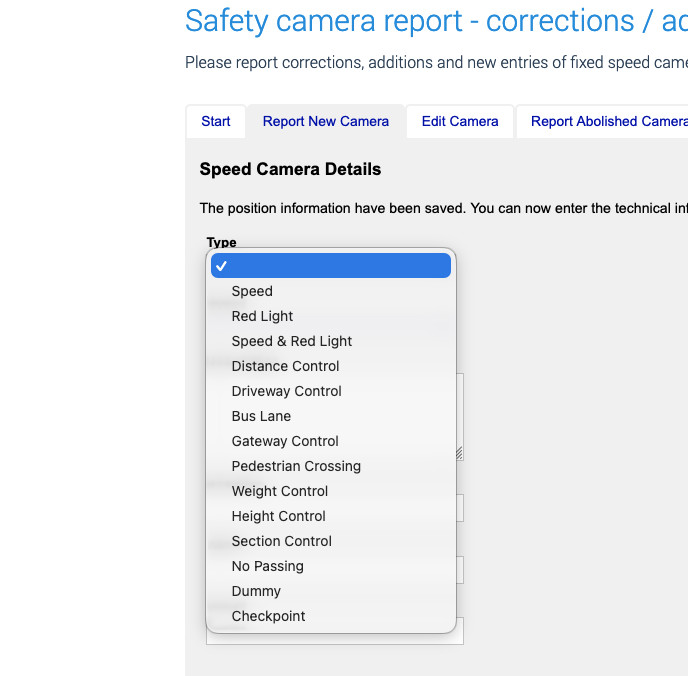
Quote from Guido on 15.02.2026, 20:17section control
section control
Quote from HighPeakRider on 24.02.2026, 12:54Has the average speed camera warnings been changed?
I think from past posts I was expecting a warning on entry which stays on until you exit.On the latest version I saw a warning on entry which stayed on for about 5 seconds, then further warnings flashed on when in the section with a final warning on exit.
Is this now the correct functionality?
Also, warning for anyone that didn't notice in the new version you have to select your warnings on a country basis, I missed this new setting and thought I had an issue.......
Has the average speed camera warnings been changed?
I think from past posts I was expecting a warning on entry which stays on until you exit.
On the latest version I saw a warning on entry which stayed on for about 5 seconds, then further warnings flashed on when in the section with a final warning on exit.
Is this now the correct functionality?
Also, warning for anyone that didn't notice in the new version you have to select your warnings on a country basis, I missed this new setting and thought I had an issue.......
Quote from Guido on 24.02.2026, 12:58Yes it changed. More info on new behaviour here: https://scenic.app/help/safety-cameras/
Yes it changed. More info on new behaviour here: https://scenic.app/help/safety-cameras/
Quote from HighPeakRider on 24.02.2026, 13:50Quote from Guido on 24.02.2026, 12:58Yes it changed. More info on new behaviour here: https://scenic.app/help/safety-cameras/
My section only has a start and end listed , although it actually has a number in-between so I guess you maybe have a timed warning for these until you exit.
I'll get the true locations and get the database updated as it also changes speeds in the middle.
Quote from Guido on 24.02.2026, 12:58Yes it changed. More info on new behaviour here: https://scenic.app/help/safety-cameras/
My section only has a start and end listed , although it actually has a number in-between so I guess you maybe have a timed warning for these until you exit.
I'll get the true locations and get the database updated as it also changes speeds in the middle.
Quote from Guido on 24.02.2026, 13:59I'm not sure these "middle" cameras are showing on the SCDB map, but if they are known, they should show in Scenic. If they don't, then SCDB doesn't know about them either.
I'm not sure these "middle" cameras are showing on the SCDB map, but if they are known, they should show in Scenic. If they don't, then SCDB doesn't know about them either.
Quote from HighPeakRider on 01.03.2026, 11:26The average speed indicator works great, I went down a local long section and it was really handy to know the average.
I was 44 mph over a long section which is controlled at 50 mph.
The average speed indicator works great, I went down a local long section and it was really handy to know the average.
I was 44 mph over a long section which is controlled at 50 mph.
Quote from Marts on 01.03.2026, 21:20Quote from HighPeakRider on 01.03.2026, 11:26The average speed indicator works great,
Is this a new feature? If so, how do you view it?
Thanks.
Quote from HighPeakRider on 01.03.2026, 11:26The average speed indicator works great,
Is this a new feature? If so, how do you view it?
Thanks.
Quote from Guido on 01.03.2026, 21:57It’s part of the safety camera feature. You’ll find a description in the help article linked above.
It’s part of the safety camera feature. You’ll find a description in the help article linked above.
Quote from Jimmy999 on 11.03.2026, 18:38Quote from Marts on 04.02.2026, 16:47Quote from Jimmy999 on 03.02.2026, 23:11Are we getting Aussie speed cameras warning. No legal issues here with warning apps.
https://www.scdb.info/en/countrycameralist/AUS/
Scenic is working here in Oz. Not all speed cameras are in the database, however. I don't know how long they take to update it but a number of new point-to-point cams aren't in it that I've seen, so far.
Just went through some p2p cams on the Hulme. Do they work on bikes, looks like front facing camera only?
Quote from Marts on 04.02.2026, 16:47Quote from Jimmy999 on 03.02.2026, 23:11Are we getting Aussie speed cameras warning. No legal issues here with warning apps.
Scenic is working here in Oz. Not all speed cameras are in the database, however. I don't know how long they take to update it but a number of new point-to-point cams aren't in it that I've seen, so far.
Just went through some p2p cams on the Hulme. Do they work on bikes, looks like front facing camera only?
Quote from Marts on 11.03.2026, 18:42We have them now on the M1 heading east from Melbourne. They're not in the database yet. But they appear to only capture vehicles from the front.
Doesn't bother me, though. My bike is rarely ridden on the freeway.
We have them now on the M1 heading east from Melbourne. They're not in the database yet. But they appear to only capture vehicles from the front.
Doesn't bother me, though. My bike is rarely ridden on the freeway.


