
Scenic 4 Speed Cameras Feature

Quote from pe112 on 10.01.2026, 08:32Quote from DaffyDuck on 10.01.2026, 08:15Hi,
Grüezi from Switzerland!
I just learned there’s a « secret » developer menu
How does one get access to this menu?
You get there by long tapping on Main menu -> Settings -> "Scenic Version 4.xy" (at the very bottom).
(But please do not expect too much from it. It is more like debug functions what you will find there.)
Servus, Martin
Quote from DaffyDuck on 10.01.2026, 08:15Hi,
Grüezi from Switzerland!
I just learned there’s a « secret » developer menu
You get there by long tapping on Main menu -> Settings -> "Scenic Version 4.xy" (at the very bottom).
(But please do not expect too much from it. It is more like debug functions what you will find there.)
Servus, Martin

Quote from HighPeakRider on 10.01.2026, 10:06Quote from Guido on 09.01.2026, 09:25Good question. It will show cameras in a 5km radius of where you are at the moment. As you move (so not as you scroll the map) the cameras will update.
At the moment only FIXED cameras are showing. Mobile camera locations are not in the database. Scenic uses the SCDB database. (https://scdb.info)
This section is wrong as it has a number of average cameras some in 50mph zones, some in 40mph zones.
I added them to Opensteetmap but maybe SCDB needs updating correctly?Is SCDB the data source?
Quote from Guido on 09.01.2026, 09:25Good question. It will show cameras in a 5km radius of where you are at the moment. As you move (so not as you scroll the map) the cameras will update.
At the moment only FIXED cameras are showing. Mobile camera locations are not in the database. Scenic uses the SCDB database. (https://scdb.info)

I added them to Opensteetmap but maybe SCDB needs updating correctly?
Is SCDB the data source?
Quote from blackhawk1618 on 10.01.2026, 10:09Quote from Guido on 09.01.2026, 18:56yeah. I’m afraid SCDB is more EU focused.
If you know of database that has Oz speed cams, I’d be happy to take a look to see if I can include it.Hello @guidomm
I am back from a vacation and excited to see the new update with the release of the most waited Speed Camera feature. I quickly enabled the Speed Camera option from the Settings, but still I couldn’t see the speed cameras while tracking or navigation. I checked SCDB database and there are Speed Cameras available in the United Arab Emirates but not showing in the Scenic maps
I am not sure why Speed Cameras are not showing on the Scenic maps, what iI am doing wrong?
Quote from Guido on 09.01.2026, 18:56yeah. I’m afraid SCDB is more EU focused.
If you know of database that has Oz speed cams, I’d be happy to take a look to see if I can include it.
Hello @guidomm
I am back from a vacation and excited to see the new update with the release of the most waited Speed Camera feature. I quickly enabled the Speed Camera option from the Settings, but still I couldn’t see the speed cameras while tracking or navigation. I checked SCDB database and there are Speed Cameras available in the United Arab Emirates but not showing in the Scenic maps
I am not sure why Speed Cameras are not showing on the Scenic maps, what iI am doing wrong?

Quote from Guido on 10.01.2026, 10:16That's strange. Can you give me a GPS coordinate of a camera that shows on SCDB, but not in Scenic?
That's strange. Can you give me a GPS coordinate of a camera that shows on SCDB, but not in Scenic?
Quote from blackhawk1618 on 10.01.2026, 11:36Quote from Guido on 10.01.2026, 10:16That's strange. Can you give me a GPS coordinate of a camera that shows on SCDB, but not in Scenic?
Example: Here is link of SCDB Camera Location but it doesn’t display on Scenic maps. None of the Speed Cameras are showing while tracking or Navigating.
https://www.scdb.info/en/karte/111889/
(25.1476999, 55.8833769)
Quote from Guido on 10.01.2026, 10:16That's strange. Can you give me a GPS coordinate of a camera that shows on SCDB, but not in Scenic?
Example: Here is link of SCDB Camera Location but it doesn’t display on Scenic maps. None of the Speed Cameras are showing while tracking or Navigating.
https://www.scdb.info/en/karte/111889/
(25.1476999, 55.8833769)
Quote from Guido on 10.01.2026, 12:03Thanks. I’ll investigate on Monday and report back.
Thanks. I’ll investigate on Monday and report back.
Quote from DarrenS on 10.01.2026, 16:10Hi,
I was out riding today and was testing the speed camera feature (also had Apple Maps running in the background so I could compare the alerts and locations) on CarPlay.
Just to clarify I was not navigating but recording the ride.
Scenic seemed to audibly alert for the speed cameras correctly, and show the pop up toast notification on the screen for CarPlay. However I did not see the speed cameras on the map in any of the cases (unlike what you have in your CarPlay screenshot)
I cannot see anything in overlays to turn on the cameras on the map (I have it enabled in settings->navigation->...)
Am I missing something somewhere? The audio alerts are great, the pop up semi-useful (if you are viewing full screen on car play only), but would be good to see them on the map as per your screenshot.
Thanks
Darren
Hi,
I was out riding today and was testing the speed camera feature (also had Apple Maps running in the background so I could compare the alerts and locations) on CarPlay.
Just to clarify I was not navigating but recording the ride.
Scenic seemed to audibly alert for the speed cameras correctly, and show the pop up toast notification on the screen for CarPlay. However I did not see the speed cameras on the map in any of the cases (unlike what you have in your CarPlay screenshot)
I cannot see anything in overlays to turn on the cameras on the map (I have it enabled in settings->navigation->...)
Am I missing something somewhere? The audio alerts are great, the pop up semi-useful (if you are viewing full screen on car play only), but would be good to see them on the map as per your screenshot.
Thanks
Darren
Quote from Guido on 10.01.2026, 16:22Likely a bug. Possibly related to @blackhawk1618 feedback. @blackhawk... are you on CarPlay, or iPhone?
Likely a bug. Possibly related to @blackhawk1618 feedback. @blackhawk... are you on CarPlay, or iPhone?
Quote from blackhawk1618 on 11.01.2026, 01:57Quote from Guido on 10.01.2026, 16:22Likely a bug. Possibly related to @blackhawk1618 feedback. @blackhawk... are you on CarPlay, or iPhone?
Hi @guidomm
I tried both iPhone and CarPlay, the issue is same on both. Even I tried reinstalling the app and updated the Offline Maps but that didn’t resolve the Speed Cameras issue.
Quote from Guido on 10.01.2026, 16:22Likely a bug. Possibly related to @blackhawk1618 feedback. @blackhawk... are you on CarPlay, or iPhone?
Hi @guidomm
I tried both iPhone and CarPlay, the issue is same on both. Even I tried reinstalling the app and updated the Offline Maps but that didn’t resolve the Speed Cameras issue.
Quote from Middelfrangge on 11.01.2026, 12:02Quote from Guido on 09.01.2026, 15:21Find below an image of iPhone and CarPlay.
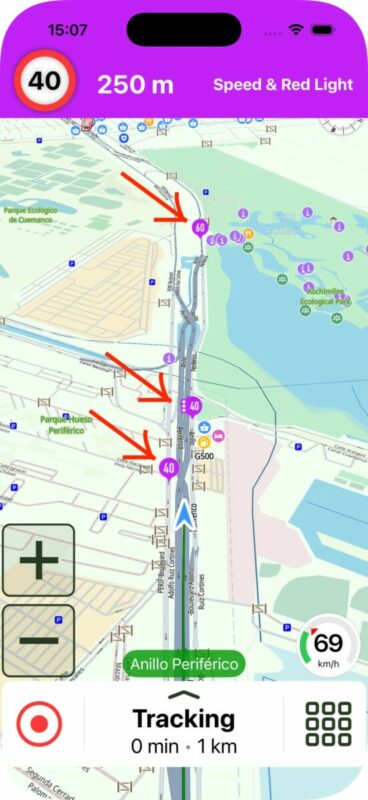
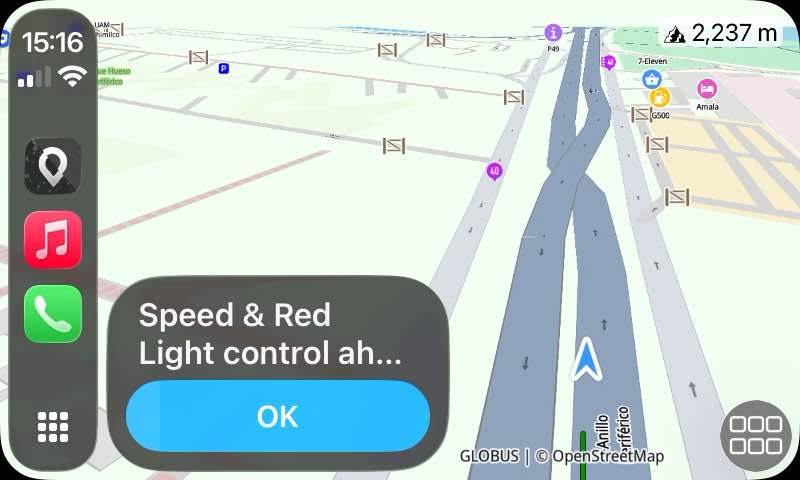
The cameras are always displayed on the map with purple markers. Depending on the type of camera they will be a bit different.When you are close to a camera, on iPhone you'll see the top purple bar. On CarPlay you'll see the message bottom left (or bottom right, depending if your CarPlay system is left-hand right-hand drive).
Note about these messages... Scenic needs to have received your heading information (to determine (1), the camera flashes in your direction of travel, or is meant for the oncoming traffic. If you are going really slow (walking) then heading information is unreliable, and the message will probably not show. I believe that's OK since, if you are walking / walking pace, it's very likely you won't pass the limit anyway.
Hi Guido,
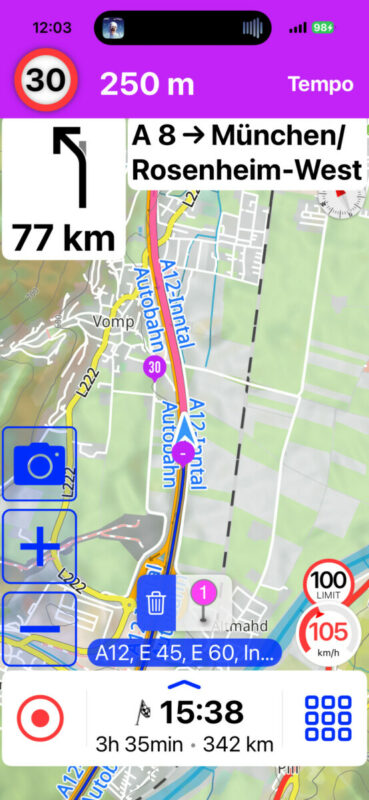
I tested that today and it worked, however as you wrote it will give a warning to every speed camera in my rough direction. That is a bit strange when driving on an interstate (german Autobahn) and you get a warning for a camera with a limit of 30km/h……is there any possibility to align that? In other words, I should not get warnings when I am on the Autobahn for any speed limit for example below 60km/h?
Regards
Thomas
Quote from Guido on 09.01.2026, 15:21Find below an image of iPhone and CarPlay.
The cameras are always displayed on the map with purple markers. Depending on the type of camera they will be a bit different.When you are close to a camera, on iPhone you'll see the top purple bar. On CarPlay you'll see the message bottom left (or bottom right, depending if your CarPlay system is left-hand right-hand drive).
Note about these messages... Scenic needs to have received your heading information (to determine (1), the camera flashes in your direction of travel, or is meant for the oncoming traffic. If you are going really slow (walking) then heading information is unreliable, and the message will probably not show. I believe that's OK since, if you are walking / walking pace, it's very likely you won't pass the limit anyway.
Hi Guido,
I tested that today and it worked, however as you wrote it will give a warning to every speed camera in my rough direction. That is a bit strange when driving on an interstate (german Autobahn) and you get a warning for a camera with a limit of 30km/h……is there any possibility to align that? In other words, I should not get warnings when I am on the Autobahn for any speed limit for example below 60km/h?
Regards
Thomas

Quote from Karlchen on 11.01.2026, 22:42Hallo,
das macht Blitzer.de aber auch.
sobald die App merkt das du dort nicht herfährst, ist der Weg.
Ich denke das ist normal.
Hallo,
das macht Blitzer.de aber auch.
sobald die App merkt das du dort nicht herfährst, ist der Weg.
Ich denke das ist normal.
Quote from Middelfrangge on 11.01.2026, 23:16no, it does not disappear when it does recognize that its not in my route.
The warning is on till I have passed the camera.
Thomas
no, it does not disappear when it does recognize that its not in my route.
The warning is on till I have passed the camera.
Thomas

Quote from GB on 12.01.2026, 01:25Tested it yesterday against two directional cameras on different sides of the roads and it notified me for one and not the other and reversed the notification on the way back so that works well, good job.
one thing I would say is can you increase the notification distance as 300 yards seems a bit a short.
Tested it yesterday against two directional cameras on different sides of the roads and it notified me for one and not the other and reversed the notification on the way back so that works well, good job.
one thing I would say is can you increase the notification distance as 300 yards seems a bit a short.

Quote from mattsz on 12.01.2026, 04:34Quote from GB on 12.01.2026, 01:25one thing I would say is can you increase the notification distance as 300 yards seems a bit a short.
This seems like it could benefit from a variation of the speed-based zoom customization concept: offer a range of speeds and allow the user to choose the notification distance for each. How hard could it be? 😁
Quote from GB on 12.01.2026, 01:25one thing I would say is can you increase the notification distance as 300 yards seems a bit a short.
This seems like it could benefit from a variation of the speed-based zoom customization concept: offer a range of speeds and allow the user to choose the notification distance for each. How hard could it be? 😁
Quote from Houndog on 12.01.2026, 11:23Good evening, I tried it today to go to work. There are 2 speed cameras on the route. I navigated as if I were on a journey. Only a small purple circle appeared in the lane with the number 50 written in small letters, but no audible warning. The direction warnings were clearly audible. I'm definitely missing something, but what?
Max
Good evening, I tried it today to go to work. There are 2 speed cameras on the route. I navigated as if I were on a journey. Only a small purple circle appeared in the lane with the number 50 written in small letters, but no audible warning. The direction warnings were clearly audible. I'm definitely missing something, but what?
Max
Quote from Guido on 12.01.2026, 11:43This is from another thread on speed cameras, which I closed, so that we have all speed cam feedback centralized in this topic.
From @klei111Iphone senkrecht. An der Oberkante erscheint eine Fläche über die gesamte Breite in Pink mit der Darstellung eines Verkehrsschildes mit dem aktuellen Limit. Die Fahranweisungen werden dabei überdeckt. Ist ja schnell vorbei. Die Warnung kommt immer, auch wenn man das Limit nicht verletzt.
The warning should not cover the instructions. The instructions should shift down when the warning appears. I'll have a look at that. Doesn't seem to happen all the time (see @middelfrangge screenshot above).
It's by design that the warning always shows, even if you are going below the speed camera limit. I've basically copied this from all other apps that integrate speed cameras. Of course I could add a setting like "only show speed camera if my speed is more than speed camera speed minus x km/h or mph". But I want to keep it simple. No additional customization settings for this. Better to be warned too much than too little and risk a fine.Speed cams not showing on the map (@marts & @blackhawk1618 & @darrens )
Two things going on.
(1) I thought I had the world coverage package from SCDB, but I "only" had North America, Europe and Oceania. That explains why the cameras are not showing in UAE (@blackhawk1618). I'v inquired for the costs of the world package. Depending on the additional cost I'll add it. Scenic has very few users outside NA, EU and Oceania so need to determine if it's financially viable.
For the cameras not showing in Australia & NZ... I'm afraid that's really cameras not being in the SCDB database. Over time this will be better I suppose, but it's not something I can control. If you have some time on your hand you could report the cameras to SCDB yourself: https://www.scdb.info/en/report/
(2) Bug when displaying cameras on the map on CarPlay. That's a bug I will address for the next update.
The legal issue (especially in Switzerland, but also in other countries) addressed by @pe112
Some people are willing to take the risk, others are not. Both viewpoints I can understand. I'll think of something for the next update.
Warnings showing for speed cams on roads parallel to the road you are actually on
Will see if I can improve. At least that the warning disappears when Scenic realizes you are on another road.
Warn earlier, mentioned by @gb
At the moment, the warning distance is dynamic, based on a base value of 200 meters + 5*your speed in km/h. So, if you're going 100 km/h warning distance is 700 meters. I'll increase this a little bit to 200 meters + 6* your speed. That makes it 800 meters at 100 km/h. Should be plenty distance to decrease your speed before the camera. (Well... I guess that depends... if you're going 100 km/h in a 30 km/h zone you might have some trouble, but there's only so much that an app can do 🙂.) I want to keep this simple, so don't want to add another customization setting for this @mattz .😉.
This is from another thread on speed cameras, which I closed, so that we have all speed cam feedback centralized in this topic.
From @klei111Iphone senkrecht. An der Oberkante erscheint eine Fläche über die gesamte Breite in Pink mit der Darstellung eines Verkehrsschildes mit dem aktuellen Limit. Die Fahranweisungen werden dabei überdeckt. Ist ja schnell vorbei. Die Warnung kommt immer, auch wenn man das Limit nicht verletzt.
The warning should not cover the instructions. The instructions should shift down when the warning appears. I'll have a look at that. Doesn't seem to happen all the time (see @middelfrangge screenshot above).
It's by design that the warning always shows, even if you are going below the speed camera limit. I've basically copied this from all other apps that integrate speed cameras. Of course I could add a setting like "only show speed camera if my speed is more than speed camera speed minus x km/h or mph". But I want to keep it simple. No additional customization settings for this. Better to be warned too much than too little and risk a fine.
Speed cams not showing on the map (@marts & @blackhawk1618 & @darrens )
Two things going on.
(1) I thought I had the world coverage package from SCDB, but I "only" had North America, Europe and Oceania. That explains why the cameras are not showing in UAE (@blackhawk1618). I'v inquired for the costs of the world package. Depending on the additional cost I'll add it. Scenic has very few users outside NA, EU and Oceania so need to determine if it's financially viable.
For the cameras not showing in Australia & NZ... I'm afraid that's really cameras not being in the SCDB database. Over time this will be better I suppose, but it's not something I can control. If you have some time on your hand you could report the cameras to SCDB yourself: https://www.scdb.info/en/report/
(2) Bug when displaying cameras on the map on CarPlay. That's a bug I will address for the next update.
The legal issue (especially in Switzerland, but also in other countries) addressed by @pe112
Some people are willing to take the risk, others are not. Both viewpoints I can understand. I'll think of something for the next update.
Warnings showing for speed cams on roads parallel to the road you are actually on
Will see if I can improve. At least that the warning disappears when Scenic realizes you are on another road.
Warn earlier, mentioned by @gb
At the moment, the warning distance is dynamic, based on a base value of 200 meters + 5*your speed in km/h. So, if you're going 100 km/h warning distance is 700 meters. I'll increase this a little bit to 200 meters + 6* your speed. That makes it 800 meters at 100 km/h. Should be plenty distance to decrease your speed before the camera. (Well... I guess that depends... if you're going 100 km/h in a 30 km/h zone you might have some trouble, but there's only so much that an app can do 🙂.) I want to keep this simple, so don't want to add another customization setting for this @mattz .😉.
Quote from Guido on 12.01.2026, 11:47Quote from Houndog on 12.01.2026, 11:23Good evening, I tried it today to go to work. There are 2 speed cameras on the route. I navigated as if I were on a journey. Only a small purple circle appeared in the lane with the number 50 written in small letters, but no audible warning. The direction warnings were clearly audible. I'm definitely missing something, but what?
MaxDid you see the warning on the screen (see screenshots above for example).
Quote from Houndog on 12.01.2026, 11:23Good evening, I tried it today to go to work. There are 2 speed cameras on the route. I navigated as if I were on a journey. Only a small purple circle appeared in the lane with the number 50 written in small letters, but no audible warning. The direction warnings were clearly audible. I'm definitely missing something, but what?
Max
Did you see the warning on the screen (see screenshots above for example).
Quote from Houndog on 12.01.2026, 12:20No warning, only a small purple circle on the route with the number 50 inside, the right speed, but no warning at all
No warning, only a small purple circle on the route with the number 50 inside, the right speed, but no warning at all
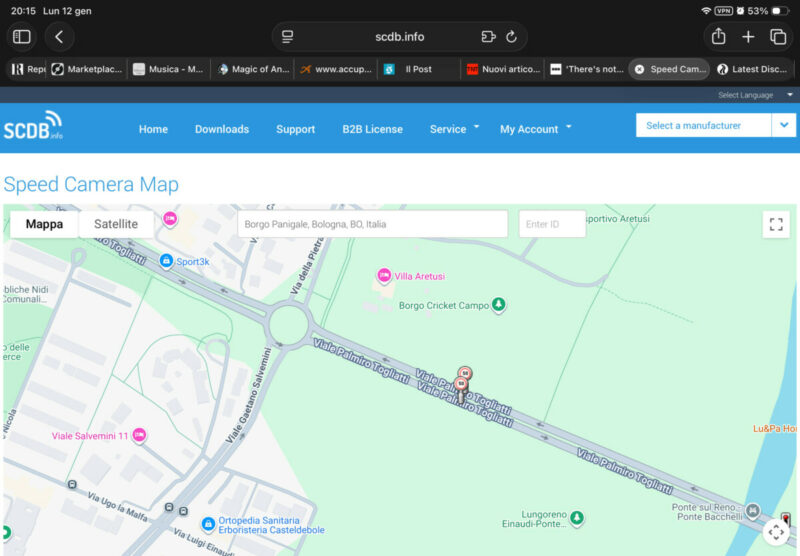
Quote from Guido on 12.01.2026, 12:27Could you perhaps send me the approximate location of this speed camera? Or, better yet, find the camera on the SCDB map (https://www.scdb.info/en/karte) and send me the link? I want to check if this camera is correct in the database (specifically the direction in which it flashes i.e. which traffic direction it takes pictures).
Could you perhaps send me the approximate location of this speed camera? Or, better yet, find the camera on the SCDB map (https://www.scdb.info/en/karte) and send me the link? I want to check if this camera is correct in the database (specifically the direction in which it flashes i.e. which traffic direction it takes pictures).
Quote from Guido on 12.01.2026, 13:44Sorry.. I wan't clear..
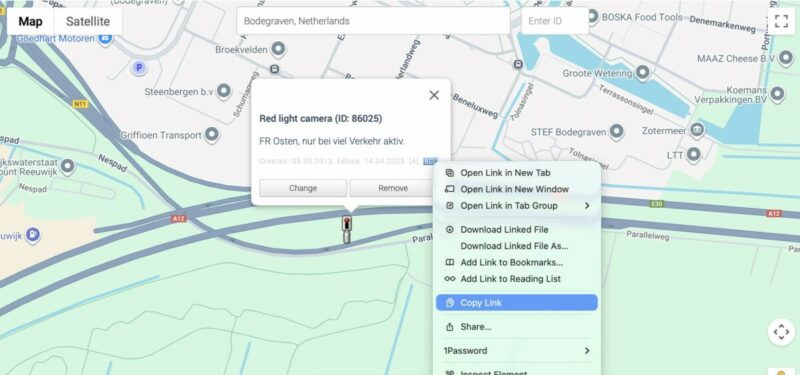
Can you click on a camera on the map. Then a pop-up will appear. In that pop-up, there is a "Link". Right click on that, and choose "copy link". Then, paste that link here.
Sorry.. I wan't clear..
Can you click on a camera on the map. Then a pop-up will appear. In that pop-up, there is a "Link". Right click on that, and choose "copy link". Then, paste that link here.
Quote from Guido on 12.01.2026, 16:18Sorry @houndog. I noticed you got banned from the forum by posting that link. The spam detector was a bit to eager there.
I've unbanned you.
This was the link you posted: https://www.scdb.info/en/karte/182120
Thank you.
I noticed that the two speed cameras there do not have a direction linked to it (the heading you need to move for the camera to photograph your plate/plates). This is probably the reason why. I'll change Scenic so that it will report the cameras if direction is unknown (better to get an unnecessary warning then no warning at all). I've also added direction for these 2 cameras in SCDB, but obviously can't do this for all cameras with missing data.
Thanks for pointing my attention to this.Correction. These two cameras do have directions linked to it. It has to be something else. I'll investigate.
Sorry @houndog. I noticed you got banned from the forum by posting that link. The spam detector was a bit to eager there.
I've unbanned you.
This was the link you posted: https://www.scdb.info/en/karte/182120
Thank you.
I noticed that the two speed cameras there do not have a direction linked to it (the heading you need to move for the camera to photograph your plate/plates). This is probably the reason why. I'll change Scenic so that it will report the cameras if direction is unknown (better to get an unnecessary warning then no warning at all). I've also added direction for these 2 cameras in SCDB, but obviously can't do this for all cameras with missing data.
Thanks for pointing my attention to this.
Correction. These two cameras do have directions linked to it. It has to be something else. I'll investigate.
Quote from Guido on 12.01.2026, 16:54I think I already found the issue. In this area there were multiple speed cameras in close proximity. Scenic can only show you an alert for one camera at a time. It should prioritize based on distance to the camera (closest camera first). It wasn't doing that, so I think it got confused. I'll fix for next update.
I think I already found the issue. In this area there were multiple speed cameras in close proximity. Scenic can only show you an alert for one camera at a time. It should prioritize based on distance to the camera (closest camera first). It wasn't doing that, so I think it got confused. I'll fix for next update.

Quote from Marts on 12.01.2026, 17:31Quote from Guido on 12.01.2026, 11:43Speed cams not showing on the map (@marts & @blackhawk1618 & @darrens )
Two things going on.
For the cameras not showing in Australia & NZ... I'm afraid that's really cameras not being in the SCDB database. Over time this will be better I suppose, but it's not something I can control. If you have some time on your hand you could report the cameras to SCDB yourself: https://www.scdb.info/en/report/
(2) Bug when displaying cameras on the map on CarPlay. That's a bug I will address for the next update.
Thanks Guido. I'll scour the database and report the speed cameras that are missing. The ones that I have in mind are only new, so it may take a while to update.
I haven't seen the bug (I only use Scenic in Carplay, either on the bike (Chigee AIO-5 Lite) or in the car). I'm heading out later so I'll program a route and see if it picks up the cams. These ones are Point-to-Point cams. The other one is a redlight/speed cam at a set of traffic lights.
Quote from Guido on 12.01.2026, 11:43Speed cams not showing on the map (@marts & @blackhawk1618 & @darrens )
Two things going on.
For the cameras not showing in Australia & NZ... I'm afraid that's really cameras not being in the SCDB database. Over time this will be better I suppose, but it's not something I can control. If you have some time on your hand you could report the cameras to SCDB yourself: https://www.scdb.info/en/report/
(2) Bug when displaying cameras on the map on CarPlay. That's a bug I will address for the next update.
Thanks Guido. I'll scour the database and report the speed cameras that are missing. The ones that I have in mind are only new, so it may take a while to update.
I haven't seen the bug (I only use Scenic in Carplay, either on the bike (Chigee AIO-5 Lite) or in the car). I'm heading out later so I'll program a route and see if it picks up the cams. These ones are Point-to-Point cams. The other one is a redlight/speed cam at a set of traffic lights.
Quote from Houndog on 13.01.2026, 02:05Quote from Guido on 12.01.2026, 16:54I think I already found the issue. In this area there were multiple speed cameras in close proximity. Scenic can only show you an alert for one camera at a time. It should prioritize based on distance to the camera (closest camera first). It wasn't doing that, so I think it got confused. I'll fix for next update.
Good morning Guido, this morning I drove down the same road where, in addition to these two speed cameras, there are also red light cameras. All are correctly flagged by the app with a red warning at the top of the iPhone, but no audio message at the moment.
Thanks
Max
Quote from Guido on 12.01.2026, 16:54I think I already found the issue. In this area there were multiple speed cameras in close proximity. Scenic can only show you an alert for one camera at a time. It should prioritize based on distance to the camera (closest camera first). It wasn't doing that, so I think it got confused. I'll fix for next update.
Good morning Guido, this morning I drove down the same road where, in addition to these two speed cameras, there are also red light cameras. All are correctly flagged by the app with a red warning at the top of the iPhone, but no audio message at the moment.
Thanks
Max
Quote from Guido on 13.01.2026, 05:55Hi Max, to be clear, the audio message does not “say” anything. It’s 3 short beeps only.
Hi Max, to be clear, the audio message does not “say” anything. It’s 3 short beeps only.

Quote from Melbara on 13.01.2026, 05:55Grüezi
@guidomm - Being a Swiss living in Switzerland, I'd take the risk with the speed cameras😁
Should you really want/need to do somthing about countiers like Switzerland, then do it like other Apps do.
I used to have the BMW Navigator (got rid of it and am only using Scenic......much better!👍) it just didn't show any cameras in Switzerland, but then going over the boarder to Italy for instance, everything worked as a Radar Warner should. I belive even the button in the settings was greyed out.
This can be done by Geopfencing, i belive.
My 2 cents if you are intressed at all.
Regards Melbara
Grüezi
@guidomm - Being a Swiss living in Switzerland, I'd take the risk with the speed cameras😁
Should you really want/need to do somthing about countiers like Switzerland, then do it like other Apps do.
I used to have the BMW Navigator (got rid of it and am only using Scenic......much better!👍) it just didn't show any cameras in Switzerland, but then going over the boarder to Italy for instance, everything worked as a Radar Warner should. I belive even the button in the settings was greyed out.
This can be done by Geopfencing, i belive.
My 2 cents if you are intressed at all.
Regards Melbara

Quote from DaffyDuck on 13.01.2026, 06:56Quote from Melbara on 13.01.2026, 05:55Grüezi
@guidomm - Being a Swiss living in Switzerland, I'd take the risk with the speed cameras
Should you really want/need to do somthing about countiers like Switzerland, then do it like other Apps do.
I used to have the BMW Navigator (got rid of it and am only using Scenic......much better!
) it just didn't show any cameras in Switzerland, but then going over the boarder to Italy for instance, everything worked as a Radar Warner should. I belive even the button in the settings was greyed out.
This can be done by Geopfencing, i belive.
My 2 cents if you are intressed at all.
Regards Melbara
@guidomm and @melbara
Grüezi too, offering my own 2 Rappen. As CH is my home and playground too, I would gladly use the alerts in CH. Geofencing CH out is the « nuke it from orbit » option, in my opinion.
I am ok with some hidden « offloading/uploading » menu of the cameras’ layer that would make the app compliant. Add some « last time activated/deactivated » date for evidence if you want, but please let us decide.

Quote from Melbara on 13.01.2026, 05:55Grüezi
@guidomm - Being a Swiss living in Switzerland, I'd take the risk with the speed cameras
Should you really want/need to do somthing about countiers like Switzerland, then do it like other Apps do.
I used to have the BMW Navigator (got rid of it and am only using Scenic......much better!
This can be done by Geopfencing, i belive.
My 2 cents if you are intressed at all.
Regards Melbara
Grüezi too, offering my own 2 Rappen. As CH is my home and playground too, I would gladly use the alerts in CH. Geofencing CH out is the « nuke it from orbit » option, in my opinion.
I am ok with some hidden « offloading/uploading » menu of the cameras’ layer that would make the app compliant. Add some « last time activated/deactivated » date for evidence if you want, but please let us decide.
Quote from Houndog on 13.01.2026, 07:40Quote from Guido on 13.01.2026, 05:55Hi Max, to be clear, the audio message does not “say” anything. It’s 3 short beeps only.
Ah, tonight I'll check for the beeps and let you know
Quote from Guido on 13.01.2026, 05:55Hi Max, to be clear, the audio message does not “say” anything. It’s 3 short beeps only.
Ah, tonight I'll check for the beeps and let you know
Quote from Houndog on 13.01.2026, 12:01I’m back from work, I confirm, the warning is on at 250 metres, but no beeps at all, voice is working correctly. I passed 2 red light cameras and a speed camera.
thank you
Max
I’m back from work, I confirm, the warning is on at 250 metres, but no beeps at all, voice is working correctly. I passed 2 red light cameras and a speed camera.
thank you
Max
Quote from Guido on 13.01.2026, 13:40OK. Thanks @houndog. I'll take a look.
OK. Thanks @houndog. I'll take a look.
Quote from Lo100469 on 16.01.2026, 13:41Hi Guido,
thanks for the camera addition, I tested the new version today on my way back from France, it works well for most of it, just a couple of issues.
- I crossed a road that was going under the highway and did si a warning at 90km/h. The speed limit on the highway is 130 so I’m pretty sure it was the road under. Problem was that the warning never disappeared. And even when I clicked on the icon, it came back immediately. The warning is hiding the ETA, so not too much of an issue but I had to reset the app to have the warning gone.
- I’m ok with beeps and warning but I struggle to see the camera on the map, it is just a small pink dot and the way is indicated in purple.
- I had the start of the average speed camera warning but not the end.
thanks,
Laurent
Hi Guido,
thanks for the camera addition, I tested the new version today on my way back from France, it works well for most of it, just a couple of issues.
- I crossed a road that was going under the highway and did si a warning at 90km/h. The speed limit on the highway is 130 so I’m pretty sure it was the road under. Problem was that the warning never disappeared. And even when I clicked on the icon, it came back immediately. The warning is hiding the ETA, so not too much of an issue but I had to reset the app to have the warning gone.
- I’m ok with beeps and warning but I struggle to see the camera on the map, it is just a small pink dot and the way is indicated in purple.
- I had the start of the average speed camera warning but not the end.
thanks,
Laurent
Quote from Guido on 16.01.2026, 13:48Thanks Laurent. I'm had more reports already and am working on improvements. They should address all issues you experienced.
Thanks Laurent. I'm had more reports already and am working on improvements. They should address all issues you experienced.
Quote from Guido on 16.01.2026, 14:01Could you tell me approximately where that avg speed section start was? Or better yet... send me the link to that camera? To do that:
- Go here: https://www.scdb.info/en/karte/
- Find the camera and click it. In the popup that appears there is a link...right click it and choose "copy link".
Regarding struggling to see the cameras...did it look like in the screenshots in this article? https://scenic.app/help/speed-cameras/
Are you on CarPlay or using Phone?
Could you tell me approximately where that avg speed section start was? Or better yet... send me the link to that camera? To do that:
- Go here: https://www.scdb.info/en/karte/
- Find the camera and click it. In the popup that appears there is a link...right click it and choose "copy link".
Regarding struggling to see the cameras...did it look like in the screenshots in this article? https://scenic.app/help/speed-cameras/
Are you on CarPlay or using Phone?
Quote from GB on 19.01.2026, 01:08Another thing I found yesterday was, came across an average speed camera (I had been on this road before) the app notified me “beginning of average speed zone” and was spot on with the camera’s location but didn’t notify me when it ended?
Another thing I found yesterday was, came across an average speed camera (I had been on this road before) the app notified me “beginning of average speed zone” and was spot on with the camera’s location but didn’t notify me when it ended?
Quote from Guido on 19.01.2026, 09:14Quote from GB on 19.01.2026, 01:08Another thing I found yesterday was, came across an average speed camera (I had been on this road before) the app notified me “beginning of average speed zone” and was spot on with the camera’s location but didn’t notify me when it ended?
The warning for a g speed zones should stay visible until you exit the zone. You won’t get a warning upon exiting. It’s just the visible warning disappearing. Is this what you saw?
Quote from GB on 19.01.2026, 01:08Another thing I found yesterday was, came across an average speed camera (I had been on this road before) the app notified me “beginning of average speed zone” and was spot on with the camera’s location but didn’t notify me when it ended?
The warning for a g speed zones should stay visible until you exit the zone. You won’t get a warning upon exiting. It’s just the visible warning disappearing. Is this what you saw?
Quote from HighPeakRider on 19.01.2026, 15:31Quote from Guido on 19.01.2026, 09:14Quote from GB on 19.01.2026, 01:08Another thing I found yesterday was, came across an average speed camera (I had been on this road before) the app notified me “beginning of average speed zone” and was spot on with the camera’s location but didn’t notify me when it ended?
The warning for a g speed zones should stay visible until you exit the zone. You won’t get a warning upon exiting. It’s just the visible warning disappearing. Is this what you saw?
I didn’t see that on mine, i’ll try it again when the rain stops.
I just got one on entry.
Quote from Guido on 19.01.2026, 09:14Quote from GB on 19.01.2026, 01:08Another thing I found yesterday was, came across an average speed camera (I had been on this road before) the app notified me “beginning of average speed zone” and was spot on with the camera’s location but didn’t notify me when it ended?
The warning for a g speed zones should stay visible until you exit the zone. You won’t get a warning upon exiting. It’s just the visible warning disappearing. Is this what you saw?
I didn’t see that on mine, i’ll try it again when the rain stops.
I just got one on entry.
Quote from Marts on 19.01.2026, 17:42Got to check out the speed camera feature today. Had an appointment in Melbourne, capital of Victoria, Australia.
It didn't pick up the new point-to-point cameras, but I didn't expect it to - they're new. It did, however, pick up the fixed cameras that have been in operation for a few years now. It would pop up an alert, one saying "speed/redlight camera" with a -100 in the alert box. Is the -100 the distance to it? If so it didn't change as I approached the site.
Also, I'd acknowledge the alert by tapping it, but it popped back up again.
And the "speed/red light" alert is wrong. It's a straightforward speed camera as there are no traffic lights where this camera is. Another cam was alerted, on the same road, but it just said "speed camera". But that's the database's fault, I guess, not Scenic's.
Note: this was in Carplay mode in the car.
Got to check out the speed camera feature today. Had an appointment in Melbourne, capital of Victoria, Australia.
It didn't pick up the new point-to-point cameras, but I didn't expect it to - they're new. It did, however, pick up the fixed cameras that have been in operation for a few years now. It would pop up an alert, one saying "speed/redlight camera" with a -100 in the alert box. Is the -100 the distance to it? If so it didn't change as I approached the site.
Also, I'd acknowledge the alert by tapping it, but it popped back up again.
And the "speed/red light" alert is wrong. It's a straightforward speed camera as there are no traffic lights where this camera is. Another cam was alerted, on the same road, but it just said "speed camera". But that's the database's fault, I guess, not Scenic's.
Note: this was in Carplay mode in the car.
Quote from Guido on 19.01.2026, 20:38The 100 is the speed for which the camera checks.
I’ll look into the alert popping up again after you dismissed it.
speed/red light is indeed the scdb database. You can correct it at SCDB: https://www.scdb.info/en/report/
You can also report the missing cameras there.
The 100 is the speed for which the camera checks.
I’ll look into the alert popping up again after you dismissed it.
speed/red light is indeed the scdb database. You can correct it at SCDB: https://www.scdb.info/en/report/
You can also report the missing cameras there.
Quote from Marts on 19.01.2026, 20:51Quote from Guido on 19.01.2026, 20:38The 100 is the speed for which the camera checks.
I’ll look into the alert popping up again after you dismissed it.
speed/red light is indeed the scdb database. You can correct it at SCDB: https://www.scdb.info/en/report/
You can also report the missing cameras there.
Thanks Guido. The speed limit at the time was 80 km/h. I'll see if I can find it in the database to correct it.
I wanted to add the new point-to-point or average speed cams but when I was asked the type it didn't have that. I wonder if they call it something else.
Quote from Guido on 19.01.2026, 20:38The 100 is the speed for which the camera checks.
I’ll look into the alert popping up again after you dismissed it.
speed/red light is indeed the scdb database. You can correct it at SCDB: https://www.scdb.info/en/report/
You can also report the missing cameras there.
Thanks Guido. The speed limit at the time was 80 km/h. I'll see if I can find it in the database to correct it.
I wanted to add the new point-to-point or average speed cams but when I was asked the type it didn't have that. I wonder if they call it something else.
Quote from Melbara on 20.01.2026, 00:41Quote from Houndog on 13.01.2026, 12:01I’m back from work, I confirm, the warning is on at 250 metres, but no beeps at all, voice is working correctly. I passed 2 red light cameras and a speed camera.
thank you
Max
@guidomm
I have the same situation, I get the speed warnings - I have 2 on my way from work to home, but I get no "BEEP" sound.
fyi - I drove in Ride mode and not Navigation modeGruess Melbara
Quote from Houndog on 13.01.2026, 12:01I’m back from work, I confirm, the warning is on at 250 metres, but no beeps at all, voice is working correctly. I passed 2 red light cameras and a speed camera.
thank you
Max
I have the same situation, I get the speed warnings - I have 2 on my way from work to home, but I get no "BEEP" sound.
fyi - I drove in Ride mode and not Navigation mode
Gruess Melbara
Quote from GB on 20.01.2026, 01:48Quote from Guido on 19.01.2026, 09:14Quote from GB on 19.01.2026, 01:08Another thing I found yesterday was, came across an average speed camera (I had been on this road before) the app notified me “beginning of average speed zone” and was spot on with the camera’s location but didn’t notify me when it ended?
The warning for a g speed zones should stay visible until you exit the zone. You won’t get a warning upon exiting. It’s just the visible warning disappearing. Is this what you saw?
Hi Guido
all it did was flash up the countdown to the start of the zone then went off?
Quote from Guido on 19.01.2026, 09:14Quote from GB on 19.01.2026, 01:08Another thing I found yesterday was, came across an average speed camera (I had been on this road before) the app notified me “beginning of average speed zone” and was spot on with the camera’s location but didn’t notify me when it ended?
The warning for a g speed zones should stay visible until you exit the zone. You won’t get a warning upon exiting. It’s just the visible warning disappearing. Is this what you saw?
Hi Guido
all it did was flash up the countdown to the start of the zone then went off?
Quote from Guido on 20.01.2026, 08:19Yes. Will be releasing a beta update today with a potential fix. Are you in the beta test group @gb?
Yes. Will be releasing a beta update today with a potential fix. Are you in the beta test group @gb?
Quote from Guido on 20.01.2026, 08:29Quote from Melbara on 20.01.2026, 00:41Quote from Houndog on 13.01.2026, 12:01I’m back from work, I confirm, the warning is on at 250 metres, but no beeps at all, voice is working correctly. I passed 2 red light cameras and a speed camera.
thank you
Max
@guidomm
I have the same situation, I get the speed warnings - I have 2 on my way from work to home, but I get no "BEEP" sound.
fyi - I drove in Ride mode and not Navigation modeGruess Melbara
Yes. Should also be fixed in the next update.
Quote from Melbara on 20.01.2026, 00:41Quote from Houndog on 13.01.2026, 12:01I’m back from work, I confirm, the warning is on at 250 metres, but no beeps at all, voice is working correctly. I passed 2 red light cameras and a speed camera.
thank you
Max
I have the same situation, I get the speed warnings - I have 2 on my way from work to home, but I get no "BEEP" sound.
fyi - I drove in Ride mode and not Navigation modeGruess Melbara
Yes. Should also be fixed in the next update.
Quote from GB on 20.01.2026, 10:27Quote from Guido on 20.01.2026, 08:Are you in the beta test group @gb?no I’m not Guido, happy to if it helps
Quote from Guido on 20.01.2026, 08:Are you in the beta test group @gb?
no I’m not Guido, happy to if it helps
Quote from Guido on 20.01.2026, 10:36@GB. Great. Thank you. That would be very helpful since I don't have any avg speed section controls here where I live.
I just added you as a beta tester. You should have an invitation from TestFlight in your mailbox.
Important to know: You cannot simultaneously have the App Store and beta versions on one device. The beta overwrites the App Store version. However, if you want to return to the App Store version, you can overwrite the beta version with the App Store version again. Your data will stay in Scenic no matter if you have the beta of App Store version installed.
If you have any questions, please feel free to contact me.
Best regards,
Guido
@GB. Great. Thank you. That would be very helpful since I don't have any avg speed section controls here where I live.
I just added you as a beta tester. You should have an invitation from TestFlight in your mailbox.
Important to know: You cannot simultaneously have the App Store and beta versions on one device. The beta overwrites the App Store version. However, if you want to return to the App Store version, you can overwrite the beta version with the App Store version again. Your data will stay in Scenic no matter if you have the beta of App Store version installed.
If you have any questions, please feel free to contact me.
Best regards,
Guido
Quote from GB on 20.01.2026, 11:38Quote from Guido on 20.01.2026, 10:36@GB. Great. Thank you. That would be very helpful since I don't have any avg speed section controls here where I live.
I just added you as a beta tester. You should have an invitation from TestFlight in your mailbox.
Important to know: You cannot simultaneously have the App Store and beta versions on one device. The beta overwrites the App Store version. However, if you want to return to the App Store version, you can overwrite the beta version with the App Store version again. Your data will stay in Scenic no matter if you have the beta of App Store version installed.
If you have any questions, please feel free to contact me.
Best regards,
GuidoAll installed, let me know what you need.
Quote from Guido on 20.01.2026, 10:36@GB. Great. Thank you. That would be very helpful since I don't have any avg speed section controls here where I live.
I just added you as a beta tester. You should have an invitation from TestFlight in your mailbox.
Important to know: You cannot simultaneously have the App Store and beta versions on one device. The beta overwrites the App Store version. However, if you want to return to the App Store version, you can overwrite the beta version with the App Store version again. Your data will stay in Scenic no matter if you have the beta of App Store version installed.
If you have any questions, please feel free to contact me.
Best regards,
Guido
All installed, let me know what you need.
Quote from Guido on 20.01.2026, 12:30If you get the chance… drive or ride through an average speed section.
There are two kinds:
Zones with just an entry and exit camera. In that case Scenic should show you an alert before reaching the entry camera then the alert will change color a little bit while you are in the zone, until you exited it
Zones with entry and exit camera and one or more ‘middle’ cameras.
Especially in UK there are sections that have various cameras. Someone can enter a zone though an on-ramp without passing the very first camera (the entry camera) of that zone, and/or exit through an off ramp without reaching the very last camera (exit camera) of that zone.I’d like to see how Scenic reacts to this. It should show you an alert as long as you are inside the zone. If you exit the zone before reaching the very last camera (th exit camera), it will probably show you the warning a little bit longer until it’s certain that you exited the motorway. At least.. that’s how I intend it to work 🙂
If you get the chance… drive or ride through an average speed section.
There are two kinds:
Zones with just an entry and exit camera. In that case Scenic should show you an alert before reaching the entry camera then the alert will change color a little bit while you are in the zone, until you exited it
Zones with entry and exit camera and one or more ‘middle’ cameras.
Especially in UK there are sections that have various cameras. Someone can enter a zone though an on-ramp without passing the very first camera (the entry camera) of that zone, and/or exit through an off ramp without reaching the very last camera (exit camera) of that zone.
I’d like to see how Scenic reacts to this. It should show you an alert as long as you are inside the zone. If you exit the zone before reaching the very last camera (th exit camera), it will probably show you the warning a little bit longer until it’s certain that you exited the motorway. At least.. that’s how I intend it to work 🙂


