
Scenic 4 Speed Cameras Feature

Quote from blackhawk1618 on 16.12.2024, 08:23Hello Guido,
I noticed the updated FAQs, and I wanted to bring up something that’s really important to me - the Speed Cameras feature. I am genuinely missing it in Scenic 4. It would be amazing to see this feature brought back soon, rather than being treated as a low-priority item.
In my region, speed cameras are everywhere, and having alerts for them is crucial for safe and stress-free riding. As a rider, it’s not just a convenience but it is something I have come to rely on. At the moment, I have been using Scenic in the background while running Waze Maps in the foreground just for speed camera alerts. It is not ideal, and it takes away from the great experience I have had with Scenic.
I really hope you will reconsider and make this a higher priority. I know this feature would make a big difference for many riders like me.
Thanks for listening, and I hope to see it back in Scenic 4 soon!
Hello Guido,
I noticed the updated FAQs, and I wanted to bring up something that’s really important to me - the Speed Cameras feature. I am genuinely missing it in Scenic 4. It would be amazing to see this feature brought back soon, rather than being treated as a low-priority item.
In my region, speed cameras are everywhere, and having alerts for them is crucial for safe and stress-free riding. As a rider, it’s not just a convenience but it is something I have come to rely on. At the moment, I have been using Scenic in the background while running Waze Maps in the foreground just for speed camera alerts. It is not ideal, and it takes away from the great experience I have had with Scenic.
I really hope you will reconsider and make this a higher priority. I know this feature would make a big difference for many riders like me.
Thanks for listening, and I hope to see it back in Scenic 4 soon!
Quote from 7dage on 10.02.2025, 02:37I fully agree. The speed camera feature is for me the missing critical feature. I was thrilled when it came in the release 3 version, however, in Europe it did not really work (because of map restrictions). With cameras spreading rapidly here I cannot see anybody on a motorcycle without some kind of warning system. Hope it is still on the agenda for a pre season release
I fully agree. The speed camera feature is for me the missing critical feature. I was thrilled when it came in the release 3 version, however, in Europe it did not really work (because of map restrictions). With cameras spreading rapidly here I cannot see anybody on a motorcycle without some kind of warning system. Hope it is still on the agenda for a pre season release
Quote from 7dage on 10.03.2025, 05:46Any news on when we can expect the speed camera warning feature to be reimplemented in Scenic? We desperately need it in Europe where speed cameras are everywhere these days.
I have been a strong advocate of Scenic (3rd or 4th most kilometers in Denmark on Scenic) since one of the first releases. I would hate to have to leave Scenic, but i have unfortunately no choice if the speed camera warning does not come in time for the season.
Jes
Any news on when we can expect the speed camera warning feature to be reimplemented in Scenic? We desperately need it in Europe where speed cameras are everywhere these days.
I have been a strong advocate of Scenic (3rd or 4th most kilometers in Denmark on Scenic) since one of the first releases. I would hate to have to leave Scenic, but i have unfortunately no choice if the speed camera warning does not come in time for the season.
Jes
Quote from Dae on 10.03.2025, 06:29It’s on the FAQ - https://scenic.app/scenic-4-faqs/
It’s on the FAQ - https://scenic.app/scenic-4-faqs/

Quote from Helge on 25.04.2025, 07:52I loved the feature in the old version of Scenic as well and cannot wait to see it coming back! I couldn’t agree more on what blackhawk wrote.
I loved the feature in the old version of Scenic as well and cannot wait to see it coming back! I couldn’t agree more on what blackhawk wrote.


Quote from Guido on 27.04.2025, 15:30Sorry. Delay. The map customizer will be released in the coming week. After that it’s all hands on deck for the speed cams. Will not give any more date estimations.
Sorry. Delay. The map customizer will be released in the coming week. After that it’s all hands on deck for the speed cams. Will not give any more date estimations.
Quote from blackhawk1618 on 14.05.2025, 06:17Hi Guido,
I was wondering when we can expect the Speed Camera feature to be available again. Can you give an estimate time because I am planning an international travel in mid-June, and Speed Cameras is very critical when navigating unfamiliar roads and countries. Your update would help me decide whether to continue using Scenic during my travels or temporarily switch to another app that offers this functionality.
Thanks
Hi Guido,
I was wondering when we can expect the Speed Camera feature to be available again. Can you give an estimate time because I am planning an international travel in mid-June, and Speed Cameras is very critical when navigating unfamiliar roads and countries. Your update would help me decide whether to continue using Scenic during my travels or temporarily switch to another app that offers this functionality.
Thanks
Quote from Guido on 14.05.2025, 06:34Sorry, probably not by mid june. Most likely July... if all goes a bit faster maybe end of June.
Sorry, probably not by mid june. Most likely July... if all goes a bit faster maybe end of June.

Quote from pe112 on 18.05.2025, 12:26Hi @guidomm,
as much as some of our fellow riders wish for speed cameras, I would like to repeat a word of caution that I already wrote some months ago:
Devices warning of speed cameras (including smart phones) are illegal in some countries. This includes Germany and Switzerland. The Swiss go as far as to check your smart phone and to immediately seize it if they find any kind of speed camera warning software on it.
So if you add speed cameras again please remember that at the same time we need an option to NOT have them in a reliable and reproducible way.
Thank you and best regards,
Martin
Hi @guidomm,
as much as some of our fellow riders wish for speed cameras, I would like to repeat a word of caution that I already wrote some months ago:
Devices warning of speed cameras (including smart phones) are illegal in some countries. This includes Germany and Switzerland. The Swiss go as far as to check your smart phone and to immediately seize it if they find any kind of speed camera warning software on it.
So if you add speed cameras again please remember that at the same time we need an option to NOT have them in a reliable and reproducible way.
Thank you and best regards,
Martin
Quote from Guido on 21.05.2025, 10:21My plan is to disable them by default. They can only be manually enabled through a setting... and when that toggle is flipped, you'll get a warning to check local regulations.
My plan is to disable them by default. They can only be manually enabled through a setting... and when that toggle is flipped, you'll get a warning to check local regulations.
Quote from Helge on 21.05.2025, 11:37Hi Guido,
even though I cannot wait to see the feature implemented in Germany, I think Martin has a point. Disabling the feature by default is definitely a good idea. But what do you think of going further and including a small text below the enable/disable button saying something like "disabled since xxx days" just to meet concerns Martin mentioned. This way any discussion with the police should be easier.
Just an idea.
Best regards
Helge
Hi Guido,
even though I cannot wait to see the feature implemented in Germany, I think Martin has a point. Disabling the feature by default is definitely a good idea. But what do you think of going further and including a small text below the enable/disable button saying something like "disabled since xxx days" just to meet concerns Martin mentioned. This way any discussion with the police should be easier.
Just an idea.
Best regards
Helge
Quote from Guido on 21.05.2025, 11:39Good idea. Easy to implement. Only when you forgot to disable the feature and you do it last minute this might work against you.
Good idea. Easy to implement. Only when you forgot to disable the feature and you do it last minute this might work against you.
Quote from Helge on 22.05.2025, 01:13You are right. Maybe better show a text like "This feature has not been enabled within the last x days" that is just shown when the corresponding number of days is more than 1 or 2?
You are right. Maybe better show a text like "This feature has not been enabled within the last x days" that is just shown when the corresponding number of days is more than 1 or 2?

Quote from Melbara on 22.05.2025, 04:06Better is to disable them by default and hide the switch somewere less obvious and not have it called "Speed Warnings"
As a Swiss I know of all the problems we get into if we get caught, but i'd rather risk it than not have it!
Keep on the good work Guido, I just love the App and your endurance with all of us.
Regards Melbara
Better is to disable them by default and hide the switch somewere less obvious and not have it called "Speed Warnings"
As a Swiss I know of all the problems we get into if we get caught, but i'd rather risk it than not have it!
Keep on the good work Guido, I just love the App and your endurance with all of us.
Regards Melbara
Quote from Helge on 22.05.2025, 05:43@Melbara: This is also a way to go. But the better it is hidden and the more unspecific it is named, the more likely it is, that users will have issues finding it.
Independently from the name and location of the activation of the feature, I'd suggest only showing and speed camera indications on the map/riding screen, when the bike is moving. I (just speaking for myself) do not care about radars while planning a route or standing at a traffic light. Instead while riding the situation changes drastically 😉
Greetings
Helge
@Melbara: This is also a way to go. But the better it is hidden and the more unspecific it is named, the more likely it is, that users will have issues finding it.
Independently from the name and location of the activation of the feature, I'd suggest only showing and speed camera indications on the map/riding screen, when the bike is moving. I (just speaking for myself) do not care about radars while planning a route or standing at a traffic light. Instead while riding the situation changes drastically 😉
Greetings
Helge
Quote from blackhawk1618 on 01.10.2025, 15:50Hi @guidomm
We would like to know when the Speed Cameras feature will be coming back. It’s been over a year since the release of Scenic v4.
Many users, myself included, used to rely heavily on this feature, and its continuous delay is becoming increasingly frustrating. While we truly appreciate the effort you have put into making the current version stable and reliable, we believe it's time for a clear update on when we can expect Speed Cameras to be reintroduced.
Looking forward to your response.
Hi @guidomm
We would like to know when the Speed Cameras feature will be coming back. It’s been over a year since the release of Scenic v4.
Many users, myself included, used to rely heavily on this feature, and its continuous delay is becoming increasingly frustrating. While we truly appreciate the effort you have put into making the current version stable and reliable, we believe it's time for a clear update on when we can expect Speed Cameras to be reintroduced.
Looking forward to your response.
Quote from Guido on 01.10.2025, 15:56I understand and I apologize for the delay. I'm going to be real careful with this update, because I don't want to disappoint again.
So... towards the end of fall (in the northern hemisphere) of this year!
I understand and I apologize for the delay. I'm going to be real careful with this update, because I don't want to disappoint again.
So... towards the end of fall (in the northern hemisphere) of this year!

Quote from Marts on 01.10.2025, 19:15What I'm doing is to note the location of the fixed cameras then to create a POI in the map. I've done one but so far I haven't ridden past it to test how it appears in the map.
Where I live we're seeing an infestation of point-to-point cameras, so once they're implemented hopefully the mapping software (Google, Waze, Scenic, etc.) will alert us to them.
What I'm doing is to note the location of the fixed cameras then to create a POI in the map. I've done one but so far I haven't ridden past it to test how it appears in the map.
Where I live we're seeing an infestation of point-to-point cameras, so once they're implemented hopefully the mapping software (Google, Waze, Scenic, etc.) will alert us to them.
Quote from blackhawk1618 on 06.12.2025, 15:15Quote from Guido on 01.10.2025, 15:56I understand and I apologize for the delay. I'm going to be real careful with this update, because I don't want to disappoint again.
So... towards the end of fall (in the northern hemisphere) of this year!Guido,
Any news when Speed Camera feature will be released. It’s like we are hitting the wall every time asking the same question.
Quote from Guido on 01.10.2025, 15:56I understand and I apologize for the delay. I'm going to be real careful with this update, because I don't want to disappoint again.
So... towards the end of fall (in the northern hemisphere) of this year!
Guido,
Any news when Speed Camera feature will be released. It’s like we are hitting the wall every time asking the same question.
Quote from Marts on 07.12.2025, 17:14I think that we should be patient. No doubt Guido will update Scenic with the new features as we've requested all in good time.
A workaround, as posted on here somewhere, is to run Waze in the background. Apparently if an alert pops up it will be over Scenic if Scenic is running in the foreground.
I think that we should be patient. No doubt Guido will update Scenic with the new features as we've requested all in good time.
A workaround, as posted on here somewhere, is to run Waze in the background. Apparently if an alert pops up it will be over Scenic if Scenic is running in the foreground.
Quote from HighPeakRider on 08.12.2025, 07:05Quote from Marts on 07.12.2025, 17:14I think that we should be patient. No doubt Guido will update Scenic with the new features as we've requested all in good time.
A workaround, as posted on here somewhere, is to run Waze in the background. Apparently if an alert pops up it will be over Scenic if Scenic is running in the foreground.
Yes we can be patient, but at the end of the day we have paid a full price subscription and for me for much of that time I been using a product that got reverted to a beta phase with many of the functions I subscribed for being missing.
Quote from Marts on 07.12.2025, 17:14I think that we should be patient. No doubt Guido will update Scenic with the new features as we've requested all in good time.
A workaround, as posted on here somewhere, is to run Waze in the background. Apparently if an alert pops up it will be over Scenic if Scenic is running in the foreground.
Yes we can be patient, but at the end of the day we have paid a full price subscription and for me for much of that time I been using a product that got reverted to a beta phase with many of the functions I subscribed for being missing.
Quote from Mattmch on 08.12.2025, 11:24Just a question about using waze for a workaround ? Do you need to put the same route in or will it pick up on the direction your traveling and warn you ?
Just a question about using waze for a workaround ? Do you need to put the same route in or will it pick up on the direction your traveling and warn you ?
Quote from HighPeakRider on 08.12.2025, 15:00Quote from Mattmch on 08.12.2025, 11:24Just a question about using waze for a workaround ? Do you need to put the same route in or will it pick up on the direction your traveling and warn you ?
You just need it running in the background.
Quote from Mattmch on 08.12.2025, 11:24Just a question about using waze for a workaround ? Do you need to put the same route in or will it pick up on the direction your traveling and warn you ?
You just need it running in the background.
Quote from DaffyDuck on 13.12.2025, 09:27Quote from blackhawk1618 on 06.12.2025, 15:15Quote from Guido on 01.10.2025, 15:56I understand and I apologize for the delay. I'm going to be real careful with this update, because I don't want to disappoint again.
So... towards the end of fall (in the northern hemisphere) of this year!Guido,
Any news when Speed Camera feature will be released. It’s like we are hitting the wall every time asking the same question.
Following this discussion and awaiting some feedback.
Quote from blackhawk1618 on 06.12.2025, 15:15Quote from Guido on 01.10.2025, 15:56I understand and I apologize for the delay. I'm going to be real careful with this update, because I don't want to disappoint again.
So... towards the end of fall (in the northern hemisphere) of this year!Guido,
Any news when Speed Camera feature will be released. It’s like we are hitting the wall every time asking the same question.
Following this discussion and awaiting some feedback.
Quote from Guido on 13.12.2025, 09:414.27 is being rolled out now with some small bug fixes. It will be in v4.28
4.27 is being rolled out now with some small bug fixes. It will be in v4.28
Quote from blackhawk1618 on 14.12.2025, 07:18Quote from Guido on 13.12.2025, 09:414.27 is being rolled out now with some small bug fixes. It will be in v4.28
Sounds good. Thank you very much.
Quote from Guido on 13.12.2025, 09:414.27 is being rolled out now with some small bug fixes. It will be in v4.28
Sounds good. Thank you very much.

Quote from GB on 09.01.2026, 02:36Well my update says it’s here, will test on way home from work. Looked on the scenic map without setting a route or tracking and can’t see the cameras as POI so not sure what manic Guido has done.
Well my update says it’s here, will test on way home from work. Looked on the scenic map without setting a route or tracking and can’t see the cameras as POI so not sure what manic Guido has done.
Quote from Charlie J on 09.01.2026, 03:25I've also updated to 4.28 and can't find any reference to speed cameras! Perhaps the function is "hidden"
I've also updated to 4.28 and can't find any reference to speed cameras! Perhaps the function is "hidden"
Quote from Charlie J on 09.01.2026, 03:40Quote from GB on 09.01.2026, 03:29I went into settings and switched it on
Thanks GB
I had looked through settings earlier but didn't spot it. Got it now.
Quote from GB on 09.01.2026, 03:29I went into settings and switched it on
Thanks GB
I had looked through settings earlier but didn't spot it. Got it now.
Quote from Guenne on 09.01.2026, 03:46It’s on but can not see any speed cam in Map.
[caption id="attachment_9875" align="alignnone" width="800"]
Screenshot[/caption]
It’s on but can not see any speed cam in Map.
[caption id="attachment_9875" align="alignnone" width="800"] Screenshot[/caption]
Quote from Guido on 09.01.2026, 08:45Like @guenne mentioned, you have to turn speed cameras on through Settings > Navigation & Tracking.
Furthrnore, Speed cameras only show while navigating or tracking. Not while planning. So, only AFTER you tap the “Ride” button.
Like @guenne mentioned, you have to turn speed cameras on through Settings > Navigation & Tracking.
Furthrnore, Speed cameras only show while navigating or tracking. Not while planning. So, only AFTER you tap the “Ride” button.
Quote from GB on 09.01.2026, 08:49Quote from Guido on 09.01.2026, 08:45Like @guenne mentioned, you have to turn speed cameras on through Settings > Navigation & Tracking.
Furthrnore, Speed cameras only show while navigating or tracking. Not while planning. So, only AFTER you tap the “Ride” button.
So just to clarify if I hit the ride button then scroll the map will I see camera locations or will it only work if I’m travelling on that screen?
Quote from Guido on 09.01.2026, 08:45Like @guenne mentioned, you have to turn speed cameras on through Settings > Navigation & Tracking.
Furthrnore, Speed cameras only show while navigating or tracking. Not while planning. So, only AFTER you tap the “Ride” button.
So just to clarify if I hit the ride button then scroll the map will I see camera locations or will it only work if I’m travelling on that screen?
Quote from Guido on 09.01.2026, 09:25Good question. It will show cameras in a 5km radius of where you are at the moment. As you move (so not as you scroll the map) the cameras will update.
At the moment only FIXED cameras are showing. Mobile camera locations are not in the database. Scenic uses the SCDB database. (https://scdb.info)
Good question. It will show cameras in a 5km radius of where you are at the moment. As you move (so not as you scroll the map) the cameras will update.
At the moment only FIXED cameras are showing. Mobile camera locations are not in the database. Scenic uses the SCDB database. (https://scdb.info)
Quote from GB on 09.01.2026, 09:28Thank you Guido, so average and fixed are shown but no Mobil cameras. How often will this update and will Mobil locations ever be added?
Thank you Guido, so average and fixed are shown but no Mobil cameras. How often will this update and will Mobil locations ever be added?
Quote from Guido on 09.01.2026, 09:39It will update with every app update. Since fixed speed cameras don't change that often I believe that's OK.
I can't say anything about mobile cameras yet. IF I'll add it, it will probably be the Blitzer.de mobile database, meaning the coverage will be limited to western Europe as there is no ONE database for worldwide coverage of mobile cameras as far as I know.
It will update with every app update. Since fixed speed cameras don't change that often I believe that's OK.
I can't say anything about mobile cameras yet. IF I'll add it, it will probably be the Blitzer.de mobile database, meaning the coverage will be limited to western Europe as there is no ONE database for worldwide coverage of mobile cameras as far as I know.
Quote from GB on 09.01.2026, 14:26Set the route for home tonight knowing ther is a speed camera close. But when I got there there was roadworks so I didn’t gat a notification of it as I was literally at walking pace but I could see the icon on the map saying the speed limit. So how does this show on the map when you are approaching one at speed, do you have a screenshot Guido?
Set the route for home tonight knowing ther is a speed camera close. But when I got there there was roadworks so I didn’t gat a notification of it as I was literally at walking pace but I could see the icon on the map saying the speed limit. So how does this show on the map when you are approaching one at speed, do you have a screenshot Guido?
Quote from Guido on 09.01.2026, 15:21Find below an image of iPhone and CarPlay.
The cameras are always displayed on the map with purple markers. Depending on the type of camera they will be a bit different.When you are close to a camera, on iPhone you'll see the top purple bar. On CarPlay you'll see the message bottom left (or bottom right, depending if your CarPlay system is left-hand right-hand drive).
Note about these messages... Scenic needs to have received your heading information (to determine (1), the camera flashes in your direction of travel, or is meant for the oncoming traffic. If you are going really slow (walking) then heading information is unreliable, and the message will probably not show. I believe that's OK since, if you are walking / walking pace, it's very likely you won't pass the limit anyway.
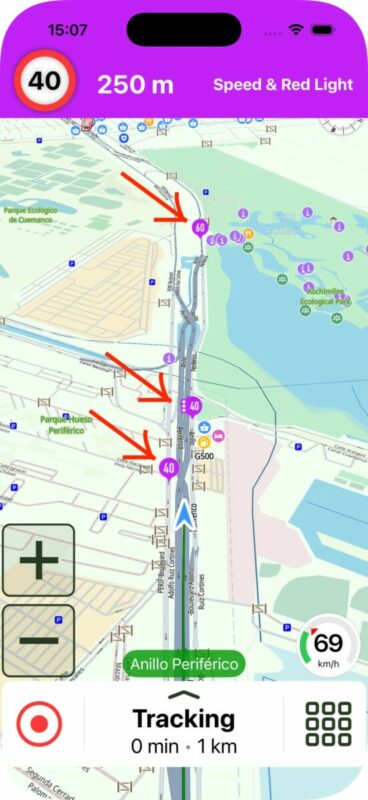
Find below an image of iPhone and CarPlay.
The cameras are always displayed on the map with purple markers. Depending on the type of camera they will be a bit different.
When you are close to a camera, on iPhone you'll see the top purple bar. On CarPlay you'll see the message bottom left (or bottom right, depending if your CarPlay system is left-hand right-hand drive).
Note about these messages... Scenic needs to have received your heading information (to determine (1), the camera flashes in your direction of travel, or is meant for the oncoming traffic. If you are going really slow (walking) then heading information is unreliable, and the message will probably not show. I believe that's OK since, if you are walking / walking pace, it's very likely you won't pass the limit anyway.
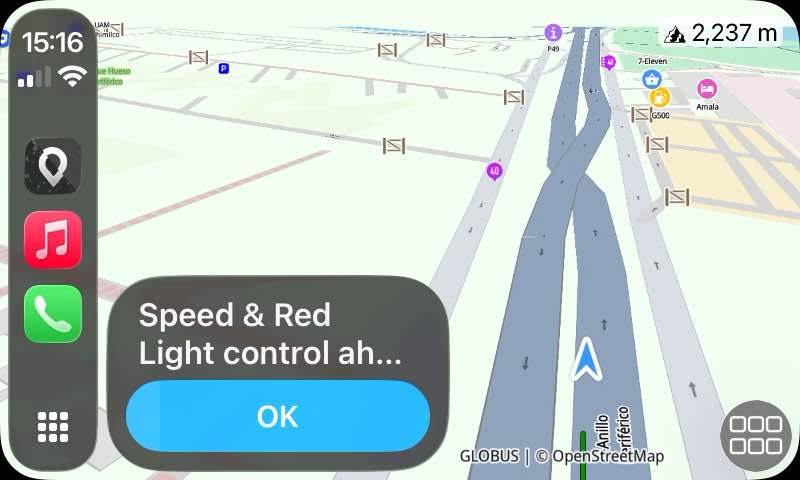
Quote from Guido on 09.01.2026, 15:23If you don't see a camera on the map, then
(1) Make sure you are in navigation/tracking mode
(2) If you don't see it in that mode, then probably the camera is not in the SCDB database. You can check that here: https://www.scdb.info/en/karte/
If you don't see a camera on the map, then
(1) Make sure you are in navigation/tracking mode
(2) If you don't see it in that mode, then probably the camera is not in the SCDB database. You can check that here: https://www.scdb.info/en/karte/
Quote from Marts on 09.01.2026, 18:07Quote from Guido on 09.01.2026, 09:25At the moment only FIXED cameras are showing. Mobile camera locations are not in the database. Scenic uses the SCDB database. (https://scdb.info)
I wonder how they'd update them anyway. I just looked at the database for where I live. Unfortunately it is missing a lot of known fixed cams including the point to point ones which are now infesting Oz in a manner similar to the Wuhan plague.
Quote from Guido on 09.01.2026, 09:25At the moment only FIXED cameras are showing. Mobile camera locations are not in the database. Scenic uses the SCDB database. (https://scdb.info)
I wonder how they'd update them anyway. I just looked at the database for where I live. Unfortunately it is missing a lot of known fixed cams including the point to point ones which are now infesting Oz in a manner similar to the Wuhan plague.
Quote from Guido on 09.01.2026, 18:56yeah. I’m afraid SCDB is more EU focused.
If you know of database that has Oz speed cams, I’d be happy to take a look to see if I can include it.
yeah. I’m afraid SCDB is more EU focused.
If you know of database that has Oz speed cams, I’d be happy to take a look to see if I can include it.
Quote from Marts on 09.01.2026, 22:57Quote from Guido on 09.01.2026, 18:56yeah. I’m afraid SCDB is more EU focused.
If you know of database that has Oz speed cams, I’d be happy to take a look to see if I can include it.I'll see what there is, if anything.
Quote from Guido on 09.01.2026, 18:56yeah. I’m afraid SCDB is more EU focused.
If you know of database that has Oz speed cams, I’d be happy to take a look to see if I can include it.
I'll see what there is, if anything.

Quote from Karlchen on 10.01.2026, 00:25Quote from Guido on 09.01.2026, 15:21Find below an image of iPhone and CarPlay.
The cameras are always displayed on the map with purple markers. Depending on the type of camera they will be a bit different.When you are close to a camera, on iPhone you'll see the top purple bar. On CarPlay you'll see the message bottom left (or bottom right, depending if your CarPlay system is left-hand right-hand drive).
Note about these messages... Scenic needs to have received your heading information (to determine (1), the camera flashes in your direction of travel, or is meant for the oncoming traffic. If you are going really slow (walking) then heading information is unreliable, and the message will probably not show. I believe that's OK since, if you are walking / walking pace, it's very likely you won't pass the limit anyway.
Hallo Guido,
wird das auch im geteilten Carplaybildscirm angezeigt?
Beste Grüße
Karlchen
Quote from Guido on 09.01.2026, 15:21Find below an image of iPhone and CarPlay.
The cameras are always displayed on the map with purple markers. Depending on the type of camera they will be a bit different.When you are close to a camera, on iPhone you'll see the top purple bar. On CarPlay you'll see the message bottom left (or bottom right, depending if your CarPlay system is left-hand right-hand drive).
Note about these messages... Scenic needs to have received your heading information (to determine (1), the camera flashes in your direction of travel, or is meant for the oncoming traffic. If you are going really slow (walking) then heading information is unreliable, and the message will probably not show. I believe that's OK since, if you are walking / walking pace, it's very likely you won't pass the limit anyway.
Hallo Guido,
wird das auch im geteilten Carplaybildscirm angezeigt?
Beste Grüße
Karlchen
Quote from pe112 on 10.01.2026, 07:39Hi @guidomm
now that you have implemented the Speed Cams I need to come back to what I wrote above in post #12:
The solution you implemented for disabling Speed Cam warnings (and displaying) seems to be sufficient for the legal situation in Germany. Here it is okay to carry a warning device as long as you are not using it.
Unfortunately in Switzerland the regulations are much more rigid:
Here it is strictly illegal to just own, buy, import, carry, offer (!) or sell (!) any device, system or media that is suited to warn against any kind of speed checks.
The "Bundesamt für Strassen ASTRA", the relevant authority in Switzerland, details the respective regulation (SVG 98a) with regard to GPS devices and Navigation apps: They must not contain any Speed Camera POIs or databases. If the do, these data are to be removed So in Switzerland it is not a matter of a switch to enable/disable the use of that data. It is a matter of its presence.
Please find their document here.I understand somehow (honestly I actually do not) that a relevant number of Scenic users gain peace of mind from having the Speed Camera warnings.
However my own peace of mind depends on not committing a legal offense by just using my favorite navigation app. And the penalties in Switzerland are draconian.So I am asking you to add a user option (possibly in the "secret" developer menu) that does all of these:
- disable and remove the "Enable SpeedCam warnings" option in the setting screen
- delete the Speed cam database from the device
- remove or gray out itself
As far as I understand the SpeedCam database is delivered and installed together with the app. So after each app update the SpeedCam database and the option to use it would be back again.
That would be fine for me as long as we can delete them again for the next trip to Switzerland.Knowing your dedication to Scenic and to you your user base I am am confident that you will be adding this option very soon.
Thanks a lot for that, for listening to your users in the way you do, and for all the work you are putting into the best navigation app around!
Best regards, Martin
Hi @guidomm
now that you have implemented the Speed Cams I need to come back to what I wrote above in post #12:
The solution you implemented for disabling Speed Cam warnings (and displaying) seems to be sufficient for the legal situation in Germany. Here it is okay to carry a warning device as long as you are not using it.
Unfortunately in Switzerland the regulations are much more rigid:
Here it is strictly illegal to just own, buy, import, carry, offer (!) or sell (!) any device, system or media that is suited to warn against any kind of speed checks.
The "Bundesamt für Strassen ASTRA", the relevant authority in Switzerland, details the respective regulation (SVG 98a) with regard to GPS devices and Navigation apps: They must not contain any Speed Camera POIs or databases. If the do, these data are to be removed So in Switzerland it is not a matter of a switch to enable/disable the use of that data. It is a matter of its presence.
Please find their document here.
I understand somehow (honestly I actually do not) that a relevant number of Scenic users gain peace of mind from having the Speed Camera warnings.
However my own peace of mind depends on not committing a legal offense by just using my favorite navigation app. And the penalties in Switzerland are draconian.
So I am asking you to add a user option (possibly in the "secret" developer menu) that does all of these:
- disable and remove the "Enable SpeedCam warnings" option in the setting screen
- delete the Speed cam database from the device
- remove or gray out itself
As far as I understand the SpeedCam database is delivered and installed together with the app. So after each app update the SpeedCam database and the option to use it would be back again.
That would be fine for me as long as we can delete them again for the next trip to Switzerland.
Knowing your dedication to Scenic and to you your user base I am am confident that you will be adding this option very soon.
Thanks a lot for that, for listening to your users in the way you do, and for all the work you are putting into the best navigation app around!
Best regards, Martin

Quote from mattsz on 10.01.2026, 07:57Do I understand correctly, that Scenic doesn't indicate speed camera locations while planning? That seems odd to me, I would think that one might want to take their presence into account when planning a route.
But maybe I'm wrong, as I have no experience with them. To date, I've never come across a single one, anywhere I ride or drive (EDIT: that I know of!), so I don't have a dog in the fight, as they say.
But, is there a resource that can, at any desired time, show locations? In North America? Are there any speed cameras in North America?
Do I understand correctly, that Scenic doesn't indicate speed camera locations while planning? That seems odd to me, I would think that one might want to take their presence into account when planning a route.
But maybe I'm wrong, as I have no experience with them. To date, I've never come across a single one, anywhere I ride or drive (EDIT: that I know of!), so I don't have a dog in the fight, as they say.
But, is there a resource that can, at any desired time, show locations? In North America? Are there any speed cameras in North America?
Quote from DaffyDuck on 10.01.2026, 08:15So I am asking you to add a user option (possibly in the "secret" developer menu) that does all of these:
- disable and remove the "Enable SpeedCam warnings" option in the setting screen
- delete the Speed cam database from the device
- remove or gray out itself
Hi,
Grüezi from Switzerland!
I just learned there’s a « secret » developer menu 🙂 How does one get access to this menu?
So I am asking you to add a user option (possibly in the "secret" developer menu) that does all of these:
- disable and remove the "Enable SpeedCam warnings" option in the setting screen
- delete the Speed cam database from the device
- remove or gray out itself
Hi,
Grüezi from Switzerland!
I just learned there’s a « secret » developer menu 🙂 How does one get access to this menu?


