
Route problem - want to return back to the first point

Quote from Joerg400 on 02.12.2021, 10:34Hi Guido,
I made the experience (Scenic 3.02) that the shorter a route was (less then 80 - 100 km), the grater the deviation problems.
Perhaps only by a random.
Hi Guido,
I made the experience (Scenic 3.02) that the shorter a route was (less then 80 - 100 km), the grater the deviation problems.
Perhaps only by a random.

Quote from Guido on 02.12.2021, 10:41Quote from Joerg400 on 02.12.2021, 10:34Hi Guido,
I made the experience (Scenic 3.02) that the shorter a route was (less then 80 - 100 km), the grater the deviation problems.
Perhaps only by a random.
Maybe... Icould be indeed.
Quote from Joerg400 on 02.12.2021, 10:34Hi Guido,
I made the experience (Scenic 3.02) that the shorter a route was (less then 80 - 100 km), the grater the deviation problems.
Perhaps only by a random.
Maybe... Icould be indeed.
Quote from Maxodo on 09.12.2021, 09:57Hi Guido, I am pleased to finally give you some feedback on Beta 3.5 (4) after the terrible weather subsided.
I rode the same route as my last post here and with similar detours and some more for fun.
Settings: Recalculate=ON, Self-correct=ON, Auto-skip=OFF, Skip button=ON
Voice=English (UK) announced street names.
I am pleased to say things are *much* improved.
In all cases when I rejoined the route it allowed me to continue as normal with no attempt to force me backwards.
Firstly here all good:
Following this overview with regard to the junction near VP 19. You can see my detour (clockwise) and I come to the left of VP 19 to naturally turn left and continue on the route.
However, Scenic still wants me to turn right at the very last moment (toward VP 19) even though a turn left would be the logical thing:
Is this just the limit of AI navigation and there is no way round it?
Human logic would just say: "Ahh - there is the route, turn left!"
Here is another example - a long detour as follows:
But again approaching VP 28 from the SW and a natural turn left would be best, it wants me to carry on.
But as soon as I make the decision to turn left it does recognise the route so the main massive issue of route recalculation gremlins has been fixed. 🙂
I am sorry I cannot give much more feedback Guido, time and weather is an issue now.
Just some other minor observations:
I did get some slightly random "route recalculation" voice announcements still - I thought these were removed?
Also a great help would be an audible chime to alert the rider that Scenic realises you are back on route, before I think we had voice "route rejoined".
The 'squiggle' chime that announces a route recalculation in progress is very helpful. I think we need a simple 'ta-daaaah!" or 'dee-dee-deeeeee!" sound when Scenic has rejoined the route so we know all is well.
Anyway, hope this helps, thanks for the fixes. 🙂
Hi Guido, I am pleased to finally give you some feedback on Beta 3.5 (4) after the terrible weather subsided.
I rode the same route as my last post here and with similar detours and some more for fun.
Settings: Recalculate=ON, Self-correct=ON, Auto-skip=OFF, Skip button=ON
Voice=English (UK) announced street names.
I am pleased to say things are *much* improved.
In all cases when I rejoined the route it allowed me to continue as normal with no attempt to force me backwards.
Firstly here all good:
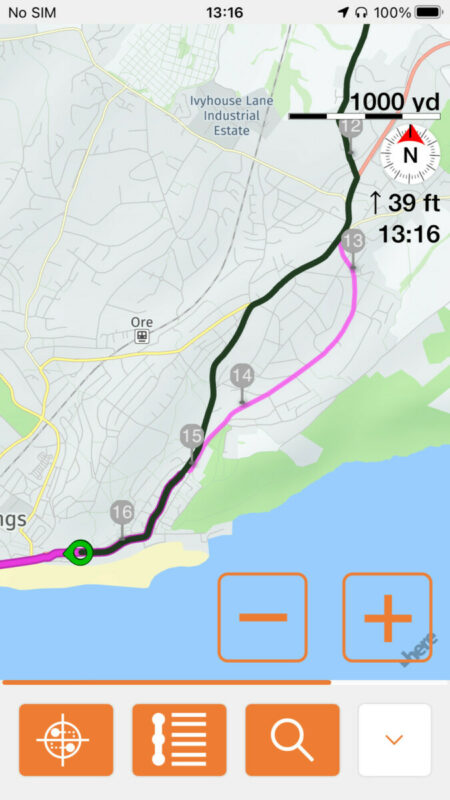
Following this overview with regard to the junction near VP 19. You can see my detour (clockwise) and I come to the left of VP 19 to naturally turn left and continue on the route.
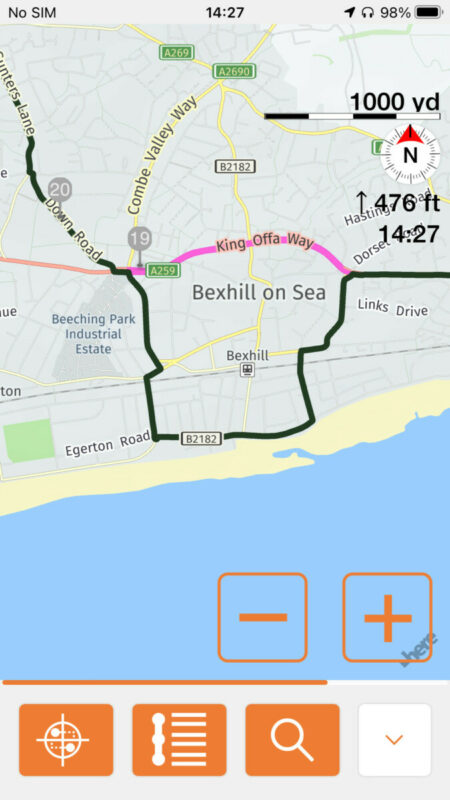
However, Scenic still wants me to turn right at the very last moment (toward VP 19) even though a turn left would be the logical thing:
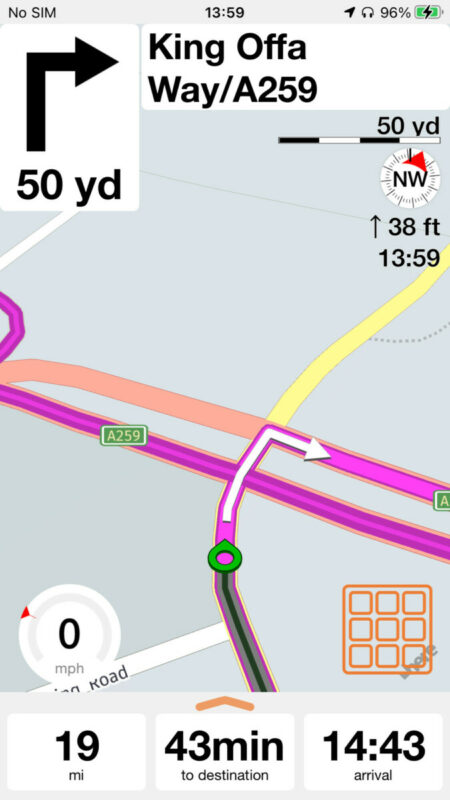
Is this just the limit of AI navigation and there is no way round it?
Human logic would just say: "Ahh - there is the route, turn left!"
Here is another example - a long detour as follows:
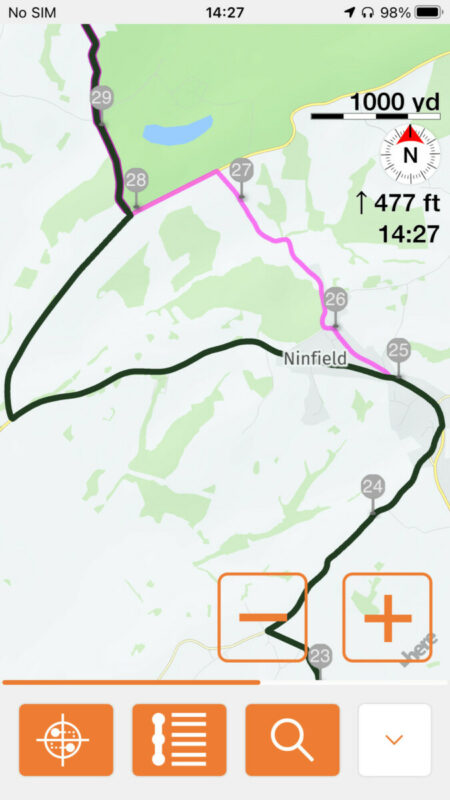
But again approaching VP 28 from the SW and a natural turn left would be best, it wants me to carry on.
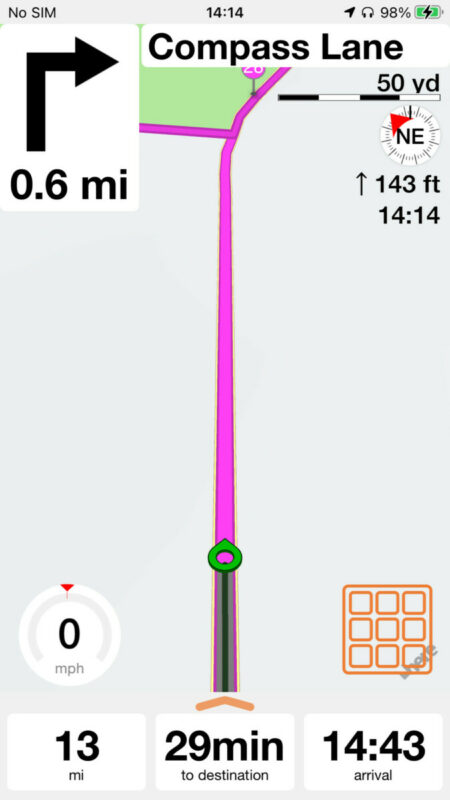
But as soon as I make the decision to turn left it does recognise the route so the main massive issue of route recalculation gremlins has been fixed. 🙂
I am sorry I cannot give much more feedback Guido, time and weather is an issue now.
Just some other minor observations:
I did get some slightly random "route recalculation" voice announcements still - I thought these were removed?
Also a great help would be an audible chime to alert the rider that Scenic realises you are back on route, before I think we had voice "route rejoined".
The 'squiggle' chime that announces a route recalculation in progress is very helpful. I think we need a simple 'ta-daaaah!" or 'dee-dee-deeeeee!" sound when Scenic has rejoined the route so we know all is well.
Anyway, hope this helps, thanks for the fixes. 🙂
Quote from Guido on 09.12.2021, 10:01Happy to hear that Max.
Regarding Scenic giving instructions to turn wrong way... this is indeed an AI limitation I guess. Currently when you come within 50 meters of the original route it will assume you are back on the route. I could change this to 100 meters, or even 200 meters, but that would have other unwanted consequences.
I like your idea about 'tada' sound when back on route / re-joining route (I indeed removed that spoken text).
Happy to hear that Max.
Regarding Scenic giving instructions to turn wrong way... this is indeed an AI limitation I guess. Currently when you come within 50 meters of the original route it will assume you are back on the route. I could change this to 100 meters, or even 200 meters, but that would have other unwanted consequences.
I like your idea about 'tada' sound when back on route / re-joining route (I indeed removed that spoken text).
Quote from Maxodo on 09.12.2021, 10:04I am not sure the 50m thing is working then as it should as I was much less than that I think when it still wants me to turn the 'wrong' way?
But did you see my point that I still got random voice of 'route recalculation'?
I am not sure the 50m thing is working then as it should as I was much less than that I think when it still wants me to turn the 'wrong' way?
But did you see my point that I still got random voice of 'route recalculation'?
Quote from Guido on 09.12.2021, 10:07Sorry... I misread that. I will fix those 'route recalculation' for the next build. Could you do me a favor... if you get the chance... could you select another voice . This time a pre-recorded (NOT synthetic / announces street names) voice and check if you still get these 'Route recalculation' messages?
Sorry... I misread that. I will fix those 'route recalculation' for the next build. Could you do me a favor... if you get the chance... could you select another voice . This time a pre-recorded (NOT synthetic / announces street names) voice and check if you still get these 'Route recalculation' messages?
Quote from Guido on 09.12.2021, 10:09No worries... I will test myself and ask other beta testers as well. Tx
No worries... I will test myself and ask other beta testers as well. Tx
Quote from Guido on 09.12.2021, 16:32The line is made up of lots of geometry points (mostly these are on junctions and where the line curves). It’s 50 meters (or could be 25, not sure what I ended up with… will check later…) from a geometry point.
The line is made up of lots of geometry points (mostly these are on junctions and where the line curves). It’s 50 meters (or could be 25, not sure what I ended up with… will check later…) from a geometry point.
Quote from Maxodo on 10.12.2021, 03:08So, does that mean in the last example I gave above "But again approaching VP 28 from the SW and a natural turn left would be best, it wants me to carry on" when I approach the route and it wants me to go straight on that it will recognise the route but maybe it should change and make me turn left at the last moment?
Same for the other example I gave when I am at the route wanting to turn left but it still tells me to go right.
What I mean is if I join the route at a T junction will it understand that it has 'found/rejoined' the route BUT then it must make a decision of: right is 'backwards' on the route and left is ''forward' (and correct logically) but it may still take me backwards??
So, does that mean in the last example I gave above "But again approaching VP 28 from the SW and a natural turn left would be best, it wants me to carry on" when I approach the route and it wants me to go straight on that it will recognise the route but maybe it should change and make me turn left at the last moment?
Same for the other example I gave when I am at the route wanting to turn left but it still tells me to go right.
What I mean is if I join the route at a T junction will it understand that it has 'found/rejoined' the route BUT then it must make a decision of: right is 'backwards' on the route and left is ''forward' (and correct logically) but it may still take me backwards??
Quote from Guido on 10.12.2021, 07:04
In this example, from the moment you leave the route just after 25, it is trying to guide you back to 26, because that is the first point you did not reach yet. It tries to do that until you reach the route just after 28. Only then will it realize where you are on the route and skip the vias/stops “behind” you.
Technically it will search the geometry in a ‘forward’ direction (the way the route is supposed to be ridden), starting from the geo-point where you join the route, until it finds the first via/stop. Then it will mark all vias/stops before that as ‘skipped/reached’ (they become gray) and calculate your route from your current location to the first unreached via/stop.
So, it will always go ‘forward’.
It becomes more complicated if you join the route on a stretch of road that’s in the (remaining) route twice. In that case it will assume that you are on that stretch of road for the first time of those two times.
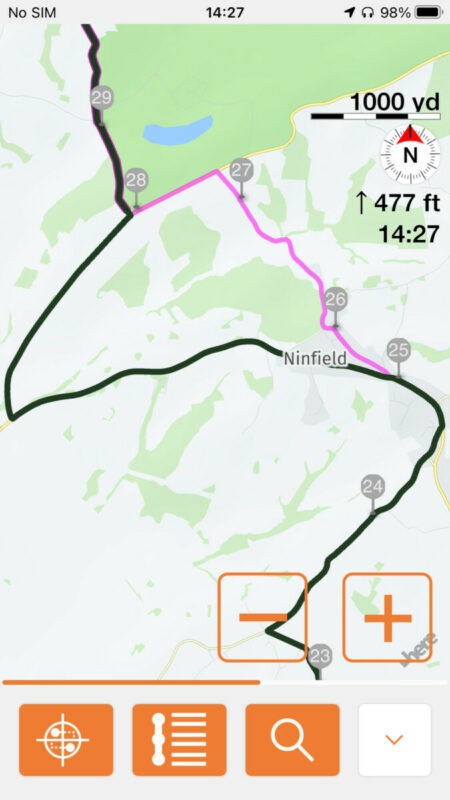
In this example, from the moment you leave the route just after 25, it is trying to guide you back to 26, because that is the first point you did not reach yet. It tries to do that until you reach the route just after 28. Only then will it realize where you are on the route and skip the vias/stops “behind” you.
Technically it will search the geometry in a ‘forward’ direction (the way the route is supposed to be ridden), starting from the geo-point where you join the route, until it finds the first via/stop. Then it will mark all vias/stops before that as ‘skipped/reached’ (they become gray) and calculate your route from your current location to the first unreached via/stop.
So, it will always go ‘forward’.
It becomes more complicated if you join the route on a stretch of road that’s in the (remaining) route twice. In that case it will assume that you are on that stretch of road for the first time of those two times.
Quote from Maxodo on 10.12.2021, 08:15I see, thanks Guido. I did not know from the 50m comment you made earlier that it 'saw' the route 50m ahead to the LEFT before VP28 and then thought 'change the plan, turn him left not straight on'?
I see, thanks Guido. I did not know from the 50m comment you made earlier that it 'saw' the route 50m ahead to the LEFT before VP28 and then thought 'change the plan, turn him left not straight on'?
Quote from Guido on 10.12.2021, 08:37Nope...sorry....I was mistaken. The 50 meters was an older versions. This didn't work well from a performance perspective as it has to constantly check what the closest point on the route was and how close you were from that point. It had to do that with every coordinate that was received (every second or so). This was using too much battery and slowing down the map movement.
Now, it's still 50 meters, but it only checks this at moments that the route is recalculated, not all the time.
So, this explains what you saw during your rides. It kept going when you reached VP28. If you would not have turned left (initiating a route calculation), it would have kept going.
I know this does not cover 100% of the situations, but I'd argue that in actual real life this is acceptable. Why? Because I believe there are two reasons why you'd consistently ignore recalculated route instructions: (1) you know a better way. In that case you would also know to turn left at this crossing (2) You don't know the region, and there is road maintenance and a detour indicated. In that case, you follow the road signs, which will get you back on route as well. The road signs might have pointed left at the VP28 intersection, or might have lead you back to VP26 (or VP27). In all cases, you would be fine and not get lost. (You could als use Scenic's road block function in case of maintenance work, but that's another topic 🙂).
Nope...sorry....I was mistaken. The 50 meters was an older versions. This didn't work well from a performance perspective as it has to constantly check what the closest point on the route was and how close you were from that point. It had to do that with every coordinate that was received (every second or so). This was using too much battery and slowing down the map movement.
Now, it's still 50 meters, but it only checks this at moments that the route is recalculated, not all the time.
So, this explains what you saw during your rides. It kept going when you reached VP28. If you would not have turned left (initiating a route calculation), it would have kept going.
I know this does not cover 100% of the situations, but I'd argue that in actual real life this is acceptable. Why? Because I believe there are two reasons why you'd consistently ignore recalculated route instructions: (1) you know a better way. In that case you would also know to turn left at this crossing (2) You don't know the region, and there is road maintenance and a detour indicated. In that case, you follow the road signs, which will get you back on route as well. The road signs might have pointed left at the VP28 intersection, or might have lead you back to VP26 (or VP27). In all cases, you would be fine and not get lost. (You could als use Scenic's road block function in case of maintenance work, but that's another topic 🙂).
Quote from Maxodo on 10.12.2021, 10:53Understood - it's not easy. So, in the same example above if I did not know the route and had therfore followed Scenic and so it had taken me to vp28: Next I had passed vp28 - when would it realise I was now going the 'wrong' direction and instruct me to U turn - after 28 and before 27 or after I had passed 27 etc?
Understood - it's not easy. So, in the same example above if I did not know the route and had therfore followed Scenic and so it had taken me to vp28: Next I had passed vp28 - when would it realise I was now going the 'wrong' direction and instruct me to U turn - after 28 and before 27 or after I had passed 27 etc?
Quote from Guido on 10.12.2021, 11:03It would not realize that, unless you deviate from the (recalculated) route again.
It would not realize that, unless you deviate from the (recalculated) route again.
Quote from Maxodo on 10.12.2021, 11:20Sorry if I'm being dumb but do you mean it would take me from 28-27-26 and so on all the way to the start?!
Sorry if I'm being dumb but do you mean it would take me from 28-27-26 and so on all the way to the start?!
Quote from Guido on 10.12.2021, 11:55OK. Consider the situation with the self-correct feature DISABLED:The last via point you reached was 25 so it will try to get you to 26 no matter what. Once you reach 26, it will lead you to 27, then 28 etc. This remains true ALL THE TIME. Even if you get close to 28 while going to 26, it will not register this. The order of via point visiting will be as you designed it. Even if that means going up and down the same road twice.
Now consider the situation where self-correct is ENABLED.IF, at the moment and place you deviate from the route, you are within 50 meters of the original route, it will assume that you skipped or reached any via and stop before that point (it will mark them gray) and guide you to the first ‘unreached’ via point or stop.In this case you deviated by going left just before reaching 28. The first via ‘down route’ from the where you deviated (the point where you took a left) is via 29. So, it marks all vias before that as gray (already reached or skipped).Now, suppose you kept following the instructions / you didn’t take a left / you did not deviate / you did not cause a recalculation.In that case Scenic is not checking if you are back on the route. Because it ONLY CHECKS AT THE MOMENT YOU DEVIATE. In that case it will guide you to 26, then 27, then 28.Now, this might not seem as expected, but what I’ve tried to explain in my previous post is that in real life situations this IS acceptable (in my opinion at least), maybe even desirable.
The last via point you reached was 25 so it will try to get you to 26 no matter what. Once you reach 26, it will lead you to 27, then 28 etc. This remains true ALL THE TIME. Even if you get close to 28 while going to 26, it will not register this. The order of via point visiting will be as you designed it. Even if that means going up and down the same road twice.
Quote from Joerg400 on 10.12.2021, 12:02Quote from Maxodo on 10.12.2021, 11:20Sorry if I'm being dumb but do you mean it would take me from 28-27-26 and so on all the way to the start?!
Hi,
these question is not dump. I follow this topic and your posts very interested because for me this issue belongs to the important ones.
I think, that Scenic would take you back to 26 (because 25 was normal passed) then U-turn to 27, 28, ....
But when turn left in direction of 29 (and your settings are like 'self correcton' ON, then Scenic will "forget" 26, 27 28.
(And if I'm wrong, Guido will tell us the correct. 🙂 )
And during writing my post, Guiodo explained much better 😉
Quote from Maxodo on 10.12.2021, 11:20Sorry if I'm being dumb but do you mean it would take me from 28-27-26 and so on all the way to the start?!
Hi,
these question is not dump. I follow this topic and your posts very interested because for me this issue belongs to the important ones.
I think, that Scenic would take you back to 26 (because 25 was normal passed) then U-turn to 27, 28, ....
But when turn left in direction of 29 (and your settings are like 'self correcton' ON, then Scenic will "forget" 26, 27 28.
(And if I'm wrong, Guido will tell us the correct. 🙂 )
And during writing my post, Guiodo explained much better 😉
Quote from Guido on 10.12.2021, 12:14Quote from Maxodo on 10.12.2021, 11:20Sorry if I'm being dumb but do you mean it would take me from 28-27-26 and so on all the way to the start?!
Indeed not dumb. It’s complicated stuff.
To answer your question directly… it would guide you to 26, then 27, then 28.That you pass 28 and 27 while going to 26 is not registered at all.
Quote from Maxodo on 10.12.2021, 11:20Sorry if I'm being dumb but do you mean it would take me from 28-27-26 and so on all the way to the start?!
Indeed not dumb. It’s complicated stuff.
To answer your question directly… it would guide you to 26, then 27, then 28.
That you pass 28 and 27 while going to 26 is not registered at all.
Quote from Maxodo on 10.12.2021, 13:22Sorry Guido, I and others I guess just need to understand the algorithms.
Self correction was on.
I think I understand now, it wants me to visit 26 as that was the first missed VP? The fact I go past 28 and 27 is a coincidence?
It wants to take me past 28 then 27 (irrelevant) to 26. As I say even when I approached the route (the left turn) to take me back on track Scenic guides me to 26 instead of sensing the route at the left turn?
So even though I cross the route and am closer to it, it will take me all the way to 26 then want me to U turn back to 27, 28 etc as I have already visited 25?!
Sorry Guido, I and others I guess just need to understand the algorithms.
Self correction was on.
I think I understand now, it wants me to visit 26 as that was the first missed VP? The fact I go past 28 and 27 is a coincidence?
It wants to take me past 28 then 27 (irrelevant) to 26. As I say even when I approached the route (the left turn) to take me back on track Scenic guides me to 26 instead of sensing the route at the left turn?
So even though I cross the route and am closer to it, it will take me all the way to 26 then want me to U turn back to 27, 28 etc as I have already visited 25?!
Quote from Guido on 10.12.2021, 13:28Quote from Maxodo on 10.12.2021, 13:22Sorry Guido, I and others I guess just need to understand the algorithms.
Self correction was on.
I think I understand now, it wants me to visit 26 as that was the first missed VP? The fact I go past 28 and 27 is a coincidence?
It wants to take me past 28 then 27 (irrelevant) to 26. As I say even when I approached the route (the left turn) to take me back on track Scenic guides me to 26 instead of sensing the route at the left turn?
So even though I cross the route and am closer to it, it will take me all the way to 26 then want me to U turn back to 27, 28 etc as ai have already visited 25?!
Yes. Your understanding is 100% correct now
Quote from Maxodo on 10.12.2021, 13:22Sorry Guido, I and others I guess just need to understand the algorithms.
Self correction was on.
I think I understand now, it wants me to visit 26 as that was the first missed VP? The fact I go past 28 and 27 is a coincidence?
It wants to take me past 28 then 27 (irrelevant) to 26. As I say even when I approached the route (the left turn) to take me back on track Scenic guides me to 26 instead of sensing the route at the left turn?
So even though I cross the route and am closer to it, it will take me all the way to 26 then want me to U turn back to 27, 28 etc as ai have already visited 25?!
Yes. Your understanding is 100% correct now
Quote from Maxodo on 10.12.2021, 13:52So I hit 26 then Scenic says U turn?
And (moving on!) at what point will Scenic give me a 'skip next VP?' button in this scenario?
So I hit 26 then Scenic says U turn?
And (moving on!) at what point will Scenic give me a 'skip next VP?' button in this scenario?
Quote from Guido on 10.12.2021, 14:04So I hit 26 then Scenic says U turn?
It will turn you around where it’s allowed. Could be a u-turn a bit further down the road. Could be three right turns and a left turn, three left turns and a right turn. The point is, once you reached 26 it will guide you to 27.
And (moving on!) at what point will Scenic give me a 'skip next VP?' button in this scenario?
If you have that turned on in detour behaviour, scenic will show you a ‘skip next via’ button every time you deviate. (Because every time you deviate is where you might actually want to skip the next via)
So, in this case it would have shown you the button when you left the route at VP25. Tapping that button would have marked 26 ‘gray’ and you would be guided to 27.
So I hit 26 then Scenic says U turn?
It will turn you around where it’s allowed. Could be a u-turn a bit further down the road. Could be three right turns and a left turn, three left turns and a right turn. The point is, once you reached 26 it will guide you to 27.
And (moving on!) at what point will Scenic give me a 'skip next VP?' button in this scenario?
If you have that turned on in detour behaviour, scenic will show you a ‘skip next via’ button every time you deviate. (Because every time you deviate is where you might actually want to skip the next via)
So, in this case it would have shown you the button when you left the route at VP25. Tapping that button would have marked 26 ‘gray’ and you would be guided to 27.
Quote from chupa88 on 09.01.2022, 10:31I've read this thread and other threads on the recalculation of v3 and it is still a bit confusing. While using v3, I've missed some turns by accident and found the rerouting to be quite confusing with wanting to take me back to a missed via point despite the next points are closer. Guido, can you make a video explaining the options? It may be easier to understand than reading these threads.
I've read this thread and other threads on the recalculation of v3 and it is still a bit confusing. While using v3, I've missed some turns by accident and found the rerouting to be quite confusing with wanting to take me back to a missed via point despite the next points are closer. Guido, can you make a video explaining the options? It may be easier to understand than reading these threads.
Quote from Maxodo on 27.01.2022, 08:43Hi Guido, just an update. First rides with Scenic (latest beta version) and all worked perfectly over three routes and quite a few diversions. Just a few random voice “route recalculation” announcements for no reason when following the route quite normally.
Hi Guido, just an update. First rides with Scenic (latest beta version) and all worked perfectly over three routes and quite a few diversions. Just a few random voice “route recalculation” announcements for no reason when following the route quite normally.
Quote from Guido on 27.01.2022, 10:39That's great news. It took quite a few iterations to get to here, as there are so many scenarios, so many settings and so many kinds of situation. But I really think/hope I got it right this time.
Regarding the 'route recalculation' announcement. Unfortunately I can't filter this out if you have a pre-recorded voice selected. If you have a synthetic/computer/text-to-speech voice selected this announcement can and is filtered out (because Scenic can see the text string that the framework wants to play and then stop it from playing). However if it's a pre-recorded voice Scenic can't see which sound file is being played (and stop it).
That's great news. It took quite a few iterations to get to here, as there are so many scenarios, so many settings and so many kinds of situation. But I really think/hope I got it right this time.
Regarding the 'route recalculation' announcement. Unfortunately I can't filter this out if you have a pre-recorded voice selected. If you have a synthetic/computer/text-to-speech voice selected this announcement can and is filtered out (because Scenic can see the text string that the framework wants to play and then stop it from playing). However if it's a pre-recorded voice Scenic can't see which sound file is being played (and stop it).
Quote from Maxodo on 27.01.2022, 11:50Thanks Guido, just to be clear on the "recalculation" - what I meant was there was no reason for it to say it anyway as I was just following the exact route at this time, there was no actual change or recalculation taking place, just the voice telling me it was! It happened maybe 6 times. 🙂
Thanks Guido, just to be clear on the "recalculation" - what I meant was there was no reason for it to say it anyway as I was just following the exact route at this time, there was no actual change or recalculation taking place, just the voice telling me it was! It happened maybe 6 times. 🙂
Quote from Guido on 27.01.2022, 11:54I understand. What happens is that there are always slight deviations in the GPS location. The new map provider is very sensitive to this. If you are only a little bit "off route" (meaning, if the received GPS location is not exactly on the road you are on), this is signaled as being "off route".... and the framework then immediately gives this announcements, even though the new route might be exactly the same as it was. The only way around this is to select a computer voice.
I'll investigate a bit further to see if I can maybe fix this for pre-recorded voices too
I understand. What happens is that there are always slight deviations in the GPS location. The new map provider is very sensitive to this. If you are only a little bit "off route" (meaning, if the received GPS location is not exactly on the road you are on), this is signaled as being "off route".... and the framework then immediately gives this announcements, even though the new route might be exactly the same as it was. The only way around this is to select a computer voice.
I'll investigate a bit further to see if I can maybe fix this for pre-recorded voices too
Quote from knightde on 17.02.2022, 15:01I have read a lot of the posts in this section, but not all of them. Sorry if you have answered this, but I did not see an answer in the responses I have read. I recently updated to V3. I did not have this problem in V2. I have all my Detour Behaviors on expecting it to skip missed VIA points. It does not. It keeps nagging me until I turn off the app and restart it. Then it will take me to the next VIA point from my location and resume the route. I do not want to have to stop the app every time I deviate. And it will do this even if I pull into a gas station or parking lot just 20 feet off the road!! This is unacceptable, especially when you are leading a group ride which I do a lot. Is there a fix? Oh, just as a test...on one occasion where it was nagging me to go back near the beginning of the route. I left the app on, just muted the voice. Then used Google maps to get where I had to go. I was all the way to the destination and Scenic was still nagging me to go all the way back to that original missed VIA! It never, ever attempted to skip passed VIA points and continue. Please help!! 🙂
I have read a lot of the posts in this section, but not all of them. Sorry if you have answered this, but I did not see an answer in the responses I have read. I recently updated to V3. I did not have this problem in V2. I have all my Detour Behaviors on expecting it to skip missed VIA points. It does not. It keeps nagging me until I turn off the app and restart it. Then it will take me to the next VIA point from my location and resume the route. I do not want to have to stop the app every time I deviate. And it will do this even if I pull into a gas station or parking lot just 20 feet off the road!! This is unacceptable, especially when you are leading a group ride which I do a lot. Is there a fix? Oh, just as a test...on one occasion where it was nagging me to go back near the beginning of the route. I left the app on, just muted the voice. Then used Google maps to get where I had to go. I was all the way to the destination and Scenic was still nagging me to go all the way back to that original missed VIA! It never, ever attempted to skip passed VIA points and continue. Please help!! 🙂
Quote from Guido on 17.02.2022, 16:06This should be solved now. In version 3.07 I made another few changes. But version 3.06 should also skip via points.
you can see your version number at the bottom of the settings tab… and if not latest version update through the App Store.
I assume you have default detour behaviour settings? (Recalculate on detour ON, Self-correct ON, rest off)
Meanwhile there is also a way to manually skip via points: go to navigation (big button) menu and tap ‘skip stop/via’ button. I know this is not a solution but maybe it helps in those cases where it doesn’t self-correct
This should be solved now. In version 3.07 I made another few changes. But version 3.06 should also skip via points.
you can see your version number at the bottom of the settings tab… and if not latest version update through the App Store.
I assume you have default detour behaviour settings? (Recalculate on detour ON, Self-correct ON, rest off)
Meanwhile there is also a way to manually skip via points: go to navigation (big button) menu and tap ‘skip stop/via’ button. I know this is not a solution but maybe it helps in those cases where it doesn’t self-correct
Quote from Kam on 24.02.2022, 15:33Hi Guido,
Is there a quick place on website to see progression of enhancements and bug fixes per Scenic Version? Relative to Scenic 3. I see the current release is 3.07. But, I would like to see list of changes. Thanks.
Hi Guido,
Is there a quick place on website to see progression of enhancements and bug fixes per Scenic Version? Relative to Scenic 3. I see the current release is 3.07. But, I would like to see list of changes. Thanks.
Quote from Guido on 24.02.2022, 15:35Hi Kam...
in the App Store you can see the version history including list of changes: https://apps.apple.com/app/id1089668246 (then tap on 'Version History' and select the 'More' text to see the whole list of changes)
Hi Kam...
in the App Store you can see the version history including list of changes: https://apps.apple.com/app/id1089668246 (then tap on 'Version History' and select the 'More' text to see the whole list of changes)


