
Route problem - want to return back to the first point

Quote from botzko on 06.11.2021, 03:37Yesterday it was my first time using v3. I can confirm that I like the instructions much better than the v2, especially when using only voice instructions.
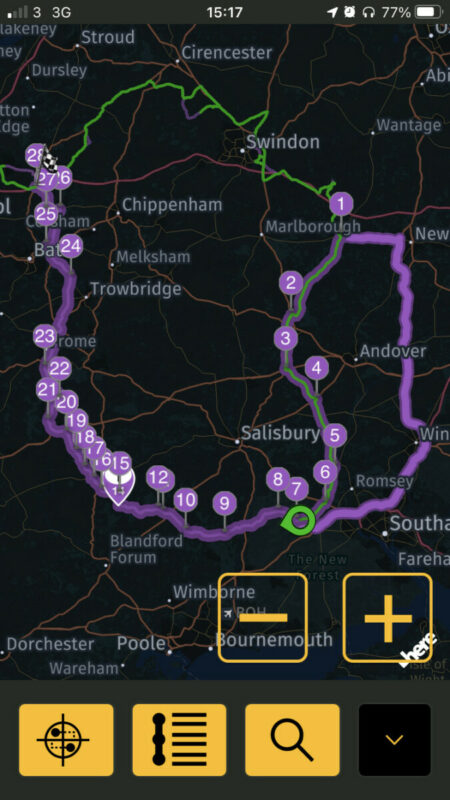
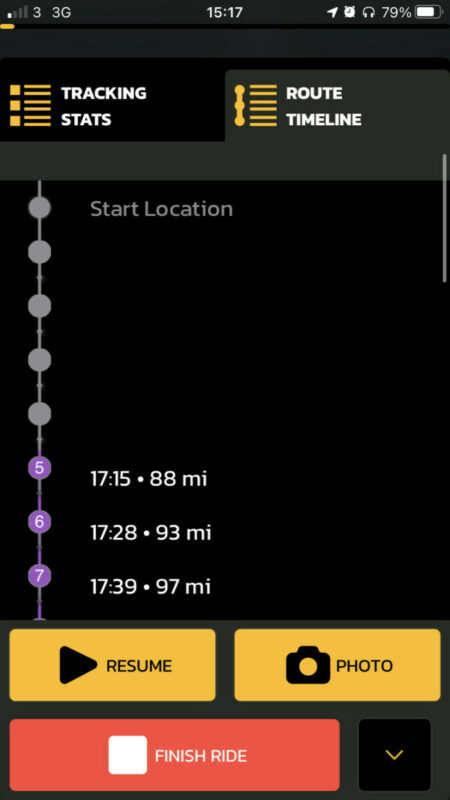
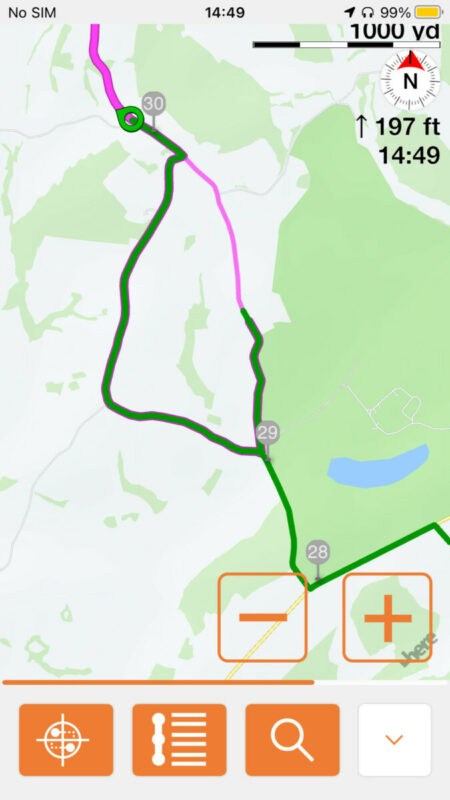
However I had 2 times where I will be close to the next point (via 4) in the attachments. The point is next to a right turn. On the display I saw the distance to the point and there was no voice instruction that I will need to turn right. When I have reached the junction the ‘Route recalculation’ was triggered and it wanted me to turn left. The purple route like on the right was still there, so I turned right hoping that it will recalculate again, but it was trying to make me go back. At this point I left someone else to lead. On our next stop I took the screenshots. It’s visible that I didn’t skip any via point and even if I did, my settings are to go to the next point.
I have fixed this by removing all previous via points.The same thing happened one mor time but I didn’t have time to make screenshots. Also the second time I do not believe I was near a via point. It was again on a junction or a traffic circle.
Let me know if I can help with something else to resolve this issue.
Yesterday it was my first time using v3. I can confirm that I like the instructions much better than the v2, especially when using only voice instructions.
However I had 2 times where I will be close to the next point (via 4) in the attachments. The point is next to a right turn. On the display I saw the distance to the point and there was no voice instruction that I will need to turn right. When I have reached the junction the ‘Route recalculation’ was triggered and it wanted me to turn left. The purple route like on the right was still there, so I turned right hoping that it will recalculate again, but it was trying to make me go back. At this point I left someone else to lead. On our next stop I took the screenshots. It’s visible that I didn’t skip any via point and even if I did, my settings are to go to the next point.
I have fixed this by removing all previous via points.
The same thing happened one mor time but I didn’t have time to make screenshots. Also the second time I do not believe I was near a via point. It was again on a junction or a traffic circle.
Let me know if I can help with something else to resolve this issue.

Quote from Guido on 06.11.2021, 07:18Thanks for the details. I am aware of this bug and will be looking into it for the next update. Thanks again.
Thanks for the details. I am aware of this bug and will be looking into it for the next update. Thanks again.
Quote from botzko on 11.11.2021, 12:32Hi Guido,
could you confirm that this will be fixed in the next update, that will be released these days?
Kind regards.
Hi Guido,
could you confirm that this will be fixed in the next update, that will be released these days?
Kind regards.
Quote from Guido on 11.11.2021, 12:34Fix is implemented and update is awaiting Apple approval now. Hopefully they approve before the weekend.
Fix is implemented and update is awaiting Apple approval now. Hopefully they approve before the weekend.
Quote from botzko on 12.11.2021, 11:13Could you confirm the version number that will include this fix please. I see version 3.02 released 17h ago but the release notes doesn’t include it.
Could you confirm the version number that will include this fix please. I see version 3.02 released 17h ago but the release notes doesn’t include it.
Quote from Guido on 12.11.2021, 11:20This build (3.02) fixes that you didn't get voice instructions to turn.
That it was trying to send you back, I believe, is 'as designed'. This depends on your 'Detour Behaviour' settings under Settings > Navigation & Tracking.
This build (3.02) fixes that you didn't get voice instructions to turn.
That it was trying to send you back, I believe, is 'as designed'. This depends on your 'Detour Behaviour' settings under Settings > Navigation & Tracking.
Quote from botzko on 12.11.2021, 11:53Excuse me, I didn’t report them as separated issues and I expected that the problem were it required me to return back was fixed.
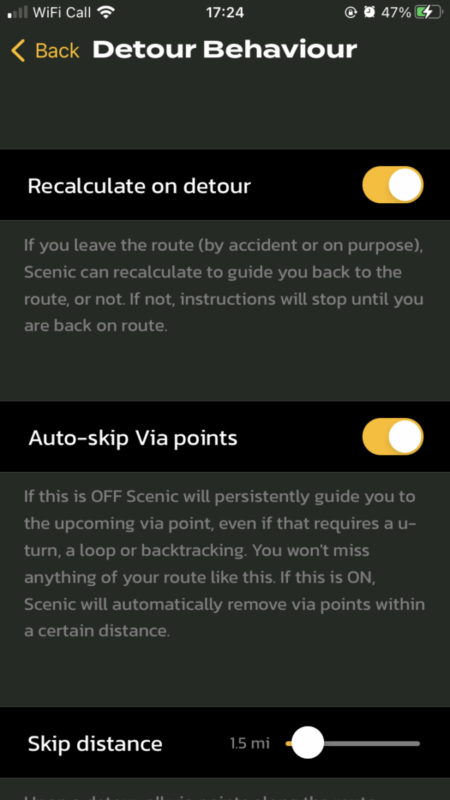
As seen from the screenshots my setting is to skip the missed point if I’m more than 1.5 miles away from it. This was the first setting that I have set in v3.
Also as visible from the previous screenshots (in the original problem reporting) I have already passed via the first point and at the time when the problem started I have been much more than 1.5 miles away from point 1. The track shows it and all passed points are grey in the list of points. I have received proper instructions going through points 2,3 and 4 (before I reached the turn and heard “Route recalculation”. This means that something has happened near point 4.
I had the same issue on the ride yesterday but no screenshots because I expected it will be foxed with this version.
I will update you when I encounter this problem again.
Excuse me, I didn’t report them as separated issues and I expected that the problem were it required me to return back was fixed.
As seen from the screenshots my setting is to skip the missed point if I’m more than 1.5 miles away from it. This was the first setting that I have set in v3.
Also as visible from the previous screenshots (in the original problem reporting) I have already passed via the first point and at the time when the problem started I have been much more than 1.5 miles away from point 1. The track shows it and all passed points are grey in the list of points. I have received proper instructions going through points 2,3 and 4 (before I reached the turn and heard “Route recalculation”. This means that something has happened near point 4.
I had the same issue on the ride yesterday but no screenshots because I expected it will be foxed with this version.
I will update you when I encounter this problem again.
Quote from Deleted user on 20.11.2021, 14:48Will the incorrect navigation issues be resolved soon? I used scenic 2 for a year with no issues but scenic 3 continues to insist on routing back to previous via points no matter what options are selected. Moving through a parking lot results in detour detected and even when turning onto the road that is clearly back on the route, nothing works. It either stops all guidance and maintains a disruptive straight line backwards to some previous point or (with changes to the navigation settings to recalculate on detour), starts routing u-turns endlessly to some previous location. I have tried every combination of settings to recalculate on detour, auto skip via points, recalculate but do not auto skip, adjusted the skip distance, turned off recalculate (which is what I used for over a year in scenic 2), change from raw to snapped and vice versa,etc. I cannot find any combination of settings that function like scenic 2 and just continue normal guidance along the route and clear directions to get back on the route, recognizing when I am back on the route to guide to the next point. The only manual option in the navigation screens is to skip the route end point (no skip previous/next via or stop?) The constant guidance for u turns and going backwards disrupted two trips so far so I can’t use scenic 3.
Will the incorrect navigation issues be resolved soon? I used scenic 2 for a year with no issues but scenic 3 continues to insist on routing back to previous via points no matter what options are selected. Moving through a parking lot results in detour detected and even when turning onto the road that is clearly back on the route, nothing works. It either stops all guidance and maintains a disruptive straight line backwards to some previous point or (with changes to the navigation settings to recalculate on detour), starts routing u-turns endlessly to some previous location. I have tried every combination of settings to recalculate on detour, auto skip via points, recalculate but do not auto skip, adjusted the skip distance, turned off recalculate (which is what I used for over a year in scenic 2), change from raw to snapped and vice versa,etc. I cannot find any combination of settings that function like scenic 2 and just continue normal guidance along the route and clear directions to get back on the route, recognizing when I am back on the route to guide to the next point. The only manual option in the navigation screens is to skip the route end point (no skip previous/next via or stop?) The constant guidance for u turns and going backwards disrupted two trips so far so I can’t use scenic 3.
Quote from Guido on 20.11.2021, 14:58An update which addresses these issues is currently in beta test. So far results are good. Will probably bring this version to App Store in the coming week.
Scenic 2 did not have an option to not recalculate.
My apologies for the bad experience! I hope to have this sorted very soon.
An update which addresses these issues is currently in beta test. So far results are good. Will probably bring this version to App Store in the coming week.
Scenic 2 did not have an option to not recalculate.
My apologies for the bad experience! I hope to have this sorted very soon.
Quote from Joerg400 on 20.11.2021, 16:50Quote from TimeStandStill on 20.11.2021, 14:48I used scenic 2 for a year with no issues
Sorry TimeStandStill,
if this will be true, you are the only one using Scenic-2 with no issues! I think you knew the issues and navigated arround 😉.
The step using an other routing-engine and changing the map-provider havn't had any option!Long times and distances I was used leading groups by other navigations like e. g. TomTomRider. But the better is the death of the good. Regarding the hardware-necessity and -potential, Scenic has!
When we aid together and respect the first, second, third ... priority making navigation with Scenic still better, we'll get an app also for the future!
This is my (perhaps lonly) opinion.
And the best navigationsystem is this you are yoused.
Quote from TimeStandStill on 20.11.2021, 14:48I used scenic 2 for a year with no issues
Sorry TimeStandStill,
if this will be true, you are the only one using Scenic-2 with no issues! I think you knew the issues and navigated arround 😉.
The step using an other routing-engine and changing the map-provider havn't had any option!
Long times and distances I was used leading groups by other navigations like e. g. TomTomRider. But the better is the death of the good. Regarding the hardware-necessity and -potential, Scenic has!
When we aid together and respect the first, second, third ... priority making navigation with Scenic still better, we'll get an app also for the future!
This is my (perhaps lonly) opinion.
And the best navigationsystem is this you are yoused.
Quote from Maxodo on 21.11.2021, 06:41Guido - I tried out Scenic 2 again today and pleased to say I now have the voice instructions working well and your improvements to the 'next junction' on the top left are much appreciated.
But - I had real routing issues - this was a simple 30 mile circular route and I always use a lot of WP's (over 30 in this case) so I am guided exactly where I want to go.
But it still tried to force me a different way just a few WPs in and then refused to just abandon this and go back to the next numerical WP and guide me to that but took me on a wild goose chase here and there!
Is there also an issue when the route crosses or comes close to itself (eg I have WP4 going out 500m from WP28 coming back).
Can you also explain the route recalculation options too as I am not sure of how they exactly work. If you skip say WPs 1.5 miles is this along the route or in a circlular radius of 1.5 miles.
Guido - I tried out Scenic 2 again today and pleased to say I now have the voice instructions working well and your improvements to the 'next junction' on the top left are much appreciated.
But - I had real routing issues - this was a simple 30 mile circular route and I always use a lot of WP's (over 30 in this case) so I am guided exactly where I want to go.
But it still tried to force me a different way just a few WPs in and then refused to just abandon this and go back to the next numerical WP and guide me to that but took me on a wild goose chase here and there!
Is there also an issue when the route crosses or comes close to itself (eg I have WP4 going out 500m from WP28 coming back).
Can you also explain the route recalculation options too as I am not sure of how they exactly work. If you skip say WPs 1.5 miles is this along the route or in a circlular radius of 1.5 miles.
Quote from Guido on 21.11.2021, 07:02currently there is a beta being tested which’s resolves these issues. It looks good so far. If all is well it will be released in the coming week.
The skip distance, in v3.02 is along the route of the RECALCULATED route. This is one of the problems. On the new version this will be circular radius.
currently there is a beta being tested which’s resolves these issues. It looks good so far. If all is well it will be released in the coming week.
The skip distance, in v3.02 is along the route of the RECALCULATED route. This is one of the problems. On the new version this will be circular radius.
Quote from Maxodo on 29.11.2021, 02:54Any update Guido? I tried another simple round route again yesterday and problems just the same - I made one small detour on purpose halfway round the circle and even when I rejoined the route (numerous) times it tried to detour me seemingly back to the beginning section or earlier waypoints that I had long since passed meaning I had no effective guidance for the second half.
Is this still bugs or my re-routing settings?
Basically if I detour by mistake or on purpose then I simply want the app to always guide me to the *next nearest WP in the future* rather than a set distance or radius from the one I missed - will this be possible?
Any update Guido? I tried another simple round route again yesterday and problems just the same - I made one small detour on purpose halfway round the circle and even when I rejoined the route (numerous) times it tried to detour me seemingly back to the beginning section or earlier waypoints that I had long since passed meaning I had no effective guidance for the second half.
Is this still bugs or my re-routing settings?
Basically if I detour by mistake or on purpose then I simply want the app to always guide me to the *next nearest WP in the future* rather than a set distance or radius from the one I missed - will this be possible?
Quote from Guido on 29.11.2021, 06:35The update that fixes this has. It yet been approved by Apple. They are busy due to thanksgiving around this weekend. Will probably be later this week.
The update that fixes this has. It yet been approved by Apple. They are busy due to thanksgiving around this weekend. Will probably be later this week.
Quote from Deleted user on 30.11.2021, 20:00Hi - the update today fixes many bugs. However, trying to join a route from the nearest point seems broken.
Settings:
Recalculate on detour: On
Self-correct: On
Auto skip via points: On (also tried this off)
Skip distance: 0.5 miles
At any point more than 0.5 miles away from the starting point, trying to join a route with the ‘nearest point’ option results in the entire majority of the route being removed except the last 1-2 via points and it just routes directly back to the end point (which next to the start point).
Is there any tool that we can use to simulate navigating to test out these features and settings without actually moving?
Thanks!
Hi - the update today fixes many bugs. However, trying to join a route from the nearest point seems broken.
Settings:
Recalculate on detour: On
Self-correct: On
Auto skip via points: On (also tried this off)
Skip distance: 0.5 miles
At any point more than 0.5 miles away from the starting point, trying to join a route with the ‘nearest point’ option results in the entire majority of the route being removed except the last 1-2 via points and it just routes directly back to the end point (which next to the start point).
Is there any tool that we can use to simulate navigating to test out these features and settings without actually moving?
Thanks!
Quote from Guido on 30.11.2021, 20:50That’s weird. I just tried myself and seems to work. I’m probably doing something different.
Does this happen even before you start riding, or during your ride? Would it be possible to share some more details? Like the route and your current location? Or, even better, a screen recording?
if you want you can mail me directly through the email me button at the bottom of the help page.
I have a way to simulate rides here on my end, but it’s pretty cumbersome and there are some delicate differences with real life scenarios and GPS inaccuracies. Don’t want to subject Scenic users and even beta testers to this.
That’s weird. I just tried myself and seems to work. I’m probably doing something different.
Does this happen even before you start riding, or during your ride? Would it be possible to share some more details? Like the route and your current location? Or, even better, a screen recording?
if you want you can mail me directly through the email me button at the bottom of the help page.
I have a way to simulate rides here on my end, but it’s pretty cumbersome and there are some delicate differences with real life scenarios and GPS inaccuracies. Don’t want to subject Scenic users and even beta testers to this.
Quote from Deleted user on 30.11.2021, 20:58Thanks for the quick reply! I am probably doing something wrong 🙂. I will email you directly once I gather some more data to replicate the issue.
Thanks for the quick reply! I am probably doing something wrong 🙂. I will email you directly once I gather some more data to replicate the issue.
Quote from Guido on 30.11.2021, 21:05Ok. Great.
A bit of background info… the ‘nearest point’ option, looks at which via point or stop is nearest to you “as the crow flies”. So, to be clear, it doesn’t look where the route line is closest to you
Then it deletes all points before that point, making that nearest point the first via point to which you will be guided to from your current location… then follows the rest of the route as it was designed.
That’s how it should work at least.
Ok. Great.
A bit of background info… the ‘nearest point’ option, looks at which via point or stop is nearest to you “as the crow flies”. So, to be clear, it doesn’t look where the route line is closest to you
Then it deletes all points before that point, making that nearest point the first via point to which you will be guided to from your current location… then follows the rest of the route as it was designed.
That’s how it should work at least.
Quote from Guido on 01.12.2021, 07:06The update will be released spread out over the next 7 days. You can force it by going to the App Store directly: https://apps.apple.com/app/id1089668246
The update will be released spread out over the next 7 days. You can force it by going to the App Store directly: https://apps.apple.com/app/id1089668246
Quote from Maxodo on 01.12.2021, 08:59Thanks Guido, got it now and thanks again for all your efforts.
You changed the bottom nav screen font/boldness ? - fantastic! 🙂
Can you just explain best settings for detour as this is the one thing I have most problems with! Most of my routes are circular with WP's maybe every 1-3 miles to keep me on track as much as possible.
Normally I detour on purpose but occasionally not. Presuming it is best then to leave 'Recalculate on detour' and 'self-correct' both ON?
How does 'Auto skip via points' best fit in with this?
And is skip distance now a radius of where you are and NOT along the route? And what distance would you recommend for the setting?
Sorry, it all confuses me often...
Thanks Guido, got it now and thanks again for all your efforts.
You changed the bottom nav screen font/boldness ? - fantastic! 🙂
Can you just explain best settings for detour as this is the one thing I have most problems with! Most of my routes are circular with WP's maybe every 1-3 miles to keep me on track as much as possible.
Normally I detour on purpose but occasionally not. Presuming it is best then to leave 'Recalculate on detour' and 'self-correct' both ON?
How does 'Auto skip via points' best fit in with this?
And is skip distance now a radius of where you are and NOT along the route? And what distance would you recommend for the setting?
Sorry, it all confuses me often...
Quote from Guido on 01.12.2021, 09:15Totally understand. It is very confusing I have to admit. It's hard to explain in words. I'm planning to do a tutorial video with examples to explain all the Detour Behaviour options. For now, let me try to answer your questions:
I think the best option for your kind of routes is:
- Recalculate on detour: ON
- Self-Correct: ON
- Auto-skip Via points: OFFWith this setting, if you deviate from your route, Scenic will recalculate to get you to the first via point you did not reach yet. It will keep recalculating if you detour again... persistently trying to get you to that via point. HOWEVER... if you decide to ignore these recalculations... and at some point join the route again further ahead... Scenic will recognize this and assume that you skipped those via points on purpose. From that point on you will be guided along the route again from the point where you joined it. This is the most intuitive setting that most people will expect in most circumstances, and is also very similar to Scenic 2 behaviour.
If Auto-skip Via points is ON, then there is an additional thing happening: At the moment you deviate from the route, Scenic will automatically assume that you don't want to go to the via points within the skip-distance. This could be a handy setting if a via point is not placed exactly on the road. In that case, even if you miss that via point (because it wasn't placed on the road), it will be removed from the route. This prevents a recalculation to reach that via point after all.
Totally understand. It is very confusing I have to admit. It's hard to explain in words. I'm planning to do a tutorial video with examples to explain all the Detour Behaviour options. For now, let me try to answer your questions:
I think the best option for your kind of routes is:
- Recalculate on detour: ON
- Self-Correct: ON
- Auto-skip Via points: OFF
With this setting, if you deviate from your route, Scenic will recalculate to get you to the first via point you did not reach yet. It will keep recalculating if you detour again... persistently trying to get you to that via point. HOWEVER... if you decide to ignore these recalculations... and at some point join the route again further ahead... Scenic will recognize this and assume that you skipped those via points on purpose. From that point on you will be guided along the route again from the point where you joined it. This is the most intuitive setting that most people will expect in most circumstances, and is also very similar to Scenic 2 behaviour.
If Auto-skip Via points is ON, then there is an additional thing happening: At the moment you deviate from the route, Scenic will automatically assume that you don't want to go to the via points within the skip-distance. This could be a handy setting if a via point is not placed exactly on the road. In that case, even if you miss that via point (because it wasn't placed on the road), it will be removed from the route. This prevents a recalculation to reach that via point after all.
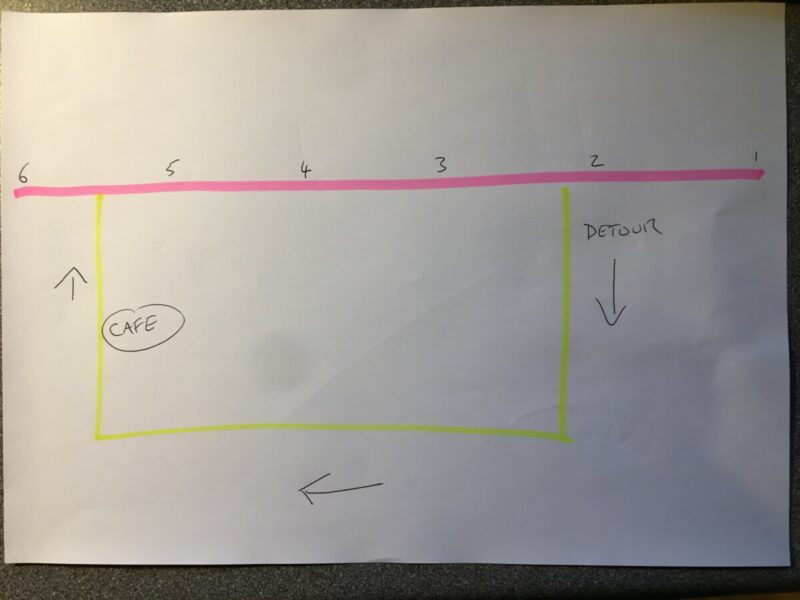
Quote from Maxodo on 01.12.2021, 09:57Thanks Guido, sometimes it is simpler to draw it but take the basic picture below; this is a typical detour for me (numbers 1 to 6 are VPs on the original planned route).
If I turn off the original pink route just past VP2 to go to the cafe then will the suggested set up (Auto skip OFF) then take me all the way back anti-clockwise along the yellow road to join the pink route after VP2 and before VP3 when really I want it to take me clockwise on yellow to turn left to VP6?
Thanks Guido, sometimes it is simpler to draw it but take the basic picture below; this is a typical detour for me (numbers 1 to 6 are VPs on the original planned route).
If I turn off the original pink route just past VP2 to go to the cafe then will the suggested set up (Auto skip OFF) then take me all the way back anti-clockwise along the yellow road to join the pink route after VP2 and before VP3 when really I want it to take me clockwise on yellow to turn left to VP6?
Quote from Guido on 01.12.2021, 10:30Hi Max,
Yes...that's correct. As long as you are not back on the orginal route, it will try to guide you back to VP3. Once you are back on the original route (between VP 5 and VP 6) it will pick up the original route and guide you to VP 6 and further.
Cheers,
Guido
Hi Max,
Yes...that's correct. As long as you are not back on the orginal route, it will try to guide you back to VP3. Once you are back on the original route (between VP 5 and VP 6) it will pick up the original route and guide you to VP 6 and further.
Cheers,
Guido
Quote from Guido on 01.12.2021, 10:55If you don't want the constant rerouting messages while you are on the yellow line, there's two things you can do:
- Turn on auto-skip and set the auto-skip distance to that VP5 (and 3 and 4) fall within the auto-skip distance. In other words so that auto skip distance is bigger than the distance between the point where you leave the route (between VP2 and VP3) and VP5. Of course this is very hard to predict beforehand.
- After deviating tap the 'skip next via/stop' button (in the navigation menu) 3 times. The first time it will skip via 3, then it will skip via 4 and then it will skip via 5.
If you don't want the constant rerouting messages while you are on the yellow line, there's two things you can do:
- Turn on auto-skip and set the auto-skip distance to that VP5 (and 3 and 4) fall within the auto-skip distance. In other words so that auto skip distance is bigger than the distance between the point where you leave the route (between VP2 and VP3) and VP5. Of course this is very hard to predict beforehand.
- After deviating tap the 'skip next via/stop' button (in the navigation menu) 3 times. The first time it will skip via 3, then it will skip via 4 and then it will skip via 5.
Quote from Maxodo on 01.12.2021, 11:14Thanks Guido, so when I come out of the cafe and before setting off I would hit the skip 3/4/5 thing and it would then (naturally) guide me N on the yellow to turn left to VP6 rather than all the way back on the yellow - in theory?!
Thanks Guido, so when I come out of the cafe and before setting off I would hit the skip 3/4/5 thing and it would then (naturally) guide me N on the yellow to turn left to VP6 rather than all the way back on the yellow - in theory?!
Quote from Guido on 01.12.2021, 11:27Correct. Or you could even to that skipping immediately after you leave the route between VP2 and 3. Or... yet another alternative... go into edit mode (double tap the map) and remove the via points like that and add the cafe as a stop. Obviously you would have to stop for that 🙂
Correct. Or you could even to that skipping immediately after you leave the route between VP2 and 3. Or... yet another alternative... go into edit mode (double tap the map) and remove the via points like that and add the cafe as a stop. Obviously you would have to stop for that 🙂
Quote from Joerg400 on 01.12.2021, 11:28Hi Guido,
what would you propose for the settings, if you are driving in an unknown area and a detour happens? When you don't know distances to the next vias or stops?
When a detour happen in an unknown area I normaly follow the deviation sings, still I reach again the planed route. In principale like Max' example, but unknown wether the deviation is only small or perhaps very large?(Thanks a lot for Scenic 3!)
Hi Guido,
what would you propose for the settings, if you are driving in an unknown area and a detour happens? When you don't know distances to the next vias or stops?
When a detour happen in an unknown area I normaly follow the deviation sings, still I reach again the planed route. In principale like Max' example, but unknown wether the deviation is only small or perhaps very large?
(Thanks a lot for Scenic 3!)
Quote from Guido on 01.12.2021, 11:32I think the best settings in general are these settings. This is what I personally use too:
- Recalculate on detour: ON
- Self-Correct: ON
- Auto-skip Via points: OFF
- 'SKIP NEXT STOP/VIA' button: As you prefer (I have it off as I can always reach this button through the navigation menu)
I think the best settings in general are these settings. This is what I personally use too:
- Recalculate on detour: ON
- Self-Correct: ON
- Auto-skip Via points: OFF
- 'SKIP NEXT STOP/VIA' button: As you prefer (I have it off as I can always reach this button through the navigation menu)
Quote from Maxodo on 01.12.2021, 11:52Thanks again Guido - none of my gloves have 'touchscreen' fingers so it's always a real PITA to stop and hit buttons so I like it to work it out for me as much as possible. 🙂
Thanks again Guido - none of my gloves have 'touchscreen' fingers so it's always a real PITA to stop and hit buttons so I like it to work it out for me as much as possible. 🙂
Quote from Joerg400 on 01.12.2021, 12:12Quote from Maxodo on 01.12.2021, 11:52Thanks again Guido - none of my gloves have 'touchscreen' fingers so it's always a real PITA to stop and hit buttons so I like it to work it out for me as much as possible.
This wil be also my strategy. To hit a mark during riding is for me very difficult. And I also have no gloves with "touchscreen-finger". (And perhaps many other users too 😉 And it will also be better for the safety and it is for me more relaxed not having to look so often at the display.)

Quote from Maxodo on 01.12.2021, 11:52Thanks again Guido - none of my gloves have 'touchscreen' fingers so it's always a real PITA to stop and hit buttons so I like it to work it out for me as much as possible.
This wil be also my strategy. To hit a mark during riding is for me very difficult. And I also have no gloves with "touchscreen-finger". (And perhaps many other users too 😉 And it will also be better for the safety and it is for me more relaxed not having to look so often at the display.)
Quote from Guido on 01.12.2021, 13:29Yep. I understand. Touching the screen while riding should be avoided as much as possible. But, I do recommend, once it’s time to upgrade your gloves, to make sure your new ones are touch screen capable. Not only for Scenic, but simply to swipe away a notification or something similar. Almost all premium gloves now are touch screen friendly ‘out of the box’.
there are ways to make your current gloves toch screen friendly too: https://scenic.app/touch-screen-enabled-gloves-motorcycle-navigation-iphone/
Yep. I understand. Touching the screen while riding should be avoided as much as possible. But, I do recommend, once it’s time to upgrade your gloves, to make sure your new ones are touch screen capable. Not only for Scenic, but simply to swipe away a notification or something similar. Almost all premium gloves now are touch screen friendly ‘out of the box’.
there are ways to make your current gloves toch screen friendly too: https://scenic.app/touch-screen-enabled-gloves-motorcycle-navigation-iphone/
Quote from Joerg400 on 01.12.2021, 16:28Hi Guido,
really! You belong meanwhile to the most honored people I know! (And its very hard to grow up in my respect to someone. E. g. when I tested for a short time Scenic 2 (in relation to a very(!) much(!) more expansiv solution with TomTom-Rider or comparable ;)) )
Many thanks for the links to help so with. (I'm sorry, that I'm not a premium-user, in contrary! And therefore once more thanks to you for the link you posted. I will search there very accurate!)
I'm a very "strong right-hander" and my left hand is the opposite. Scenic 3 offers reams of possibilities! (Therefore I have to test routes with stops and vias mixed. Stops I will reach, vias I will navigate as possible. What will happen the one or the other time? How strong is the influence of local streetpossibities by devciations? Will it be better to divide a day trip into 2 ore more parts? ... and so on. And when all is optimized ... deviations a or new version of scenic will follow 🙂 )
When you think that we users can help or can test: please let us know! Really great job!!!!
Hi Guido,
really! You belong meanwhile to the most honored people I know! (And its very hard to grow up in my respect to someone. E. g. when I tested for a short time Scenic 2 (in relation to a very(!) much(!) more expansiv solution with TomTom-Rider or comparable ;)) )
Many thanks for the links to help so with. (I'm sorry, that I'm not a premium-user, in contrary! And therefore once more thanks to you for the link you posted. I will search there very accurate!)
I'm a very "strong right-hander" and my left hand is the opposite. Scenic 3 offers reams of possibilities! (Therefore I have to test routes with stops and vias mixed. Stops I will reach, vias I will navigate as possible. What will happen the one or the other time? How strong is the influence of local streetpossibities by devciations? Will it be better to divide a day trip into 2 ore more parts? ... and so on. And when all is optimized ... deviations a or new version of scenic will follow 🙂 )
When you think that we users can help or can test: please let us know! Really great job!!!!
Quote from Deleted user on 01.12.2021, 17:03In the example above is there no way to auto skip the missed via points only(not without a certain distance)?
I am on a ride now and essentially went the same approach, keep getting repeatedly told to go back to missed via point 3 even though I rejoined the route at and drive several more miles along the route, passing several subsequent via points. I had to stop using the app. I can’t click the screen every time I detour slightly and the auto skip can remove too much - especially when you are driving in the same road you are returning on - it can find some via point that is actually near the end of the route and delete everything before it - essentially ending the route before it gets started.
How can we get this version to work like Scenic 2, hands free, where rejoining the route was recognized and didn’t route backwards after rejoining?I have the same settings suggested above.
In the example above is there no way to auto skip the missed via points only(not without a certain distance)?
I am on a ride now and essentially went the same approach, keep getting repeatedly told to go back to missed via point 3 even though I rejoined the route at and drive several more miles along the route, passing several subsequent via points. I had to stop using the app. I can’t click the screen every time I detour slightly and the auto skip can remove too much - especially when you are driving in the same road you are returning on - it can find some via point that is actually near the end of the route and delete everything before it - essentially ending the route before it gets started.
How can we get this version to work like Scenic 2, hands free, where rejoining the route was recognized and didn’t route backwards after rejoining?I have the same settings suggested above.
Quote from Deleted user on 01.12.2021, 17:18Navigation is not working right and no settings combination works without the constant u turns or removing the wrong points. Does not recognize rejoining the route correctly.
Navigation is not working right and no settings combination works without the constant u turns or removing the wrong points. Does not recognize rejoining the route correctly.
Quote from Maxodo on 01.12.2021, 17:20Thanks for the glove thread suggestion, That is super helpful.
Ultimately is it possible to have what may be the ideal re-routing solution, again using my example drawing; that the algorithm looks at the route and when I leave the cafe simply takes the distance firstly from the cafe (or detour point) to the previous VP (ie 5) and secondly to the next further VP (6) and compares these two distances and takes you automatically to either 5 or 6 whichever is the nearest. It ignores all other VPs be they earlier or later ie 3, 4, 7, 8 etc. The user does not need to worry about skipping points or settings a distance radius or whatever.
Of course if a ‘Stop’ was missed this could take priority.
Is this possible?
Thanks for the glove thread suggestion, That is super helpful.
Ultimately is it possible to have what may be the ideal re-routing solution, again using my example drawing; that the algorithm looks at the route and when I leave the cafe simply takes the distance firstly from the cafe (or detour point) to the previous VP (ie 5) and secondly to the next further VP (6) and compares these two distances and takes you automatically to either 5 or 6 whichever is the nearest. It ignores all other VPs be they earlier or later ie 3, 4, 7, 8 etc. The user does not need to worry about skipping points or settings a distance radius or whatever.
Of course if a ‘Stop’ was missed this could take priority.
Is this possible?
Quote from Guido on 01.12.2021, 17:31Quote from Keo76 on 01.12.2021, 17:18Navigation is not working right and no settings combination works without the constant u turns or removing the wrong points. Does not recognize rejoining the route correctly.
What version do you have installed? v3.02 still perhaps? (You can see version number at the bottom of the settings page).Yesterday v3.04 was released to the App Store, which should resolve this issue. It was not pushed automatically to all users though…this will be spread out over a 7 day period. To force an update go to the Scenic App Store page and update from there: https://apps.apple.com/app/id1089668246
Quote from Keo76 on 01.12.2021, 17:18Navigation is not working right and no settings combination works without the constant u turns or removing the wrong points. Does not recognize rejoining the route correctly.
Quote from Guido on 01.12.2021, 17:39Quote from Maxodo on 01.12.2021, 17:20Thanks for the glove thread suggestion, That is super helpful.
Ultimately is it possible to have what may be the ideal re-routing solution, again using my example drawing; that the algorithm looks at the route and when I leave the cafe simply takes the distance firstly from the cafe (or detour point) to the previous VP (ie 5) and secondly to the next further VP (6) and compares these two distances and takes you automatically to either 5 or 6 whichever is the nearest. It ignores all other VPs be they earlier or later ie 3, 4, 7, 8 etc. The user does not need to worry about skipping points or settings a distance radius or whatever.
Of course if a ‘Stop’ was missed this could take priority.
Is this possible?
Everything is possible of course, but I think the Detour Behaviour configuration settings are already very complicated. I don't want to complicate it more by adding more options.
In the end, Scenic doesn't know why you deviated, it doesn't know if you deviated on purpose or by accident. It doesn't know if you want to be kept on the route or if you prefer to skip this part. Your described behaviour at the cafe, might not be what you want during another route if you have to make an unexpected gasoline stop. It might also be different for other people. It might also be different if a route is in an area you don't know, or if it's in an area you do know.
This is why I have chosen for the approach where you can set some typical detour behaviour in settings, but you still have the option to change this 'on the fly' on a case by case bases.
Quote from Maxodo on 01.12.2021, 17:20Thanks for the glove thread suggestion, That is super helpful.
Ultimately is it possible to have what may be the ideal re-routing solution, again using my example drawing; that the algorithm looks at the route and when I leave the cafe simply takes the distance firstly from the cafe (or detour point) to the previous VP (ie 5) and secondly to the next further VP (6) and compares these two distances and takes you automatically to either 5 or 6 whichever is the nearest. It ignores all other VPs be they earlier or later ie 3, 4, 7, 8 etc. The user does not need to worry about skipping points or settings a distance radius or whatever.
Of course if a ‘Stop’ was missed this could take priority.
Is this possible?
Everything is possible of course, but I think the Detour Behaviour configuration settings are already very complicated. I don't want to complicate it more by adding more options.
In the end, Scenic doesn't know why you deviated, it doesn't know if you deviated on purpose or by accident. It doesn't know if you want to be kept on the route or if you prefer to skip this part. Your described behaviour at the cafe, might not be what you want during another route if you have to make an unexpected gasoline stop. It might also be different for other people. It might also be different if a route is in an area you don't know, or if it's in an area you do know.
This is why I have chosen for the approach where you can set some typical detour behaviour in settings, but you still have the option to change this 'on the fly' on a case by case bases.
Quote from Deleted user on 01.12.2021, 17:53Quote from Guido on 01.12.2021, 17:31Quote from Keo76 on 01.12.2021, 17:18Navigation is not working right and no settings combination works without the constant u turns or removing the wrong points. Does not recognize rejoining the route correctly.
What version do you have installed? v3.02 still perhaps? (You can see version number at the bottom of the settings page).Yesterday v3.04 was released to the App Store, which should resolve this issue. It was not pushed automatically to all users though…this will be spread out over a 7 day period. To force an update go to the Scenic App Store page and update from there: https://apps.apple.com/app/id1089668246It shows 3.04 :
here is sample from the route:
Driving past VP1 but continuing straight (avoiding Stop 1) to arrive at VP3 ( and continuing miles down the actual route and subsequent via points) results in u turn instructions for all of those miles, trying to route back to Stop 1. At no point after rejoining the route at VP3 did it stop trying to send u turns.
Recalc on detour - on
Self correct- on
Auto skip - off


Quote from Guido on 01.12.2021, 17:31Quote from Keo76 on 01.12.2021, 17:18Navigation is not working right and no settings combination works without the constant u turns or removing the wrong points. Does not recognize rejoining the route correctly.
What version do you have installed? v3.02 still perhaps? (You can see version number at the bottom of the settings page).Yesterday v3.04 was released to the App Store, which should resolve this issue. It was not pushed automatically to all users though…this will be spread out over a 7 day period. To force an update go to the Scenic App Store page and update from there: https://apps.apple.com/app/id1089668246
It shows 3.04 :
here is sample from the route:
Driving past VP1 but continuing straight (avoiding Stop 1) to arrive at VP3 ( and continuing miles down the actual route and subsequent via points) results in u turn instructions for all of those miles, trying to route back to Stop 1. At no point after rejoining the route at VP3 did it stop trying to send u turns.
Recalc on detour - on
Self correct- on
Auto skip - off
Quote from Guido on 01.12.2021, 17:57Quote from Keo76 on 01.12.2021, 17:03In the example above is there no way to auto skip the missed via points only(not without a certain distance)?
How far away was the missed via point placed from the road? Scenic has a threshold of 50 meters. If you come within 50 meters of a via point it will (or at least should) consider this via point as 'reached'. If you miss a via point by 50 meter you need to manually skip it. I don't think this 50 meter is too low. If the via is really 50 meters away from a road, you perhaps could consider moving it closer to the road. On the other hand, if Scenic started to recalculate 'out of the blue' without any apparent reason, then this is another scenario that I need to look into.
Scenic 2 was far from perfect in detour behaviour. I think a lot of you have learned how to work around its shortcomings. For example...if start and end were in the same place Scenic would think you already arrived while you were just getting started... and when the route contains the same stretch of route twice (often with round trips), Scenic 2 would randomly decide for you if you were on the way back or going.
Quote from Keo76 on 01.12.2021, 17:03In the example above is there no way to auto skip the missed via points only(not without a certain distance)?
How far away was the missed via point placed from the road? Scenic has a threshold of 50 meters. If you come within 50 meters of a via point it will (or at least should) consider this via point as 'reached'. If you miss a via point by 50 meter you need to manually skip it. I don't think this 50 meter is too low. If the via is really 50 meters away from a road, you perhaps could consider moving it closer to the road. On the other hand, if Scenic started to recalculate 'out of the blue' without any apparent reason, then this is another scenario that I need to look into.
Scenic 2 was far from perfect in detour behaviour. I think a lot of you have learned how to work around its shortcomings. For example...if start and end were in the same place Scenic would think you already arrived while you were just getting started... and when the route contains the same stretch of route twice (often with round trips), Scenic 2 would randomly decide for you if you were on the way back or going.
Quote from Guido on 01.12.2021, 18:01Driving past VP1 but continuing straight (avoiding Stop 1) to arrive at VP3 ( and continuing miles down the actual route and subsequent via points) results in u turn instructions for all of those miles, trying to route back to Stop 1. At no point after rejoining the route at VP3 did it stop trying to send u turns.
That's not right indeed. After re-joining the route at VP3 is should have stopped guiding you back to VP1.
Could you share the route and the ride with me please? This way I can simulate this exact scenario here.
To share... select the route / ride and then hit the 'share' button.
If you prefer you can mail them to me though the 'email me' button at bottom of the help page.
Driving past VP1 but continuing straight (avoiding Stop 1) to arrive at VP3 ( and continuing miles down the actual route and subsequent via points) results in u turn instructions for all of those miles, trying to route back to Stop 1. At no point after rejoining the route at VP3 did it stop trying to send u turns.
That's not right indeed. After re-joining the route at VP3 is should have stopped guiding you back to VP1.
Could you share the route and the ride with me please? This way I can simulate this exact scenario here.
To share... select the route / ride and then hit the 'share' button.
If you prefer you can mail them to me though the 'email me' button at bottom of the help page.
Quote from Maxodo on 01.12.2021, 18:06Sure, it’s not easy to please us all, very, very impossible! But detour behaviour is super important and super frustrating when it sends you even more wrong than you were already. Thanks as always for the stellar support on here.
Weather permitting and COVID jab after effects not too bad 🙂 hopefully I’ll try a ride with the latest Scenic tomorrow.
Sure, it’s not easy to please us all, very, very impossible! But detour behaviour is super important and super frustrating when it sends you even more wrong than you were already. Thanks as always for the stellar support on here.
Weather permitting and COVID jab after effects not too bad 🙂 hopefully I’ll try a ride with the latest Scenic tomorrow.
Quote from Guido on 01.12.2021, 18:20Ok yes. Let me know. Because I really thought I got it right now. My own tests and beta testers also found no problems. But it appears something is still not right based on @keo76 experience above.
@keo76 Sorry to ask, but could it be that Scenic updated between your ride and the moment you checked the version? Did you have the ‘self-correct option before your ride already (that was added in 3.04). Sorry to ask. It’s just that I really thought I fixed it.
Ok yes. Let me know. Because I really thought I got it right now. My own tests and beta testers also found no problems. But it appears something is still not right based on @keo76 experience above.
@keo76 Sorry to ask, but could it be that Scenic updated between your ride and the moment you checked the version? Did you have the ‘self-correct option before your ride already (that was added in 3.04). Sorry to ask. It’s just that I really thought I fixed it.
Quote from TimeStandStill on 01.12.2021, 18:56Thanks Guido. My account got deleted so I posted the above under Keo76. I will email you the info now, might be a wrong setting I have or an issue with the route. Thanks for the support!
Thanks Guido. My account got deleted so I posted the above under Keo76. I will email you the info now, might be a wrong setting I have or an issue with the route. Thanks for the support!
Quote from Maxodo on 02.12.2021, 09:38OK Guido, I have an update and it is not good news I am afraid, nothing seems fixed on the rerouting issues. I am sorry. I followed your comments from earlier:
I think the best option for your kind of routes is:
- Recalculate on detour: ON
- Self-Correct: ON
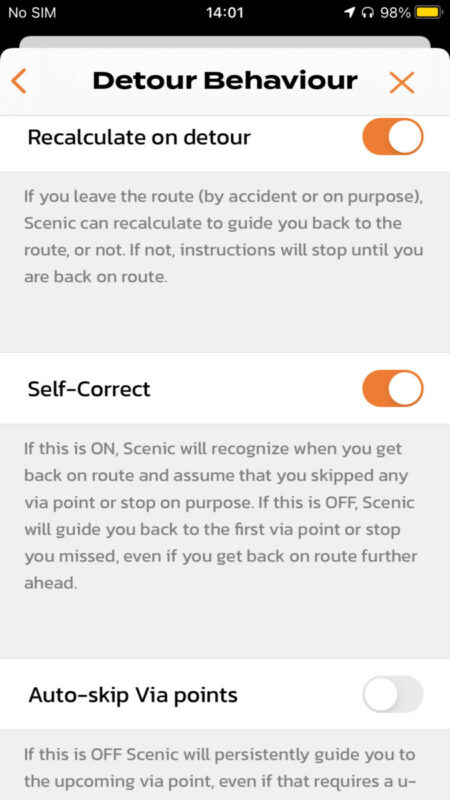
- Auto-skip Via points: OFFWith this setting, if you deviate from your route, Scenic will recalculate to get you to the first via point you did not reach yet. It will keep recalculating if you detour again... persistently trying to get you to that via point. HOWEVER... if you decide to ignore these recalculations... and at some point join the route again further ahead... Scenic will recognize this and assume that you skipped those via points on purpose. From that point on you will be guided along the route again from the point where you joined it. This is the most intuitive setting that most people will expect in most circumstances, and is also very similar to Scenic 2 behaviour.
And so today tried the same easy circular 30 mile route - this is a simple route, no crossovers etc.
Just to confirm too I am on the latest update 3.04.
I made three detours (the first two my choice to test it and these were simple detours similar to the cafe example on paper earlier).
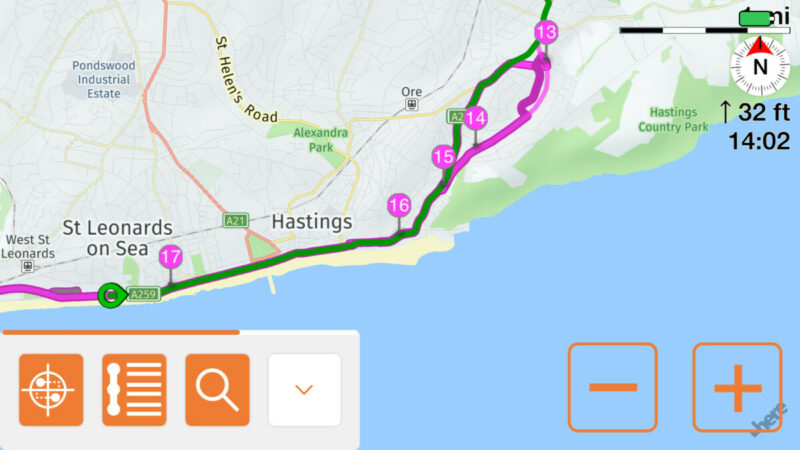
The first detour just before VP13 rejoining just before VP15. Obviously it tried on this section to detour me back/turn etc but when I rejoined at no point did it recognise I had rejoined my route and kept trying non-stop to force me to turn off or U turn to go back. This continued for some time before I got fed up and stopped to manually delete the points up to 18.
It did not announce 'route rejoined' either - I presume this is because I have 'spoken road names' selected and you cannot have the extra speech alerts at the same time?
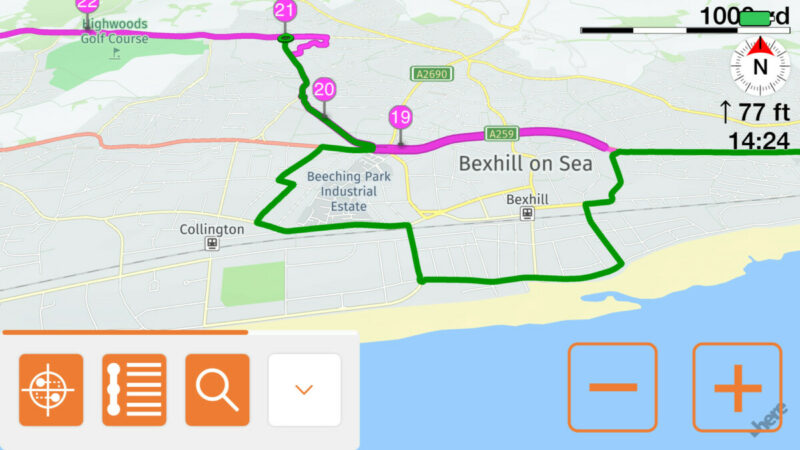
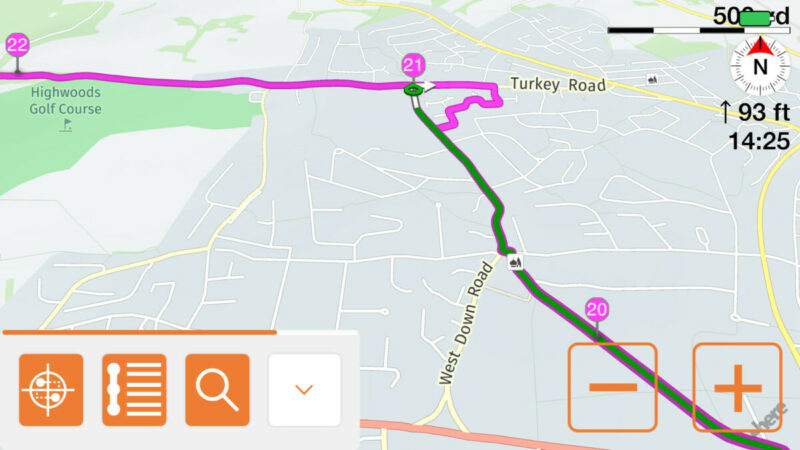
The second detour much the same - off past VP18 rejoining past VP19. You can see even at VP21 it wants me to turn right and go backwards rather than left to naturally follow the route.
The third detour was enforced by a road block (VP 29-30) - you can see I came back but this time it allowed me to continue presumably because I had not missed any VPs.
It's a real shame it is not working, I am sure I did not have this much trouble with Scenic 2. I know these routes well so it was not an issue but of course for new routes and unknown areas this will be unusable in this current situation.
OK Guido, I have an update and it is not good news I am afraid, nothing seems fixed on the rerouting issues. I am sorry. I followed your comments from earlier:
I think the best option for your kind of routes is:
- Recalculate on detour: ON
- Self-Correct: ON
- Auto-skip Via points: OFF
With this setting, if you deviate from your route, Scenic will recalculate to get you to the first via point you did not reach yet. It will keep recalculating if you detour again... persistently trying to get you to that via point. HOWEVER... if you decide to ignore these recalculations... and at some point join the route again further ahead... Scenic will recognize this and assume that you skipped those via points on purpose. From that point on you will be guided along the route again from the point where you joined it. This is the most intuitive setting that most people will expect in most circumstances, and is also very similar to Scenic 2 behaviour.
And so today tried the same easy circular 30 mile route - this is a simple route, no crossovers etc.
Just to confirm too I am on the latest update 3.04.
I made three detours (the first two my choice to test it and these were simple detours similar to the cafe example on paper earlier).
The first detour just before VP13 rejoining just before VP15. Obviously it tried on this section to detour me back/turn etc but when I rejoined at no point did it recognise I had rejoined my route and kept trying non-stop to force me to turn off or U turn to go back. This continued for some time before I got fed up and stopped to manually delete the points up to 18.
It did not announce 'route rejoined' either - I presume this is because I have 'spoken road names' selected and you cannot have the extra speech alerts at the same time?
The second detour much the same - off past VP18 rejoining past VP19. You can see even at VP21 it wants me to turn right and go backwards rather than left to naturally follow the route.
The third detour was enforced by a road block (VP 29-30) - you can see I came back but this time it allowed me to continue presumably because I had not missed any VPs.
It's a real shame it is not working, I am sure I did not have this much trouble with Scenic 2. I know these routes well so it was not an issue but of course for new routes and unknown areas this will be unusable in this current situation.
Quote from Guido on 02.12.2021, 09:42Thank Max. Keo76 remarks from yesterday have already got me looking into this... and uncovered a much more structural problem with the Self-Correct feature. I'm looking into this as we speak. For the moment, it's better to turn off the Self-Correct feature. Sorry.
I'll be contacting some of you directly for beta testing. Simulation is not covering all cases, and most beta testers are not riding now due to weather circumstances. Please stand by for my direct message today or tomorrow once I have a beta version with a fix ready.
Again...sorry about this
Thank Max. Keo76 remarks from yesterday have already got me looking into this... and uncovered a much more structural problem with the Self-Correct feature. I'm looking into this as we speak. For the moment, it's better to turn off the Self-Correct feature. Sorry.
I'll be contacting some of you directly for beta testing. Simulation is not covering all cases, and most beta testers are not riding now due to weather circumstances. Please stand by for my direct message today or tomorrow once I have a beta version with a fix ready.
Again...sorry about this
Quote from Maxodo on 02.12.2021, 10:27Thanks Guido, we know you will get there in the end! 🙂
TBH on the ride today I thought why am I out here. Heated vest and grips but still cold and the sun is so low it's not that much fun really...
At least these issues with the update have come at the right time for us UK/EU riders, ie Winter and they will be sorted I'm sure by Spring.
Thanks Guido, we know you will get there in the end! 🙂
TBH on the ride today I thought why am I out here. Heated vest and grips but still cold and the sun is so low it's not that much fun really...
At least these issues with the update have come at the right time for us UK/EU riders, ie Winter and they will be sorted I'm sure by Spring.
Quote from Guido on 02.12.2021, 10:28🙂 You are a hero!!!!
🙂 You are a hero!!!!


