
Recalculation settings

Quote from Papagoose on 21.10.2026, 17:15Today I went on a ride with my detour settings set for guide me back to first I reached waypoint. Well I missed the first one and for the rest of the trip it fought me to get back to the beginning. Obviously I am using the wrong setting. So I looked at your descriptions and I see that this is very different from a navigation like Apple or Google Maps where if you deviate from the guidance it will look forward and guide you to your destination. For this example I will consider this as a normal recalculation.
Is there a setup with Scenic that will do this or what is the best suggestion to change my settings to get to something close to a “normal” recalculation to get back on the trip route.
Today I went on a ride with my detour settings set for guide me back to first I reached waypoint. Well I missed the first one and for the rest of the trip it fought me to get back to the beginning. Obviously I am using the wrong setting. So I looked at your descriptions and I see that this is very different from a navigation like Apple or Google Maps where if you deviate from the guidance it will look forward and guide you to your destination. For this example I will consider this as a normal recalculation.
Is there a setup with Scenic that will do this or what is the best suggestion to change my settings to get to something close to a “normal” recalculation to get back on the trip route.

Quote from Guido on 21.10.2026, 17:22Yes. Scenic is definitely different from main stream navigation apps. Google doesn’t care how you get to your destination. It just wants to get you there the faster. Scenic assumes that you want to follow the route as much as possible like you planned it, even if you deviate from that route a bit.
But, you can make it work like you want it, which can be different for everybody and also depends on how you plan your routes. That’s the beauty of Scenic. It’s very customizable in that sense. This unfortunately also means that it takes a bit do time to understand all the options.
Have a look here for all the detour behaviour settings: https://scenic.app/help/detour-behaviour-scenic/
Yes. Scenic is definitely different from main stream navigation apps. Google doesn’t care how you get to your destination. It just wants to get you there the faster. Scenic assumes that you want to follow the route as much as possible like you planned it, even if you deviate from that route a bit.
But, you can make it work like you want it, which can be different for everybody and also depends on how you plan your routes. That’s the beauty of Scenic. It’s very customizable in that sense. This unfortunately also means that it takes a bit do time to understand all the options.
Have a look here for all the detour behaviour settings: https://scenic.app/help/detour-behaviour-scenic/
Quote from Papagoose on 22.10.2026, 17:24Thank you for a quick response but I do have a follow-up clarification which may help you understand my issue.
I went on a ride today and used the Skip Waypoint to get myself back on the route.(Guide me to the first unreached waypoint turn on & Skip Waypoint button map turned on ) I find that difficult to manage as you need to remember where the Waypoints were on the map when you drew the planned ride. I made it work but I kept getting distracted hitting the ship Waypoint button until it started on the right path. I decided to stop the ride and wait for your response as it might help with my issues.
After reading your response I once again read carefully the steps to skip the Waypoint. Looking further into the instructions I see there was an option to Auto Skip waypoints and this brought me to my next question. The Skip Waypoint Button skips the Missed Waypoint- simple and understandable. The Auto Skip says it wants to skip the NEXT Waypoint. My question can be hopefully clarified by an example. (I have entered a file as a public file titled Skipping Waypoints for you to reference)
I manually created a route with a Start to finish and multiple waypoints with the first waypoint almost at the start of the ride. If the Auto Skip was turned on and I start my ride and immediately miss the first waypoint by taking a wrong turn. With the Auto Skip on according to the definition the next Waypoint #2 will be skipped and a recalculation will occur to get me to waypoint #3. Or does it skip waypoint #1 and recalculate me to Waypoint #2.
If it removes waypoint #2 and recalculates me to waypoint #3 what about waypoint #1. Won't the program try to direct me back to #1 to start the ride over, which is not what I want. I would like it to skip #1 and direct me towards #2.
Sorry I know this is complicated but hopefully you can access the public file and clarify my understanding.
Thank you for a quick response but I do have a follow-up clarification which may help you understand my issue.
I went on a ride today and used the Skip Waypoint to get myself back on the route.(Guide me to the first unreached waypoint turn on & Skip Waypoint button map turned on ) I find that difficult to manage as you need to remember where the Waypoints were on the map when you drew the planned ride. I made it work but I kept getting distracted hitting the ship Waypoint button until it started on the right path. I decided to stop the ride and wait for your response as it might help with my issues.
After reading your response I once again read carefully the steps to skip the Waypoint. Looking further into the instructions I see there was an option to Auto Skip waypoints and this brought me to my next question. The Skip Waypoint Button skips the Missed Waypoint- simple and understandable. The Auto Skip says it wants to skip the NEXT Waypoint. My question can be hopefully clarified by an example. (I have entered a file as a public file titled Skipping Waypoints for you to reference)
I manually created a route with a Start to finish and multiple waypoints with the first waypoint almost at the start of the ride. If the Auto Skip was turned on and I start my ride and immediately miss the first waypoint by taking a wrong turn. With the Auto Skip on according to the definition the next Waypoint #2 will be skipped and a recalculation will occur to get me to waypoint #3. Or does it skip waypoint #1 and recalculate me to Waypoint #2.
If it removes waypoint #2 and recalculates me to waypoint #3 what about waypoint #1. Won't the program try to direct me back to #1 to start the ride over, which is not what I want. I would like it to skip #1 and direct me towards #2.
Sorry I know this is complicated but hopefully you can access the public file and clarify my understanding.
Quote from Guido on 22.10.2026, 17:35Next waypoint = first unreached waypoint.
Next waypoint = first unreached waypoint.

Quote from Mex on 22.10.2026, 23:43Hi @papagoose
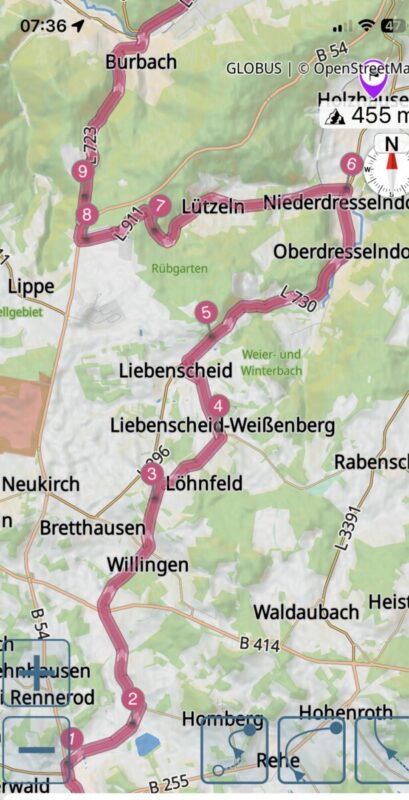
While navigating you may choose big button menu. Lower right corner of your screen.
Second row left button is for overview. Select it and you can identify the waypoints and decide which one to skip.
What you get depends on your settings, overview around you, or to your destination. Need to try what fits for you.
Below an example:
Regards Mex
Screenshot
Hi @papagoose
While navigating you may choose big button menu. Lower right corner of your screen.
Second row left button is for overview. Select it and you can identify the waypoints and decide which one to skip.
What you get depends on your settings, overview around you, or to your destination. Need to try what fits for you.
Below an example:
Regards Mex
- Screenshot


