
Problem when outgoing route encounters returning route.

Quote from Dad-rideagain on 05.09.2026, 21:11I frequent have the problem that when the out going route encounters the returning route. The app wants to send me to the end rather than on to the next wave-point. Although my routes are generally loops rather than out an back, there are often time where the returning route uses the same roads as the outgoing route. The instructions then try to send be to the end. Recently, it kept repeating to turn on the same road that was at the start something like: " in half a mile turn right on Baker street." It kept this up even when that end point was 20 miles behind. (I could see the route line and follow that) the only thing that seems to work is to save the ride and restart the route.
This has happened for a long time so when I can I set the start point past where the returning route intersects. This is inconvenient.
(Sorry this has probably been discussed before but I couldn't find it)
Thanks,
Lary
I frequent have the problem that when the out going route encounters the returning route. The app wants to send me to the end rather than on to the next wave-point. Although my routes are generally loops rather than out an back, there are often time where the returning route uses the same roads as the outgoing route. The instructions then try to send be to the end. Recently, it kept repeating to turn on the same road that was at the start something like: " in half a mile turn right on Baker street." It kept this up even when that end point was 20 miles behind. (I could see the route line and follow that) the only thing that seems to work is to save the ride and restart the route.
This has happened for a long time so when I can I set the start point past where the returning route intersects. This is inconvenient.
(Sorry this has probably been discussed before but I couldn't find it)
Thanks,
Lary

Quote from Guido on 05.09.2026, 21:14Hi Lary,
This sounds like a bug. Are you using iOS or Android? And what are your detour behaviour settings (Settings > Navigation & Tracking > Detour behaviour)? (perhaps you could post a screenshot of those here?).
Thanks and regards,
Guido
Hi Lary,
This sounds like a bug. Are you using iOS or Android? And what are your detour behaviour settings (Settings > Navigation & Tracking > Detour behaviour)? (perhaps you could post a screenshot of those here?).
Thanks and regards,
Guido
Quote from Dad-rideagain on 05.09.2026, 21:52I am using the latest iOS. The nav setting is do not recalculate.
I am using the latest iOS. The nav setting is do not recalculate.
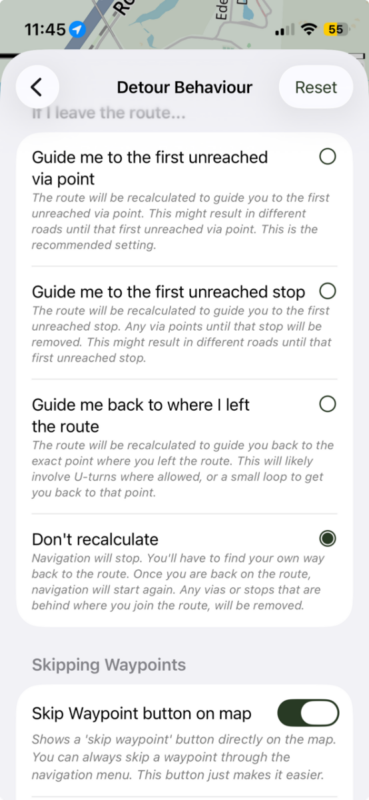
Quote from Guido on 06.09.2026, 08:50Thanks for the screenshot. It’s the “dont recalculate” setting I believe. In this setting, when you deviate from the route (even a small bit or even due to GPS inaccuracies) Scenic starts monitoring when en where you join the route again. If that’s on an overlapping stretch then it looks like it’s choosing that you joined the route again”on the way back”.
I will look into this and build some safeguards so that it will lean towards the outgoing stretch.
Thanks and best regards,
Guido
Thanks for the screenshot. It’s the “dont recalculate” setting I believe. In this setting, when you deviate from the route (even a small bit or even due to GPS inaccuracies) Scenic starts monitoring when en where you join the route again. If that’s on an overlapping stretch then it looks like it’s choosing that you joined the route again”on the way back”.
I will look into this and build some safeguards so that it will lean towards the outgoing stretch.
Thanks and best regards,
Guido
Quote from Dad-rideagain on 06.09.2026, 09:05That makes sense. I see how it wouldn't know which one meant - thanks. I may try the recommended guide me to the first unreaded .. again. I vaguely recall having difficulty with that and the don't recalculate was an idea presented. Might have been a few versions ago. Are there a specific combinations of settings you'd recommend for unfamiliar territory and not wanting to reach for the screen?
Wonderful app.
Thanks
Lary
That makes sense. I see how it wouldn't know which one meant - thanks. I may try the recommended guide me to the first unreaded .. again. I vaguely recall having difficulty with that and the don't recalculate was an idea presented. Might have been a few versions ago. Are there a specific combinations of settings you'd recommend for unfamiliar territory and not wanting to reach for the screen?
Wonderful app.
Thanks
Lary
Quote from Guido on 06.09.2026, 09:45Hi Lary,
I'd recommend the default settings. You can use the "reset" button top right to return to those.
I did recently make some changes to have it act more intuitive with the default settings (added auto-skip radius and auto-skipping stops). Here's the update help article for all the settings: https://scenic.app/help/detour-behaviour-scenic/
Cheers,
Guido
Hi Lary,
I'd recommend the default settings. You can use the "reset" button top right to return to those.
I did recently make some changes to have it act more intuitive with the default settings (added auto-skip radius and auto-skipping stops). Here's the update help article for all the settings: https://scenic.app/help/detour-behaviour-scenic/
Cheers,
Guido


