
Import Kurviger Favourites to Scenic … ?

Quote from Old Man Emu on 13.01.2024, 23:10Hi all, I’ve been using Kurviger for over 2 years and have 100’s of Favourite Locations so I can punch out a ride route pretty quickly.
As I use an iPhone I was using a Garmin Zumo XT but now I’m using Scenic.
Has anyone worked out a way Export/Import or have a script that can duplicate my Kurviger Favourites to Scenic ?
Many thanks in advance.
Hi all, I’ve been using Kurviger for over 2 years and have 100’s of Favourite Locations so I can punch out a ride route pretty quickly.
As I use an iPhone I was using a Garmin Zumo XT but now I’m using Scenic.
Has anyone worked out a way Export/Import or have a script that can duplicate my Kurviger Favourites to Scenic ?
Many thanks in advance.

Quote from Charlie J on 14.01.2024, 10:39There is guidance on importing from Kurviger and other Apps in the help section.
https://scenic.app/help/ways-sources-to-import/
Hope this is of use.
There is guidance on importing from Kurviger and other Apps in the help section.
Hope this is of use.
Quote from Old Man Emu on 14.01.2024, 15:37Thanks Charlie,
I had seen that thread and it was useful. I have been importing rides from Kurviger with good success but what I was seeking is a way to import all my “FAVOURITE” places from Kurviger and make them into Scenic Locations.
I suppose I could create a Kurviger ride with all FAVOURITES import that. Can I convert a STOP or VIA into a LOCATION ?
Cheers
Thanks Charlie,
I had seen that thread and it was useful. I have been importing rides from Kurviger with good success but what I was seeking is a way to import all my “FAVOURITE” places from Kurviger and make them into Scenic Locations.
I suppose I could create a Kurviger ride with all FAVOURITES import that. Can I convert a STOP or VIA into a LOCATION ?
Cheers

Quote from Guido on 15.01.2024, 09:37At the moment, it's not possible for Scenic to access your favorite locations in your Kurviger account, or anything directly in your Kurviger account for that matter. But, there is a way to get all your locations in Scenic, however it requires some manual work through.
It boils down to getting your locations into a GPX file. As far as I know, you can't export a bunch of your favorite locations into a GPX directly in Kurviber. But, what you can do, and what you also suggested, is create a route with all your locations in it. Then export that route as GPX, and make sure to check the "waypoint" checkbox when you export it. Then you can import that GPX into Scenic, and save all those waypoints as locations.
Hope this helps/explains. If not, please let me know if you have other questions. Happy to help.
Best regards and ride safe,
Guido
At the moment, it's not possible for Scenic to access your favorite locations in your Kurviger account, or anything directly in your Kurviger account for that matter. But, there is a way to get all your locations in Scenic, however it requires some manual work through.
It boils down to getting your locations into a GPX file. As far as I know, you can't export a bunch of your favorite locations into a GPX directly in Kurviber. But, what you can do, and what you also suggested, is create a route with all your locations in it. Then export that route as GPX, and make sure to check the "waypoint" checkbox when you export it. Then you can import that GPX into Scenic, and save all those waypoints as locations.
Hope this helps/explains. If not, please let me know if you have other questions. Happy to help.
Best regards and ride safe,
Guido
Quote from Old Man Emu on 16.01.2024, 00:12Thanks Guido, I followed that advice and imported a GPX with a few FAVOURITES.
I could not find a way to tap on a Stop or Via and save it as a location.
Advice please
Thanks
Thanks Guido, I followed that advice and imported a GPX with a few FAVOURITES.
I could not find a way to tap on a Stop or Via and save it as a location.
Advice please
Thanks
Quote from Old Man Emu on 16.01.2024, 00:14Also is there a Map view when planning a ride that has a visible marker for my saved locations ? Kurviger shows a Brown Target Icon
Also is there a Map view when planning a ride that has a visible marker for my saved locations ? Kurviger shows a Brown Target Icon
Quote from PeteRT on 16.01.2024, 03:45Yes. On the home page there are three menu icons in a vertical row in the top left corner. Click on the bottom one. Now you can select from the list of stored locations which are visible on the map. The same menu icon is also available on the planning page.
Yes. On the home page there are three menu icons in a vertical row in the top left corner. Click on the bottom one. Now you can select from the list of stored locations which are visible on the map. The same menu icon is also available on the planning page.
Quote from Old Man Emu on 16.01.2024, 03:57Thanks for that
Thanks for that
Quote from Guido on 16.01.2024, 06:11
Quote from Old Man Emu on 16.01.2024, 00:12Thanks Guido, I followed that advice and imported a GPX with a few FAVOURITES.
I could not find a way to tap on a Stop or Via and save it as a location.
Advice please
Thanks
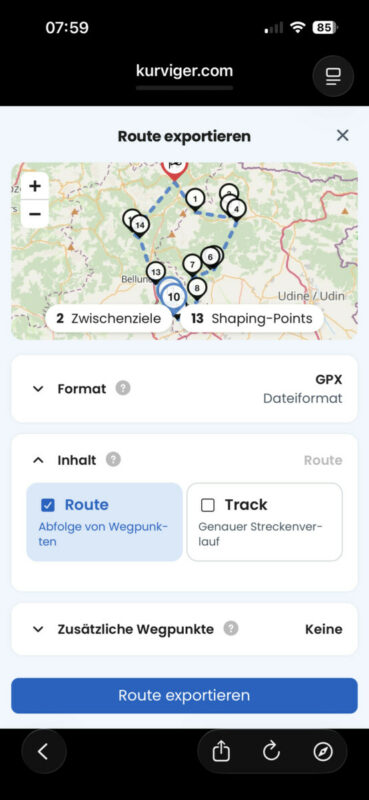
To import as locations, don’t import the route or track, but the waypoints. When you check the “waypoints” box while exporting from Kurviger, then all waypoint you added to the route should be there as waypoint too. Here is an example screenshot:
Quote from Old Man Emu on 16.01.2024, 00:12Thanks Guido, I followed that advice and imported a GPX with a few FAVOURITES.
I could not find a way to tap on a Stop or Via and save it as a location.
Advice please
Thanks
To import as locations, don’t import the route or track, but the waypoints. When you check the “waypoints” box while exporting from Kurviger, then all waypoint you added to the route should be there as waypoint too. Here is an example screenshot:
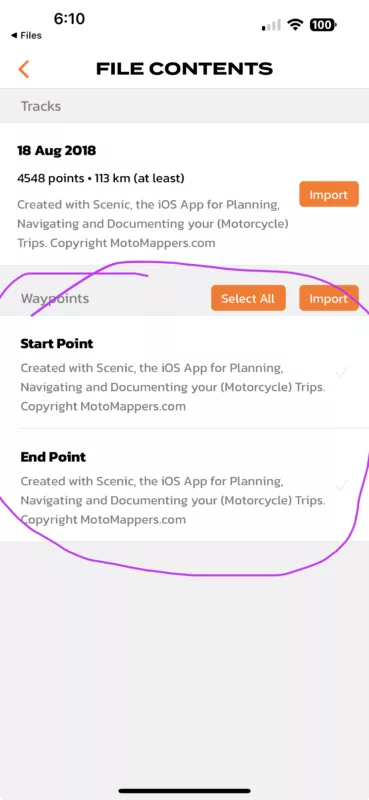
Quote from Old Man Emu on 16.01.2024, 15:29Ok got it. That’s great.
It took a while to work out how to get that “Files” dialogue screen as I was using “Send To Scenic” from Kurviger then searching the Scenic menus for “Files” or a way to import the Waypoints.
The standard IOS “Share” function works but is there value in putting that “Files” dialogue on the main menu or the “Import” menu ?
GC
Ok got it. That’s great.
It took a while to work out how to get that “Files” dialogue screen as I was using “Send To Scenic” from Kurviger then searching the Scenic menus for “Files” or a way to import the Waypoints.
The standard IOS “Share” function works but is there value in putting that “Files” dialogue on the main menu or the “Import” menu ?
GC
Quote from Guido on 16.01.2024, 16:08Not really. The content of the “File Contents” screen depends on what file you are importing. If you import a GPX to Scenic through the iOS share dialog you will end up in that screen automatically. If you use the Scenic webapp to send a GPX to the import queue, you first need to select that file from the import queue.
Going to this “File Content” screen directly would show an empty screen as it wouldn’t know which file to show the contents of.
Hope that makes sense? And that I understood your question correctly?
Not really. The content of the “File Contents” screen depends on what file you are importing. If you import a GPX to Scenic through the iOS share dialog you will end up in that screen automatically. If you use the Scenic webapp to send a GPX to the import queue, you first need to select that file from the import queue.
Going to this “File Content” screen directly would show an empty screen as it wouldn’t know which file to show the contents of.
Hope that makes sense? And that I understood your question correctly?
Quote from Old Man Emu on 16.01.2024, 16:31Yes. I’m happy with that now that I worked it out.
GC
Yes. I’m happy with that now that I worked it out.
GC

Quote from Mex on 20.07.2024, 06:50Hi folks,
in a thread i saw that the feature: import directly to Scenic, doesn’t exist anymore.
Ok one may export the gpx.files.
The real reason, in my eyes, is: They did this app. And it looks to be amazing close to Scenic. Almost like copy/paste.
I found a thread in a BMW forum this morning about the app. Here you are, may search it in the app-store.
Ride save, Mex
Hi folks,
in a thread i saw that the feature: import directly to Scenic, doesn’t exist anymore.
Ok one may export the gpx.files.
The real reason, in my eyes, is: They did this app. And it looks to be amazing close to Scenic. Almost like copy/paste.
I found a thread in a BMW forum this morning about the app. Here you are, may search it in the app-store.
Ride save, Mex
Quote from Guido on 20.07.2024, 07:08Yep. That's the reason. I had contact with Kurviger about it. Even though we were competitors in the past, we were never direct competition because they did not have an iOS app. That's changed now, so they removed the 'send to scenic' button. I understand that decision. Nothing wrong with a bit of healthy competition.
Yep. That's the reason. I had contact with Kurviger about it. Even though we were competitors in the past, we were never direct competition because they did not have an iOS app. That's changed now, so they removed the 'send to scenic' button. I understand that decision. Nothing wrong with a bit of healthy competition.
Quote from Old Man Emu on 20.07.2024, 16:31I was on the beta test for Kurviger IOS Apple. It is now released into the wild.
With the removal of the send to Scenic you can use the Share function and anything that is a client for GPX will be able to receive it.
I am still using both. Kurviger App does not have speed and speed limits and does not support CarPlay.
I was on the beta test for Kurviger IOS Apple. It is now released into the wild.
With the removal of the send to Scenic you can use the Share function and anything that is a client for GPX will be able to receive it.
I am still using both. Kurviger App does not have speed and speed limits and does not support CarPlay.
Quote from Old Man Emu on 20.07.2024, 16:42Quote from Mex on 20.07.2024, 06:50Hi folks,
[edit]
The real reason, in my eyes, is: They did this app. And it looks to be amazing close to Scenic. Almost like copy/paste.
Ride save, Mex
Although I’m I fan of Kurviger that is not cool that they have almost duplicated the banner page. 😒
Quote from Mex on 20.07.2024, 06:50Hi folks,
[edit]
The real reason, in my eyes, is: They did this app. And it looks to be amazing close to Scenic. Almost like copy/paste.
Ride save, Mex
Although I’m I fan of Kurviger that is not cool that they have almost duplicated the banner page. 😒

Quote from johansw on 02.08.2024, 23:51That kind of competition is not cool at all! So let us hope Scenics Android version will dig deep into Kurvigers portfolio.
That kind of competition is not cool at all! So let us hope Scenics Android version will dig deep into Kurvigers portfolio.
Quote from Maxi Forest on 07.08.2024, 00:00I seems that we have to deal with the situation,... I like scenic so much
maybe i did not find the right wa to import the kurviger routes it in a similar way as in the past. When i export a gpx from kurviger then i can import the Route OR the Track - with Route i am not sure to follow the same Track as planned, and all imported points are Stops. When i import the track, then its easy to check that my sceinc route will follow the kuriviger route, but only Via points availible, no Stops.
Is there a way to import it in the old style where i have seen the track in the background and a differenciation between Vias and Stops was made. I can live with the GPX file workaround - But the actual import result is ... improvable
I seems that we have to deal with the situation,... I like scenic so much
maybe i did not find the right wa to import the kurviger routes it in a similar way as in the past. When i export a gpx from kurviger then i can import the Route OR the Track - with Route i am not sure to follow the same Track as planned, and all imported points are Stops. When i import the track, then its easy to check that my sceinc route will follow the kuriviger route, but only Via points availible, no Stops.
Is there a way to import it in the old style where i have seen the track in the background and a differenciation between Vias and Stops was made. I can live with the GPX file workaround - But the actual import result is ... improvable
Quote from Guido on 07.08.2024, 07:54I'm working on a big update for the fall where I will improve GPX import for Kurviger (and other sources) to combine the track and the route to get a better match AND keep the stops.
I'm working on a big update for the fall where I will improve GPX import for Kurviger (and other sources) to combine the track and the route to get a better match AND keep the stops.
Quote from Maxi Forest on 02.06.2026, 12:54I am still struggeling with the import of the GPX files from the kurviger Planner - still no straight way to get the stops and vias in the right definition and still no way to use eg. Garmin RoutePointExtensions to follow the correct track. Since i know how good this worked in former times this is really exhausting ... no progress since 2 years 🙁 Sorry but i am a little frustrated on this topic. Or do i oversee something?
I am still struggeling with the import of the GPX files from the kurviger Planner - still no straight way to get the stops and vias in the right definition and still no way to use eg. Garmin RoutePointExtensions to follow the correct track. Since i know how good this worked in former times this is really exhausting ... no progress since 2 years 🙁 Sorry but i am a little frustrated on this topic. Or do i oversee something?
Quote from Guido on 02.06.2026, 19:43I understand. It worked 2 years ago because Kurviger had the "Send to Scenic" button, which was not a GPX exchange, but an API interaction between Kurviger and Scenic. Kurviger decided to remove this. I have not prioritized GPX import for GPX files exported from Kurviger. It is still on the list, but as you might understand, not really a priority. Our own web based planner is currently in development and will be ready Q4. Maybe Q3.
I understand. It worked 2 years ago because Kurviger had the "Send to Scenic" button, which was not a GPX exchange, but an API interaction between Kurviger and Scenic. Kurviger decided to remove this. I have not prioritized GPX import for GPX files exported from Kurviger. It is still on the list, but as you might understand, not really a priority. Our own web based planner is currently in development and will be ready Q4. Maybe Q3.
Quote from Maxi Forest on 02.06.2026, 23:03Hi Guido, thanks for the fast response. I understand your priorities. Anyhow i seems that even a basic GPX file with just a bunch of stops an vias is not imported in a correct way, so thats basic functionality which is not working and should be a no brainer for an App like Scenic. I have a bloody workaroud by importing a track and adding later in a second step the stops but this is really unsatisfactory, time consuming and not failure resistant. I see it positiv if scenic goes the way to its own webplanner, but see it critical if it ends to its own ecosystem with limited possibilities for interaction to other systems...
Hi Guido, thanks for the fast response. I understand your priorities. Anyhow i seems that even a basic GPX file with just a bunch of stops an vias is not imported in a correct way, so thats basic functionality which is not working and should be a no brainer for an App like Scenic. I have a bloody workaroud by importing a track and adding later in a second step the stops but this is really unsatisfactory, time consuming and not failure resistant. I see it positiv if scenic goes the way to its own webplanner, but see it critical if it ends to its own ecosystem with limited possibilities for interaction to other systems...
Quote from williwacker on 23.06.2026, 15:40Hi Guido, we are three guys with different equipment (TomTom Rider, Kurviger on Android and me with Scenic on iOS). Planning on Kurviger our 300KM trips is key for the last years. Every time I import a Kurviger route with stops and Kurviger shaping points, Scenic will take over these routing points, but stops will not be longer stops (only sometimes) and Kurviger shaping points will not be Scenic vias but sometimes also Scenic stops.
In best case Kurviger shaping points should be Scenic vias and Kurviger stops should be Scenic stops.
As a minimum functionality I expect Kurviger stops will become Scenic stops. The route inbetween may vary with Scenic vias and I could understand if Kurviger shaping points may be droped. But please - take over the stops as stops and do not transfer a shaping point into a stop! It’s a pain having to go over the route again and again.
Hi Guido, we are three guys with different equipment (TomTom Rider, Kurviger on Android and me with Scenic on iOS). Planning on Kurviger our 300KM trips is key for the last years. Every time I import a Kurviger route with stops and Kurviger shaping points, Scenic will take over these routing points, but stops will not be longer stops (only sometimes) and Kurviger shaping points will not be Scenic vias but sometimes also Scenic stops.
In best case Kurviger shaping points should be Scenic vias and Kurviger stops should be Scenic stops.
As a minimum functionality I expect Kurviger stops will become Scenic stops. The route inbetween may vary with Scenic vias and I could understand if Kurviger shaping points may be droped. But please - take over the stops as stops and do not transfer a shaping point into a stop! It’s a pain having to go over the route again and again.
Quote from Guido on 23.06.2026, 20:32@williwacker
I tried to reproduce with a simple route created on kurviger with 1 stop (= via in Kurviger) and 1 via (= shaping point in Kurviger). It imported without problems. The Kuviger via became a stop in Scenic and the Kurviger shaping point became a via in Scenic.
Can you:
- show me (screenshots) what export settings you are using when you export the GPX from Kurviger
- send me a screenshot of how the route looks in Kurviger
- a screenshot of the route how it looks like when importing into Scenic
- the actual GPX as you exported it from KurvigerIf you prefer you can send me a direct email by using the Email Me button at the bottom of https://scenic.app.help
@williwacker
I tried to reproduce with a simple route created on kurviger with 1 stop (= via in Kurviger) and 1 via (= shaping point in Kurviger). It imported without problems. The Kuviger via became a stop in Scenic and the Kurviger shaping point became a via in Scenic.
Can you:
- show me (screenshots) what export settings you are using when you export the GPX from Kurviger
- send me a screenshot of how the route looks in Kurviger
- a screenshot of the route how it looks like when importing into Scenic
- the actual GPX as you exported it from Kurviger
If you prefer you can send me a direct email by using the Email Me button at the bottom of https://scenic.app.help
Quote from Old Man Emu on 23.06.2026, 22:22Let me summarise;
Kurviger STOPS use to be treated as shaping points when exported to Scenic and Kurviger shaping points used to become Scenic stops.
this seems to have changed in the last few weeks, which is great to see.
In Kurviger I used to plan and save and then change all stops to shaping points for export to Scenic and Scenic would create stops.
scenic now seems to ignore shaping points.
I will add a few screenshots
scenic imports the Stop ok but not the shaping point from Kurviger. It adds its own shaping point (2)
Gary
Let me summarise;
Kurviger STOPS use to be treated as shaping points when exported to Scenic and Kurviger shaping points used to become Scenic stops.
this seems to have changed in the last few weeks, which is great to see.
In Kurviger I used to plan and save and then change all stops to shaping points for export to Scenic and Scenic would create stops.
scenic now seems to ignore shaping points.
I will add a few screenshots
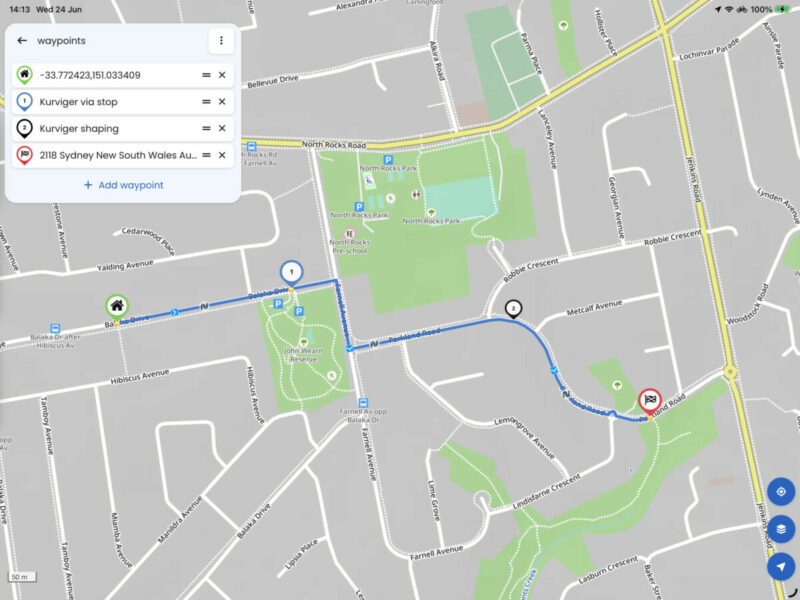
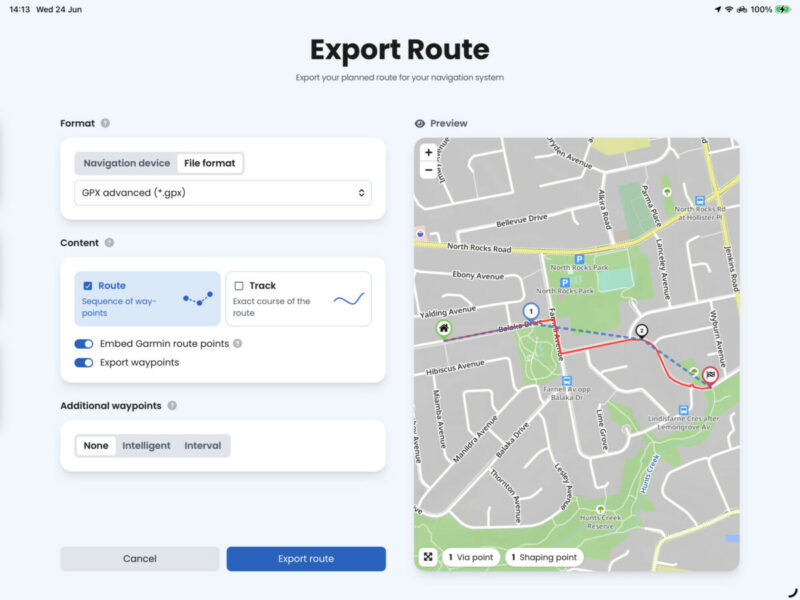
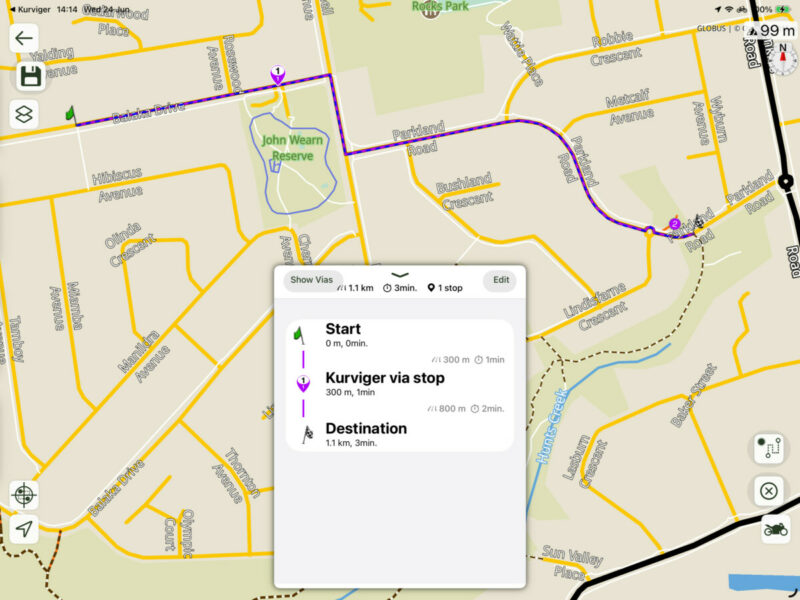
scenic imports the Stop ok but not the shaping point from Kurviger. It adds its own shaping point (2)
Gary
Quote from Maxi Forest on 23.06.2026, 22:49Hi,
its according to my import experience not that simple .... i will send Guido some example screenshots and GPX files to explain the problem. hope that helps to remove our pain.
Quote from Old Man Emu on 23.06.2026, 22:22Let me summarise;
Kurviger STOPS use to be treated as shaping points when exported to Scenic and Kurviger shaping points used to become Scenic stops.
this seems to have changed in the last few weeks, which is great to see.
In Kurviger I used to plan and save and then change all stops to shaping points for export to Scenic and Scenic would create stops.
scenic now seems to ignore shaping points.
I will add a few screenshots
scenic imports the Stop ok but not the shaping point from Kurviger. It adds its own shaping point (2)
Gary
Hi,
its according to my import experience not that simple .... i will send Guido some example screenshots and GPX files to explain the problem. hope that helps to remove our pain.
Quote from Old Man Emu on 23.06.2026, 22:22Let me summarise;
Kurviger STOPS use to be treated as shaping points when exported to Scenic and Kurviger shaping points used to become Scenic stops.
this seems to have changed in the last few weeks, which is great to see.
In Kurviger I used to plan and save and then change all stops to shaping points for export to Scenic and Scenic would create stops.
scenic now seems to ignore shaping points.
I will add a few screenshots
scenic imports the Stop ok but not the shaping point from Kurviger. It adds its own shaping point (2)
Gary
Quote from williwacker on 24.06.2026, 01:01Hi Old Man Emu,
unfortunately it is not as simple as you summarised. Some Kurviger stops become Scenic vias or stops, some Kurviger shaping points become Scenic stops or vias.
Here some screenshots and route exports.
Take a look to Kurviger routing point 9 (Shaping), 10 (Stop), 11 (Stop) and 12 (Shaping).
In Scenic it becomes 9 (Stop), 10 (Stop), 11 (via), 12 (via).
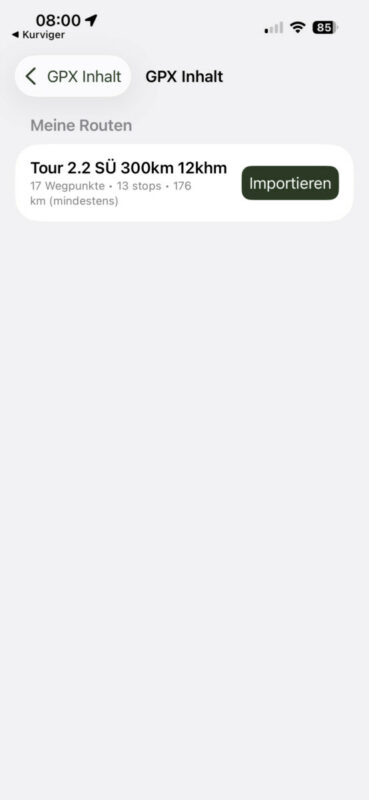
Unfortunately I cannot upload the Kurviger export file of the route. But here the link to the Scenic Import.
Hi Old Man Emu,
unfortunately it is not as simple as you summarised. Some Kurviger stops become Scenic vias or stops, some Kurviger shaping points become Scenic stops or vias.
Here some screenshots and route exports.
Take a look to Kurviger routing point 9 (Shaping), 10 (Stop), 11 (Stop) and 12 (Shaping).
In Scenic it becomes 9 (Stop), 10 (Stop), 11 (via), 12 (via).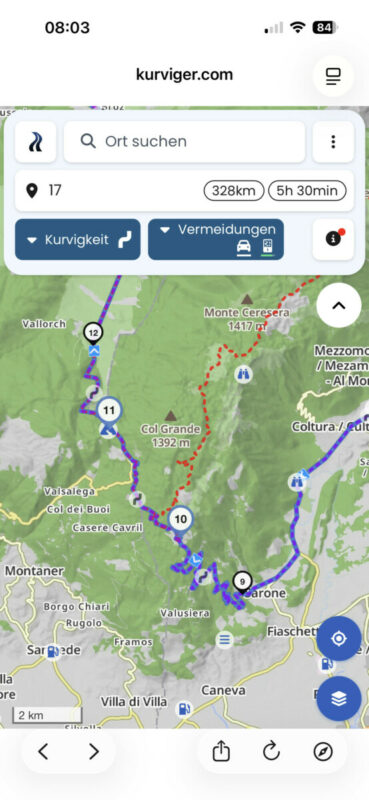
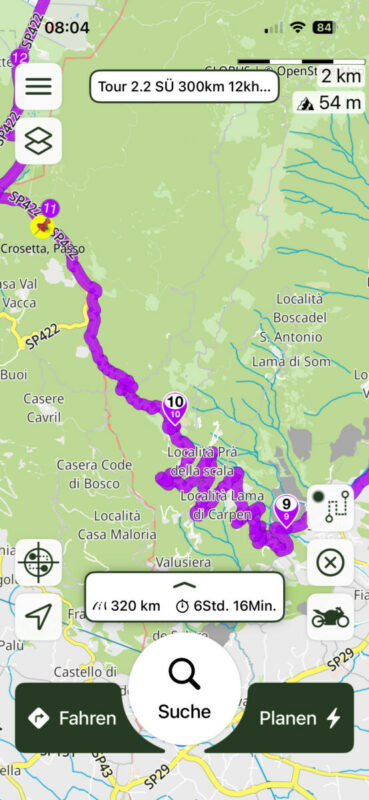
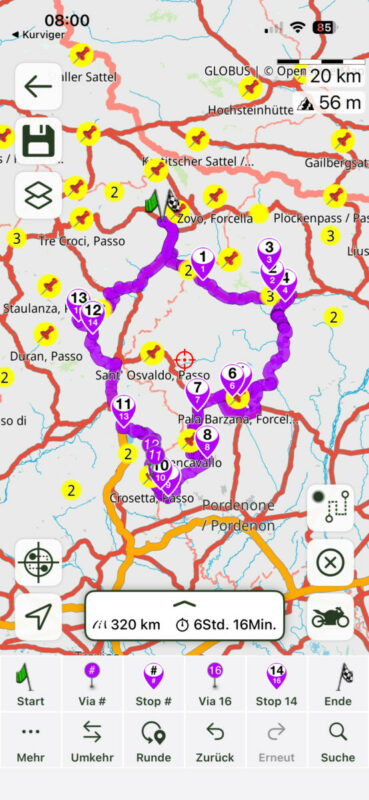
Unfortunately I cannot upload the Kurviger export file of the route. But here the link to the Scenic Import.
Quote from Guido on 24.06.2026, 06:02Thanks guys. I have received your info and will take a look. When was the last time it worked OK for you? I’m asking because the last time I changed something in Scenic regarding GPX import is quite a while ago. It could also be that Kurviger changed something that is causing this. Not sure yet but will let you know after my analyses.
Thanks guys. I have received your info and will take a look. When was the last time it worked OK for you? I’m asking because the last time I changed something in Scenic regarding GPX import is quite a while ago. It could also be that Kurviger changed something that is causing this. Not sure yet but will let you know after my analyses.
Quote from williwacker on 24.06.2026, 10:31Hi Guido, cannot say if it ever worked in the expected way, because in the past I only export a Kurviger track, not a route. On the track, Scenic sets a lot of vias automatically to follow it. This worked very well. But of course on a track export all Kurviger stops and shaping points will be gone.
Because we planned our trips now more detailed with stops for gas stations and lunch breaks I tried the first time a Kurviger route export which includes this information.
Hi Guido, cannot say if it ever worked in the expected way, because in the past I only export a Kurviger track, not a route. On the track, Scenic sets a lot of vias automatically to follow it. This worked very well. But of course on a track export all Kurviger stops and shaping points will be gone.
Because we planned our trips now more detailed with stops for gas stations and lunch breaks I tried the first time a Kurviger route export which includes this information.
Quote from Maxi Forest on 24.06.2026, 11:10Hi Guido,
i was always using the direct link between kuriviger and scenic - this worked very well, only small adjustment on the route had to be done. - Perfect Solution.
Once the link was gone (Summer 2024) I tried a lot of different combinations of export on kurviger and import on scenic and from my point of view - it never worked. No significant change in behaviour since summer 2024 till today. My only functioning workaround was importing a track - getting there a huge number of vias an adding the stops manually .. very similar to the method of @williwacker.
@guidomm: I am pretty convinced the problem is the scenic import - if you have a look on the basic plain GPX file which i have sent to you in a text editior you see that the file looks pretty well structured with the right information on the right place - anyhow - i am of cource no GPX expert, so maybe i oversee something ....
Hi Guido,
i was always using the direct link between kuriviger and scenic - this worked very well, only small adjustment on the route had to be done. - Perfect Solution.
Once the link was gone (Summer 2024) I tried a lot of different combinations of export on kurviger and import on scenic and from my point of view - it never worked. No significant change in behaviour since summer 2024 till today. My only functioning workaround was importing a track - getting there a huge number of vias an adding the stops manually .. very similar to the method of @williwacker.
@guidomm: I am pretty convinced the problem is the scenic import - if you have a look on the basic plain GPX file which i have sent to you in a text editior you see that the file looks pretty well structured with the right information on the right place - anyhow - i am of cource no GPX expert, so maybe i oversee something ....

Quote from Karlchen on 24.06.2026, 11:30Hallo zusammen,
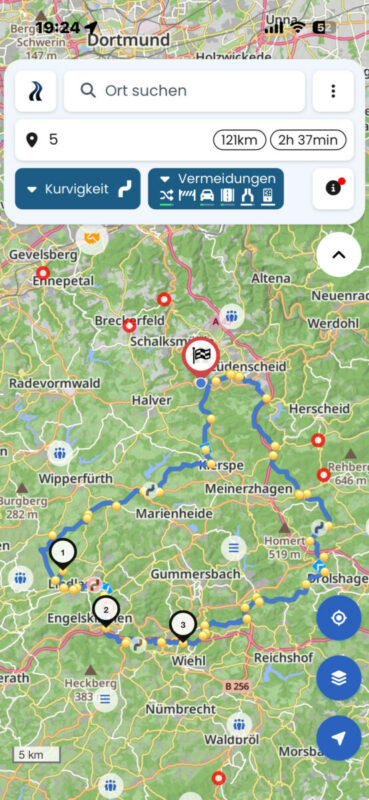
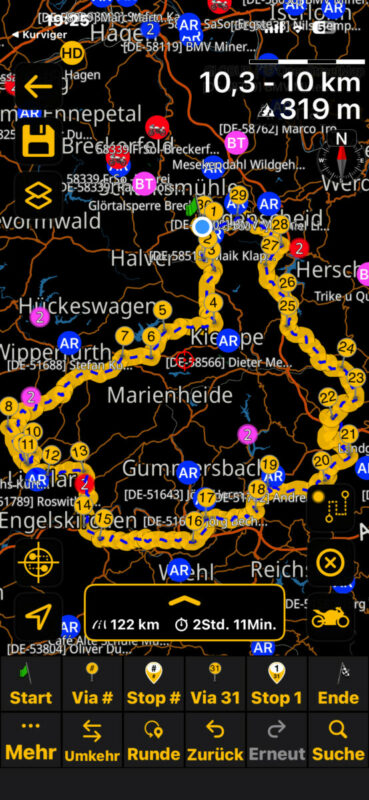
Ich erstelle auf meinem iPhone mit Kurviger einen Rundkurs und Exportiere (nicht teilen) den mit Scenic als Track.
Dann prüfe ich und speichere dann als Route. Schließe und öffne ich Scenic und fahre los. Ich finde seitens Fehler.
Ich denke, als Track senden ist der Schlüssel zum Erfolg.
Viel Spaß beim Ausprobieren
Hallo zusammen,
Ich erstelle auf meinem iPhone mit Kurviger einen Rundkurs und Exportiere (nicht teilen) den mit Scenic als Track.
Dann prüfe ich und speichere dann als Route. Schließe und öffne ich Scenic und fahre los. Ich finde seitens Fehler.
Ich denke, als Track senden ist der Schlüssel zum Erfolg.
Viel Spaß beim Ausprobieren
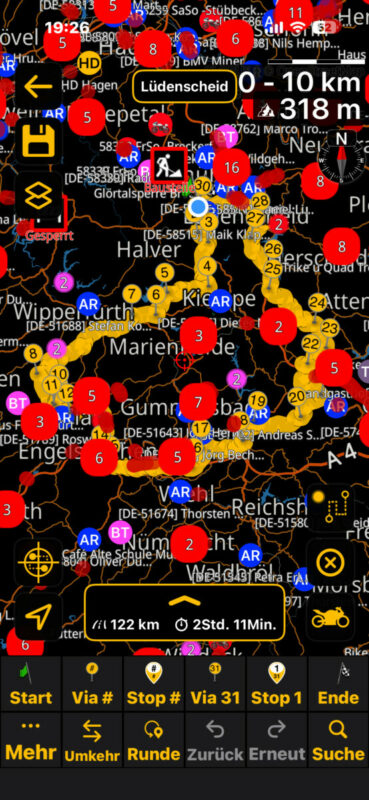
Quote from Guido on 24.06.2026, 11:34Thanks for all the info guys. I have managed to find the bug and fix it.
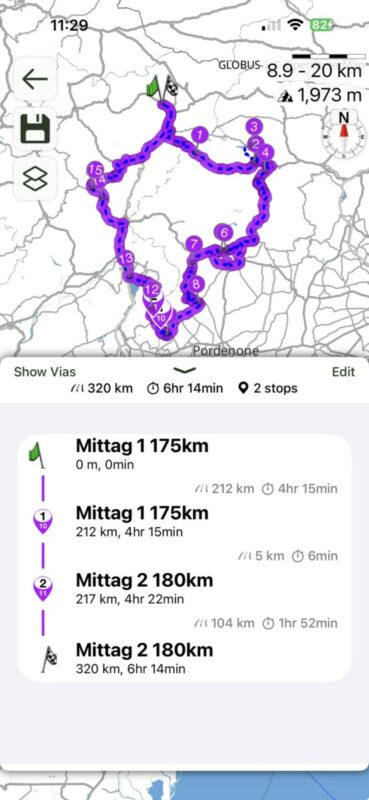
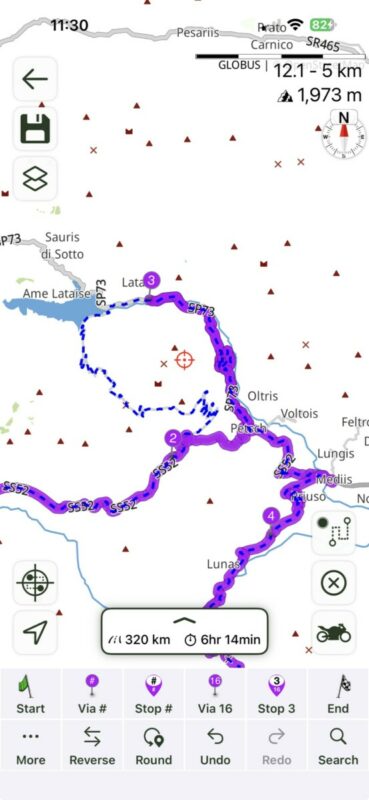
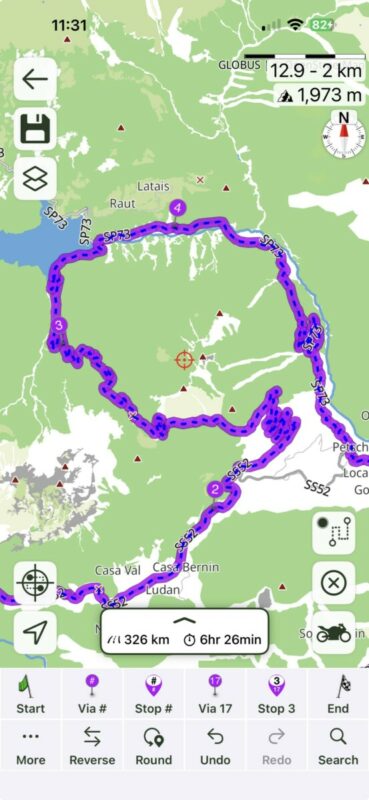
I also added something else. If you export the track from Kurviger as well (in the same GPX)... then during import in Scenic, it will show the track AND the route on the map, so that you can easily see where the Scenic route diverts from the Kurviger track, and add additional via points to make the Scenic route match the Kurviger track exactly.@williwacker. I tested with your tour. Here's a screenshot of importing your Kurviger tour with these changes.
As you might be able to see, showing the track as blue dotted line immediately makes it clear that Scenic calculates a different route between via 2 and 3. Dropping an extra via points solves this.
If you're interested, the bug was caused by:
1) The naming convention that Kurviger uses for stops and vias (via and shaping)
2) The order of tags in their GPX export.
They are not doing it wrong... GPX file format is just "flexible" like that.I've now created a separate GPX Parse track for Kurviger files.
Thanks for all the info guys. I have managed to find the bug and fix it.
I also added something else. If you export the track from Kurviger as well (in the same GPX)... then during import in Scenic, it will show the track AND the route on the map, so that you can easily see where the Scenic route diverts from the Kurviger track, and add additional via points to make the Scenic route match the Kurviger track exactly.
@williwacker. I tested with your tour. Here's a screenshot of importing your Kurviger tour with these changes.
As you might be able to see, showing the track as blue dotted line immediately makes it clear that Scenic calculates a different route between via 2 and 3. Dropping an extra via points solves this.
If you're interested, the bug was caused by:
1) The naming convention that Kurviger uses for stops and vias (via and shaping)
2) The order of tags in their GPX export.
They are not doing it wrong... GPX file format is just "flexible" like that.
I've now created a separate GPX Parse track for Kurviger files.
Quote from Guido on 24.06.2026, 11:36Now that I'm looking at first screenshot... I see the naming of start and end is wrong. Will fix that too.
Now that I'm looking at first screenshot... I see the naming of start and end is wrong. Will fix that too.
Quote from williwacker on 24.06.2026, 11:55Hi Guido, awesome support. I get goosebumps. 😉 Thanks a lot.
This is why I try to convince my friends to use Scenic too. Especially the one using TomTom Rider.Adding a via in Scenic to follow the track exactly is natural and understandable due to the different routing methods.
Hi Guido, awesome support. I get goosebumps. 😉 Thanks a lot.
This is why I try to convince my friends to use Scenic too. Especially the one using TomTom Rider.
Adding a via in Scenic to follow the track exactly is natural and understandable due to the different routing methods.
Quote from Maxi Forest on 24.06.2026, 13:25Hi Guido,
So cool ... when will it work on our phones, with the next release?
Hi Guido,
So cool ... when will it work on our phones, with the next release?
Quote from Guido on 24.06.2026, 13:31Version 4.42. (By end of next week, maybe sooner)
Version 4.42. (By end of next week, maybe sooner)
Quote from Maxi Forest on 24.06.2026, 13:38Hi Guido,
your support is really breathtaking - i have the feeling there are 5 Guidos working in paralell. Thanks a lot for taking care about our troubles - finally Scenic is again a step ahead to the Rest.
I like using Scenic so much - looking forward to 4.42
Hi Guido,
your support is really breathtaking - i have the feeling there are 5 Guidos working in paralell. Thanks a lot for taking care about our troubles - finally Scenic is again a step ahead to the Rest.
I like using Scenic so much - looking forward to 4.42
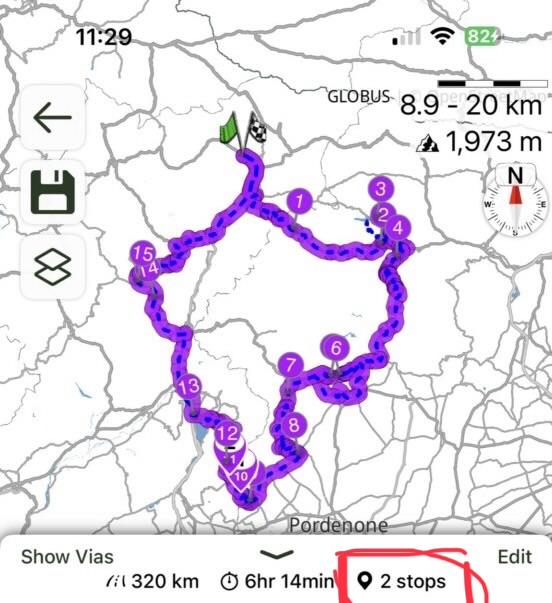
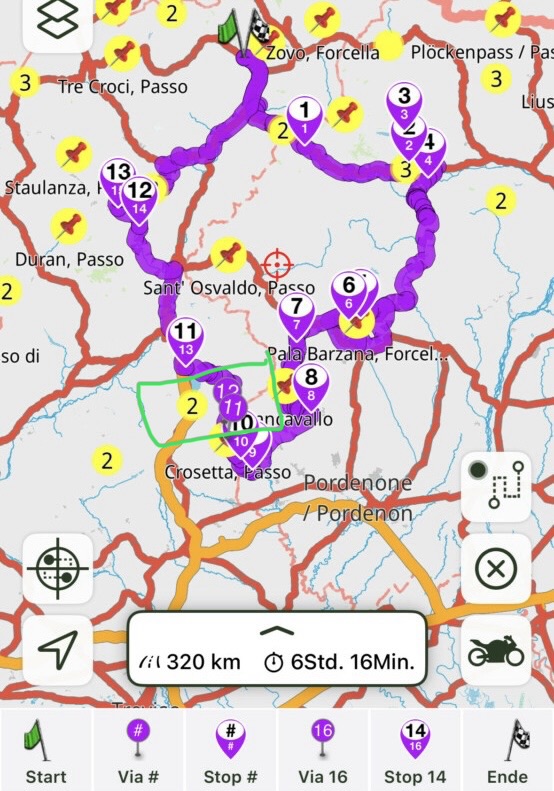
Quote from Old Man Emu on 24.06.2026, 16:29Can I double check this if I assume the above screen shots show the fix that Guido has applied
Kurviger has 2 stops that become 2 shaping points in Scenic!?
All the Kurviger shaping points become Scenic stops!
Can I double check this if I assume the above screen shots show the fix that Guido has applied
Kurviger has 2 stops that become 2 shaping points in Scenic!?
All the Kurviger shaping points become Scenic stops!
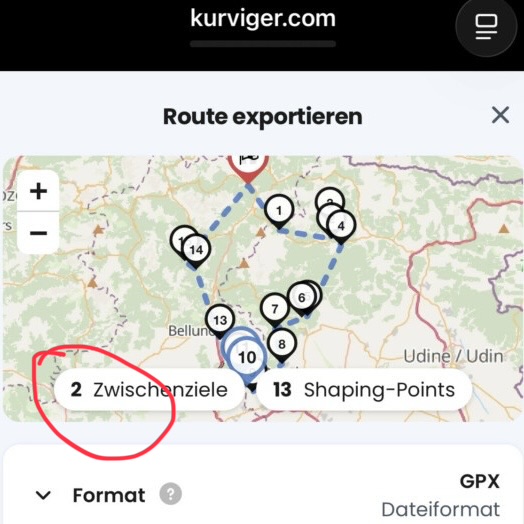
Quote from Guido on 24.06.2026, 16:41This is a terminology difference between Kurviger and Scenic.
Kurviger has Vias (zwischenzieken) and Shaping points.
A kurviger Via is what Scenic calls a stop
A kurviger shaping points is what Scenic calls a via.
Scenic doesn’t use the term shaping points.
This is a terminology difference between Kurviger and Scenic.
Kurviger has Vias (zwischenzieken) and Shaping points.
A kurviger Via is what Scenic calls a stop
A kurviger shaping points is what Scenic calls a via.
Scenic doesn’t use the term shaping points.
Quote from Old Man Emu on 24.06.2026, 17:47I’d like to check this “A kurviger Via is what Scenic calls a stop”
this Kurviger route has all my Vias/stops and they are all labelled
my export is
using export then next I share with Scenic and tap the top left import
I loose all my labelled Stops from Kurviger as they are now Scenic vias.
so I have to label them all again and I’ve ended up with only 2 stops in a 395km ride
to avoid this before exporting from Kurviger I convert them all to Kurviger shaping points - this is my workaround and the step I find redundant.
to me the navigation will let me bypass shaping points or vias but always take me to stops. When sharing rides this is important.
I’d like to check this “A kurviger Via is what Scenic calls a stop”
this Kurviger route has all my Vias/stops and they are all labelled
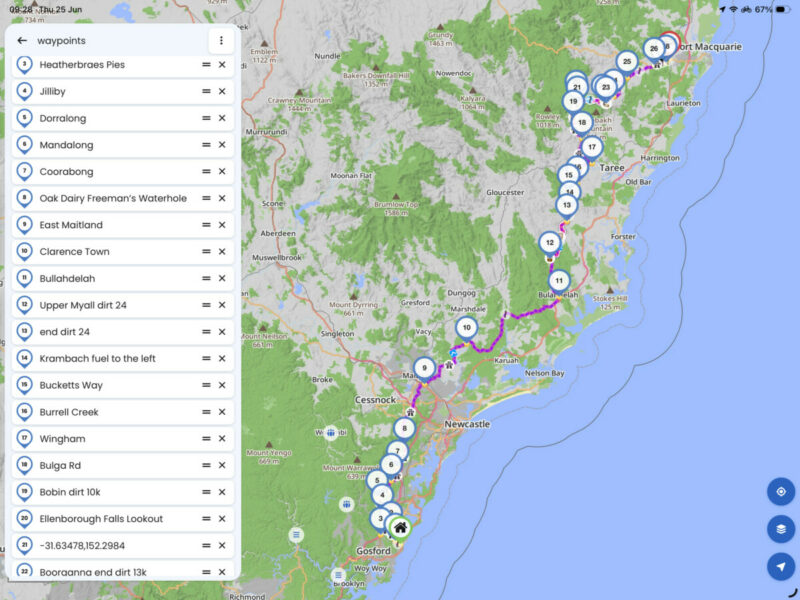
my export is
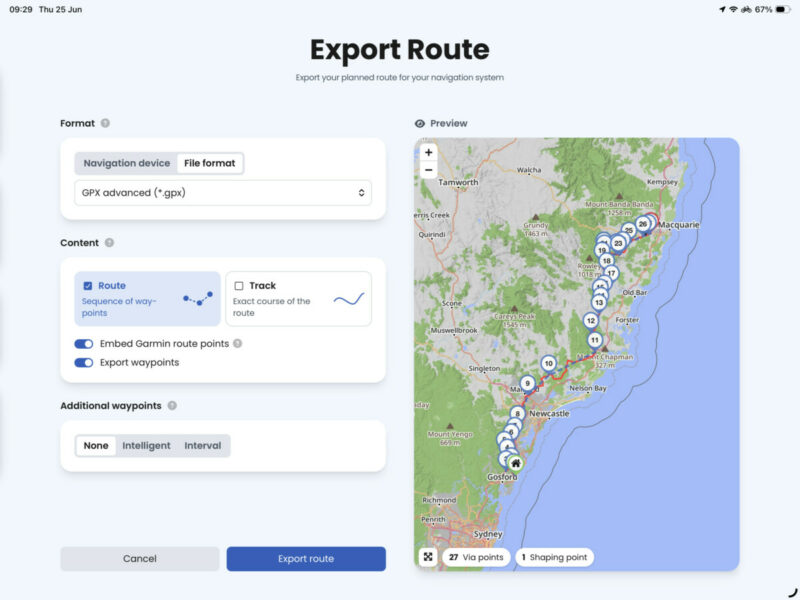
using export then next I share with Scenic and tap the top left import
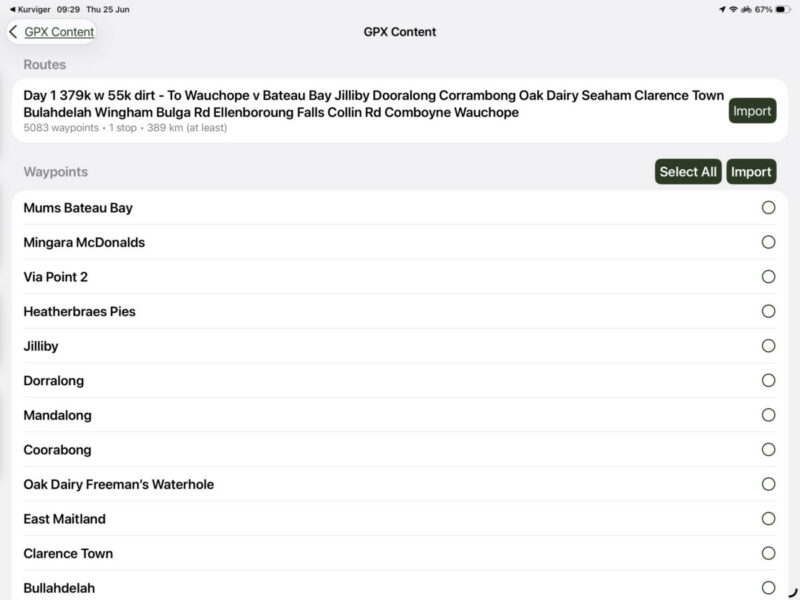
I loose all my labelled Stops from Kurviger as they are now Scenic vias.
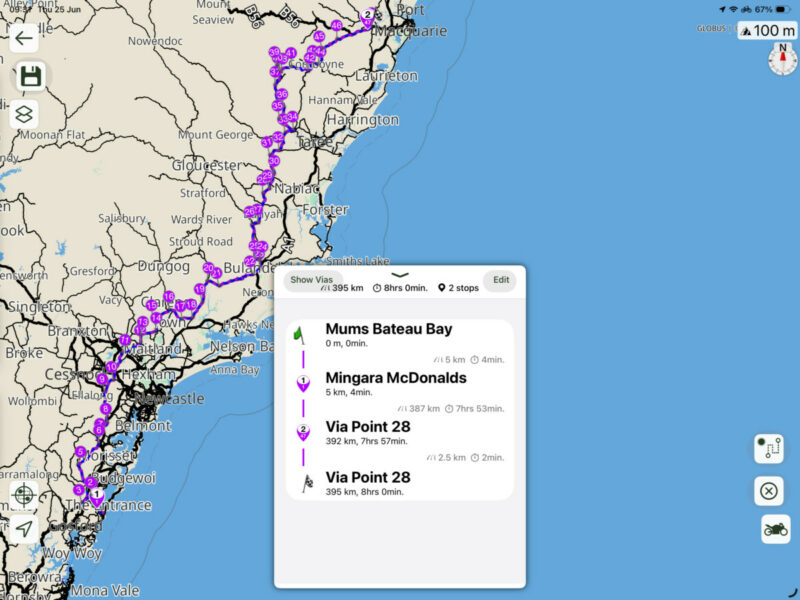
so I have to label them all again and I’ve ended up with only 2 stops in a 395km ride
to avoid this before exporting from Kurviger I convert them all to Kurviger shaping points - this is my workaround and the step I find redundant.
to me the navigation will let me bypass shaping points or vias but always take me to stops. When sharing rides this is important.
Quote from Guido on 24.06.2026, 18:45Well, that’s because the update with the fix I mentioned above has not yet been released 🙂
Well, that’s because the update with the fix I mentioned above has not yet been released 🙂


