
Import Kurviger Favourites to Scenic … ?

Quote from Old Man Emu on 13.01.2024, 23:10Hi all, I’ve been using Kurviger for over 2 years and have 100’s of Favourite Locations so I can punch out a ride route pretty quickly.
As I use an iPhone I was using a Garmin Zumo XT but now I’m using Scenic.
Has anyone worked out a way Export/Import or have a script that can duplicate my Kurviger Favourites to Scenic ?
Many thanks in advance.
Hi all, I’ve been using Kurviger for over 2 years and have 100’s of Favourite Locations so I can punch out a ride route pretty quickly.
As I use an iPhone I was using a Garmin Zumo XT but now I’m using Scenic.
Has anyone worked out a way Export/Import or have a script that can duplicate my Kurviger Favourites to Scenic ?
Many thanks in advance.

Quote from Charlie J on 14.01.2024, 10:39There is guidance on importing from Kurviger and other Apps in the help section.
https://scenic.app/help/ways-sources-to-import/
Hope this is of use.
There is guidance on importing from Kurviger and other Apps in the help section.
Hope this is of use.
Quote from Old Man Emu on 14.01.2024, 15:37Thanks Charlie,
I had seen that thread and it was useful. I have been importing rides from Kurviger with good success but what I was seeking is a way to import all my “FAVOURITE” places from Kurviger and make them into Scenic Locations.
I suppose I could create a Kurviger ride with all FAVOURITES import that. Can I convert a STOP or VIA into a LOCATION ?
Cheers
Thanks Charlie,
I had seen that thread and it was useful. I have been importing rides from Kurviger with good success but what I was seeking is a way to import all my “FAVOURITE” places from Kurviger and make them into Scenic Locations.
I suppose I could create a Kurviger ride with all FAVOURITES import that. Can I convert a STOP or VIA into a LOCATION ?
Cheers

Quote from Guido on 15.01.2024, 09:37At the moment, it's not possible for Scenic to access your favorite locations in your Kurviger account, or anything directly in your Kurviger account for that matter. But, there is a way to get all your locations in Scenic, however it requires some manual work through.
It boils down to getting your locations into a GPX file. As far as I know, you can't export a bunch of your favorite locations into a GPX directly in Kurviber. But, what you can do, and what you also suggested, is create a route with all your locations in it. Then export that route as GPX, and make sure to check the "waypoint" checkbox when you export it. Then you can import that GPX into Scenic, and save all those waypoints as locations.
Hope this helps/explains. If not, please let me know if you have other questions. Happy to help.
Best regards and ride safe,
Guido
At the moment, it's not possible for Scenic to access your favorite locations in your Kurviger account, or anything directly in your Kurviger account for that matter. But, there is a way to get all your locations in Scenic, however it requires some manual work through.
It boils down to getting your locations into a GPX file. As far as I know, you can't export a bunch of your favorite locations into a GPX directly in Kurviber. But, what you can do, and what you also suggested, is create a route with all your locations in it. Then export that route as GPX, and make sure to check the "waypoint" checkbox when you export it. Then you can import that GPX into Scenic, and save all those waypoints as locations.
Hope this helps/explains. If not, please let me know if you have other questions. Happy to help.
Best regards and ride safe,
Guido
Quote from Old Man Emu on 16.01.2024, 00:12Thanks Guido, I followed that advice and imported a GPX with a few FAVOURITES.
I could not find a way to tap on a Stop or Via and save it as a location.
Advice please
Thanks
Thanks Guido, I followed that advice and imported a GPX with a few FAVOURITES.
I could not find a way to tap on a Stop or Via and save it as a location.
Advice please
Thanks
Quote from Old Man Emu on 16.01.2024, 00:14Also is there a Map view when planning a ride that has a visible marker for my saved locations ? Kurviger shows a Brown Target Icon
Also is there a Map view when planning a ride that has a visible marker for my saved locations ? Kurviger shows a Brown Target Icon
Quote from PeteRT on 16.01.2024, 03:45Yes. On the home page there are three menu icons in a vertical row in the top left corner. Click on the bottom one. Now you can select from the list of stored locations which are visible on the map. The same menu icon is also available on the planning page.
Yes. On the home page there are three menu icons in a vertical row in the top left corner. Click on the bottom one. Now you can select from the list of stored locations which are visible on the map. The same menu icon is also available on the planning page.
Quote from Old Man Emu on 16.01.2024, 03:57Thanks for that
Thanks for that
Quote from Guido on 16.01.2024, 06:11
Quote from Old Man Emu on 16.01.2024, 00:12Thanks Guido, I followed that advice and imported a GPX with a few FAVOURITES.
I could not find a way to tap on a Stop or Via and save it as a location.
Advice please
Thanks
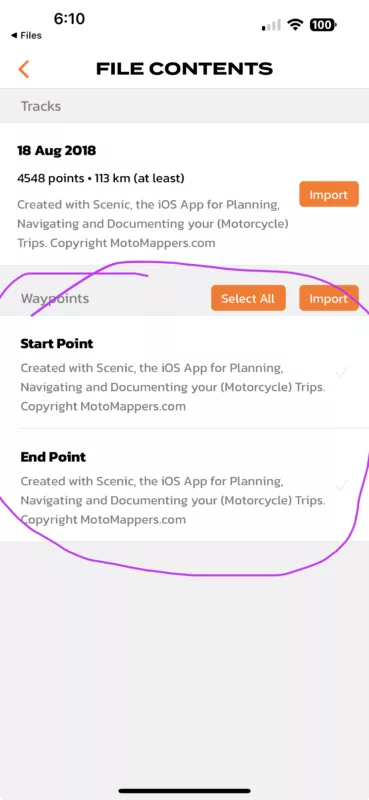
To import as locations, don’t import the route or track, but the waypoints. When you check the “waypoints” box while exporting from Kurviger, then all waypoint you added to the route should be there as waypoint too. Here is an example screenshot:
Quote from Old Man Emu on 16.01.2024, 00:12Thanks Guido, I followed that advice and imported a GPX with a few FAVOURITES.
I could not find a way to tap on a Stop or Via and save it as a location.
Advice please
Thanks
To import as locations, don’t import the route or track, but the waypoints. When you check the “waypoints” box while exporting from Kurviger, then all waypoint you added to the route should be there as waypoint too. Here is an example screenshot:
Quote from Old Man Emu on 16.01.2024, 15:29Ok got it. That’s great.
It took a while to work out how to get that “Files” dialogue screen as I was using “Send To Scenic” from Kurviger then searching the Scenic menus for “Files” or a way to import the Waypoints.
The standard IOS “Share” function works but is there value in putting that “Files” dialogue on the main menu or the “Import” menu ?
GC
Ok got it. That’s great.
It took a while to work out how to get that “Files” dialogue screen as I was using “Send To Scenic” from Kurviger then searching the Scenic menus for “Files” or a way to import the Waypoints.
The standard IOS “Share” function works but is there value in putting that “Files” dialogue on the main menu or the “Import” menu ?
GC
Quote from Guido on 16.01.2024, 16:08Not really. The content of the “File Contents” screen depends on what file you are importing. If you import a GPX to Scenic through the iOS share dialog you will end up in that screen automatically. If you use the Scenic webapp to send a GPX to the import queue, you first need to select that file from the import queue.
Going to this “File Content” screen directly would show an empty screen as it wouldn’t know which file to show the contents of.
Hope that makes sense? And that I understood your question correctly?
Not really. The content of the “File Contents” screen depends on what file you are importing. If you import a GPX to Scenic through the iOS share dialog you will end up in that screen automatically. If you use the Scenic webapp to send a GPX to the import queue, you first need to select that file from the import queue.
Going to this “File Content” screen directly would show an empty screen as it wouldn’t know which file to show the contents of.
Hope that makes sense? And that I understood your question correctly?
Quote from Old Man Emu on 16.01.2024, 16:31Yes. I’m happy with that now that I worked it out.
GC
Yes. I’m happy with that now that I worked it out.
GC

Quote from Mex on 20.07.2024, 06:50Hi folks,
in a thread i saw that the feature: import directly to Scenic, doesn’t exist anymore.
Ok one may export the gpx.files.
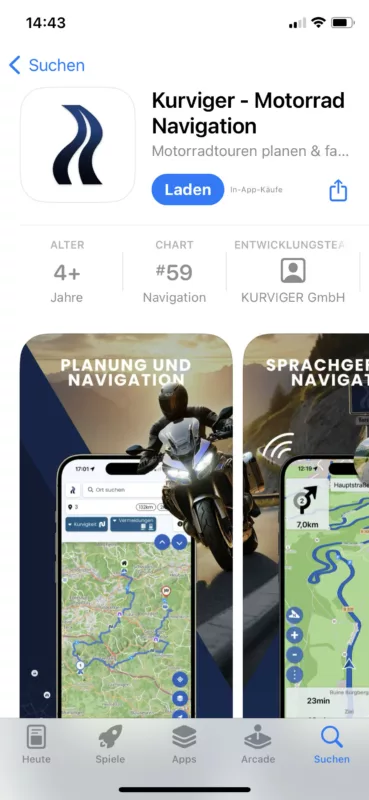
The real reason, in my eyes, is: They did this app. And it looks to be amazing close to Scenic. Almost like copy/paste.
I found a thread in a BMW forum this morning about the app. Here you are, may search it in the app-store.
Ride save, Mex
Hi folks,
in a thread i saw that the feature: import directly to Scenic, doesn’t exist anymore.
Ok one may export the gpx.files.
The real reason, in my eyes, is: They did this app. And it looks to be amazing close to Scenic. Almost like copy/paste.
I found a thread in a BMW forum this morning about the app. Here you are, may search it in the app-store.
Ride save, Mex
Quote from Guido on 20.07.2024, 07:08Yep. That's the reason. I had contact with Kurviger about it. Even though we were competitors in the past, we were never direct competition because they did not have an iOS app. That's changed now, so they removed the 'send to scenic' button. I understand that decision. Nothing wrong with a bit of healthy competition.
Yep. That's the reason. I had contact with Kurviger about it. Even though we were competitors in the past, we were never direct competition because they did not have an iOS app. That's changed now, so they removed the 'send to scenic' button. I understand that decision. Nothing wrong with a bit of healthy competition.
Quote from Old Man Emu on 20.07.2024, 16:31I was on the beta test for Kurviger IOS Apple. It is now released into the wild.
With the removal of the send to Scenic you can use the Share function and anything that is a client for GPX will be able to receive it.
I am still using both. Kurviger App does not have speed and speed limits and does not support CarPlay.
I was on the beta test for Kurviger IOS Apple. It is now released into the wild.
With the removal of the send to Scenic you can use the Share function and anything that is a client for GPX will be able to receive it.
I am still using both. Kurviger App does not have speed and speed limits and does not support CarPlay.
Quote from Old Man Emu on 20.07.2024, 16:42Quote from Mex on 20.07.2024, 06:50Hi folks,
[edit]
The real reason, in my eyes, is: They did this app. And it looks to be amazing close to Scenic. Almost like copy/paste.
Ride save, Mex
Although I’m I fan of Kurviger that is not cool that they have almost duplicated the banner page. 😒
Quote from Mex on 20.07.2024, 06:50Hi folks,
[edit]
The real reason, in my eyes, is: They did this app. And it looks to be amazing close to Scenic. Almost like copy/paste.
Ride save, Mex
Although I’m I fan of Kurviger that is not cool that they have almost duplicated the banner page. 😒

Quote from johansw on 02.08.2024, 23:51That kind of competition is not cool at all! So let us hope Scenics Android version will dig deep into Kurvigers portfolio.
That kind of competition is not cool at all! So let us hope Scenics Android version will dig deep into Kurvigers portfolio.
Quote from Maxi Forest on 07.08.2024, 00:00I seems that we have to deal with the situation,... I like scenic so much
maybe i did not find the right wa to import the kurviger routes it in a similar way as in the past. When i export a gpx from kurviger then i can import the Route OR the Track - with Route i am not sure to follow the same Track as planned, and all imported points are Stops. When i import the track, then its easy to check that my sceinc route will follow the kuriviger route, but only Via points availible, no Stops.
Is there a way to import it in the old style where i have seen the track in the background and a differenciation between Vias and Stops was made. I can live with the GPX file workaround - But the actual import result is ... improvable
I seems that we have to deal with the situation,... I like scenic so much
maybe i did not find the right wa to import the kurviger routes it in a similar way as in the past. When i export a gpx from kurviger then i can import the Route OR the Track - with Route i am not sure to follow the same Track as planned, and all imported points are Stops. When i import the track, then its easy to check that my sceinc route will follow the kuriviger route, but only Via points availible, no Stops.
Is there a way to import it in the old style where i have seen the track in the background and a differenciation between Vias and Stops was made. I can live with the GPX file workaround - But the actual import result is ... improvable
Quote from Guido on 07.08.2024, 07:54I'm working on a big update for the fall where I will improve GPX import for Kurviger (and other sources) to combine the track and the route to get a better match AND keep the stops.
I'm working on a big update for the fall where I will improve GPX import for Kurviger (and other sources) to combine the track and the route to get a better match AND keep the stops.


