
Where have all the village names gone??

Quote from Ian744 on 05.02.2024, 03:53
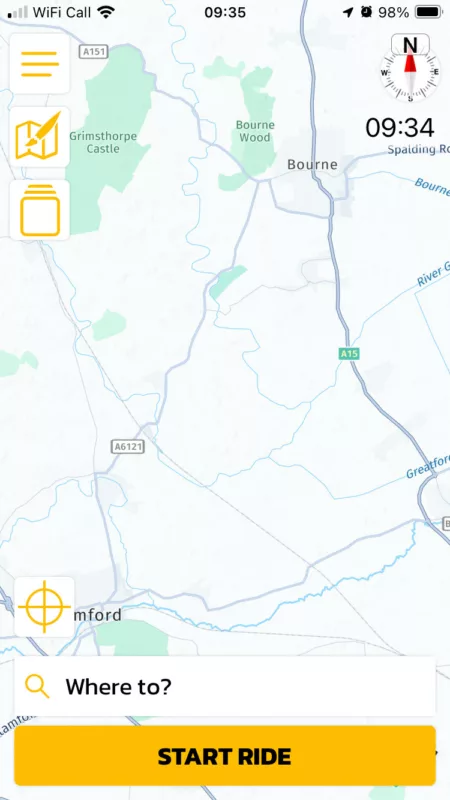
- Hi Guido,The delight of Scenic was it’s easy to read map and ability to plan where you want to go without stress.
The base map & lack of village names in 3.5 has convinced me to start looking around for another navigation & planning app for my motorbiking if I can’t get back to 3.0I enclose a couple of screenshots for comparison (I still have an older version on another phone)
Regards
- Ian
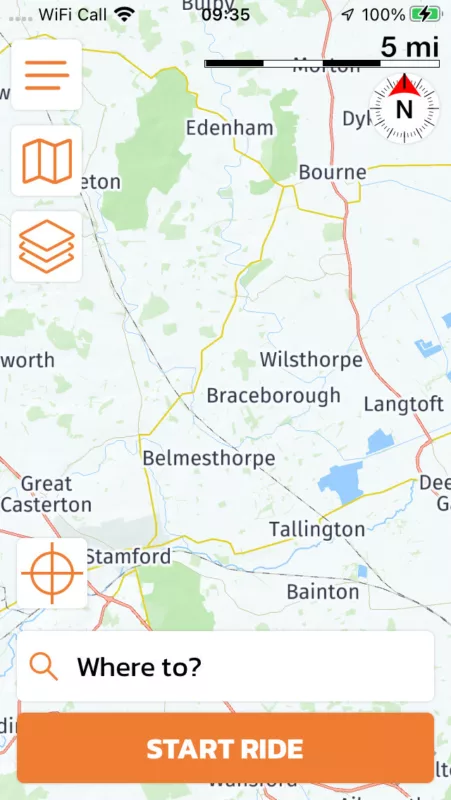
- Hi Guido,The delight of Scenic was it’s easy to read map and ability to plan where you want to go without stress.
The base map & lack of village names in 3.5 has convinced me to start looking around for another navigation & planning app for my motorbiking if I can’t get back to 3.0I enclose a couple of screenshots for comparison (I still have an older version on another phone)
Regards
- Ian
-

Quote from Mex on 05.02.2024, 07:41Hi Ian.
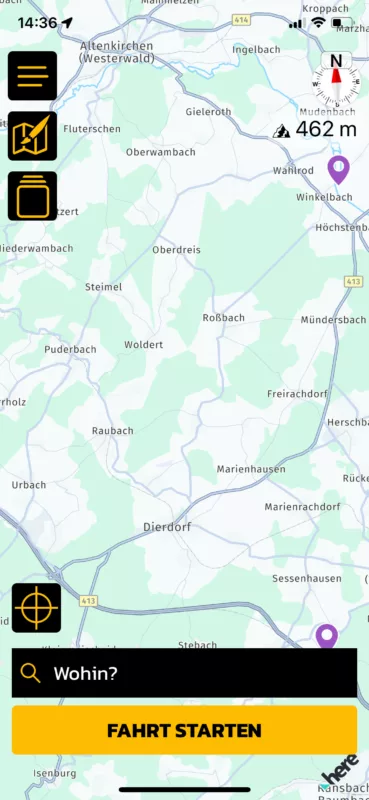
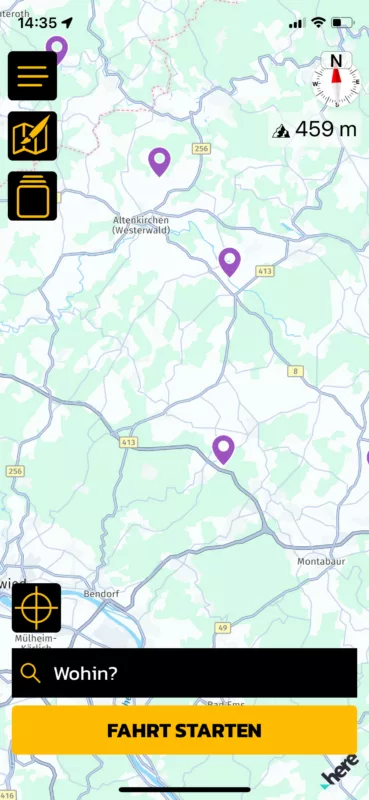
How many names you see depends on your zoom-level, i guess.
2 examples for the same location:
Smaler towns will disappear when you zoom out. Hope its the solution.
Regards, Mex
Hi Ian.
How many names you see depends on your zoom-level, i guess.
2 examples for the same location:
Smaler towns will disappear when you zoom out. Hope its the solution.
Regards, Mex

Quote from mattsz on 05.02.2024, 16:40@mex - I think Ian has a point. Take a look at his two screenshots: the previous version's pic, with town names, is actually already zoomed out a bit further than the 3.5 version's pic, with no town names. Kind of the opposite of what you describe...
@mex - I think Ian has a point. Take a look at his two screenshots: the previous version's pic, with town names, is actually already zoomed out a bit further than the 3.5 version's pic, with no town names. Kind of the opposite of what you describe...
Quote from Mex on 06.02.2024, 00:59Hi Matts.
Your right. Same zoom-level on both pics.
Looks like 3.5 shows less information at the same level. Pro: cleaner look. Con: less names.
Thx for the hint, Mex
Hi Matts.
Your right. Same zoom-level on both pics.
Looks like 3.5 shows less information at the same level. Pro: cleaner look. Con: less names.
Thx for the hint, Mex

Quote from Binwaa on 09.02.2024, 21:48Hey Guido,
I did not upgrade yet, but my friend did. And the problem described here worked so hard on his nerves, that he moved to Google Maps.
As he is now in North Thailand, he does not see any village name and can not decide where to go. Google maps does this correctly.
i will upgrade myself next week (my big south Thailand tour just finished), and provide you with extra feedback about this point.
grtz
Binwaa
Hey Guido,
I did not upgrade yet, but my friend did. And the problem described here worked so hard on his nerves, that he moved to Google Maps.
As he is now in North Thailand, he does not see any village name and can not decide where to go. Google maps does this correctly.
i will upgrade myself next week (my big south Thailand tour just finished), and provide you with extra feedback about this point.
grtz
Binwaa
Quote from Binwaa on 15.02.2024, 07:37Hey Guido,
just installed the new Scenic but the representation of the maps with appropriate info is really a step backwards.
I will send you a comparison of Scenic 3.0 and 3.5 for the same region (north of Thailand) by mailIn general, the roads are represented finer and darker with less road info except if you zoom more than in 3.0
Also the dashed representation of routes and rides makes it much disturbing to look at than in version 3.0
I don’t mind increasing features, but do not change the essence of Scenic : good map representation
Binwaa
Hey Guido,
just installed the new Scenic but the representation of the maps with appropriate info is really a step backwards.
I will send you a comparison of Scenic 3.0 and 3.5 for the same region (north of Thailand) by mail
In general, the roads are represented finer and darker with less road info except if you zoom more than in 3.0
Also the dashed representation of routes and rides makes it much disturbing to look at than in version 3.0
I don’t mind increasing features, but do not change the essence of Scenic : good map representation
Binwaa

Quote from Guido on 15.02.2024, 11:53I understand. I wish I had a choice, but I had to move to the new HERE map framework, because HERE is decomissioning their old map framework that Scenic was running on. I'm working with HERE to get the new maps up to par with the old maps, but that's going to take a while I'm afraid.
I saw your screenshots, and it might (at least partially) help creating or editing a custom map style for these cases. Here's a forum thread on that: https://scenic.app/forum/topic/custom-map-styles/
I understand. I wish I had a choice, but I had to move to the new HERE map framework, because HERE is decomissioning their old map framework that Scenic was running on. I'm working with HERE to get the new maps up to par with the old maps, but that's going to take a while I'm afraid.
I saw your screenshots, and it might (at least partially) help creating or editing a custom map style for these cases. Here's a forum thread on that: https://scenic.app/forum/topic/custom-map-styles/
Quote from Binwaa on 15.02.2024, 20:37Hey Guido,
thanks for the feedback. I tried to experiment by changing the colors settings to make the road appear like in Scenic 3.0 and it looks already much better. Perhaps in a next version, you should set the default colors like in 3.0
But there are still some other issues (tested on my iPad Pro M2) :
- the width of the selected pink route is too large. Scenic 3.0 was perfect
- the dashed line to show routes and rides is not ok and should only be visible when they are overlapping or eventually using a third color (pink, black and intensive red for overlap)
- and finally objects appear too late while zooming in. In Scenic 3.0, small roads and lakes appeared at zoom level 12.1 and in Scenic 3.5 they appear at zoom level 13.5 (if you want screenshots about this, I can send them to you by mail).
These issues becomes even more annoying on smaller screens like an IPhone SE2. Perhaps by analysing Google Maps, it an inspire to further enhance Scenic.
I hope you can take care to solve these annoying issues. I can tell you that my emotional friend just moved to Google maps and will not return until further notice.
Looking forward
Hey Guido,
thanks for the feedback. I tried to experiment by changing the colors settings to make the road appear like in Scenic 3.0 and it looks already much better. Perhaps in a next version, you should set the default colors like in 3.0
But there are still some other issues (tested on my iPad Pro M2) :
- the width of the selected pink route is too large. Scenic 3.0 was perfect
- the dashed line to show routes and rides is not ok and should only be visible when they are overlapping or eventually using a third color (pink, black and intensive red for overlap)
- and finally objects appear too late while zooming in. In Scenic 3.0, small roads and lakes appeared at zoom level 12.1 and in Scenic 3.5 they appear at zoom level 13.5 (if you want screenshots about this, I can send them to you by mail).
These issues becomes even more annoying on smaller screens like an IPhone SE2. Perhaps by analysing Google Maps, it an inspire to further enhance Scenic.
I hope you can take care to solve these annoying issues. I can tell you that my emotional friend just moved to Google maps and will not return until further notice.
Looking forward
Quote from Guido on 15.02.2024, 21:55Route thickness will be adjusted in upcoming update.
The default styles are from HERE maps and can’t be configured.
dashed line: yes in 3.0 they were solid. I dashed them so the underlying roads are more visible and overlaps are more visible. Some people like the change, some people don’t. It’s 50/50 at the moment. I’ll keep this as is for now.
Rest of the issues are out of my control / need to be addressed by HERE. Already submitted change requests for that.
Route thickness will be adjusted in upcoming update.
The default styles are from HERE maps and can’t be configured.
dashed line: yes in 3.0 they were solid. I dashed them so the underlying roads are more visible and overlaps are more visible. Some people like the change, some people don’t. It’s 50/50 at the moment. I’ll keep this as is for now.
Rest of the issues are out of my control / need to be addressed by HERE. Already submitted change requests for that.

Quote from Old Man Emu on 20.03.2024, 16:18Quote from Guido on 15.02.2024, 11:53… I'm working with HERE to get the new maps up to par with the old maps, but that's going to take a while I'm afraid….
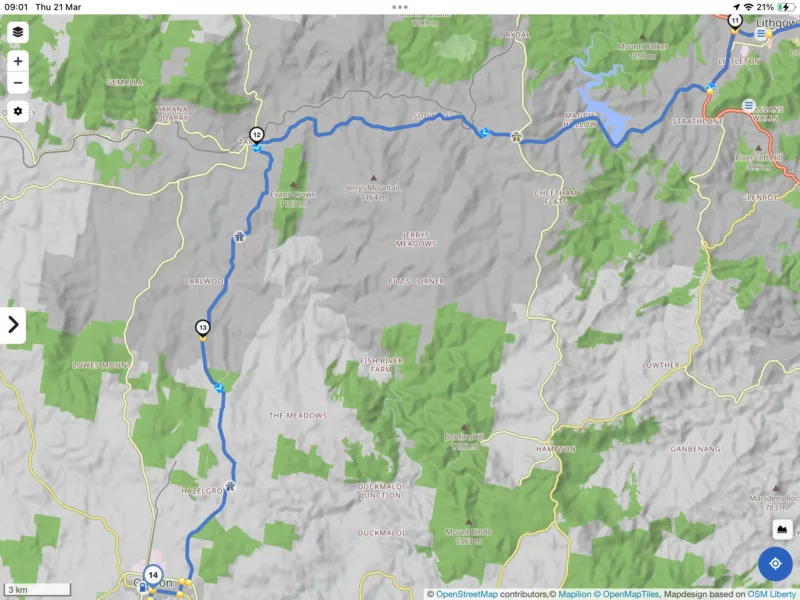
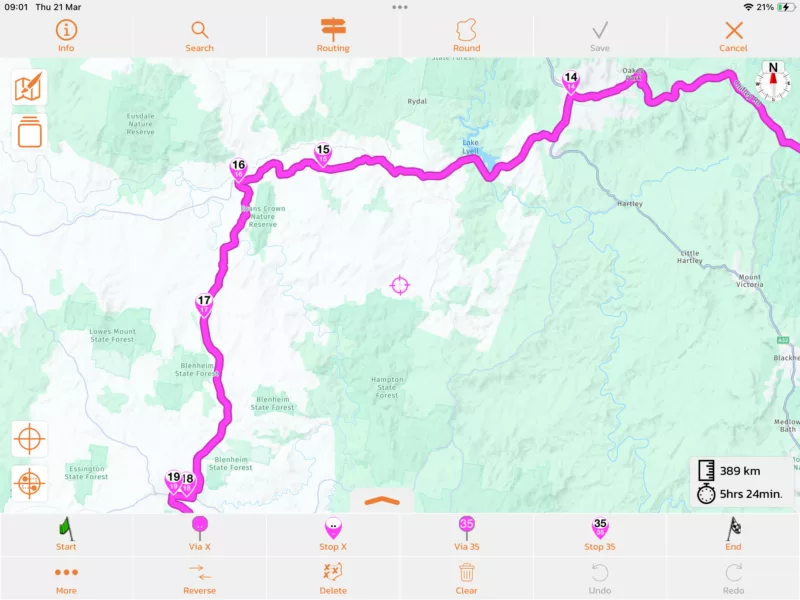
I’d like to add my voice to this topic … with the village names not appearing until a high level of zoom it has really slowed down the process of a detailed route plan through areas that one is not overly familiar with.
I have gone back to Kurviger to do my routes and then send the GPX to Scenic and double check.
The examples above are good but I also attach 2 screen shots at about the same zoom level for the same ride. Firstly Kurviger showing village name and second Scenic mostly blank even large towns like Lithgow and Oberon.
Quote from Guido on 15.02.2024, 11:53… I'm working with HERE to get the new maps up to par with the old maps, but that's going to take a while I'm afraid….
I’d like to add my voice to this topic … with the village names not appearing until a high level of zoom it has really slowed down the process of a detailed route plan through areas that one is not overly familiar with.
I have gone back to Kurviger to do my routes and then send the GPX to Scenic and double check.
The examples above are good but I also attach 2 screen shots at about the same zoom level for the same ride. Firstly Kurviger showing village name and second Scenic mostly blank even large towns like Lithgow and Oberon.
Quote from Guido on 20.03.2024, 16:20I'm keeping the pressure on HERE to resolve this asap.
I'm keeping the pressure on HERE to resolve this asap.
Quote from Deleted user on 25.04.2024, 07:00Hey Guido,
Any update from HERE?
Hey Guido,
Any update from HERE?
Quote from Guido on 25.04.2024, 07:09Afraid not. Following up constantly. I did find a workaround for Built In POIs. They now show at further away zoom levels. Unfortunately I have been unable to find a similar workaround for village names.
Afraid not. Following up constantly. I did find a workaround for Built In POIs. They now show at further away zoom levels. Unfortunately I have been unable to find a similar workaround for village names.
Quote from Binwaa on 25.04.2024, 07:18So sad. I admit that I moved to Google maps most of the time. I’ll try again to use Scenic on my next big motorbike tour. Probably I will do my preparation on Google Maps, export to Scenic and add some stops after finding interesting POI in Google maps.
It is really so sad that this move to HERE maps can damage such a nice app like Scenic 3.0 was.
I hope you will be able to find constructive solutions with HERE to make Scenic as good as version 3.0
Crossing fingers.
Binwaa
So sad. I admit that I moved to Google maps most of the time. I’ll try again to use Scenic on my next big motorbike tour. Probably I will do my preparation on Google Maps, export to Scenic and add some stops after finding interesting POI in Google maps.
It is really so sad that this move to HERE maps can damage such a nice app like Scenic 3.0 was.
I hope you will be able to find constructive solutions with HERE to make Scenic as good as version 3.0
Crossing fingers.
Binwaa
Quote from Deleted user on 25.04.2024, 07:46Guido, can we help your efforts by also contacting anyone at HERE?
Guido, can we help your efforts by also contacting anyone at HERE?
Quote from Guido on 25.04.2024, 08:27Contacting HERE for the Scenic app will not make a lot of difference I believe.
BUT... what you could do, is give the same feedback to the HERE WeGo app (that's HERE's own app) ( https://www.here.com/products/wego ). They use the same maps, obviously, with the same shortcomings regarding the names-zoomlevel issue. If enough people do that, then they will get this message not only from 3rd party developers, but also via another channel, from their own direct app users. Perhaps that will make them bump up priority for this.
There is a "Give Feedback" option at the bottom if you slide up the "Where to?" panel.
Contacting HERE for the Scenic app will not make a lot of difference I believe.
BUT... what you could do, is give the same feedback to the HERE WeGo app (that's HERE's own app) ( https://www.here.com/products/wego ). They use the same maps, obviously, with the same shortcomings regarding the names-zoomlevel issue. If enough people do that, then they will get this message not only from 3rd party developers, but also via another channel, from their own direct app users. Perhaps that will make them bump up priority for this.
There is a "Give Feedback" option at the bottom if you slide up the "Where to?" panel.
Quote from Binwaa on 25.04.2024, 19:52I just gave a negative feedback in their app (2/10) explaining the problem of the details of their maps, rendering their app as unusable.
Hopes it helps.
I just gave a negative feedback in their app (2/10) explaining the problem of the details of their maps, rendering their app as unusable.
Hopes it helps.
Quote from Binwaa on 26.04.2024, 02:30I gave following feedback to HERE :
The details on the map are very poor. only when zooming at very low level you start to see appear details. which is much too late compared to apps like Google Maps. and it is not only cities and road names, but also lakes and waterways appear much too late to be useable.
and this was HERE answer :
Thank you for your feedback, the development team is aware of this and hopes to address the issue in coming updates. Unfortunately there is no firm timeline yet.Best regards,TheodoraHERE WeGo Support team
I gave following feedback to HERE :
The details on the map are very poor. only when zooming at very low level you start to see appear details. which is much too late compared to apps like Google Maps. and it is not only cities and road names, but also lakes and waterways appear much too late to be useable.
and this was HERE answer :
Quote from Guido on 26.04.2024, 05:13Great. Thank you 👍
Great. Thank you 👍

Quote from massi on 23.05.2024, 06:20Are there any news on this? It's really annoying not to see the village and city names when planning a route.
Are there any news on this? It's really annoying not to see the village and city names when planning a route.
Quote from Guido on 23.05.2024, 06:37Sorry, no news yet. I’ve sent another reminder.
Sorry, no news yet. I’ve sent another reminder.


