
What PC program for creating specific routes to send to Scenic?

Quote from BlasterMaster on 21.02.2023, 08:41Scenic seems to be what I was looking for. It seems to generate great maps but for me sometimes it puts me on highways I don't want to be on (yes I have all the options properly set). Therefore I am looking for a PC site/program I can take my time with and send it to my iphone. Hopefully I can lock it (no rerouting).
Also, is there a way when I change the Scenic settings on my phome, they can save as default so I don't have to change them for every ride? Thanks.
Scenic seems to be what I was looking for. It seems to generate great maps but for me sometimes it puts me on highways I don't want to be on (yes I have all the options properly set). Therefore I am looking for a PC site/program I can take my time with and send it to my iphone. Hopefully I can lock it (no rerouting).
Also, is there a way when I change the Scenic settings on my phome, they can save as default so I don't have to change them for every ride? Thanks.

Quote from Guido on 21.02.2023, 08:56Also, is there a way when I change the Scenic settings on my phome, they can save as default so I don't have to change them for every ride? Thanks.
In Settings > Finetuning you can change the default routing options
Scenic seems to be what I was looking for. It seems to generate great maps but for me sometimes it puts me on highways I don't want to be on (yes I have all the options properly set). Therefore I am looking for a PC site/program I can take my time with and send it to my iphone. Hopefully I can lock it (no rerouting).
Scenic integrates with basically any route planner that can export the route as a GPX file. However there are 3 route planners that the integration goes a bit further: (1) Google Maps (2) Kurviger and (3) Furkot.
(1) I guess we all know Google Maps. You can simply create your route on your desktop with Google Maps, and then copy-paste the URL from the browser address bar in the Scenic WebApp.
(2) Kurviger. Kurviger (kurviger.de) is also an online route planner. It has some special things like curvy routing, the ability to set different routing modes between waypoints (requires their pro plan). Once you create your route in Kurviger, go to the 'export' tab, click on "share link" and then you'll see a button "Send to Scenic". Once you click that, the route will appear in your import queue in Scenic.(3) Furkot. Furkot is a very feature rich route planner. It has a pretty steep learning curve but once you get the hang of it, it's immensely powerful. Once you create a route in furkot (they call it trips), they will show up if you tap the 'Furkot' row in the import tab in scenic (you'll need to login with your furkot account the first time).
More info on all these options, including detailed instructions with screenshots and some tutorial videos, you can find here: https://scenic.app/help/ways-sources-to-import/
One thing you should know though.... there will always be a rerouting. That's because every site and every app uses its own map data and own routing algorithm. Scenic needs to calculate routes with its own map data and own routing algorithm in order to give you turn by turn instructions. This means there can always be differences. HOWEVER, during the import step in Scenic you'll see a blue dotted line. This is the route as the 'source app/program/website' calculated the route. The magenta line is how Scenic calculates the route. Typically the routes will be the same, but if they are not, you can add/move/delete via points to make the magenta route fit the blue route.
If you place enough stops and/or via points in the source application, the chances of there being a difference should be minimal though. Here's more info on this process if you like: https://scenic.app/help/routes-vs-tracks-and-save-blue-line-as-track-during-import/
Also, is there a way when I change the Scenic settings on my phome, they can save as default so I don't have to change them for every ride? Thanks.
In Settings > Finetuning you can change the default routing options
Scenic seems to be what I was looking for. It seems to generate great maps but for me sometimes it puts me on highways I don't want to be on (yes I have all the options properly set). Therefore I am looking for a PC site/program I can take my time with and send it to my iphone. Hopefully I can lock it (no rerouting).
Scenic integrates with basically any route planner that can export the route as a GPX file. However there are 3 route planners that the integration goes a bit further: (1) Google Maps (2) Kurviger and (3) Furkot.
(1) I guess we all know Google Maps. You can simply create your route on your desktop with Google Maps, and then copy-paste the URL from the browser address bar in the Scenic WebApp.
(2) Kurviger. Kurviger (kurviger.de) is also an online route planner. It has some special things like curvy routing, the ability to set different routing modes between waypoints (requires their pro plan). Once you create your route in Kurviger, go to the 'export' tab, click on "share link" and then you'll see a button "Send to Scenic". Once you click that, the route will appear in your import queue in Scenic.
(3) Furkot. Furkot is a very feature rich route planner. It has a pretty steep learning curve but once you get the hang of it, it's immensely powerful. Once you create a route in furkot (they call it trips), they will show up if you tap the 'Furkot' row in the import tab in scenic (you'll need to login with your furkot account the first time).
More info on all these options, including detailed instructions with screenshots and some tutorial videos, you can find here: https://scenic.app/help/ways-sources-to-import/
One thing you should know though.... there will always be a rerouting. That's because every site and every app uses its own map data and own routing algorithm. Scenic needs to calculate routes with its own map data and own routing algorithm in order to give you turn by turn instructions. This means there can always be differences. HOWEVER, during the import step in Scenic you'll see a blue dotted line. This is the route as the 'source app/program/website' calculated the route. The magenta line is how Scenic calculates the route. Typically the routes will be the same, but if they are not, you can add/move/delete via points to make the magenta route fit the blue route.
If you place enough stops and/or via points in the source application, the chances of there being a difference should be minimal though. Here's more info on this process if you like: https://scenic.app/help/routes-vs-tracks-and-save-blue-line-as-track-during-import/
Quote from BlasterMaster on 21.02.2023, 09:10Thanks for the quick reply.
I tried to download the Scenic WebApp for my Windows 11 computer. I have an account setup for the iphone app and I can use that app. I can't get past the login for the Scenic WebApp. When I made an account on my iphone, the Scenic WebApp won't take that. My phone uses a login name and password (not an email). When I enter this online on the PC, it says I have no account.
Thanks for the quick reply.
I tried to download the Scenic WebApp for my Windows 11 computer. I have an account setup for the iphone app and I can use that app. I can't get past the login for the Scenic WebApp. When I made an account on my iphone, the Scenic WebApp won't take that. My phone uses a login name and password (not an email). When I enter this online on the PC, it says I have no account.
Quote from Guido on 21.02.2023, 09:15The WebApp is not a program that you download. You simply use it in your browser (Internet Explorer for you I'm assuming)
What email and password did you use in Scenic on your iPhone to create your account? That's also the email you should use in the WebApp.
If it's still not working for you, send me an email through the 'email me' button at the bottom of https://scenic.app/help and mention the nickname that you chose during account creation on your iPhone. You can see that nickname if you tap the profile picture in the side menu.
The WebApp is not a program that you download. You simply use it in your browser (Internet Explorer for you I'm assuming)
What email and password did you use in Scenic on your iPhone to create your account? That's also the email you should use in the WebApp.
If it's still not working for you, send me an email through the 'email me' button at the bottom of https://scenic.app/help and mention the nickname that you chose during account creation on your iPhone. You can see that nickname if you tap the profile picture in the side menu.
Quote from BlasterMaster on 21.02.2023, 10:09My apple account of course is associated with my email. When I downloaded Scenic on my phone, as I remember it asked me for a user ID and password. I tried that user ID (not an email) for the web app but it's not accepting it. I could be wrong but I think it's looking for my email as a user ID? I want to make sure I have the same account setup so these programs communicate with each other. Thanks.
My apple account of course is associated with my email. When I downloaded Scenic on my phone, as I remember it asked me for a user ID and password. I tried that user ID (not an email) for the web app but it's not accepting it. I could be wrong but I think it's looking for my email as a user ID? I want to make sure I have the same account setup so these programs communicate with each other. Thanks.
Quote from Guido on 21.02.2023, 10:45Your Scenic user is not the same as your AppleID.
To create a Scenic account in the iPhone app:
- Go to the side menu (by tapping the top left button in the startup screen (has three horizontal lines in it)
- In the side menu tap the profile picture top right
- Now tap the orange text at the top where it says "Tap to log in or create an account"... then choose the "create an account" row.
- Then fill in the requested information (email, password, nickname, region)
- A verification email will be sent to you. Tap the button in that email to verify your account.
- Then, you can use the same email and password in the Scenic WebApp.
Let me know if you need more help.
Best regards,
Guido
Your Scenic user is not the same as your AppleID.
To create a Scenic account in the iPhone app:
- Go to the side menu (by tapping the top left button in the startup screen (has three horizontal lines in it)
- In the side menu tap the profile picture top right
- Now tap the orange text at the top where it says "Tap to log in or create an account"... then choose the "create an account" row.
- Then fill in the requested information (email, password, nickname, region)
- A verification email will be sent to you. Tap the button in that email to verify your account.
- Then, you can use the same email and password in the Scenic WebApp.
Let me know if you need more help.
Best regards,
Guido
Quote from BlasterMaster on 21.02.2023, 12:54Guido, That was it!!! Thank you so much. I had not created an account on my phone yet. Now my phone and PC have Scenic linked. Your support is amazing.
I am about to sign up for unlimited support. I have 2 questions.
- Is the map program (GPS service) well supported and kept current in the US?
- Can I create a route that WILL NOT reroute if I get off course? I am asking because I have read it should but some comments (maybe older) have said otherwise.
Thanks again.
Guido, That was it!!! Thank you so much. I had not created an account on my phone yet. Now my phone and PC have Scenic linked. Your support is amazing.
I am about to sign up for unlimited support. I have 2 questions.
- Is the map program (GPS service) well supported and kept current in the US?
- Can I create a route that WILL NOT reroute if I get off course? I am asking because I have read it should but some comments (maybe older) have said otherwise.
Thanks again.
Quote from Guido on 21.02.2023, 13:05Is the map program (GPS service) well supported and kept current in the US?
Yes. Scenic uses HERE maps. They bring out updates to their maps every month or so. Their US maps are very good.
Can I create a route that WILL NOT reroute if I get off course? I am asking because I have read it should but some comments (maybe older) have said otherwise.
Yes... you can turn off recalculation in Settings > Navigation & Tracking > Detour Behaviour. There are many settings there, and one of them is to turn off recalculation.
Is the map program (GPS service) well supported and kept current in the US?
Yes. Scenic uses HERE maps. They bring out updates to their maps every month or so. Their US maps are very good.
Can I create a route that WILL NOT reroute if I get off course? I am asking because I have read it should but some comments (maybe older) have said otherwise.
Yes... you can turn off recalculation in Settings > Navigation & Tracking > Detour Behaviour. There are many settings there, and one of them is to turn off recalculation.
Quote from BlasterMaster on 22.02.2023, 12:14I created a ride in Google. Pasted it in your conversion web site. It came over to my phone and I uploaded it successfully.
When I created the route in Google it gave me 3 options for the route. I highlighted the one I wanted but once I uploaded to my phone in Scenic, it gave me the wrong one I didn't want. It seems the other 2 are not there to change to. Did I do something wrong?
I created a ride in Google. Pasted it in your conversion web site. It came over to my phone and I uploaded it successfully.
When I created the route in Google it gave me 3 options for the route. I highlighted the one I wanted but once I uploaded to my phone in Scenic, it gave me the wrong one I didn't want. It seems the other 2 are not there to change to. Did I do something wrong?
Quote from Guido on 22.02.2023, 12:42No, you are correct. It only transfers tha main route. You can change that main route by dragging the blue line to where you want it.
No, you are correct. It only transfers tha main route. You can change that main route by dragging the blue line to where you want it.
Quote from BlasterMaster on 27.02.2023, 09:31OK, I am locked in on Scenic for my motorcycle navigation. Much has to do with how you handle rerouting. Obviously you are a developer AND a rider.
I would like to use Indian Ride Command (PC) and Scenic (Iphone).
I created a GPX file in Ride Command and exported it. I read your instructions online of how to get it in Scenic iphone. I don't get it.
I moved the GPX file to my iCloud and can view it on my phone via the files app on the phone. But there is no option to "Open With" and use Scenic. I must be doing something wrong. It would be nice if Scenic on my phone had an import function that would allow me to look on my phone for GPX files. I would rather pull than push but will be fine with pushing if I can figure out how to do it. Thanks.
OK, I am locked in on Scenic for my motorcycle navigation. Much has to do with how you handle rerouting. Obviously you are a developer AND a rider.
I would like to use Indian Ride Command (PC) and Scenic (Iphone).
I created a GPX file in Ride Command and exported it. I read your instructions online of how to get it in Scenic iphone. I don't get it.
I moved the GPX file to my iCloud and can view it on my phone via the files app on the phone. But there is no option to "Open With" and use Scenic. I must be doing something wrong. It would be nice if Scenic on my phone had an import function that would allow me to look on my phone for GPX files. I would rather pull than push but will be fine with pushing if I can figure out how to do it. Thanks.
Quote from Guido on 27.02.2023, 09:41In this help article https://scenic.app/help/ways-sources-to-import/ the first example, is importing GPX files from the files app. It contains screenshots as well. If, in the last screenshot, you don't see the Scenic icon in the row of app icons, you'll have to scroll all the way to the right and tap 'more'.
In this help article https://scenic.app/help/ways-sources-to-import/ the first example, is importing GPX files from the files app. It contains screenshots as well. If, in the last screenshot, you don't see the Scenic icon in the row of app icons, you'll have to scroll all the way to the right and tap 'more'.
Quote from BlasterMaster on 28.02.2023, 07:57Bought it for 1 year and used it yesterday. Had I known how good it is I should just paid for lifetime use. Oh well, I will do that next year.
One thing I noticed is I wanted an obvious "Home" button. Just click on Hone, the map shows, then hit Go. IMO, that would be a good option.
Overall I am overall very pleased with Scenic. I looked at virtually everything and it seemed all your competitors were missing something very important. It was different for all. One main one was not allowing the route to reroute. So far the only thing missed here is your own PC web based planner. I used the Indian Ride Commend it seemed to work fine though but they are not good at avoiding gravel roads like Scenic is.
Can't wait for it to warm up a bit so I can use my new toy LOL.
Bought it for 1 year and used it yesterday. Had I known how good it is I should just paid for lifetime use. Oh well, I will do that next year.
One thing I noticed is I wanted an obvious "Home" button. Just click on Hone, the map shows, then hit Go. IMO, that would be a good option.
Overall I am overall very pleased with Scenic. I looked at virtually everything and it seemed all your competitors were missing something very important. It was different for all. One main one was not allowing the route to reroute. So far the only thing missed here is your own PC web based planner. I used the Indian Ride Commend it seemed to work fine though but they are not good at avoiding gravel roads like Scenic is.
Can't wait for it to warm up a bit so I can use my new toy LOL.
Quote from Guido on 28.02.2023, 08:43Happy you chose Scenic in the end. 🙂
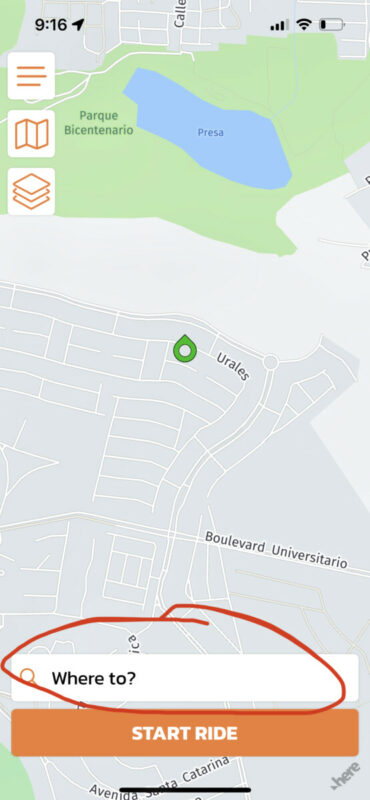
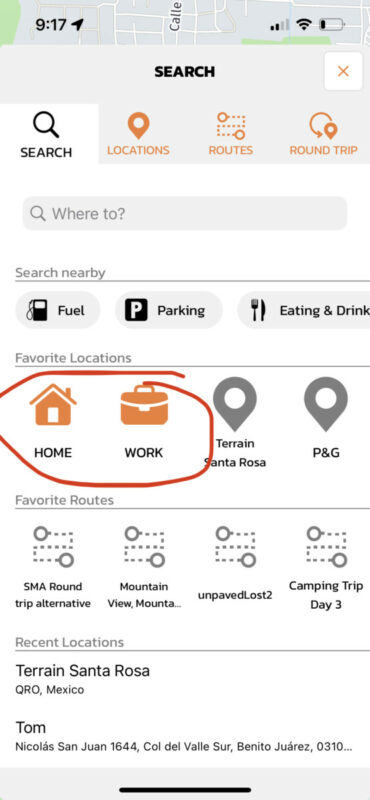
Scenic does have quick buttons to access your home and your work location. You can find those buttons by tapping the "Where To" button in the Home Screen. Then you'll see them.
Actually setting your home and work location is not so intuitive at the moment (need to improve this in the future). Here is how you can set them: https://scenic.app/forum/topic/scenic-3-setting-home-location/
Happy you chose Scenic in the end. 🙂
Scenic does have quick buttons to access your home and your work location. You can find those buttons by tapping the "Where To" button in the Home Screen. Then you'll see them.
Actually setting your home and work location is not so intuitive at the moment (need to improve this in the future). Here is how you can set them: https://scenic.app/forum/topic/scenic-3-setting-home-location/
Quote from BlasterMaster on 28.02.2023, 09:15I had already done as you suggested (added my home location and flipped the HOME switch). But I don't see a simple way to go HOME other than going back to my locations and selecting my HOME in favorites.
A simple, small "HOME" button on the main MAP screen would be my wish. Like many options you offer, maybe make it an off or on toggle.
I already have some from the Indian motorcycle forum taking a look at Scenic.
Thanks for the response.
I had already done as you suggested (added my home location and flipped the HOME switch). But I don't see a simple way to go HOME other than going back to my locations and selecting my HOME in favorites.
A simple, small "HOME" button on the main MAP screen would be my wish. Like many options you offer, maybe make it an off or on toggle.
I already have some from the Indian motorcycle forum taking a look at Scenic.
Thanks for the response.
Quote from Guido on 28.02.2023, 09:18The home and work buttons are just two taps away:
The home and work buttons are just two taps away:
Quote from BlasterMaster on 28.02.2023, 09:26I see. That's easy. Normally I use a program for a while before making suggestions. I learn by mostly using while also reading and watching videos. But mostly using.
I broke my rule by asking for something that Scenic really supports very well. Scenic offers tons of options and with that comes the challenge of making it understandable and user friendly which I think you did a great job of. Thanks again. Now I can get home when lost LOL.
I see. That's easy. Normally I use a program for a while before making suggestions. I learn by mostly using while also reading and watching videos. But mostly using.
I broke my rule by asking for something that Scenic really supports very well. Scenic offers tons of options and with that comes the challenge of making it understandable and user friendly which I think you did a great job of. Thanks again. Now I can get home when lost LOL.

Quote from mattsz on 28.02.2023, 09:48Quote from BlasterMaster on 28.02.2023, 09:26I see. That's easy. Normally I use a program for a while before making suggestions. I learn by mostly using while also reading and watching videos. But mostly using.
I broke my rule by asking for something that Scenic really supports very well. Scenic offers tons of options and with that comes the challenge of making it understandable and user friendly which I think you did a great job of. Thanks again. Now I can get home when lost LOL.
BlasterMaster - I see your point, I often feel the same. But when you ask a question like this, and Guido replies with his inevitable quick and helpful response, there's a good chance that lots of other people who read this forum will learn something. So don't be shy about asking...
Quote from BlasterMaster on 28.02.2023, 09:26I see. That's easy. Normally I use a program for a while before making suggestions. I learn by mostly using while also reading and watching videos. But mostly using.
I broke my rule by asking for something that Scenic really supports very well. Scenic offers tons of options and with that comes the challenge of making it understandable and user friendly which I think you did a great job of. Thanks again. Now I can get home when lost LOL.
BlasterMaster - I see your point, I often feel the same. But when you ask a question like this, and Guido replies with his inevitable quick and helpful response, there's a good chance that lots of other people who read this forum will learn something. So don't be shy about asking...
Quote from BlasterMaster on 03.03.2023, 12:54Relating to drag and drop GPX files on your website. It looks like this.....
As a VERY new user, I was trying to drag them onto the yellow areas above and I couldn't figure out why it wasn't working. Finally I clicked on the top one and the drop window opened. Duh. Maybe other first time users could be confused by this also.
2) After I finish a planned one way ride, can I somehow select "reverse ride" or similar and ride home? I didn't see that. Thanks.
Relating to drag and drop GPX files on your website. It looks like this.....
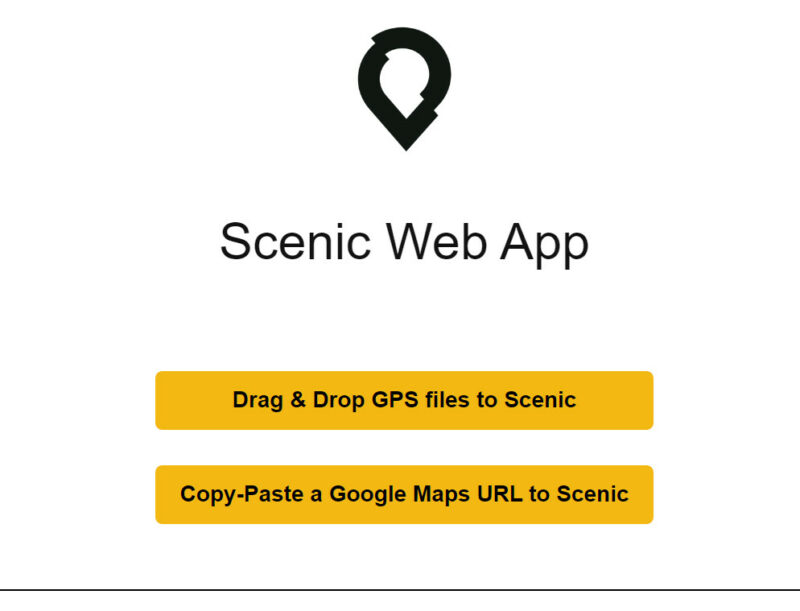
As a VERY new user, I was trying to drag them onto the yellow areas above and I couldn't figure out why it wasn't working. Finally I clicked on the top one and the drop window opened. Duh. Maybe other first time users could be confused by this also.
2) After I finish a planned one way ride, can I somehow select "reverse ride" or similar and ride home? I didn't see that. Thanks.
Quote from Guido on 03.03.2023, 18:51I understand the confusion about drag/dropping the GPX files. Happy you found the solution.
As for your 2nd point. Yes.. you can reverse a pre-planned route, but it's not as straightforward as you might think (with reason). To reverse a route, select route from route list > choose ‘edit points’ (or ‘duplicate’ first if you want to keep both versions). Once the route opens in the power planner, tap the reverse button (at the bottom ,2nd from left). This will reverse the route, and you can then save that route.
So, in the end, you'll have to save the 'reversed' route as a separate different route.
I understand the confusion about drag/dropping the GPX files. Happy you found the solution.
As for your 2nd point. Yes.. you can reverse a pre-planned route, but it's not as straightforward as you might think (with reason). To reverse a route, select route from route list > choose ‘edit points’ (or ‘duplicate’ first if you want to keep both versions). Once the route opens in the power planner, tap the reverse button (at the bottom ,2nd from left). This will reverse the route, and you can then save that route.
So, in the end, you'll have to save the 'reversed' route as a separate different route.
Quote from BlasterMaster on 05.03.2023, 08:50How do you clear your "Import Queue"? I created some routes on my PC and exported/imported them into my phone and saved them there. When I import a new one, the old ones seem to stay in the queue. Can I delete them? Thanks.
How do you clear your "Import Queue"? I created some routes on my PC and exported/imported them into my phone and saved them there. When I import a new one, the old ones seem to stay in the queue. Can I delete them? Thanks.


