Weird Navigation Route

Quote from Marts on 03.04.2024, 17:30I'm in my driveway. iPhone is plugged into the car's USB port so CarPlay is active.
When I leave I'll turn left onto the road then 20m later, left onto the highway to go on my trip.
However, Scenic is telling me to turn right onto my street, then right again into a court (or cul-de-sac) then at the end of the court, turn right down a lane (which is too narrow for the car) and then left onto the highway.
I am not asking for a solution. Maybe an explanation as to why this is happening. Thing is, the Garmin Zumo XT, Google Maps and the car's built in navigator all do the same thing.
There's something in the map data obviously, but what?
I've covered street names for obvious reasons.
I'm in my driveway. iPhone is plugged into the car's USB port so CarPlay is active.
When I leave I'll turn left onto the road then 20m later, left onto the highway to go on my trip.
However, Scenic is telling me to turn right onto my street, then right again into a court (or cul-de-sac) then at the end of the court, turn right down a lane (which is too narrow for the car) and then left onto the highway.
I am not asking for a solution. Maybe an explanation as to why this is happening. Thing is, the Garmin Zumo XT, Google Maps and the car's built in navigator all do the same thing.
There's something in the map data obviously, but what?
I've covered street names for obvious reasons.


Quote from Guido on 04.04.2024, 08:28Very likely an issue with the map. If you want you can directly reports these map error to HERE maps. There are two ways to do that: https://scenic.app/help/reporting-map-errors/
I recommend the mapcreator way.
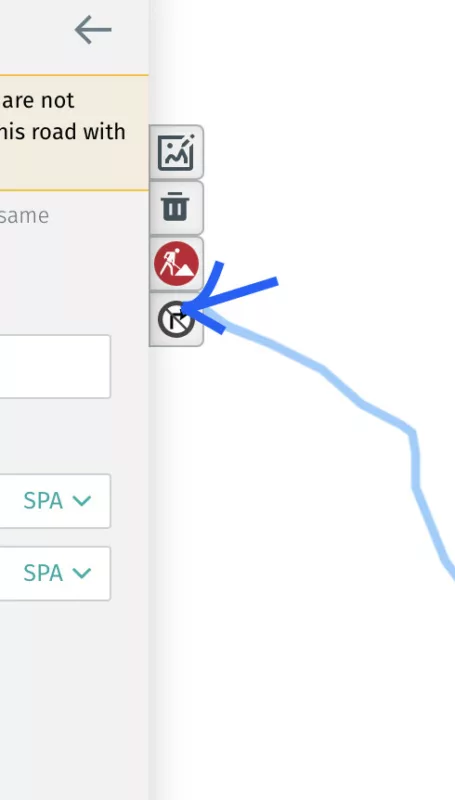
In map creator, make the allowed turns visible through this button:
Very likely an issue with the map. If you want you can directly reports these map error to HERE maps. There are two ways to do that: https://scenic.app/help/reporting-map-errors/
I recommend the mapcreator way.
In map creator, make the allowed turns visible through this button: