
Web App showing all my routes

Quote from chupa88 on 17.11.2026, 14:53Good day all,
When using the Web app, it's showing all my routes on the map even when none of my folders are checked in the Map Settings tabs. Is this a bug or is there a check box I turned on by accident? Thanks!
Good day all,
When using the Web app, it's showing all my routes on the map even when none of my folders are checked in the Map Settings tabs. Is this a bug or is there a check box I turned on by accident? Thanks!
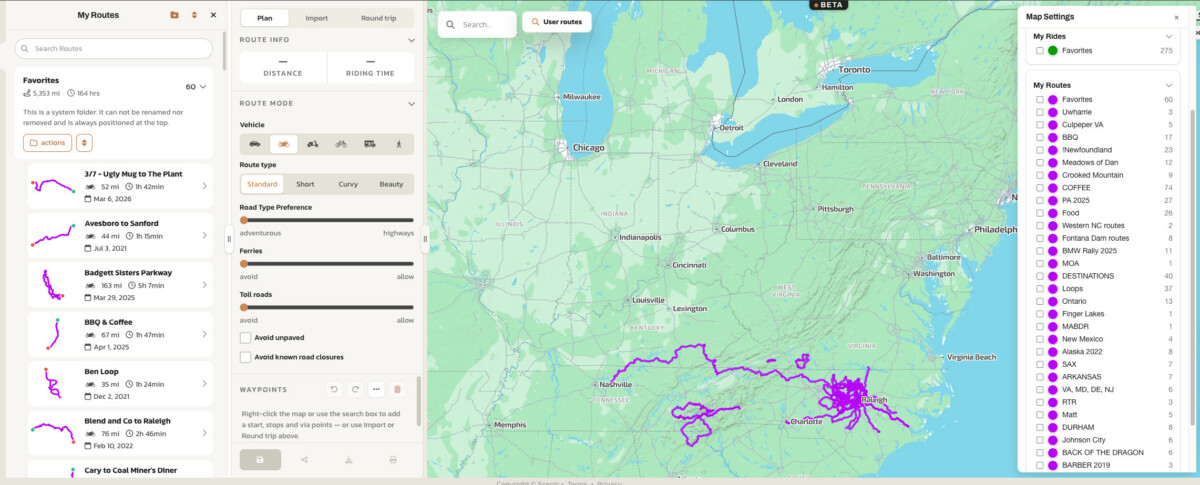

Quote from Guido on 17.11.2026, 15:15Routes in expanded folder on the left show on map.
Routes in expanded folder on the left show on map.
Quote from chupa88 on 17.11.2026, 15:47So if the folders on the left are expanded then it shows all the routes within that folder? I would imagine most people use folders extensively for organization. Seems a bit messy to see a giant web of routes when my folders have dozens of routes within each one.
Even after I click one route within the folder, I can still see the other routes in a thinner line. I would suggest adding an option to turn off the other routes so it's less messy on screen. Thanks for the quick reply!
So if the folders on the left are expanded then it shows all the routes within that folder? I would imagine most people use folders extensively for organization. Seems a bit messy to see a giant web of routes when my folders have dozens of routes within each one.
Even after I click one route within the folder, I can still see the other routes in a thinner line. I would suggest adding an option to turn off the other routes so it's less messy on screen. Thanks for the quick reply!
Quote from Guido on 17.11.2026, 16:45This was built like this upon user request. Yes, folders are for organizing. E.g. all routes for a specific trip in a folder. Even when selecting one, you'd want to see the others.
Once you click on a route in the expanded folder, the other routes will be dimmed and made thinner, and the selected route will stand out.
Once you actually start editing the route (pencil button in the top bar) the other routes will disappear.
This was built like this upon user request. Yes, folders are for organizing. E.g. all routes for a specific trip in a folder. Even when selecting one, you'd want to see the others.
Once you click on a route in the expanded folder, the other routes will be dimmed and made thinner, and the selected route will stand out.
Once you actually start editing the route (pencil button in the top bar) the other routes will disappear.
Quote from chupa88 on 18.11.2026, 09:57I
Quote from Guido on 17.11.2026, 16:45This was built like this upon user request. Even when selecting one, you'd want to see the others.
Once you click on a route in the expanded folder, the other routes will be dimmed and made thinner, and the selected route will stand out.
Once you actually start editing the route (pencil button in the top bar) the other routes will disappear.I understand your reasons and that others have asked for this implementation. For me, once I click on a route, I don't want to see the others. That's why I select one out of the dozens. Again, would be nice to have an option box to see all the other routes or just the one you select. Just a suggestion. Thanks for your reply.
I
Quote from Guido on 17.11.2026, 16:45This was built like this upon user request. Even when selecting one, you'd want to see the others.
Once you click on a route in the expanded folder, the other routes will be dimmed and made thinner, and the selected route will stand out.
Once you actually start editing the route (pencil button in the top bar) the other routes will disappear.
I understand your reasons and that others have asked for this implementation. For me, once I click on a route, I don't want to see the others. That's why I select one out of the dozens. Again, would be nice to have an option box to see all the other routes or just the one you select. Just a suggestion. Thanks for your reply.
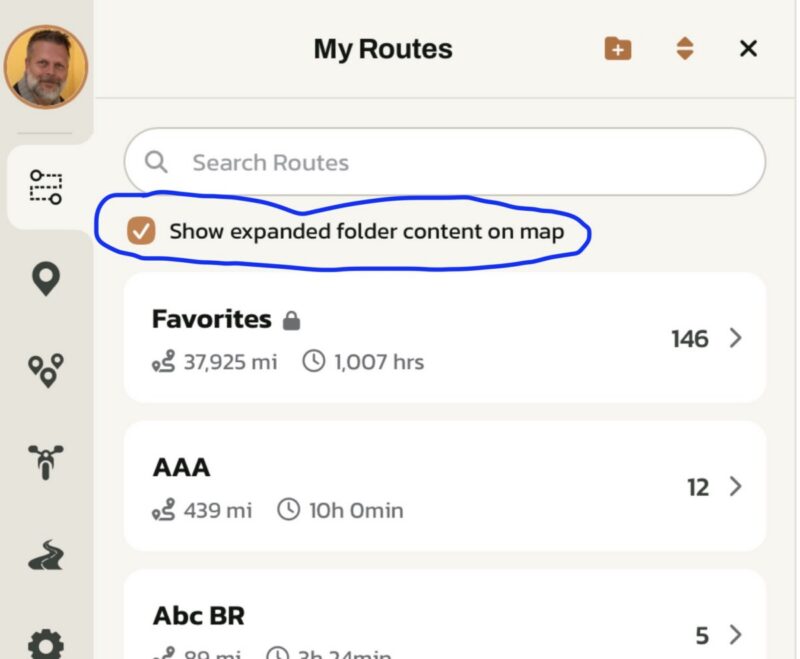
Quote from chupa88 on 19.11.2026, 11:13That's amazing! So great to be able to speak with the developer directly and see a change so quick! Thank you for adding that option!
That's amazing! So great to be able to speak with the developer directly and see a change so quick! Thank you for adding that option!

Quote from Maneno on 19.11.2026, 11:17Hello @guidomm,
I'm still analyzing the Web App, but my first impression is great. I particularly love the feature that lets you see the whole folder and choose the route by clicking on the track on the map.
Congrats!
D
Hello @guidomm,
I'm still analyzing the Web App, but my first impression is great. I particularly love the feature that lets you see the whole folder and choose the route by clicking on the track on the map.
Congrats!
D


