
Voice in turn by turn directions

Quote from jspringator on 18.08.2024, 05:58Is there any way to change the voice in the turn by turn directions?
BTW, I love the app.
Is there any way to change the voice in the turn by turn directions?
BTW, I love the app.

Quote from Guido on 18.08.2024, 06:02Thanks 😊
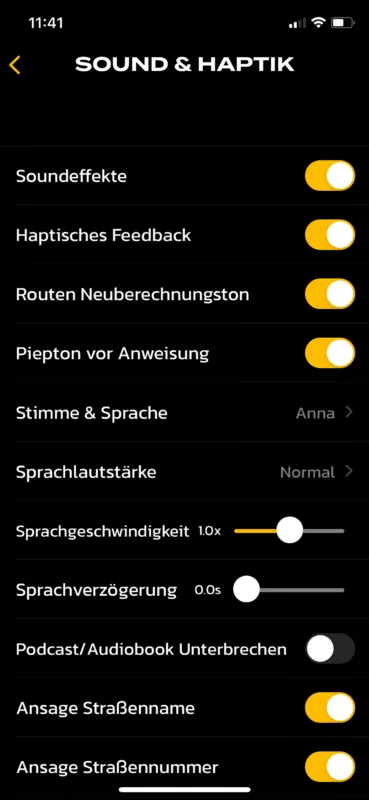
To change the voice go to Settings > Sound & Haptics > Voice & Language.
Cheers,
Guido
Thanks 😊
To change the voice go to Settings > Sound & Haptics > Voice & Language.
Cheers,
Guido
Quote from Fulvio on 27.08.2024, 08:56Dear Guido, dear all, I am very happy with Scenic. Only, sometimes, in full daylight, it may become quite hard to read the screen of my iPhone XR, even at full luminosity. Therefore, I bought a ‘cheap’ headset (perhaps I was wrong, but I am not interested in music or calls when riding, only to listen to my Scenic navigation instructions). The headset works fine, no problems connecting to Scenic via BT, but - and is a big but - I cannot hear the instructions. It is not a matter of speed: I can only hear if the engine is stopped, otherwise, even standing still, it’s impossible to hear the voice. The headset is Twiins HF2, the helmet is an AGV Sportmodular, with dedicated space for the headset… Is a problem of ‘my’ headset or others experience similar problems? Many thanks for your help
Dear Guido, dear all, I am very happy with Scenic. Only, sometimes, in full daylight, it may become quite hard to read the screen of my iPhone XR, even at full luminosity. Therefore, I bought a ‘cheap’ headset (perhaps I was wrong, but I am not interested in music or calls when riding, only to listen to my Scenic navigation instructions). The headset works fine, no problems connecting to Scenic via BT, but - and is a big but - I cannot hear the instructions. It is not a matter of speed: I can only hear if the engine is stopped, otherwise, even standing still, it’s impossible to hear the voice. The headset is Twiins HF2, the helmet is an AGV Sportmodular, with dedicated space for the headset… Is a problem of ‘my’ headset or others experience similar problems? Many thanks for your help

Quote from nick123123 on 27.08.2024, 11:00Probably just need to increase volume. There’s also a setting within app to increase volume of announcements.
Probably just need to increase volume. There’s also a setting within app to increase volume of announcements.
Quote from Guido on 27.08.2024, 14:12Try changing the voice mode. You can not find this in Settings, but you have to LONG PRESS the "speaker" button in the navigation menu. Here is a help article: https://scenic.app/help/low-voice-volume/
Try changing the voice mode. You can not find this in Settings, but you have to LONG PRESS the "speaker" button in the navigation menu. Here is a help article: https://scenic.app/help/low-voice-volume/
Quote from Fulvio on 28.08.2024, 01:02Quote from Guido on 27.08.2024, 14:12Try changing the voice mode. You can not find this in Settings, but you have to LONG PRESS the "speaker" button in the navigation menu. Here is a help article: https://scenic.app/help/low-voice-volume/
Hi Guido, no problems with the Voice Settings menu and setting it to loudest. Then I wanted to try the other way as well, i.e., "On iPhone/iPad: While navigating, tap and hold (long press) the “Audio Mode” button", but I wonder what should happen then? What message should I read? Another question: my Scenic speaks (and writes) in Italian. How could I switch to English (as its Italian is not... perfect). Thanks again,
Quote from Guido on 27.08.2024, 14:12Try changing the voice mode. You can not find this in Settings, but you have to LONG PRESS the "speaker" button in the navigation menu. Here is a help article: https://scenic.app/help/low-voice-volume/
Hi Guido, no problems with the Voice Settings menu and setting it to loudest. Then I wanted to try the other way as well, i.e., "On iPhone/iPad: While navigating, tap and hold (long press) the “Audio Mode” button", but I wonder what should happen then? What message should I read? Another question: my Scenic speaks (and writes) in Italian. How could I switch to English (as its Italian is not... perfect). Thanks again,

Quote from Mex on 28.08.2024, 03:45Hi Fulvio.
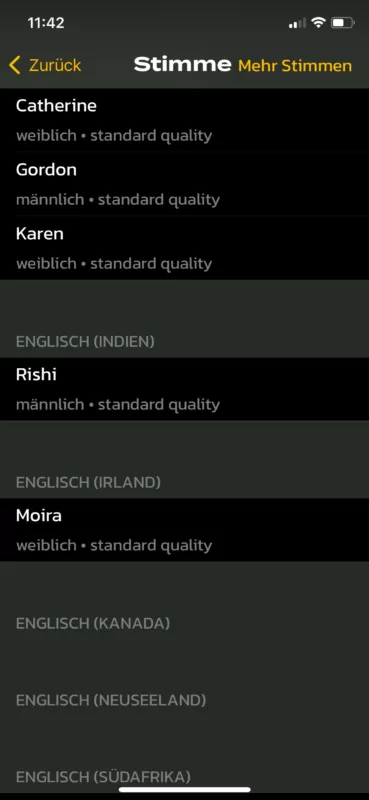
Go to settings. Select voice, maybe speech in english.
Scroll down to your preffered English voice.
Have fun, Mex
Hi Fulvio.
Go to settings. Select voice, maybe speech in english.
Scroll down to your preffered English voice.
Have fun, Mex
Quote from Guido on 28.08.2024, 08:43tap and hold (long press) the “Audio Mode” button", but I wonder what should happen then?
You will see a short pop-up displaying the Voice Mode. It will change the iOS category of the audio. "Play as Voice" or "Play as Audio". Some headsets work better with category Voice and others work better with category Audio.
To change language:
Mex already told you how to change the language of the voice instructions.If you also want to change the language of the user interface (the texts inside the app), go to iOS Settings > Scenic. There you will find a setting to change the language of Scenic.
tap and hold (long press) the “Audio Mode” button", but I wonder what should happen then?
You will see a short pop-up displaying the Voice Mode. It will change the iOS category of the audio. "Play as Voice" or "Play as Audio". Some headsets work better with category Voice and others work better with category Audio.
To change language:
Mex already told you how to change the language of the voice instructions.
If you also want to change the language of the user interface (the texts inside the app), go to iOS Settings > Scenic. There you will find a setting to change the language of Scenic.
Quote from Fulvio on 28.08.2024, 09:24Thanks Guido, indeed I will change the language of the user interface!
I have a further question: is there any possibility to 'test' the voice messages, e.g., for clarity/loudness, before actually starting a 'true' ride?
Thanks,
Fulvio
Thanks Guido, indeed I will change the language of the user interface!
I have a further question: is there any possibility to 'test' the voice messages, e.g., for clarity/loudness, before actually starting a 'true' ride?
Thanks,
Fulvio
Quote from Guido on 28.08.2024, 09:31Yes... most setting you change in Settings > Sound & Haptics will result in a short text ("Scenic") being spoken. For example, you could turn ON and OFF "beep before instruction", which will play this short voice instruction.
Yes... most setting you change in Settings > Sound & Haptics will result in a short text ("Scenic") being spoken. For example, you could turn ON and OFF "beep before instruction", which will play this short voice instruction.
Quote from Fulvio on 28.08.2024, 15:02I tried, and, in my case, the headset works ‘only’ by setting the audio mode (long press on the loudspeaker icon in navi mode) as “Audio”. The “loudest” level seems even too loud, so I set it to “louder”, that seems sufficient (I will try tomorrow at different speeds). By setting it as “Voice” the audio message from Scenic is barely audible even setting the “loudest” level. I hope this could help other users!
I tried, and, in my case, the headset works ‘only’ by setting the audio mode (long press on the loudspeaker icon in navi mode) as “Audio”. The “loudest” level seems even too loud, so I set it to “louder”, that seems sufficient (I will try tomorrow at different speeds). By setting it as “Voice” the audio message from Scenic is barely audible even setting the “loudest” level. I hope this could help other users!

Quote from iafan on 30.08.2024, 20:17I use Scenic in my car, not with a bike, so the sound comes from reasonably good speakers. What I noticed is that provided voices are not particularly optimized for speech clarity as compared, for example, to the voice navigation in Google Maps. It can be that the generated speech contains more lower frequencies, or having a higher dynamic range overall l, making the generated speech not well suited for noisy environments. I would definitely recommend playing around with different provided voice options, and anecdotally lower quality voices (voices that weigh less) may occur to sound clearer. But ideally, I would want Scenic to have voices better suited for car navigation.
I use Scenic in my car, not with a bike, so the sound comes from reasonably good speakers. What I noticed is that provided voices are not particularly optimized for speech clarity as compared, for example, to the voice navigation in Google Maps. It can be that the generated speech contains more lower frequencies, or having a higher dynamic range overall l, making the generated speech not well suited for noisy environments. I would definitely recommend playing around with different provided voice options, and anecdotally lower quality voices (voices that weigh less) may occur to sound clearer. But ideally, I would want Scenic to have voices better suited for car navigation.
Quote from Guido on 31.08.2024, 08:13Scenic uses the text to speech engine from iOS, and as such, needs to use the built-in voices from iOS.
What is the voice volume you selected in Settings > Sound & Haptics?
For the "louder" or "loudest" volumes, Scenic uses an equalizer to boost the volume above the system music volume. This can cause distortion on some speaker systems (regardless of quality). In the equalizer, I boost the higher frequencies more than the lower frequencies. Why, because if I don't do that, the distortion is even more, and after quite some testing and trying different equalizer settings, I found that by boosting the higher frequencies more, the voice becomes better to understand in your helmet where there are mostly lower 'droning' sounds caused by wind and maybe even some buffeting, and you are possibly using earplugs. I hope that makes sense.
If the distortion is too much, and if voice volume not already set to "normal", perhaps you can try setting it to "normal"?
Best regards,
Guido
Scenic uses the text to speech engine from iOS, and as such, needs to use the built-in voices from iOS.
What is the voice volume you selected in Settings > Sound & Haptics?
For the "louder" or "loudest" volumes, Scenic uses an equalizer to boost the volume above the system music volume. This can cause distortion on some speaker systems (regardless of quality). In the equalizer, I boost the higher frequencies more than the lower frequencies. Why, because if I don't do that, the distortion is even more, and after quite some testing and trying different equalizer settings, I found that by boosting the higher frequencies more, the voice becomes better to understand in your helmet where there are mostly lower 'droning' sounds caused by wind and maybe even some buffeting, and you are possibly using earplugs. I hope that makes sense.
If the distortion is too much, and if voice volume not already set to "normal", perhaps you can try setting it to "normal"?
Best regards,
Guido
Quote from Guido on 31.08.2024, 08:15Also... you could try changing the voice mode (you can't find this in Settings)... see here for more details: https://scenic.app/help/low-voice-volume/
Also... you could try changing the voice mode (you can't find this in Settings)... see here for more details: https://scenic.app/help/low-voice-volume/


