
Version 4.43 issues on IPad Pro

Quote from ElRoyDontDance on 25.08.2026, 18:42Hello all, I am a long time user of scenic. As my time in the road captains position for my motorcycle riding group we absolutely love the app because of its ability to share routes amongst all our members. As of the latest update 4.43 on my iPad Pro, I have had one difficulty after another. I have uninstalled the app reinstalled, updated my operating system on my iPad, etc. and now I can’t sign into the app on my iPad without it timing out . After I installed version 4.43 I could not share routes from my iPad without getting A failure . I was going to screen record a tutorial for version 4.43 for our members in our Motorcycle Association that use the app. On my phone it works great on my iPad currently it is useless. I can’t sign in. I can’t share a routes, It doesn’t sync my rides properly, And also, it times out when I try to use the curvy option for route planning when it was working. I uninstalled it again today and reinstalled and cannot sign into the app now because it pops up the request timed out notification. I’m unsure of what is going on, but I plan our routes almost exclusively on my iPad and then just open and ride the route from my iPhone. We require our officers to use scenic, that speaks volumes on what we think of the app, but a lot of our members are having issues as well. Just curious as if these are just bugs that will be worked out soon, or is it something with the OS on the iPad? I run the latest iOS on my iPad, just curious as to how I can fix it or if there is a fix in the works. I apologize for the run-on or if this is a duplicate forum post, I searched and didn’t really see anything where people were having problems with logging in, the curvy routes, and the timeout issues that I am having in 4.43
Hello all, I am a long time user of scenic. As my time in the road captains position for my motorcycle riding group we absolutely love the app because of its ability to share routes amongst all our members. As of the latest update 4.43 on my iPad Pro, I have had one difficulty after another. I have uninstalled the app reinstalled, updated my operating system on my iPad, etc. and now I can’t sign into the app on my iPad without it timing out . After I installed version 4.43 I could not share routes from my iPad without getting A failure . I was going to screen record a tutorial for version 4.43 for our members in our Motorcycle Association that use the app. On my phone it works great on my iPad currently it is useless. I can’t sign in. I can’t share a routes, It doesn’t sync my rides properly, And also, it times out when I try to use the curvy option for route planning when it was working. I uninstalled it again today and reinstalled and cannot sign into the app now because it pops up the request timed out notification. I’m unsure of what is going on, but I plan our routes almost exclusively on my iPad and then just open and ride the route from my iPhone. We require our officers to use scenic, that speaks volumes on what we think of the app, but a lot of our members are having issues as well. Just curious as if these are just bugs that will be worked out soon, or is it something with the OS on the iPad? I run the latest iOS on my iPad, just curious as to how I can fix it or if there is a fix in the works. I apologize for the run-on or if this is a duplicate forum post, I searched and didn’t really see anything where people were having problems with logging in, the curvy routes, and the timeout issues that I am having in 4.43

Quote from Guido on 26.08.2026, 09:47It sounds like your device can't connect to the Scenic server.
Are you using a VPN or security software by any chance? If so, try to disable that or add https://scenicapp.space to the "allow" list there.
Also check directly in iOS Settings > VPN & Device Management (some services have an auto connect feature)
If that doesn't help, try turning off your WiFi (use cellular data).
For context: a third-party security blacklist flagged our server a few weeks ago as a false-positive. VPNs, security tools, and some internet providers use that blacklist to filter traffic, which means they can block access to Scenic even though our server is operating normally.
We've already reported the false-positive and took measures and we are no longer on the blacklist. However, this can take time to propagate across all the services that use that blacklist.
My apologies for the inconvenience and best regards,
Guido
It sounds like your device can't connect to the Scenic server.
Are you using a VPN or security software by any chance? If so, try to disable that or add https://scenicapp.space to the "allow" list there.
Also check directly in iOS Settings > VPN & Device Management (some services have an auto connect feature)
If that doesn't help, try turning off your WiFi (use cellular data).
For context: a third-party security blacklist flagged our server a few weeks ago as a false-positive. VPNs, security tools, and some internet providers use that blacklist to filter traffic, which means they can block access to Scenic even though our server is operating normally.
We've already reported the false-positive and took measures and we are no longer on the blacklist. However, this can take time to propagate across all the services that use that blacklist.
My apologies for the inconvenience and best regards,
Guido
Quote from ElRoyDontDance on 26.08.2026, 11:11Thanks for the reply @guidomm I dont use a VPN or anything like that. Im using the ios app, i tried connecting to different wifi connections and it does the same thing on the three that i have tried. I will try the cellular approach and see what happens. I absolutely still have every intention of using the app. I have developed a few and know how it is when we update platforms etc.. I figured it may be bugs or my ipad, ill keep working on it.
Thanks for the reply @guidomm I dont use a VPN or anything like that. Im using the ios app, i tried connecting to different wifi connections and it does the same thing on the three that i have tried. I will try the cellular approach and see what happens. I absolutely still have every intention of using the app. I have developed a few and know how it is when we update platforms etc.. I figured it may be bugs or my ipad, ill keep working on it.
Quote from ElRoyDontDance on 26.08.2026, 13:45Ok this is gonna be a long post .. however, the short of it is : If you are running a Developer /Beta Version of IOS 27, it can possibly change your Wifi Settings, causing a failure to scenics server. I spent most of the day trouble shooting, and before going through all the steps posted
below… just go try a different Wifi Source and see what happens , then try the steps below ;
Scenic on iPadOS 27 Developer Beta
Login / Server Communication Timeout — Troubleshooting Report
Date observed: August 26, 2026
Device: iPad
Operating System: iPadOS 27 Developer Beta
Application: Scenic Motorcycle Navigation
Primary symptom: Scenic unable to successfully communicate with the Scenic server during login/account creation.IMPORTANT NOTE
This report is intended to help other Scenic users who may be running iPadOS 27 Developer Beta and encounter similar problems.
I cannot confirm that iPadOS 27 Developer Beta caused the problem. However, upgrading the iPad to the developer beta was one of the only significant changes made to the device around the same period as updating Scenic.
The problem ultimately resolved and Scenic began operating normally again.
SYMPTOMS
Scenic opened normally on the iPad and displayed the login screen.
After entering valid Scenic credentials, the application displayed:
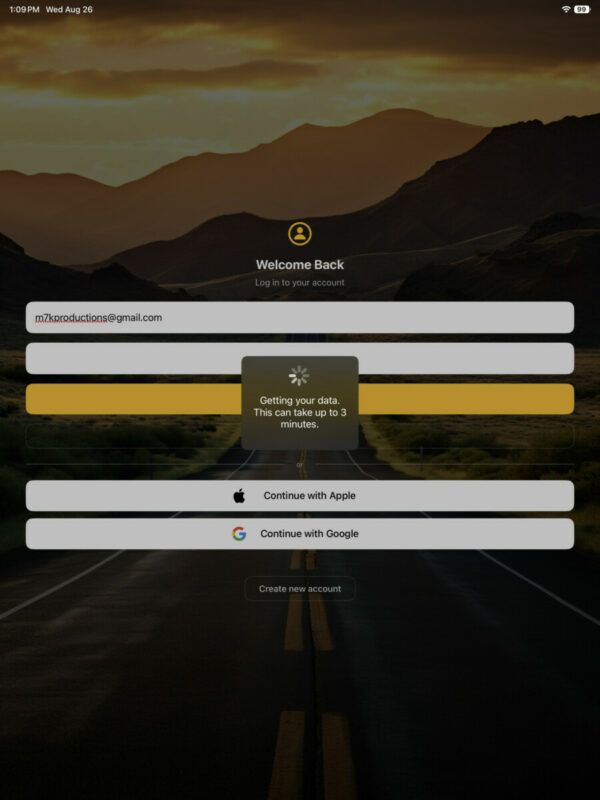
“Getting your data. This can take up to 3 minutes.”
Scenic remained at this stage for several minutes before eventually displaying:
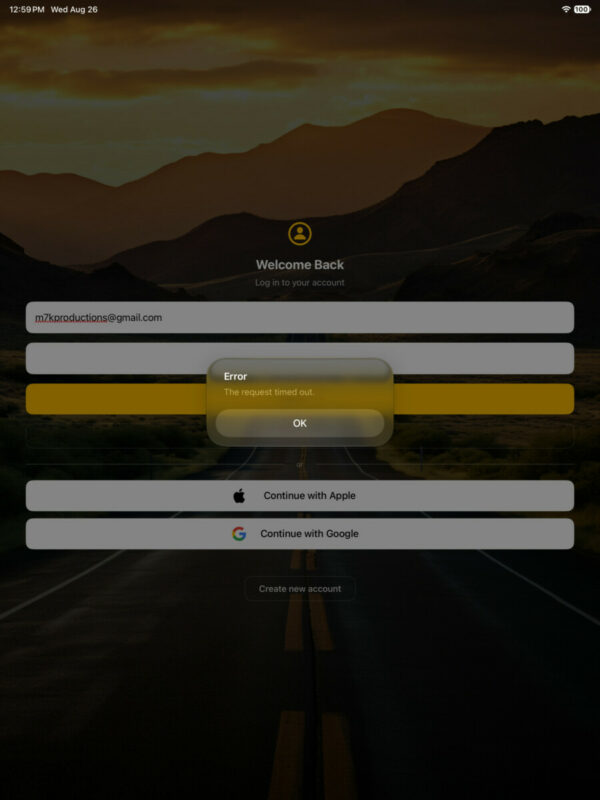
Error — The request timed out.
The same Scenic account continued to operate normally on an iPhone.
TEST 1 — VERIFY GENERAL INTERNET CONNECTIVITY
Safari and other internet services on the iPad operated normally.
The iPad had a valid Wi-Fi connection and local network address.
Observed network configuration included:
- Wi-Fi connected normally
- Valid IPv4 address assigned
- Router accessible
- HTTP Proxy: Off
- Low Data Mode: Off
Result: General internet connectivity was working.
This suggested that the issue was not simply a loss of Wi-Fi or internet access.
TEST 2 — DNS
The iPad was initially configured with manual Cloudflare DNS:
1.1.1.1
1.0.0.1For troubleshooting purposes, DNS was changed from Manual to Automatic so the network-provided DNS servers would be used.
Wi-Fi was cycled and Scenic was restarted.
Result: Scenic continued to time out.
This made the custom DNS configuration a less likely cause.
TEST 3 — VPN / DEVICE MANAGEMENT
Checked:
Settings → General → VPN & Device Management
There were no VPN configurations or device-management profiles installed that appeared capable of filtering Scenic’s network traffic.
Result: No VPN or management profile was identified as the cause.
TEST 4 — IP PRIVACY / NETWORK SETTINGS
The Wi-Fi configuration was reviewed.
Relevant settings included:
- Low Data Mode: Off
- Private Wi-Fi Address: Off during troubleshooting
- Limit IP Address Tracking: Off
- Configure IP: Automatic
- Configure DNS: Automatic after troubleshooting change
- Configure Proxy: Off
Normal websites continued working.
Result: Scenic still experienced server timeouts despite otherwise functional internet connectivity.
TEST 5 — EXISTING SCENIC ACCOUNT
The existing Scenic account was tested.
Scenic attempted to retrieve account information and displayed:
“Getting your data. This can take up to 3 minutes.”
After approximately several minutes:
“The request timed out.”
Meanwhile, the same Scenic account worked normally on an iPhone.
This was an important distinction because it demonstrated that the Scenic account itself remained functional.
TEST 6 — LOG OUT OF SCENIC ON IPHONE
Based on a suggestion found in the Scenic community, Scenic was logged out on the iPhone before attempting another login on the iPad.
Result: No change.
The iPad still timed out.
This suggested that simultaneous authentication on the iPhone was probably not responsible.
TEST 7 — ATTEMPT TO CREATE A COMPLETELY NEW ACCOUNT
This proved to be one of the most useful diagnostic tests.
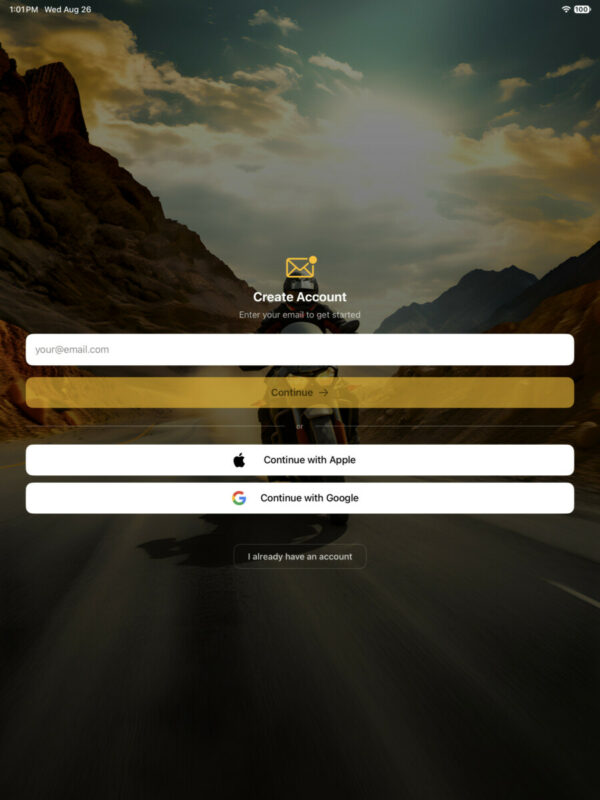
Instead of attempting to authenticate the existing account, a completely different email address was entered using Scenic’s Create Account function.
Scenic returned:
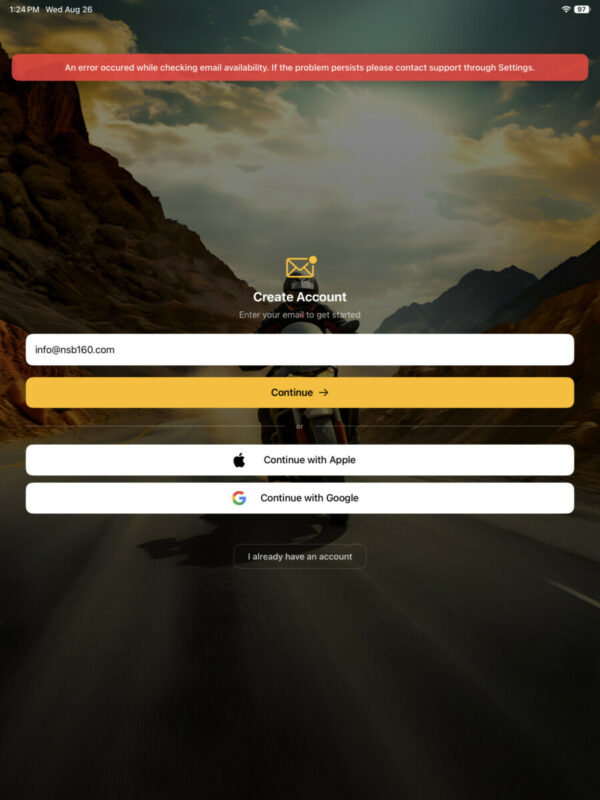
“An error occurred while checking email availability. If the problem persists please contact support through Settings.”
This was significant.
The failure occurred before a new account could even be created. Scenic apparently could not successfully complete the server request necessary to determine whether the email address was available.
That made the following explanations considerably less likely:
- Incorrect password
- Corrupted existing Scenic account
- Existing account being logged into another device
- Problem specific to one email address
- General loss of internet connectivity
Both login and new-account creation were experiencing problems when Scenic attempted to communicate with its backend services.
IMPORTANT COMPARISON — IPHONE VS. IPAD
During troubleshooting:
iPhone
Scenic operated normally.
The existing account worked correctly.
iPad
Scenic launched normally and internet access worked, but server-dependent Scenic functions repeatedly failed or timed out.
This strongly suggested a device-specific or OS/app compatibility issue rather than a Scenic account problem.
IMPORTANT VARIABLE — iPadOS 27 DEVELOPER BETA
The iPad had recently been upgraded to the iPadOS 27 Developer Beta.
This was one of the only major changes to the iPad around the same period that Scenic was updated.
Because developer beta operating systems can introduce networking, API, security, framework, and application-compatibility changes, users experiencing similar Scenic problems should include their exact iPadOS beta version and build number when reporting the issue.
This does NOT establish that iPadOS 27 caused the Scenic problem.
It does, however, make the beta OS an important troubleshooting variable.
EVENTUAL RESULT
After the troubleshooting described above, Scenic eventually began operating correctly on the iPad.
There was no single definitive change that can currently be identified as the fix.
For that reason, the problem may have involved:
- A temporary Scenic/iPadOS communication problem
- A temporary networking state within iPadOS
- A Scenic backend/API communication issue
- An interaction between Scenic and the iPadOS 27 Developer Beta
- A transient issue that cleared after network/app state changes
- Another unidentified beta-related condition
At this time there is not enough evidence to identify one of these as the definitive cause.
RECOMMENDED TROUBLESHOOTING FOR OTHER iPadOS 27 BETA USERS
If Scenic opens but login, synchronization, or account creation times out:
- Do not immediately assume your Scenic account is corrupted.
- Verify Safari and other applications have normal internet access.
- Verify Scenic works on another device, if available.
- Temporarily return custom DNS settings to Automatic.
- Check:
Settings → General → VPN & Device Management
Disable VPNs or network-filtering profiles temporarily for testing.- Check the affected Wi-Fi network and temporarily eliminate proxies, custom DNS, privacy relays, or filtering as troubleshooting variables.
- Force-close and restart Scenic.
- Restart the iPad.
- Compare the Scenic version installed on the iPhone and iPad.
- Verify:
Settings → General → Date & Time → Set Automatically
- If login continues to fail, try Scenic’s Create Account screen with another email address.
You do not need to finish creating the account.
If Scenic cannot even check whether the email address is available, this may indicate a broader communication problem between Scenic and its backend rather than a problem with your existing account.
- Record your exact:
- iPad model
- iPadOS version
- iPadOS beta number
- iPadOS build number
- Scenic version
- Network type
- Exact Scenic error message
- Approximate time the problem occurred
- Take screenshots of the errors.
- Report the information to Scenic Support and, if appropriate, through Apple’s Feedback Assistant.
FOR DEVELOPERS / ADVANCED BETA TESTERS
If the issue occurs again, it may be useful to capture diagnostics before changing multiple settings, particularly:
- Exact iPadOS build
- Scenic version/build
- Timestamp of failed authentication
- Whether Scenic’s web service is reachable through Safari
- Whether another iOS/iPadOS device on the same Wi-Fi works
- Whether the failure follows the device when connected to another network
- Relevant iPad analytics/crash logs
- Apple Feedback Assistant report number
This information may help distinguish among:
Scenic application issue → Scenic backend issue → network issue → iPadOS beta compatibility issue.
BOTTOM LINE
In this case, an iPad running iPadOS 27 Developer Beta had normal internet access but Scenic repeatedly timed out while communicating with its servers.
The same Scenic account worked normally on an iPhone.
Changing DNS to Automatic did not immediately resolve the issue. No VPN or management profile was present. Logging Scenic out on the iPhone did not resolve it. Attempting to create an entirely new Scenic account also failed when Scenic attempted to check email availability.
Scenic subsequently began operating normally again.
There is currently no evidence sufficient to say that iPadOS 27 Developer Beta caused the problem. However, because the beta OS was one of the only major recent changes to the affected iPad, and because previous iPadOS developer-beta releases have produced Scenic compatibility problems, it should remain a significant troubleshooting variable.
Hopefully this information saves another Scenic user from spending hours chasing passwords, accounts, DNS servers, and Wi-Fi settings when the underlying issue may be related to the interaction between Scenic and a beta version of iPadOS.
CRITICAL TEST — DIFFERENT WI-FI NETWORK
An additional test provided an important clue.
The affected iPad was connected to a free public Wi-Fi network instead of the home Wi-Fi network.
After connecting to the public Wi-Fi:
Scenic successfully connected and operated normally.
This demonstrated that:
- The Scenic application itself was capable of communicating with Scenic’s servers from the iPad.
- The iPad had functional internet/networking capability.
- The Scenic account was valid.
- The problem appeared to be related to the interaction between the iPad and the original Wi-Fi network rather than a complete Scenic application or account failure.
RETURNING TO THE HOME WI-FI NETWORK
After Scenic successfully operated over the public Wi-Fi network, the iPad was returned to the original home Wi-Fi network.
During troubleshooting, the Private Wi-Fi Address configuration for the home network was changed to Fixed.
The path on iPadOS was:
Settings → Wi-Fi → [Home Network] → Private Wi-Fi Address → Fixed
After these changes and the preceding network troubleshooting, Scenic began operating correctly again.
WHY THE PUBLIC WI-FI TEST IS IMPORTANT
This significantly changes the troubleshooting picture.
Before this test, it was possible that Scenic itself was incompatible with the iPadOS 27 Developer Beta or that something within the Scenic installation was preventing server communication.
However, Scenic successfully communicating with its servers when the same iPad and same Scenic installation were connected to a different Wi-Fi network demonstrates that Scenic could communicate from that device.
That makes a complete Scenic/iPadOS incompatibility considerably less likely.
Instead, the evidence suggests there may have been an issue involving the network identity or networking state of the iPad when connected to the original Wi-Fi network.
One potentially relevant variable is Apple’s Private Wi-Fi Address feature.
Apple devices can use a private MAC/Wi-Fi address rather than exposing the device’s permanent hardware Wi-Fi address to each network. Depending upon the selected mode and operating-system version, the device’s network identity can be handled differently.
Changing the home Wi-Fi network’s Private Wi-Fi Address setting to Fixed therefore becomes an important part of this troubleshooting history.
It is important to emphasize:
We cannot conclusively state that changing Private Wi-Fi Address to Fixed solved the problem.
Several network changes and reconnections had occurred during troubleshooting.
However, the sequence was:
Scenic failed repeatedly on home Wi-Fi → Scenic worked on public Wi-Fi → home Wi-Fi configuration was changed to use a Fixed Private Wi-Fi Address → Scenic subsequently operated correctly.
That sequence is significant enough that other Scenic users running an iPadOS 27 beta who encounter similar server timeouts may want to test it.
UPDATED RECOMMENDED TEST
If Scenic works normally on an iPhone but repeatedly times out on an iPad running an iPadOS 27 Developer Beta:
- Do not immediately delete your Scenic account or assume your credentials are incorrect.
- Connect the affected iPad to a completely different Wi-Fi network.
- Open Scenic and attempt to sign in.
If Scenic still fails:
The problem may be associated with Scenic, the iPad, or the beta operating system.
If Scenic immediately works:
The original Wi-Fi connection/configuration becomes a much stronger suspect.
Return to the original Wi-Fi network and inspect:
Settings → Wi-Fi → ⓘ beside the network
Check:
- Private Wi-Fi Address
- Limit IP Address Tracking
- Configure IP
- Configure DNS
- Configure Proxy
If Private Wi-Fi Address is available with multiple modes, testing Fixed may be worthwhile.
Do not assume this is a guaranteed fix. Document the original setting first so it can be restored if necessary.
UPDATED CONCLUSION
The strongest diagnostic finding in this case was that Scenic failed to communicate with its servers while the iPad was connected to the home Wi-Fi network, yet Scenic worked when the exact same iPad was connected to a free public Wi-Fi network.
That means the problem was not simply:
“Scenic doesn’t work on iPadOS 27 Developer Beta.”
A more accurate description is:
“Scenic experienced server communication timeouts on an iPad running iPadOS 27 Developer Beta while connected to a particular Wi-Fi network. The same iPad successfully connected to Scenic over public Wi-Fi. After subsequent network troubleshooting, including changing Private Wi-Fi Address to Fixed, Scenic began operating normally on the original network.”
Because iPadOS 27 is beta software, an interaction between the beta’s networking/privacy behavior, Wi-Fi network identity, the router, and Scenic cannot currently be ruled out.
Users experiencing the same symptoms should therefore test another Wi-Fi network before reinstalling Scenic, resetting the iPad, or assuming their Scenic account is damaged.
Ok this is gonna be a long post .. however, the short of it is : If you are running a Developer /Beta Version of IOS 27, it can possibly change your Wifi Settings, causing a failure to scenics server. I spent most of the day trouble shooting, and before going through all the steps posted below… just go try a different Wifi Source and see what happens , then try the steps below ;
Scenic on iPadOS 27 Developer Beta
Login / Server Communication Timeout — Troubleshooting Report
Date observed: August 26, 2026
Device: iPad
Operating System: iPadOS 27 Developer Beta
Application: Scenic Motorcycle Navigation
Primary symptom: Scenic unable to successfully communicate with the Scenic server during login/account creation.
IMPORTANT NOTE
This report is intended to help other Scenic users who may be running iPadOS 27 Developer Beta and encounter similar problems.
I cannot confirm that iPadOS 27 Developer Beta caused the problem. However, upgrading the iPad to the developer beta was one of the only significant changes made to the device around the same period as updating Scenic.
The problem ultimately resolved and Scenic began operating normally again.
SYMPTOMS
Scenic opened normally on the iPad and displayed the login screen.
After entering valid Scenic credentials, the application displayed:
“Getting your data. This can take up to 3 minutes.”
Scenic remained at this stage for several minutes before eventually displaying:
Error — The request timed out.
The same Scenic account continued to operate normally on an iPhone.
TEST 1 — VERIFY GENERAL INTERNET CONNECTIVITY
Safari and other internet services on the iPad operated normally.
The iPad had a valid Wi-Fi connection and local network address.
Observed network configuration included:
- Wi-Fi connected normally
- Valid IPv4 address assigned
- Router accessible
- HTTP Proxy: Off
- Low Data Mode: Off
Result: General internet connectivity was working.
This suggested that the issue was not simply a loss of Wi-Fi or internet access.
TEST 2 — DNS
The iPad was initially configured with manual Cloudflare DNS:
1.1.1.1
1.0.0.1
For troubleshooting purposes, DNS was changed from Manual to Automatic so the network-provided DNS servers would be used.
Wi-Fi was cycled and Scenic was restarted.
Result: Scenic continued to time out.
This made the custom DNS configuration a less likely cause.
TEST 3 — VPN / DEVICE MANAGEMENT
Checked:
Settings → General → VPN & Device Management
There were no VPN configurations or device-management profiles installed that appeared capable of filtering Scenic’s network traffic.
Result: No VPN or management profile was identified as the cause.
TEST 4 — IP PRIVACY / NETWORK SETTINGS
The Wi-Fi configuration was reviewed.
Relevant settings included:
- Low Data Mode: Off
- Private Wi-Fi Address: Off during troubleshooting
- Limit IP Address Tracking: Off
- Configure IP: Automatic
- Configure DNS: Automatic after troubleshooting change
- Configure Proxy: Off
Normal websites continued working.
Result: Scenic still experienced server timeouts despite otherwise functional internet connectivity.
TEST 5 — EXISTING SCENIC ACCOUNT
The existing Scenic account was tested.
Scenic attempted to retrieve account information and displayed:
“Getting your data. This can take up to 3 minutes.”
After approximately several minutes:
“The request timed out.”
Meanwhile, the same Scenic account worked normally on an iPhone.
This was an important distinction because it demonstrated that the Scenic account itself remained functional.
TEST 6 — LOG OUT OF SCENIC ON IPHONE
Based on a suggestion found in the Scenic community, Scenic was logged out on the iPhone before attempting another login on the iPad.
Result: No change.
The iPad still timed out.
This suggested that simultaneous authentication on the iPhone was probably not responsible.
TEST 7 — ATTEMPT TO CREATE A COMPLETELY NEW ACCOUNT
This proved to be one of the most useful diagnostic tests.
Instead of attempting to authenticate the existing account, a completely different email address was entered using Scenic’s Create Account function.
Scenic returned:
“An error occurred while checking email availability. If the problem persists please contact support through Settings.”
This was significant.
The failure occurred before a new account could even be created. Scenic apparently could not successfully complete the server request necessary to determine whether the email address was available.
That made the following explanations considerably less likely:
- Incorrect password
- Corrupted existing Scenic account
- Existing account being logged into another device
- Problem specific to one email address
- General loss of internet connectivity
Both login and new-account creation were experiencing problems when Scenic attempted to communicate with its backend services.
IMPORTANT COMPARISON — IPHONE VS. IPAD
During troubleshooting:
iPhone
Scenic operated normally.
The existing account worked correctly.
iPad
Scenic launched normally and internet access worked, but server-dependent Scenic functions repeatedly failed or timed out.
This strongly suggested a device-specific or OS/app compatibility issue rather than a Scenic account problem.
IMPORTANT VARIABLE — iPadOS 27 DEVELOPER BETA
The iPad had recently been upgraded to the iPadOS 27 Developer Beta.
This was one of the only major changes to the iPad around the same period that Scenic was updated.
Because developer beta operating systems can introduce networking, API, security, framework, and application-compatibility changes, users experiencing similar Scenic problems should include their exact iPadOS beta version and build number when reporting the issue.
This does NOT establish that iPadOS 27 caused the Scenic problem.
It does, however, make the beta OS an important troubleshooting variable.
EVENTUAL RESULT
After the troubleshooting described above, Scenic eventually began operating correctly on the iPad.
There was no single definitive change that can currently be identified as the fix.
For that reason, the problem may have involved:
- A temporary Scenic/iPadOS communication problem
- A temporary networking state within iPadOS
- A Scenic backend/API communication issue
- An interaction between Scenic and the iPadOS 27 Developer Beta
- A transient issue that cleared after network/app state changes
- Another unidentified beta-related condition
At this time there is not enough evidence to identify one of these as the definitive cause.
RECOMMENDED TROUBLESHOOTING FOR OTHER iPadOS 27 BETA USERS
If Scenic opens but login, synchronization, or account creation times out:
- Do not immediately assume your Scenic account is corrupted.
- Verify Safari and other applications have normal internet access.
- Verify Scenic works on another device, if available.
- Temporarily return custom DNS settings to Automatic.
- Check:
Settings → General → VPN & Device Management
Disable VPNs or network-filtering profiles temporarily for testing. - Check the affected Wi-Fi network and temporarily eliminate proxies, custom DNS, privacy relays, or filtering as troubleshooting variables.
- Force-close and restart Scenic.
- Restart the iPad.
- Compare the Scenic version installed on the iPhone and iPad.
- Verify:
Settings → General → Date & Time → Set Automatically
- If login continues to fail, try Scenic’s Create Account screen with another email address.
You do not need to finish creating the account.
If Scenic cannot even check whether the email address is available, this may indicate a broader communication problem between Scenic and its backend rather than a problem with your existing account.
- Record your exact:
- iPad model
- iPadOS version
- iPadOS beta number
- iPadOS build number
- Scenic version
- Network type
- Exact Scenic error message
- Approximate time the problem occurred
- Take screenshots of the errors.
- Report the information to Scenic Support and, if appropriate, through Apple’s Feedback Assistant.
FOR DEVELOPERS / ADVANCED BETA TESTERS
If the issue occurs again, it may be useful to capture diagnostics before changing multiple settings, particularly:
- Exact iPadOS build
- Scenic version/build
- Timestamp of failed authentication
- Whether Scenic’s web service is reachable through Safari
- Whether another iOS/iPadOS device on the same Wi-Fi works
- Whether the failure follows the device when connected to another network
- Relevant iPad analytics/crash logs
- Apple Feedback Assistant report number
This information may help distinguish among:
Scenic application issue → Scenic backend issue → network issue → iPadOS beta compatibility issue.
BOTTOM LINE
In this case, an iPad running iPadOS 27 Developer Beta had normal internet access but Scenic repeatedly timed out while communicating with its servers.
The same Scenic account worked normally on an iPhone.
Changing DNS to Automatic did not immediately resolve the issue. No VPN or management profile was present. Logging Scenic out on the iPhone did not resolve it. Attempting to create an entirely new Scenic account also failed when Scenic attempted to check email availability.
Scenic subsequently began operating normally again.
There is currently no evidence sufficient to say that iPadOS 27 Developer Beta caused the problem. However, because the beta OS was one of the only major recent changes to the affected iPad, and because previous iPadOS developer-beta releases have produced Scenic compatibility problems, it should remain a significant troubleshooting variable.
Hopefully this information saves another Scenic user from spending hours chasing passwords, accounts, DNS servers, and Wi-Fi settings when the underlying issue may be related to the interaction between Scenic and a beta version of iPadOS.
CRITICAL TEST — DIFFERENT WI-FI NETWORK
An additional test provided an important clue.
The affected iPad was connected to a free public Wi-Fi network instead of the home Wi-Fi network.
After connecting to the public Wi-Fi:
Scenic successfully connected and operated normally.
This demonstrated that:
- The Scenic application itself was capable of communicating with Scenic’s servers from the iPad.
- The iPad had functional internet/networking capability.
- The Scenic account was valid.
- The problem appeared to be related to the interaction between the iPad and the original Wi-Fi network rather than a complete Scenic application or account failure.
RETURNING TO THE HOME WI-FI NETWORK
After Scenic successfully operated over the public Wi-Fi network, the iPad was returned to the original home Wi-Fi network.
During troubleshooting, the Private Wi-Fi Address configuration for the home network was changed to Fixed.
The path on iPadOS was:
Settings → Wi-Fi → [Home Network] → Private Wi-Fi Address → Fixed
After these changes and the preceding network troubleshooting, Scenic began operating correctly again.
WHY THE PUBLIC WI-FI TEST IS IMPORTANT
This significantly changes the troubleshooting picture.
Before this test, it was possible that Scenic itself was incompatible with the iPadOS 27 Developer Beta or that something within the Scenic installation was preventing server communication.
However, Scenic successfully communicating with its servers when the same iPad and same Scenic installation were connected to a different Wi-Fi network demonstrates that Scenic could communicate from that device.
That makes a complete Scenic/iPadOS incompatibility considerably less likely.
Instead, the evidence suggests there may have been an issue involving the network identity or networking state of the iPad when connected to the original Wi-Fi network.
One potentially relevant variable is Apple’s Private Wi-Fi Address feature.
Apple devices can use a private MAC/Wi-Fi address rather than exposing the device’s permanent hardware Wi-Fi address to each network. Depending upon the selected mode and operating-system version, the device’s network identity can be handled differently.
Changing the home Wi-Fi network’s Private Wi-Fi Address setting to Fixed therefore becomes an important part of this troubleshooting history.
It is important to emphasize:
We cannot conclusively state that changing Private Wi-Fi Address to Fixed solved the problem.
Several network changes and reconnections had occurred during troubleshooting.
However, the sequence was:
Scenic failed repeatedly on home Wi-Fi → Scenic worked on public Wi-Fi → home Wi-Fi configuration was changed to use a Fixed Private Wi-Fi Address → Scenic subsequently operated correctly.
That sequence is significant enough that other Scenic users running an iPadOS 27 beta who encounter similar server timeouts may want to test it.
UPDATED RECOMMENDED TEST
If Scenic works normally on an iPhone but repeatedly times out on an iPad running an iPadOS 27 Developer Beta:
- Do not immediately delete your Scenic account or assume your credentials are incorrect.
- Connect the affected iPad to a completely different Wi-Fi network.
- Open Scenic and attempt to sign in.
If Scenic still fails:
The problem may be associated with Scenic, the iPad, or the beta operating system.
If Scenic immediately works:
The original Wi-Fi connection/configuration becomes a much stronger suspect.
Return to the original Wi-Fi network and inspect:
Settings → Wi-Fi → ⓘ beside the network
Check:
- Private Wi-Fi Address
- Limit IP Address Tracking
- Configure IP
- Configure DNS
- Configure Proxy
If Private Wi-Fi Address is available with multiple modes, testing Fixed may be worthwhile.
Do not assume this is a guaranteed fix. Document the original setting first so it can be restored if necessary.
UPDATED CONCLUSION
The strongest diagnostic finding in this case was that Scenic failed to communicate with its servers while the iPad was connected to the home Wi-Fi network, yet Scenic worked when the exact same iPad was connected to a free public Wi-Fi network.
That means the problem was not simply:
“Scenic doesn’t work on iPadOS 27 Developer Beta.”
A more accurate description is:
“Scenic experienced server communication timeouts on an iPad running iPadOS 27 Developer Beta while connected to a particular Wi-Fi network. The same iPad successfully connected to Scenic over public Wi-Fi. After subsequent network troubleshooting, including changing Private Wi-Fi Address to Fixed, Scenic began operating normally on the original network.”
Because iPadOS 27 is beta software, an interaction between the beta’s networking/privacy behavior, Wi-Fi network identity, the router, and Scenic cannot currently be ruled out.
Users experiencing the same symptoms should therefore test another Wi-Fi network before reinstalling Scenic, resetting the iPad, or assuming their Scenic account is damaged.
Quote from Guido on 26.08.2026, 13:54This is awesome... thanks so much @elroydontdance!
I had AI make a short summary of your post, for those that don't want to read all the details...
What to try, in order
- Switch the iPad to a completely different Wi-Fi (or hotspot) and open Scenic. If it works, your original network is the suspect — stop chasing your account or password.
- Back on your normal network: Settings → Wi-Fi → ⓘ next to the network → set Private Wi-Fi Address to Fixed(note the original setting first).
- On the same screen, temporarily clear the other variables: DNS → Automatic, Proxy → Off, Limit IP Address Tracking → Off, Low Data Mode → Off, Configure IP → Automatic.
- Check Settings → General → VPN & Device Management for any VPN or filtering profile; disable for testing.
- Force-close Scenic, then restart the iPad. Also confirm Date & Time → Set Automatically.
- Quick diagnostic: try Scenic's Create Account screen with any other email (don't finish). If it can't even check email availability, it's a server-communication problem, not your account.
- If it still fails, report to Scenic Support (and Apple Feedback Assistant) with iPad model, iPadOS version/build, Scenic version, network type, exact error text, timestamp, and screenshots.
This is awesome... thanks so much @elroydontdance!
I had AI make a short summary of your post, for those that don't want to read all the details...
What to try, in order
- Switch the iPad to a completely different Wi-Fi (or hotspot) and open Scenic. If it works, your original network is the suspect — stop chasing your account or password.
- Back on your normal network: Settings → Wi-Fi → ⓘ next to the network → set Private Wi-Fi Address to Fixed(note the original setting first).
- On the same screen, temporarily clear the other variables: DNS → Automatic, Proxy → Off, Limit IP Address Tracking → Off, Low Data Mode → Off, Configure IP → Automatic.
- Check Settings → General → VPN & Device Management for any VPN or filtering profile; disable for testing.
- Force-close Scenic, then restart the iPad. Also confirm Date & Time → Set Automatically.
- Quick diagnostic: try Scenic's Create Account screen with any other email (don't finish). If it can't even check email availability, it's a server-communication problem, not your account.
- If it still fails, report to Scenic Support (and Apple Feedback Assistant) with iPad model, iPadOS version/build, Scenic version, network type, exact error text, timestamp, and screenshots.
Quote from ElRoyDontDance on 26.08.2026, 14:05@guidomm no problem brother. I was determined to figure it out. Its truly my favorite / only navigation / route planning app. I use it a lot , and plan group rides for 20-200 riders depending on what event we are having. Im putting a tutorial together for 4.43 for our motorcycle association members that use the app.
@guidomm no problem brother. I was determined to figure it out. Its truly my favorite / only navigation / route planning app. I use it a lot , and plan group rides for 20-200 riders depending on what event we are having. Im putting a tutorial together for 4.43 for our motorcycle association members that use the app.


