
V4.43 new Waypoint Control ~ next previous

Quote from Old Man Emu on 12.08.2026, 00:33Guido, can you let us know about these controls?
[caption id="attachment_10904" align="alignnone" width="690"]
Screenshot[/caption]
Guido, can you let us know about these controls?
[caption id="attachment_10904" align="alignnone" width="690"] Screenshot[/caption]

Quote from Guido on 12.08.2026, 07:30Changes the waypoint order. Arrow up moves it up the list. Arrow down moves it down the list.
Changes the waypoint order. Arrow up moves it up the list. Arrow down moves it down the list.

Quote from Dae on 12.08.2026, 09:22Quote from Guido on 12.08.2026, 07:30Changes the waypoint order. Arrow up moves it up the list. Arrow down moves it down the list.
I mean this constructively, but that behaviour is confusing. I was expecting it to jump to the previous/next point in the route point list, rather than reorder my points.
The current tool I use for planning has similar buttons for next/previous point. It’s a handy way to quickly go through all your points and check they’re on the road correctly. I zoom in far enough to see where the point is in relation to the road, then quickly hit the next point button and the map moves to the next point. I can easily validate no points are in fields etc.
It’s great that you offer a quick way to reorder, but I’m not convinced it’s obvious enough to not confuse users, especially if they’re used to other tools that do what I describe above.
Quote from Guido on 12.08.2026, 07:30Changes the waypoint order. Arrow up moves it up the list. Arrow down moves it down the list.
I mean this constructively, but that behaviour is confusing. I was expecting it to jump to the previous/next point in the route point list, rather than reorder my points.
The current tool I use for planning has similar buttons for next/previous point. It’s a handy way to quickly go through all your points and check they’re on the road correctly. I zoom in far enough to see where the point is in relation to the road, then quickly hit the next point button and the map moves to the next point. I can easily validate no points are in fields etc.
It’s great that you offer a quick way to reorder, but I’m not convinced it’s obvious enough to not confuse users, especially if they’re used to other tools that do what I describe above.

Quote from Karlchen on 12.08.2026, 09:41Hallo
Sorry, sehe ich nicht so. Ich finde die neuen Möglichkeiten in 4.43 um Längen besser als vorher.
Top Job, Guido…..
Hallo
Sorry, sehe ich nicht so. Ich finde die neuen Möglichkeiten in 4.43 um Längen besser als vorher.
Top Job, Guido…..
Quote from Karlchen on 12.08.2026, 10:13Ändert die Reihenfolge der Wegpunkte. Mit dem Pfeil nach oben wird der Wegpunkt in der Liste nach oben verschoben. Mit dem Pfeil nach unten wird er in der Liste nach unten verschoben.
Ich meine das konstruktiv, aber dieses Verhalten ist verwirrend. Ich hatte erwartet, dass es zum richtigen/nächsten Punkt in der Routenpunktliste springt, anstatt meine Punkte neu anzuordnen.
Das Planungstool, das ich aktuell verwende, verfügt über ähnliche Schaltflächen für den nächsten/vorherigen Punkt. So kann ich schnell alle Punkte durchgehen und überprüfen, ob sie korrekt auf der Straße liegen. Ich zoome so weit hinein, dass ich die Position des Punktes im Verhältnis zur Straße erkennen kann, klicke dann schnell auf die Schaltfläche für den nächsten Punkt, und die Karte springt zum nächsten Punkt. So kann ich problemlos überprüfen, ob sich keine Punkte auf Feldern usw. befinden. befinden.
Es ist toll, dass Sie eine schnelle Möglichkeit zum Umsortieren anbieten, aber ich bin nicht davon überzeugt, dass diese so offensichtlich ist, dass sie die Benutzer nicht verwirrt, insbesondere wenn sie andere Tools gewohnt sind, die das tun, was ich oben beschrieben habe.
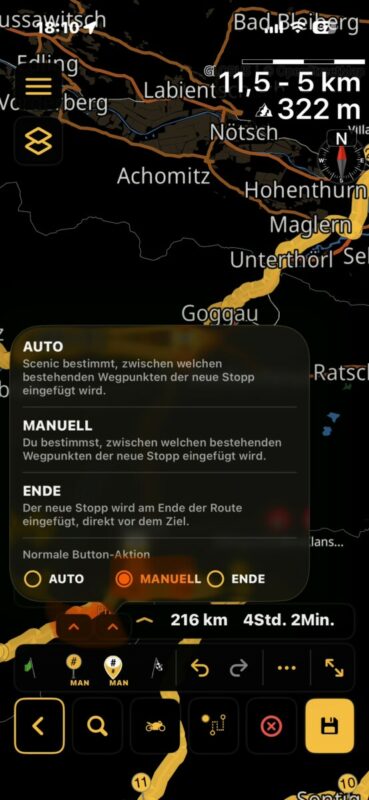
Hallo,
Du musst einmalig hier auf Manuell stellen.
Dann hast du direkt, was Du willst, wenn ich dich richtig verstanden habe.
Beste Grüße
Karlchen
Ändert die Reihenfolge der Wegpunkte. Mit dem Pfeil nach oben wird der Wegpunkt in der Liste nach oben verschoben. Mit dem Pfeil nach unten wird er in der Liste nach unten verschoben.
Ich meine das konstruktiv, aber dieses Verhalten ist verwirrend. Ich hatte erwartet, dass es zum richtigen/nächsten Punkt in der Routenpunktliste springt, anstatt meine Punkte neu anzuordnen.
Das Planungstool, das ich aktuell verwende, verfügt über ähnliche Schaltflächen für den nächsten/vorherigen Punkt. So kann ich schnell alle Punkte durchgehen und überprüfen, ob sie korrekt auf der Straße liegen. Ich zoome so weit hinein, dass ich die Position des Punktes im Verhältnis zur Straße erkennen kann, klicke dann schnell auf die Schaltfläche für den nächsten Punkt, und die Karte springt zum nächsten Punkt. So kann ich problemlos überprüfen, ob sich keine Punkte auf Feldern usw. befinden. befinden.
Es ist toll, dass Sie eine schnelle Möglichkeit zum Umsortieren anbieten, aber ich bin nicht davon überzeugt, dass diese so offensichtlich ist, dass sie die Benutzer nicht verwirrt, insbesondere wenn sie andere Tools gewohnt sind, die das tun, was ich oben beschrieben habe.
Hallo,
Du musst einmalig hier auf Manuell stellen.
Dann hast du direkt, was Du willst, wenn ich dich richtig verstanden habe.
Beste Grüße
Karlchen
Quote from Guido on 12.08.2026, 10:23@Dae, that’s what I meant with reordering. Up shift it up (previous) one position in the list. Down (next) in the waypoint list. The old way of reordering also still exists.
@Dae, that’s what I meant with reordering. Up shift it up (previous) one position in the list. Down (next) in the waypoint list. The old way of reordering also still exists.
Quote from Dae on 12.08.2026, 10:42I think you misunderstood me, or I explained badly.
I wouldn’t expect those arrows to change the order of the waypoints. I would expect it to take me to viewing the previous/next waypoints in the route, but leave the order the same. A quick way to jump from one waypoints on the map to the next, without scrolling around the map looking for the next one on the list.
This is the behaviour I’d expect from those buttons.
ScreenRecording_08-12-2026 17-38-39_1
Note that the route is unchanged I’ve purposefully put the points close so you can see, but it’s really useful to skip through a route to check waypoints when they’re a few miles apart - it saves scrolling around
I think you misunderstood me, or I explained badly.
I wouldn’t expect those arrows to change the order of the waypoints. I would expect it to take me to viewing the previous/next waypoints in the route, but leave the order the same. A quick way to jump from one waypoints on the map to the next, without scrolling around the map looking for the next one on the list.
This is the behaviour I’d expect from those buttons.
ScreenRecording_08-12-2026 17-38-39_1
Note that the route is unchanged I’ve purposefully put the points close so you can see, but it’s really useful to skip through a route to check waypoints when they’re a few miles apart - it saves scrolling around


