
The automatic dark mode in tunnels has disappeared.

Quote from fran69k on 03.03.2026, 14:24Since the latest updates, the automatic dark mode when passing through a tunnel no longer works. Has this feature been removed or moved to another setting in the app? I’ve checked and can’t find any option to enable it again (I have the navigation appearance set to automatic at sunset/sunrise).
Since the latest updates, the automatic dark mode when passing through a tunnel no longer works. Has this feature been removed or moved to another setting in the app? I’ve checked and can’t find any option to enable it again (I have the navigation appearance set to automatic at sunset/sunrise).

Quote from Guido on 03.03.2026, 15:49There is no setting for this. It does it automatically. The code didn't change regarding this.
Did you see it working in the same tunnel before? Do you have offline maps installed for the region?
If yes for both, could you send me the location of this tunnel? (Long press map > choose 'copy coordinates' in the bubble that appears > copy/paste the DEC coordinates here)
There is no setting for this. It does it automatically. The code didn't change regarding this.
Did you see it working in the same tunnel before? Do you have offline maps installed for the region?
If yes for both, could you send me the location of this tunnel? (Long press map > choose 'copy coordinates' in the bubble that appears > copy/paste the DEC coordinates here)
Quote from fran69k on 03.03.2026, 16:21Yes to both. I have the maps downloaded and it used to work before. I’ll give you several coordinates where it used to work and now it doesn’t. Best regards
42.514684,1.526130
42.528189,1.520469
Yes to both. I have the maps downloaded and it used to work before. I’ll give you several coordinates where it used to work and now it doesn’t. Best regards
42.514684,1.526130
42.528189,1.520469
Quote from Guido on 03.03.2026, 17:29Hmmm. Weird. Just tried on the simulator with a simulated route through a tunnel.
It works. See video: https://drive.google.com/file/d/1hmGOu99Nq-W4eJVWsVfiPtuIijfunB5U/view?usp=sharingThe tunnels from your coordinates is also correctly tagged as a tunnel: https://www.openstreetmap.org/way/6242756#map=18/42.528075/1.520304&layers=D, and Scenic also sees them as tunnel (note the darker color).
The only thing I can think of for it not working on your side is
(1) that your offline map got corrupted somehow. Try to remove Andorra and redownload it.
(2) Or, somehow your navigation appearance is not set correct. Try toggling to light and then back to sunset-sunrise.
Hmmm. Weird. Just tried on the simulator with a simulated route through a tunnel.
It works. See video: https://drive.google.com/file/d/1hmGOu99Nq-W4eJVWsVfiPtuIijfunB5U/view?usp=sharing
The tunnels from your coordinates is also correctly tagged as a tunnel: https://www.openstreetmap.org/way/6242756#map=18/42.528075/1.520304&layers=D, and Scenic also sees them as tunnel (note the darker color).
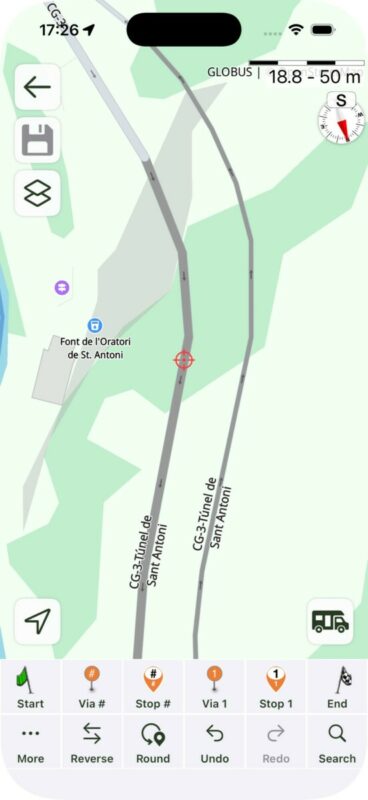
The only thing I can think of for it not working on your side is
(1) that your offline map got corrupted somehow. Try to remove Andorra and redownload it.
(2) Or, somehow your navigation appearance is not set correct. Try toggling to light and then back to sunset-sunrise.
Quote from Guido on 03.03.2026, 17:35Another reason I just thought of. What map styles have you set for light appearance and dark appearance?
Second button top left in main screen > My map styles.
Another reason I just thought of. What map styles have you set for light appearance and dark appearance?
Second button top left in main screen > My map styles.
Quote from fran69k on 03.03.2026, 17:37Ok, I’ll try downloading everything again and using another theme, and I’ll let you know. Thank you very much.
Ok, I’ll try downloading everything again and using another theme, and I’ll let you know. Thank you very much.
Quote from Guido on 03.03.2026, 17:44One last thing… should you be on CarPlay… this is not applied on CarPlay. When on CarPlay the setting of the CarPlay unit is used.
One last thing… should you be on CarPlay… this is not applied on CarPlay. When on CarPlay the setting of the CarPlay unit is used.

Quote from Mex on 03.03.2026, 23:35Hi @frank69k
Maybe you are using the same map style for dark and light apperance, then it wont change to dark mode.
Try Guidos hints first before you reinstall.
Regards Mex
Hi @frank69k
Maybe you are using the same map style for dark and light apperance, then it wont change to dark mode.
Try Guidos hints first before you reinstall.
Regards Mex

Quote from brammes62 on 25.04.2026, 09:44Today I did a drive with a 2 tunnels on the route. The Scenic does not switch to night mode. MyRoute-App works fine with tunnels, though. So the “problem” unfortunately lies with the Scenic after all I think.. 🤔
I ride with Apple CarPlay on my motorcycle.
Today I did a drive with a 2 tunnels on the route. The Scenic does not switch to night mode. MyRoute-App works fine with tunnels, though. So the “problem” unfortunately lies with the Scenic after all I think.. 🤔
I ride with Apple CarPlay on my motorcycle.
Quote from fran69k on 25.04.2026, 10:43Quote from Guido on 03.03.2026, 17:44One last thing… should you be on CarPlay… this is not applied on CarPlay. When on CarPlay the setting of the CarPlay unit is used.
Ah, okay — that explains the issue. It used to work well before, so I guess it may have changed after fixing something related to the CarPlay automation.
The downside of not being able to choose whether to follow CarPlay or not is that motorcycle CarPlay units usually don’t support automatic dark mode when the lights turn on, unless they’re somehow connected to the bike and receive that signal. In my case, for example, nothing changes at all.
In a car, since CarPlay is integrated with the vehicle, it works correctly — for example, it switches to dark mode when entering tunnels.
Would it be possible to add an option to choose whether the behavior should follow CarPlay settings or not? That way, it would work properly for everyone.
Quote from Guido on 03.03.2026, 17:44One last thing… should you be on CarPlay… this is not applied on CarPlay. When on CarPlay the setting of the CarPlay unit is used.
Ah, okay — that explains the issue. It used to work well before, so I guess it may have changed after fixing something related to the CarPlay automation.
The downside of not being able to choose whether to follow CarPlay or not is that motorcycle CarPlay units usually don’t support automatic dark mode when the lights turn on, unless they’re somehow connected to the bike and receive that signal. In my case, for example, nothing changes at all.
In a car, since CarPlay is integrated with the vehicle, it works correctly — for example, it switches to dark mode when entering tunnels.
Would it be possible to add an option to choose whether the behavior should follow CarPlay settings or not? That way, it would work properly for everyone.
Quote from fran69k on 25.04.2026, 10:52Quote from brammes62 on 25.04.2026, 09:44Today I did a drive with a 2 tunnels on the route. The Scenic does not switch to night mode. MyRoute-App works fine with tunnels, though. So the “problem” unfortunately lies with the Scenic after all I think..
I ride with Apple CarPlay on my motorcycle.
Actually, Scenic used to work in tunnels before as well. However, that behavior caused issues with devices that rely on automatic dark mode when the lights turn on.
It’s similar to what happens with MyRoute-App. For example, in my case when I use MyRoute-App in the car, it often fails — since the lights are already on, it sometimes detects that you’re exiting a tunnel and switches back to day mode on the map, even though it should stay in night mode.
So I think Scenic may have changed this behavior to avoid those kinds of inconsistencies, especially when relying on vehicle light signals instead of tunnel detection.

Quote from brammes62 on 25.04.2026, 09:44Today I did a drive with a 2 tunnels on the route. The Scenic does not switch to night mode. MyRoute-App works fine with tunnels, though. So the “problem” unfortunately lies with the Scenic after all I think..
I ride with Apple CarPlay on my motorcycle.
Actually, Scenic used to work in tunnels before as well. However, that behavior caused issues with devices that rely on automatic dark mode when the lights turn on.
It’s similar to what happens with MyRoute-App. For example, in my case when I use MyRoute-App in the car, it often fails — since the lights are already on, it sometimes detects that you’re exiting a tunnel and switches back to day mode on the map, even though it should stay in night mode.
So I think Scenic may have changed this behavior to avoid those kinds of inconsistencies, especially when relying on vehicle light signals instead of tunnel detection.
Quote from Guido on 25.04.2026, 12:13Exactly. I removed it for CarPlay because it interfered with the units that have their built in appearance switching. Indeed most (built-in) units do that based on vehicle lights. There are also aftermarket units that have an ambient light sensor and change appearance based on that.
I’ll add it to the list to add a setting for this (for when your CarPlay unit doesn’t have this automatic switching). Will be a while though… currently busy with Android development.
Exactly. I removed it for CarPlay because it interfered with the units that have their built in appearance switching. Indeed most (built-in) units do that based on vehicle lights. There are also aftermarket units that have an ambient light sensor and change appearance based on that.
I’ll add it to the list to add a setting for this (for when your CarPlay unit doesn’t have this automatic switching). Will be a while though… currently busy with Android development.
Quote from fran69k on 12.08.2026, 08:29Hi Guido,
Any idea roughly when this setting might become available?
My eyes will be forever grateful every time I enter a tunnel! 😅
Thanks!
Hi Guido,
Any idea roughly when this setting might become available?
My eyes will be forever grateful every time I enter a tunnel! 😅
Thanks!


