
strange routes when using curvy

Quote from Berenboot on 04.03.2024, 01:48Hello Guido,
Since the last update of Scenic I am experiencing a strange bug.
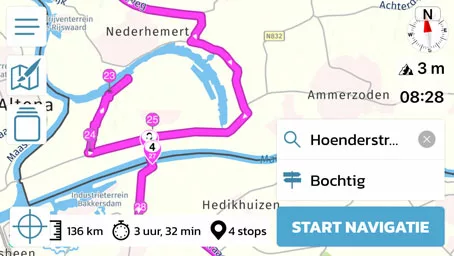
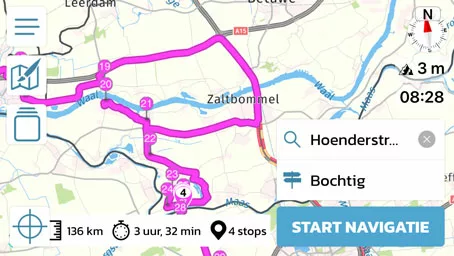
If I generate a route (select only one final destination) with curvy as the preference, via points are regularly generated that are not on the route (I have to drive back and forth on the same road). It seems to have something to do with rivers
I noticed this after the last update, but not before. I hope you can solve it, so far I am very happy with Scenic.
Thanks in advance,
Hello Guido,
Since the last update of Scenic I am experiencing a strange bug.
If I generate a route (select only one final destination) with curvy as the preference, via points are regularly generated that are not on the route (I have to drive back and forth on the same road). It seems to have something to do with rivers
I noticed this after the last update, but not before. I hope you can solve it, so far I am very happy with Scenic.
Thanks in advance,
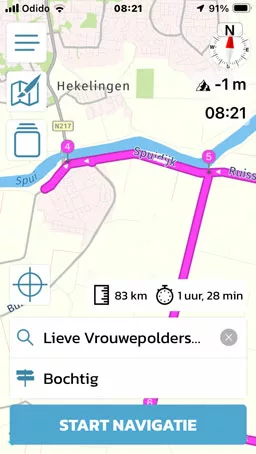
Quote from Berenboot on 04.03.2024, 01:55small correction, even when there are no rivers "nearby"(very difficult in the Netherlands), Scenic does strange things.
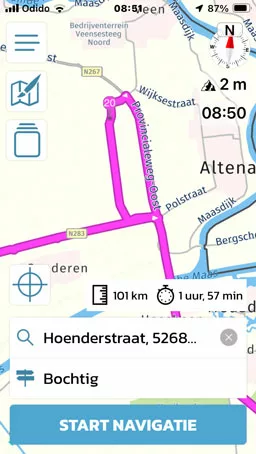
small correction, even when there are no rivers "nearby"(very difficult in the Netherlands), Scenic does strange things.


Quote from Guido on 04.03.2024, 09:24The reason why this happens is that Curvy routes are generated. How this works is as follows:
Scenic's core routing engine is provided by HERE maps. They don't have a curvy routing mode. So what Scenic does is this:
- It contacts Kurviger.de, sending your start and end coordinate.
- Kurviger sends back a list of waypoints. These are waypoints you must pass to get a curvy route.
- Scenic then calculates the route between the waypoints, which gives you the curvy route.
Now, because Kurviger and Scenic use different maps and a different routing algorithm, it's possible that the roads that Kurviger wanted you to take between the waypoints, is not the route that Scenic calculates between the waypoints. Take for example your first screenshot:
I suspect Kurviger intended you to take a ferry between 19 and 20. But HERE (Scenic's route calculation) doesn't want you to take the ferry, or doesn't know there is a ferry. So, it finds another way to get you from via 19 to via 20. What you could try in this case, is, after generating the curvy route, change the routing mode to "short". Perhaps this will make Scenic take the ferry.
The other cases are basically the same. Maybe not with a ferry, but perhaps there is a road that HERE/Scenic doesn't want you to take, or Scenic doesn't know a road is there. Again, changing routing mode to short after the curvy generation might help in these cases too.
I know this is not a full solution, but I hope it explains and gives you some options.
Best regards,
Guido
The reason why this happens is that Curvy routes are generated. How this works is as follows:
Scenic's core routing engine is provided by HERE maps. They don't have a curvy routing mode. So what Scenic does is this:
- It contacts Kurviger.de, sending your start and end coordinate.
- Kurviger sends back a list of waypoints. These are waypoints you must pass to get a curvy route.
- Scenic then calculates the route between the waypoints, which gives you the curvy route.
Now, because Kurviger and Scenic use different maps and a different routing algorithm, it's possible that the roads that Kurviger wanted you to take between the waypoints, is not the route that Scenic calculates between the waypoints. Take for example your first screenshot:
I suspect Kurviger intended you to take a ferry between 19 and 20. But HERE (Scenic's route calculation) doesn't want you to take the ferry, or doesn't know there is a ferry. So, it finds another way to get you from via 19 to via 20. What you could try in this case, is, after generating the curvy route, change the routing mode to "short". Perhaps this will make Scenic take the ferry.
The other cases are basically the same. Maybe not with a ferry, but perhaps there is a road that HERE/Scenic doesn't want you to take, or Scenic doesn't know a road is there. Again, changing routing mode to short after the curvy generation might help in these cases too.
I know this is not a full solution, but I hope it explains and gives you some options.
Best regards,
Guido
Quote from Berenboot on 04.03.2024, 13:29thanks for your quick and extensive response Guido,
Your explanation makes it clear what the cause is, unfortunately the curvy option is somewhat unusable (there are 4 such sections on a 100 km ride). "Avoiding ferries" solves some of the problems, but the problem remains.
Too bad, I noticed that it has happened since the update, but that is a coincidence based on your statement.
Regards,
thanks for your quick and extensive response Guido,
Your explanation makes it clear what the cause is, unfortunately the curvy option is somewhat unusable (there are 4 such sections on a 100 km ride). "Avoiding ferries" solves some of the problems, but the problem remains.
Too bad, I noticed that it has happened since the update, but that is a coincidence based on your statement.
Regards,
Quote from Guido on 04.03.2024, 13:41A bit of coincidence, and a bit explainable. I's possible that the new HERE routing engine of Scenic 3.5 doesn't like smaller ferries that much. I.e. puts a higher penalty on them.
A bit of coincidence, and a bit explainable. I's possible that the new HERE routing engine of Scenic 3.5 doesn't like smaller ferries that much. I.e. puts a higher penalty on them.
Quote from R1200CL on 07.05.2026, 03:37I had noticed this problem still exists in the latest version which I think is based on Open Maps and not Here. In my case this has nothing to do with ferries.
Can we expect this problem to be fixed? Also this affects the drive experience a lot, since Senic in my case struggles a lot to recalculate.
Can you suggest the best settings in detour in order to best skip these problems with wrong routing.
I also like to add, it seems avoid unpaved is not working very well if curved is chosen.
I had noticed this problem still exists in the latest version which I think is based on Open Maps and not Here. In my case this has nothing to do with ferries.
Can we expect this problem to be fixed? Also this affects the drive experience a lot, since Senic in my case struggles a lot to recalculate.
Can you suggest the best settings in detour in order to best skip these problems with wrong routing.
I also like to add, it seems avoid unpaved is not working very well if curved is chosen.
Quote from Guido on 07.05.2026, 11:55I'm afraid this is not easy to fix. We contact a 3rd party provider to generate curvy routes. This 3rd party provider sends us via points and then Scenic calculates the roads to take between those via points. It's possible that Scenic calculates different roads between the via points as the roads that the provider intended. This can be due to differences in routing mode and map data. The map data is not so much an issue anymore though since Scenic also switched to OpenStreetMap, so it's mostly routing mode.
The only thing I can recommend is:
- When you generate a curvy route or a round trip, check it before saving or navigating it. Zoom in and drag the map along the route to see if there are any strange loops. If there are, you could try to change the routing mode to short and/or change some avoidances. If that doesn't help, try removing or adding some via points to get rid of these strange loops.
I'm afraid this is not easy to fix. We contact a 3rd party provider to generate curvy routes. This 3rd party provider sends us via points and then Scenic calculates the roads to take between those via points. It's possible that Scenic calculates different roads between the via points as the roads that the provider intended. This can be due to differences in routing mode and map data. The map data is not so much an issue anymore though since Scenic also switched to OpenStreetMap, so it's mostly routing mode.
The only thing I can recommend is:
- When you generate a curvy route or a round trip, check it before saving or navigating it. Zoom in and drag the map along the route to see if there are any strange loops. If there are, you could try to change the routing mode to short and/or change some avoidances. If that doesn't help, try removing or adding some via points to get rid of these strange loops.
Quote from R1200CL on 07.05.2026, 12:07Can’t this be solved as easy as just state if an automatic (or imported) generated waypoint forces the route to go let’s say 1 km (adjustable parameter maybe) away from the logical route (as a 180 degree turn), then adjust and recalculate automatically?
Please advise how to adjust settings in detour to avoid this problem.
Can’t this be solved as easy as just state if an automatic (or imported) generated waypoint forces the route to go let’s say 1 km (adjustable parameter maybe) away from the logical route (as a 180 degree turn), then adjust and recalculate automatically?
Please advise how to adjust settings in detour to avoid this problem.
Quote from TabascoADV on 08.05.2026, 06:17I thought it was just me. 🤣
I'm a new user and after a few hours test-routing, I just became too frustrated to work-around all these dead-ends and doglegs. And deleting two dozen waypoints one by one on the Android app was really not fun. I didn't see a bulk delete option and just found myself routing on Google only to go to Scenic to try to do the same thing I was already doing on Google.
I'll check back periodically...
I thought it was just me. 🤣
I'm a new user and after a few hours test-routing, I just became too frustrated to work-around all these dead-ends and doglegs. And deleting two dozen waypoints one by one on the Android app was really not fun. I didn't see a bulk delete option and just found myself routing on Google only to go to Scenic to try to do the same thing I was already doing on Google.
I'll check back periodically...
Quote from R1200CL on 08.05.2026, 06:49Quote from TabascoADV on 08.05.2026, 06:17I thought it was just me.
Android app was really not fun. I
I think the Adroid is still in beta. Tap the first and last waypoint you like to delete. Works in IOS. I advice you not to use the recommended setting for routing, but rather the don't recalculate option in detour setting in order to avoid all these dead ends if that happens during riding.
If you import a GPX route, you should check the route as there can/will be deviation from other map systems. Don't give up 🙂
I already have had fantastic new roads discovered by using Scenic. I will defiantly keep on using the app.
I had problems with avoid unpaved roads, but this is cause by wrong input into the source OpenMap. It can take some time before Scenic use the last edited information.
4 weeks I've been told, but can be more.

Quote from TabascoADV on 08.05.2026, 06:17I thought it was just me.
Android app was really not fun. I
I think the Adroid is still in beta. Tap the first and last waypoint you like to delete. Works in IOS. I advice you not to use the recommended setting for routing, but rather the don't recalculate option in detour setting in order to avoid all these dead ends if that happens during riding.
If you import a GPX route, you should check the route as there can/will be deviation from other map systems. Don't give up 🙂
I already have had fantastic new roads discovered by using Scenic. I will defiantly keep on using the app.
I had problems with avoid unpaved roads, but this is cause by wrong input into the source OpenMap. It can take some time before Scenic use the last edited information.
4 weeks I've been told, but can be more.


