
Strange looping

Quote from Rooster72 on 23.08.2026, 09:07When I’m laying out a route I’ll put a starting and start laying out my via’s it will start making the and I just put via 24 down then when I put down via 25 it will change it to via 26 and make 25 somewhere back in the route making me double back messing up the route it is doing some weird things since the change making it difficult to make routes another issue I see if I do want to come back down the same road it will add a lower number via for route going instead of add higher number via for route back love the app and have made a lot of routes and it is a lot more difficult now than before from theses new glitches
When I’m laying out a route I’ll put a starting and start laying out my via’s it will start making the and I just put via 24 down then when I put down via 25 it will change it to via 26 and make 25 somewhere back in the route making me double back messing up the route it is doing some weird things since the change making it difficult to make routes another issue I see if I do want to come back down the same road it will add a lower number via for route going instead of add higher number via for route back love the app and have made a lot of routes and it is a lot more difficult now than before from theses new glitches

Quote from Guido on 23.08.2026, 09:30Use the chevron buttons next to the via and stop button.
Use the chevron buttons next to the via and stop button.
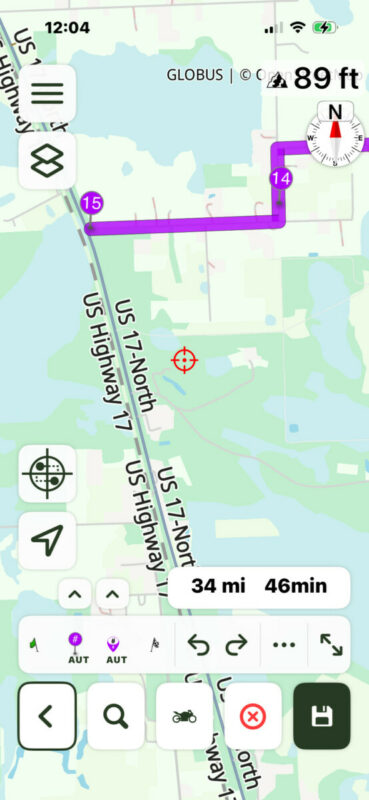
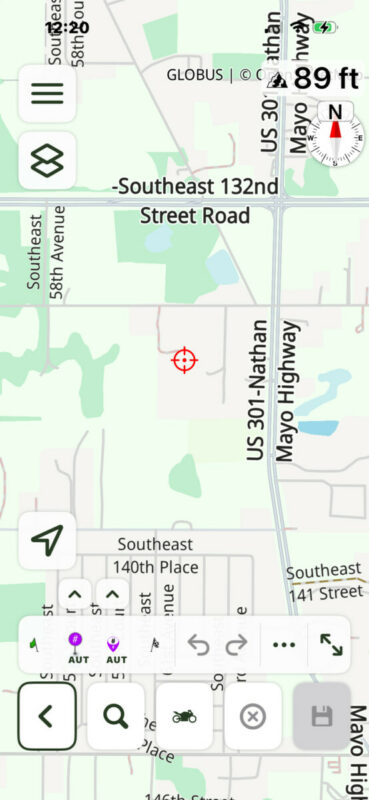
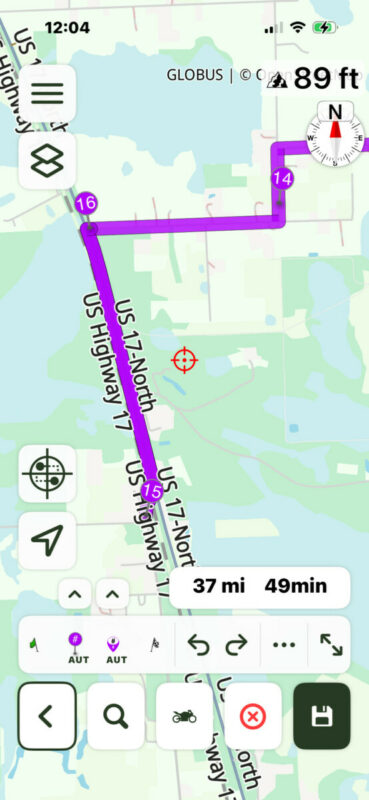
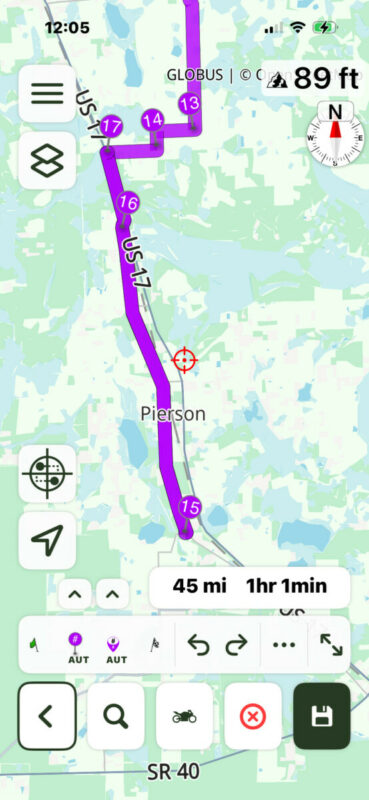
Quote from Rooster72 on 23.08.2026, 10:48Not sure what the chevron button is but as you can see in pics I set via 15 the I set via 16 and it turns to 15 and via 15 turns into 16 taking me backwards
Not sure what the chevron button is but as you can see in pics I set via 15 the I set via 16 and it turns to 15 and via 15 turns into 16 taking me backwards
Quote from Rooster72 on 23.08.2026, 10:51I have made over 33000 miles and 950 hours of routes and this just started since update
I have made over 33000 miles and 950 hours of routes and this just started since update
Quote from Guido on 23.08.2026, 10:55They are the little arrow buttons above the via and stop button. If you tap them a popup will appear. The descriptions there will speak for themselves.
You are not the first person struggling with this so I made some changes for the next update that will hopefully make this more clear.
They are the little arrow buttons above the via and stop button. If you tap them a popup will appear. The descriptions there will speak for themselves.
You are not the first person struggling with this so I made some changes for the next update that will hopefully make this more clear.
Quote from Rooster72 on 24.08.2026, 18:59Yes I used all the modes in the chevron it’s how I figured out to get past the same road situation so I have tried all modes and settings I could and it doesn’t explain the situation I’m referring too trying to use the right verbiage on what it’s doing so from the start I go into plan route mode pick my starting point I start laying out the via’s / waypoints for which way I want to go via’s 1-2-3-4-5 and so on at any random via / waypoint it all of a sudden turns some lower number via’s / waypoints into higher number via’s / waypoints and reroutes me back to that higher number via / waypoint in the route so an example I was at via / waypoint # 29 I picked where I wanted it a set it then changed 3 of my previous set via’s to #30-31-32 which was previously via’s 17, 20, & 24 so I deleted the new via’s #30-31-31 lucky it kept the route and it took me back via / waypoint #29 which is like #26 now cause I’ve deleted 3 via’s so it lets me continue to lay out my route and I get to via / waypoint # 96 it does it again it changes some more lower # via’s to higher than # 96 and routes me back to the middle of the route like via#52 or so again I deleted the higher number via’s but this time it changed the route cause where they where located so put in manual and piece it back together so back to where I put the last via #96 I did finally finish the route but it has become a lot more challenging lol so in my opinion there’s some kinda glitch going on that has changed the way it works hopefully we can resolve it lol cause I do really like this app I have had quite a few of my friends get the app so we all have the route and make them as well thanks for any help
Yes I used all the modes in the chevron it’s how I figured out to get past the same road situation so I have tried all modes and settings I could and it doesn’t explain the situation I’m referring too trying to use the right verbiage on what it’s doing so from the start I go into plan route mode pick my starting point I start laying out the via’s / waypoints for which way I want to go via’s 1-2-3-4-5 and so on at any random via / waypoint it all of a sudden turns some lower number via’s / waypoints into higher number via’s / waypoints and reroutes me back to that higher number via / waypoint in the route so an example I was at via / waypoint # 29 I picked where I wanted it a set it then changed 3 of my previous set via’s to #30-31-32 which was previously via’s 17, 20, & 24 so I deleted the new via’s #30-31-31 lucky it kept the route and it took me back via / waypoint #29 which is like #26 now cause I’ve deleted 3 via’s so it lets me continue to lay out my route and I get to via / waypoint # 96 it does it again it changes some more lower # via’s to higher than # 96 and routes me back to the middle of the route like via#52 or so again I deleted the higher number via’s but this time it changed the route cause where they where located so put in manual and piece it back together so back to where I put the last via #96 I did finally finish the route but it has become a lot more challenging lol so in my opinion there’s some kinda glitch going on that has changed the way it works hopefully we can resolve it lol cause I do really like this app I have had quite a few of my friends get the app so we all have the route and make them as well thanks for any help

Quote from Mex on 24.08.2026, 23:39Hi rooster72.
To me it looks like one of your targets (bullseye) is on the wrong side of the highway. So Scenic tries to guide you back.
In another picture you set the target into a junction. I always set the target behind the town/city so in case of a deviation Scenic doesnt try to bring me to that via.
Check your targets to be on right side of highways and behind roundabouts and junctions.
Just my 2 cents, Mex
Hi rooster72.
To me it looks like one of your targets (bullseye) is on the wrong side of the highway. So Scenic tries to guide you back.
In another picture you set the target into a junction. I always set the target behind the town/city so in case of a deviation Scenic doesnt try to bring me to that via.
Check your targets to be on right side of highways and behind roundabouts and junctions.
Just my 2 cents, Mex
Quote from Guido on 26.08.2026, 16:10Hi @rooster72,
It's a bit hard to imagine how the planning went from the written text, but what I think is happening is that you are using the via and stop buttons in AUTO mode. The way you are planning (place start, 1, 2, 3, 4, etc), you need END mode. Tap the chevron button and in the bottom row, set the 'Normal buttons action' to END. Now the buttons will act as the right "numbered" via and stop buttons in the old planner UI.
I did not change anything in the functionality of adding vias and stops, so this really did not change. When on AUTO mode, the via and stop button act like the left via # and stop # button in the old UI, when on END mode the via and stop button act like the right "numbered" via and stop buttons.
Hope this explains a bit better.
Best regards,
Guido
Hi @rooster72,
It's a bit hard to imagine how the planning went from the written text, but what I think is happening is that you are using the via and stop buttons in AUTO mode. The way you are planning (place start, 1, 2, 3, 4, etc), you need END mode. Tap the chevron button and in the bottom row, set the 'Normal buttons action' to END. Now the buttons will act as the right "numbered" via and stop buttons in the old planner UI.
I did not change anything in the functionality of adding vias and stops, so this really did not change. When on AUTO mode, the via and stop button act like the left via # and stop # button in the old UI, when on END mode the via and stop button act like the right "numbered" via and stop buttons.
Hope this explains a bit better.
Best regards,
Guido
Quote from Rooster72 on 26.08.2026, 19:39Thanks for reply I have to be honest I never did try it in end mode cause the explanation for it didn’t make sense to me with it acting up in auto and manual I figured it would make it worse I will definitely try the end mode to see if that corrects the issue I’m having I’ll let you know
Thanks for reply I have to be honest I never did try it in end mode cause the explanation for it didn’t make sense to me with it acting up in auto and manual I figured it would make it worse I will definitely try the end mode to see if that corrects the issue I’m having I’ll let you know
Quote from Guido on 26.08.2026, 19:50In v4.44 I’ve made a few changes to the terminology to make it more clear, and I also added a long press and double tap action so you won’t have to use the chevron buttons every time you want to do something. It will be released next week.
In v4.44 I’ve made a few changes to the terminology to make it more clear, and I also added a long press and double tap action so you won’t have to use the chevron buttons every time you want to do something. It will be released next week.
Quote from Rooster72 on 26.08.2026, 20:0810-4 thanks for the help and input I just played with it in end mode and seemed to work I will try a real route soon thanks again
10-4 thanks for the help and input I just played with it in end mode and seemed to work I will try a real route soon thanks again
Quote from berella on 28.08.2026, 12:15I am having the same issue since the last update. It is almost as if, when in auto, it does not count the vias correctly. Too, when you do a search and tap add it to route, it automatically adds as the route finish. It does not ask what it should be added as, via, stop, end.
I am having the same issue since the last update. It is almost as if, when in auto, it does not count the vias correctly. Too, when you do a search and tap add it to route, it automatically adds as the route finish. It does not ask what it should be added as, via, stop, end.
Quote from Guido on 28.08.2026, 13:53AUTO places waypoints BETWEEN existing waypoints. If you want to add a waypoint as the next waypoint, choose END.
Making some changes to the terminology to make this more clear.
Also fixing that search-destination thing in upcoming update.
AUTO places waypoints BETWEEN existing waypoints. If you want to add a waypoint as the next waypoint, choose END.
Making some changes to the terminology to make this more clear.
Also fixing that search-destination thing in upcoming update.


