
Strange behaviar when a Via is reached

Quote from SuperGraupe on 09.09.2026, 12:40My configuration:
iphone XR IOS 18.7.1o no Carplay.
Version 4.45(1) beta
WhatsApp is running in the background to send my live location to my family
When I reach a Via, the following happens in about 2 out of 10 cases.
The screen rotates 180 degrees. It stays that way for about 2 seconds and then rotates back.
Tracking continues. But the Via isn't marked as reached.
I have to delete the Via manually so I don't get redirected back.
Greetings,
Michael
My configuration:
iphone XR IOS 18.7.1o no Carplay.
Version 4.45(1) beta
WhatsApp is running in the background to send my live location to my family
When I reach a Via, the following happens in about 2 out of 10 cases.
The screen rotates 180 degrees. It stays that way for about 2 seconds and then rotates back.
Tracking continues. But the Via isn't marked as reached.
I have to delete the Via manually so I don't get redirected back.
Greetings,
Michael

Quote from Guido on 09.09.2026, 12:51Hi Michael,
Thanks. I'll look into it.
Are you moving when you reach those vias or stopping at those vias?Cheers,
Guido
Hi Michael,
Thanks. I'll look into it.
Are you moving when you reach those vias or stopping at those vias?
Cheers,
Guido

Quote from Dae on 09.09.2026, 13:51Julie and I have had similar, but not exactly the same, behaviour for about 6 months.
It’s only happened a handful of times, but always happens on both of our phones at the same time and the same via. We’ll be riding along, approaching a via, and as we get to the via the screen rotates 180 degrees (like we’ve done a U turn) and the recalculation sound plays. In our case though the via is marked as reached.
I’ve never mentioned it before as we thought it was something to do with the specific via points. We have one route in particular that always does it on the same via. It’s in the middle of the countryside, in a large flat area, so we know it’s not bad GPS signal.
When it happens the screen rotates, plays the recalculation sound, then the screen rotates again and shows us going in the correct direction. The via is exactly in the middle of the road.
We have had it happen on multiple routes, but this specific marker sticks in my mind. Unfortunately I have a large library of routes and can’t remember which route or marker it is - I just recognise it when it happens and promptly forget about it.
Julie and I have had similar, but not exactly the same, behaviour for about 6 months.
It’s only happened a handful of times, but always happens on both of our phones at the same time and the same via. We’ll be riding along, approaching a via, and as we get to the via the screen rotates 180 degrees (like we’ve done a U turn) and the recalculation sound plays. In our case though the via is marked as reached.
I’ve never mentioned it before as we thought it was something to do with the specific via points. We have one route in particular that always does it on the same via. It’s in the middle of the countryside, in a large flat area, so we know it’s not bad GPS signal.
When it happens the screen rotates, plays the recalculation sound, then the screen rotates again and shows us going in the correct direction. The via is exactly in the middle of the road.
We have had it happen on multiple routes, but this specific marker sticks in my mind. Unfortunately I have a large library of routes and can’t remember which route or marker it is - I just recognise it when it happens and promptly forget about it.
Quote from Guido on 09.09.2026, 14:02Thanks Dae. At least I know now that it's not something that was introduced in the latest beta version.
If you do happen to remember which route it was, could you share the link to that route and let me know the number of the via point? The fact that it happens every time with the same route and same via point means it's reproducible and that's good for finding the cause and a potential fix.
Thanks Dae. At least I know now that it's not something that was introduced in the latest beta version.
If you do happen to remember which route it was, could you share the link to that route and let me know the number of the via point? The fact that it happens every time with the same route and same via point means it's reproducible and that's good for finding the cause and a potential fix.
Quote from SuperGraupe on 09.09.2026, 14:35I was moving.
Right now, I'm on a trip through the Vosges that will last several days.
However, it happened on different days while taking different routes.I couldn't identify any pattern.
You can find my routes in my account. Folder Vogesen 2026.
Greetings,
Michael
I was moving.
Right now, I'm on a trip through the Vosges that will last several days.
However, it happened on different days while taking different routes.
I couldn't identify any pattern.
You can find my routes in my account. Folder Vogesen 2026.
Greetings,
Michael
Quote from Guido on 10.09.2026, 12:53Hi Michael and Dae,
If it happens again, it would help a lot if you could share the link to the route where it happens and mention the via point number to me. Then I can really investigate what's going on.
My theory is that somehow a U-turn is added to the route at the via point, I guess invisible on the map, but that depends on the placement of the vias. I know, @Dae, you said the via was exactly on the road, but would like to double check that anyway. A GPS inaccuracy can't be it, because if you're on the route, it will take the bearing of the route as heading (which would confirm my U-turn theory).
Anyway... a route link with via number mention would help me check this.
Thanks in advance,
Guido
Hi Michael and Dae,
If it happens again, it would help a lot if you could share the link to the route where it happens and mention the via point number to me. Then I can really investigate what's going on.
My theory is that somehow a U-turn is added to the route at the via point, I guess invisible on the map, but that depends on the placement of the vias. I know, @Dae, you said the via was exactly on the road, but would like to double check that anyway. A GPS inaccuracy can't be it, because if you're on the route, it will take the bearing of the route as heading (which would confirm my U-turn theory).
Anyway... a route link with via number mention would help me check this.
Thanks in advance,
Guido
Quote from SuperGraupe on 11.09.2026, 09:09Made an update to 4.45(2) Beta.
Had an similar behaviar, this time without rotation of the screen.
Recalculation sound.
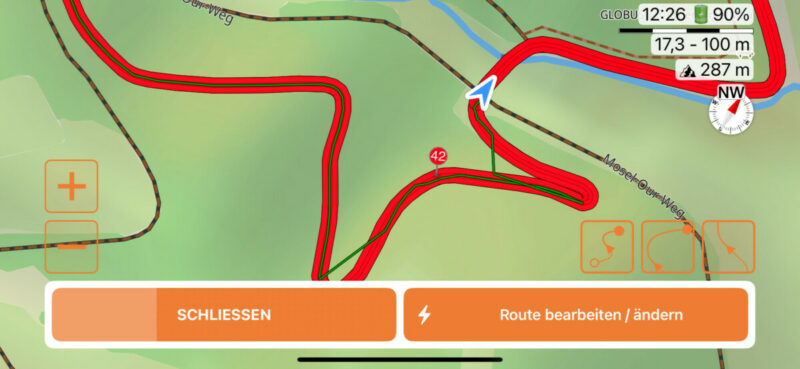
Via 42 was Not marked as reached.
Had to delete him manually.
https://scenicapp.space/route/QqlZyeYp
Hope this helps.
Greetings,
Michael
Made an update to 4.45(2) Beta.
Had an similar behaviar, this time without rotation of the screen.
Recalculation sound.
Via 42 was Not marked as reached.
Had to delete him manually.
https://scenicapp.space/route/QqlZyeYp
Hope this helps.
Greetings,
Michael
Quote from Guido on 11.09.2026, 09:24It looks like previous waypoints weren't marked as reached either, otherwise the route line would be gray behind your current position. I imagine you've been getting directions to turn around?
It looks like previous waypoints weren't marked as reached either, otherwise the route line would be gray behind your current position. I imagine you've been getting directions to turn around?
Quote from Guido on 11.09.2026, 09:45If, for example, 41 wasn't reached, then 42 won't be marked as reached, even if you are on top of it, until you reach or skip 41.
If, for example, 41 wasn't reached, then 42 won't be marked as reached, even if you are on top of it, until you reach or skip 41.
Quote from SuperGraupe on 11.09.2026, 10:16Via 41 was reached.
You see the detour correction to reach Via 42.
Scenic send me back and there was a loop
before Via 42.
Sorry for this missing detail.Greetings,
Michael
Via 41 was reached.
You see the detour correction to reach Via 42.
Scenic send me back and there was a loop
before Via 42.
Sorry for this missing detail.
Greetings,
Michael
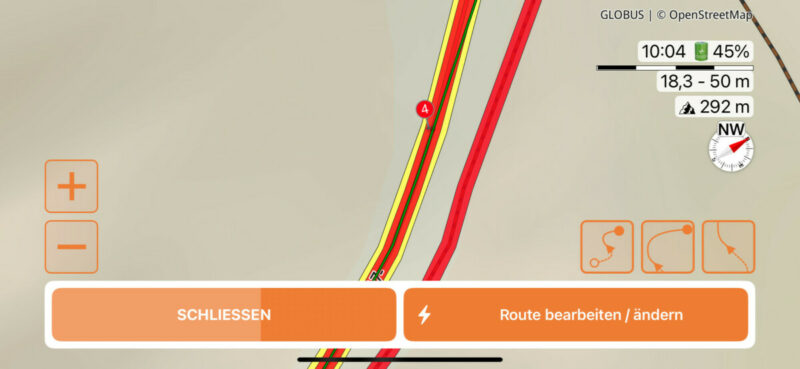
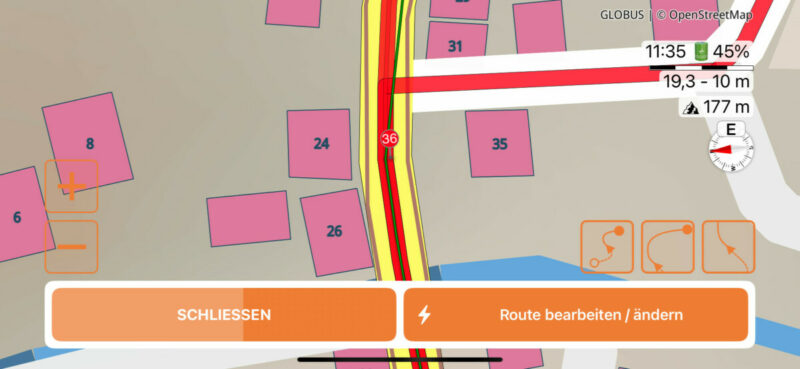
Quote from SuperGraupe on 12.09.2026, 08:02Had the same behaviar 2 times today.
Now with an overview.
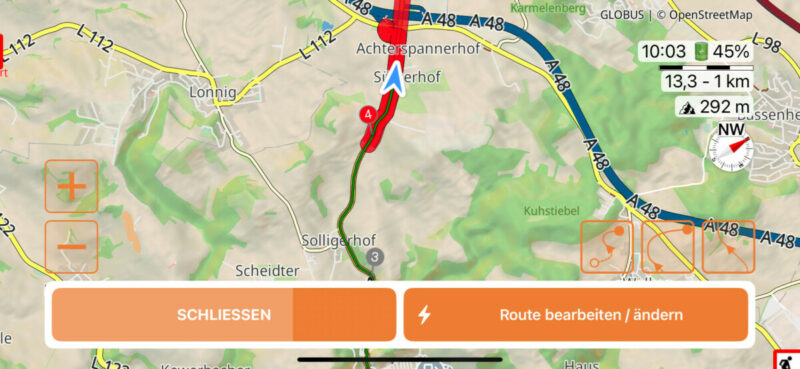
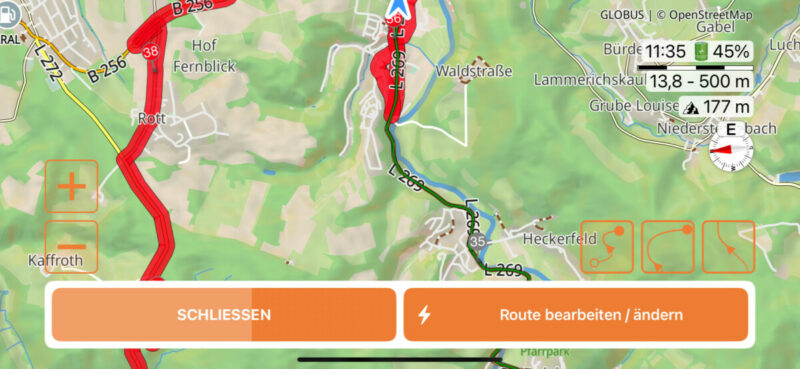
Had the same behaviar 2 times today.
Now with an overview.
Quote from Guido on 12.09.2026, 11:45OK. Do you have the route saved by any chance? If so, could you share the link to the route?
OK. Do you have the route saved by any chance? If so, could you share the link to the route?
Quote from SuperGraupe on 12.09.2026, 12:39Here are the links.
https://scenicapp.space/route/WwhxarLy
https://scenicapp.space/ride/gJDaUlWS
Greetings,
Michael
Here are the links.
https://scenicapp.space/route/WwhxarLy
https://scenicapp.space/ride/gJDaUlWS
Greetings,
Michael
Quote from Guido on 14.09.2026, 11:01Hi Guys,
In the beta version I'm releasing today v4.45(5), I have implemented a potential fix for this.
I think I have found the root cause which explains both behaviors (map sometimes turning 180 degrees at a via, and vias sometimes not being marked as reached). It is caused by the route line (which consists of hundreds of points) sometimes having 2 points for a via, where the second point was behind the first one, essentially turning you around for 0.5 meter or so. You don't see this in the route line as the distance between the points is too small for that, but the route tracker did pick that up. That's my theory anyway.
Would be great if you could give this a test. @supergraupe... are you a beta tester? If not, do you want to be? If so, send me a direct email (use 'email me' button at the bottom of https://scenic.app/help) and I'll add you.
Cheers,
Guido
Hi Guys,
In the beta version I'm releasing today v4.45(5), I have implemented a potential fix for this.
I think I have found the root cause which explains both behaviors (map sometimes turning 180 degrees at a via, and vias sometimes not being marked as reached). It is caused by the route line (which consists of hundreds of points) sometimes having 2 points for a via, where the second point was behind the first one, essentially turning you around for 0.5 meter or so. You don't see this in the route line as the distance between the points is too small for that, but the route tracker did pick that up. That's my theory anyway.
Would be great if you could give this a test. @supergraupe... are you a beta tester? If not, do you want to be? If so, send me a direct email (use 'email me' button at the bottom of https://scenic.app/help) and I'll add you.
Cheers,
Guido
Quote from SuperGraupe on 14.09.2026, 14:26I‘m a beta tester.
Got the newest version.
Will give it a try… and will respond.
Greetings,
Michael
I‘m a beta tester.
Got the newest version.
Will give it a try… and will respond.
Greetings,
Michael


