
Skip all previous wayponts

Quote from MarkerDave on 04.08.2026, 13:08What I would have liked to have recently was the option to select/tap a waypoint and then click a button to skip all waypoint before the selected waypoint.
Why: because I ran into a bug on the android app and switched to the Iphone and loaded the same route from a gpx file but the app kept telling me to go to the first waypoint and the only option I could find was skipping every way point one by one which ment that I had to do this 50 times before I would have gotten to the current waypoint I was closest to.
Seems to me that this would be relatively easy to implement a crude version since the code to skip a waypoint already exists and you want to run that in a loop until you have skipped till the desired waypoint.
What I would have liked to have recently was the option to select/tap a waypoint and then click a button to skip all waypoint before the selected waypoint.
Why: because I ran into a bug on the android app and switched to the Iphone and loaded the same route from a gpx file but the app kept telling me to go to the first waypoint and the only option I could find was skipping every way point one by one which ment that I had to do this 50 times before I would have gotten to the current waypoint I was closest to.
Seems to me that this would be relatively easy to implement a crude version since the code to skip a waypoint already exists and you want to run that in a loop until you have skipped till the desired waypoint.

Quote from Guido on 04.08.2026, 13:30You don't have to do this. In stead, load the entire route. Then, before you start the navigation tap this button and select "Start guidance where I join the route". When you do that, wherever you join the route, the navigation will start from that point, "forgetting" all waypoints before it.
An update will be released soon where this will be more intuitive.
Alternatively, during import, under the 3 dots button in the planner, you can batch delete waypoints.
You don't have to do this. In stead, load the entire route. Then, before you start the navigation tap this button and select "Start guidance where I join the route". When you do that, wherever you join the route, the navigation will start from that point, "forgetting" all waypoints before it.
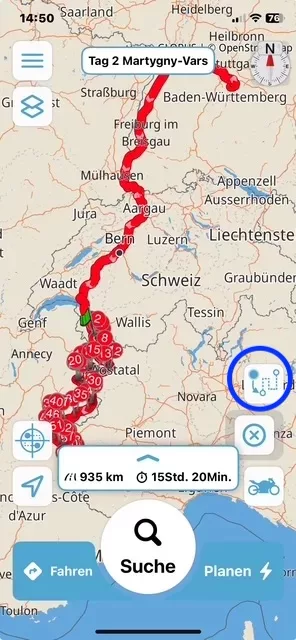
An update will be released soon where this will be more intuitive.
Alternatively, during import, under the 3 dots button in the planner, you can batch delete waypoints.


