
Server failure - can’t log in?

Quote from N-5Gunner on 01.08.2026, 09:18Wondering if this is a widespread issue or just something impacting me?
I have been trying to generate a share link for several days for one of my created routes, and every time I’ve been receiving an error “unable to create share link”. After several days of trying I thought I’d try logging out of app. Now I cannot log-in, receiving “Error - could not connect to the server”.
I have a major 7-day offroad trip in Canadian Rockies I plan to start in the 3 next days (the route link I’ve been trying to share), so now I’m really just hoping I can get logged back in to use the planned route. @guidomm
Thanks
[caption id="attachment_10852" align="alignnone" width="633"]
Screenshot[/caption]
Wondering if this is a widespread issue or just something impacting me?
I have been trying to generate a share link for several days for one of my created routes, and every time I’ve been receiving an error “unable to create share link”. After several days of trying I thought I’d try logging out of app. Now I cannot log-in, receiving “Error - could not connect to the server”.
I have a major 7-day offroad trip in Canadian Rockies I plan to start in the 3 next days (the route link I’ve been trying to share), so now I’m really just hoping I can get logged back in to use the planned route. @guidomm
Thanks
[caption id="attachment_10852" align="alignnone" width="633"] Screenshot[/caption]

Quote from Guido on 01.08.2026, 10:07It sounds like your device can't connect to the Scenic server.
Are you using a VPN or security software by any chance? If so, try to disable that or add https://scenicapp.space to the "allow" list there.
Some VPN’s also have an auto-connect feature so make sure that’s off too.
If that doesn't help, try turning off your WiFi (use cellular data).
For context: a third-party security blacklist flagged our server a few weeks ago as a false-positive. VPNs, security tools, and some internet providers use that blacklist to filter traffic, which means they can block access to Scenic even though our server is operating normally.
We've already reported the false-positive and took measures and we are no longer on the blacklist. However, this can take time to propagate across all the services that use that blacklist.
My apologies for the inconvenience and best regards,
Guido
It sounds like your device can't connect to the Scenic server.
Are you using a VPN or security software by any chance? If so, try to disable that or add https://scenicapp.space to the "allow" list there.
Some VPN’s also have an auto-connect feature so make sure that’s off too.
If that doesn't help, try turning off your WiFi (use cellular data).
For context: a third-party security blacklist flagged our server a few weeks ago as a false-positive. VPNs, security tools, and some internet providers use that blacklist to filter traffic, which means they can block access to Scenic even though our server is operating normally.
We've already reported the false-positive and took measures and we are no longer on the blacklist. However, this can take time to propagate across all the services that use that blacklist.
My apologies for the inconvenience and best regards,
Guido
Quote from N-5Gunner on 01.08.2026, 10:31Weird things happening. First, thanks as always for quick and attentive response.
I do have and use a dedicated paid VPN app, but have ensured that it is not turned on, both for the earlier issue with generating a route share link, and the current log-in issue.
Previous to posting I had already tried the VPN/Wifi toggles to no avail. However that was in response to trying to solve the “share link” issue, prior to logging out.
Just tried logging in on Cellular instead of Wifi and despite having 3-4 bars of 5G connection anytime I try to log in I instead get the error “Your device is not connected to the internet” (photo attached, including showing the 3-4 bars of 5G). When I attempt to log in on Wifi it switches back to the “couldn’t connect to server” error.
Just sharing in case this points to something else or helps in any way. For now still unable to log in and unsure what to do.
Thanks
Weird things happening. First, thanks as always for quick and attentive response.
I do have and use a dedicated paid VPN app, but have ensured that it is not turned on, both for the earlier issue with generating a route share link, and the current log-in issue.
Previous to posting I had already tried the VPN/Wifi toggles to no avail. However that was in response to trying to solve the “share link” issue, prior to logging out.
Just tried logging in on Cellular instead of Wifi and despite having 3-4 bars of 5G connection anytime I try to log in I instead get the error “Your device is not connected to the internet” (photo attached, including showing the 3-4 bars of 5G). When I attempt to log in on Wifi it switches back to the “couldn’t connect to server” error.
Just sharing in case this points to something else or helps in any way. For now still unable to log in and unsure what to do.
Thanks
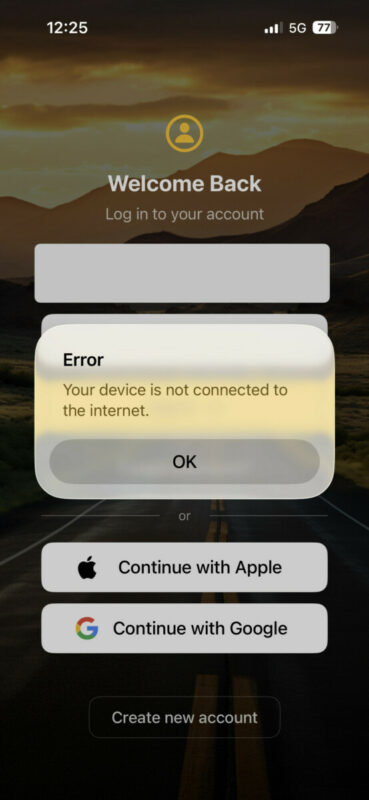
Quote from N-5Gunner on 01.08.2026, 10:45Ok, even weirder. I was also logged into my Scenic app on a secondary phone (an older phone I actually use as my navigation device on motorcycle).
I opened the app on that phone (still logged in), and on cellular, I could create the share link successfully for the route I had been trying to generate share link for on my primary (now logged out) phone.
I toggled Wifi ON, on the secondary logged in phone, and the share link for the same route would no longer work, giving the same issue I had previously had on my primary phone.
This suggests it may be related to that blacklist issue you mentioned - in my case likely from the Internet provider for our Wifi.
Still a bit puzzled as to why I can’t log-in on my primary phone over Cellular with the “no internet” error - I am going to try reinstalling the app on my primary phone.
Ok, even weirder. I was also logged into my Scenic app on a secondary phone (an older phone I actually use as my navigation device on motorcycle).
I opened the app on that phone (still logged in), and on cellular, I could create the share link successfully for the route I had been trying to generate share link for on my primary (now logged out) phone.
I toggled Wifi ON, on the secondary logged in phone, and the share link for the same route would no longer work, giving the same issue I had previously had on my primary phone.
This suggests it may be related to that blacklist issue you mentioned - in my case likely from the Internet provider for our Wifi.
Still a bit puzzled as to why I can’t log-in on my primary phone over Cellular with the “no internet” error - I am going to try reinstalling the app on my primary phone.
Quote from N-5Gunner on 01.08.2026, 11:08The app delete and reinstall seems to have worked on my primary phone. I’ll assume the original share link issue and log-in issue may somehow be down to the Wifi service provider blacklist issue you mentioned Guido.
Will add any additional info here if anything else changes, mostly for anyone else who may encounter similar issue in the future and stumbles upon this thread for support.
The app delete and reinstall seems to have worked on my primary phone. I’ll assume the original share link issue and log-in issue may somehow be down to the Wifi service provider blacklist issue you mentioned Guido.
Will add any additional info here if anything else changes, mostly for anyone else who may encounter similar issue in the future and stumbles upon this thread for support.


