
Scenic taking the "long way" to create a route

Quote from Marts on 05.06.2026, 18:51Last night, while watching MotoGP at Balaton, I used the iPhone to create a route for a ride on Sunday.
I used the "search" feature to find the final destination, then long pressing on parts of the map where we're going to ride I created the route. After refining it, I found that I cannot save it.
This this normal?
Next, I used the "Plan" method. I did my home as the start point, found the destination and used it as the last/ending/destination point. I then long pressed on the map to create the first stop (where we're all meeting up), then the next lot of via points.
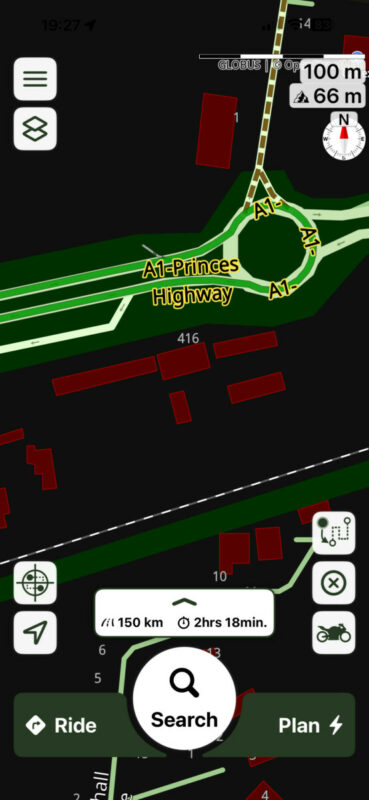
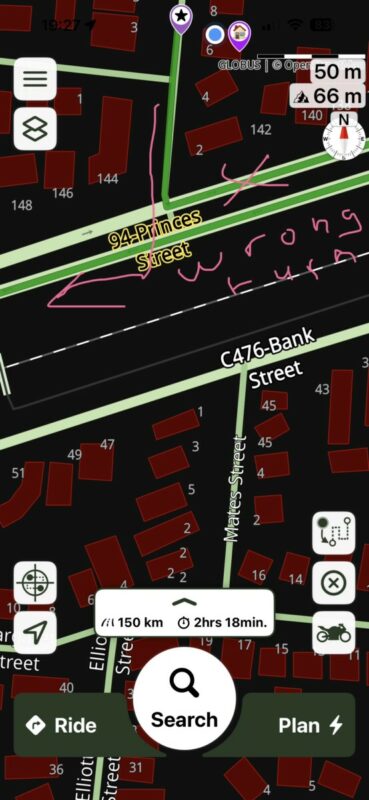
However, if you look at the two screen shots, when I leave my street I'm supposed to turn right. But Scenic has me going left and about a kilometre or so east before the route takes me back west at a roundabout.
In the second image the pink arrow and text show the direction that I want to go in.
Why would it do this?
Normally I use the Mac Mini version of Scenic to create my rides. But I thought that I would see how I went doing it on the iPhone. I only use the iPhone if already on a ride and I want to start a new route, say, a direct route to home from where we've stopped for coffee or whatever, or if using it in the car to go to the city, I merely punch in the destination and tap "ride".
Thanks
Last night, while watching MotoGP at Balaton, I used the iPhone to create a route for a ride on Sunday.
I used the "search" feature to find the final destination, then long pressing on parts of the map where we're going to ride I created the route. After refining it, I found that I cannot save it.
This this normal?
Next, I used the "Plan" method. I did my home as the start point, found the destination and used it as the last/ending/destination point. I then long pressed on the map to create the first stop (where we're all meeting up), then the next lot of via points.
However, if you look at the two screen shots, when I leave my street I'm supposed to turn right. But Scenic has me going left and about a kilometre or so east before the route takes me back west at a roundabout.
In the second image the pink arrow and text show the direction that I want to go in.
Why would it do this?
Normally I use the Mac Mini version of Scenic to create my rides. But I thought that I would see how I went doing it on the iPhone. I only use the iPhone if already on a ride and I want to start a new route, say, a direct route to home from where we've stopped for coffee or whatever, or if using it in the car to go to the city, I merely punch in the destination and tap "ride".
Thanks

Quote from Mex on 07.06.2026, 00:53Hi Marts.
Looking at the second picture, there is a small arrow on the road showing to the right. I assume Scenic recognizes this part of the road as an oneway street, so it tells you: Turn left.
Maybe a bug, or may be a wrong tagged road in OSM.
Of course you can cross the road an turn right afterwards.Regards, Mex
Hi Marts.
Looking at the second picture, there is a small arrow on the road showing to the right. I assume Scenic recognizes this part of the road as an oneway street, so it tells you: Turn left.
Maybe a bug, or may be a wrong tagged road in OSM.
Of course you can cross the road an turn right afterwards.
Regards, Mex

Quote from Guido on 07.06.2026, 09:20Hi @marts,
First... not being able to save:. Saving a route can only be done from the planner. However, if you create a route not using the planner (by long pressing on the map like you did), you can still tap the plan button. The route will stay on the map and there you'll find the save button.
Regarding the "long way".
At the moment it's taking the right way:
-38.200648, 146.524744
Maybe the map was updated meanwhile. Check if your offline maps are up to date. (Go to offline maps... there will be a big "update all" button at the top if there is an update).
If it still doesn't work, try changing your routing mode.Cheers,
Guido
Hi @marts,
First... not being able to save:. Saving a route can only be done from the planner. However, if you create a route not using the planner (by long pressing on the map like you did), you can still tap the plan button. The route will stay on the map and there you'll find the save button.
Regarding the "long way".
At the moment it's taking the right way:
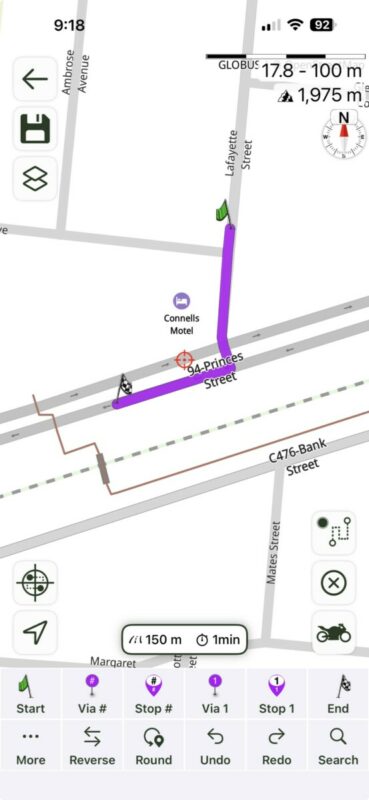
-38.200648, 146.524744
Maybe the map was updated meanwhile. Check if your offline maps are up to date. (Go to offline maps... there will be a big "update all" button at the top if there is an update).
If it still doesn't work, try changing your routing mode.
Cheers,
Guido
Quote from Marts on 07.06.2026, 17:54Thanks Guido. I didn't know about tapping "plan" to actually save it. It was just on the iPhone anyway.
Anyway, the ride went without a hitch. Of course, like any ride, the route was torn to shreds pretty much after leaving our departure point with the rider leader deciding to go in another direction to what I had planned.
It took quite a while for Scenic to work out where we were going, though with a lot of prompts to turn down such and such road and so on.
The ride home was simple. Just tapped on the search icon, selected home and off we went. It rerouted as needed as the leader went down roads that I wasn't expecting.
Thanks Guido. I didn't know about tapping "plan" to actually save it. It was just on the iPhone anyway.
Anyway, the ride went without a hitch. Of course, like any ride, the route was torn to shreds pretty much after leaving our departure point with the rider leader deciding to go in another direction to what I had planned.
It took quite a while for Scenic to work out where we were going, though with a lot of prompts to turn down such and such road and so on.
The ride home was simple. Just tapped on the search icon, selected home and off we went. It rerouted as needed as the leader went down roads that I wasn't expecting.
Quote from Marts on 07.06.2026, 19:43Quote from Mex on 07.06.2026, 00:53Hi Marts.
Looking at the second picture, there is a small arrow on the road showing to the right. I assume Scenic recognizes this part of the road as an oneway street, so it tells you: Turn left.
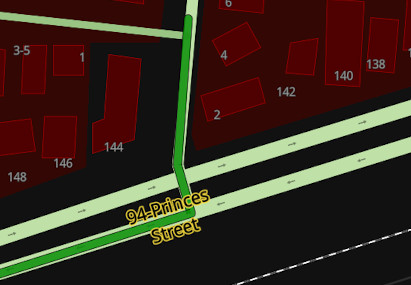
The road is a divided carriageway (what they call them here in Australia). I can cross over to the middle and turn right.
Attached is a screen grab from another route that I planned earlier. It, however, is a simple one - I searched for and selected a destination without any vias, stops or waypoints.
SO, not sure why it did it in the example in my original post.
Anyway, it doesn't matter.
Quote from Mex on 07.06.2026, 00:53Hi Marts.
Looking at the second picture, there is a small arrow on the road showing to the right. I assume Scenic recognizes this part of the road as an oneway street, so it tells you: Turn left.
The road is a divided carriageway (what they call them here in Australia). I can cross over to the middle and turn right.
Attached is a screen grab from another route that I planned earlier. It, however, is a simple one - I searched for and selected a destination without any vias, stops or waypoints.
SO, not sure why it did it in the example in my original post.
Anyway, it doesn't matter.


