
Scenic _does_ skip stops

Quote from pe112 on 27.06.2026, 05:19Hi Guido,
in a previous post from a few weeks ago you wrote that under no circumstances Scenic would skip a real stop. At least I understood it like that.
Now on my last trip through the Alps I had to learn that currently there is an exception to this rule:
When you use Scenic in "do not recalculate" mode, leave your route and join it again after an unvisited stop, Scenic will automatically skip the stop and join the remainder of the route.
While this might sound like a constructed corner case at first sight, it is not. Here are two real life examples that happened to me:
One: Skipping a dead end
Coming from the south I could not turn left a planned due of the a road block (yellow box) and continued north.
As soon a I reached the route again - roughly at (9) - Scenix re-joined it, marked stop 3 as visited and sent me to the right.Two: Shortcut of a round trip
Coming from east the planned route would have taken me north. However I decided to go to the petrol station which was located on the route also, but at the end of the round trip.
As soon as I turned south-east Scenic reported "Not on route". If I remember correctly it did so until I reached the petrol station.
Then when I turned around there and went north-west again, Scenic re-joined the route and sent me back home, marking the three real stops as visited.Conclusion:
It seems to me that Scenic does not take unvisited stops into account when re-joining the route in "do not recalculate" mode.
Should re-joining the route not be restricted to the route section up to the next unvisited stop?
I do think so.Best regards and thank you,
Martin
Hi Guido,
in a previous post from a few weeks ago you wrote that under no circumstances Scenic would skip a real stop. At least I understood it like that.
Now on my last trip through the Alps I had to learn that currently there is an exception to this rule:
When you use Scenic in "do not recalculate" mode, leave your route and join it again after an unvisited stop, Scenic will automatically skip the stop and join the remainder of the route.
While this might sound like a constructed corner case at first sight, it is not. Here are two real life examples that happened to me:
One: Skipping a dead end
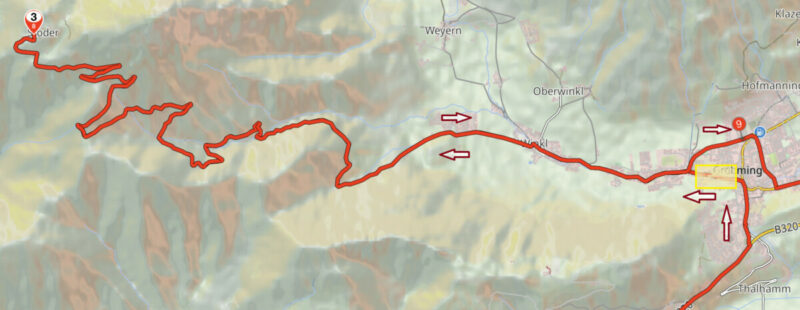
Coming from the south I could not turn left a planned due of the a road block (yellow box) and continued north.
As soon a I reached the route again - roughly at (9) - Scenix re-joined it, marked stop 3 as visited and sent me to the right.
Two: Shortcut of a round trip
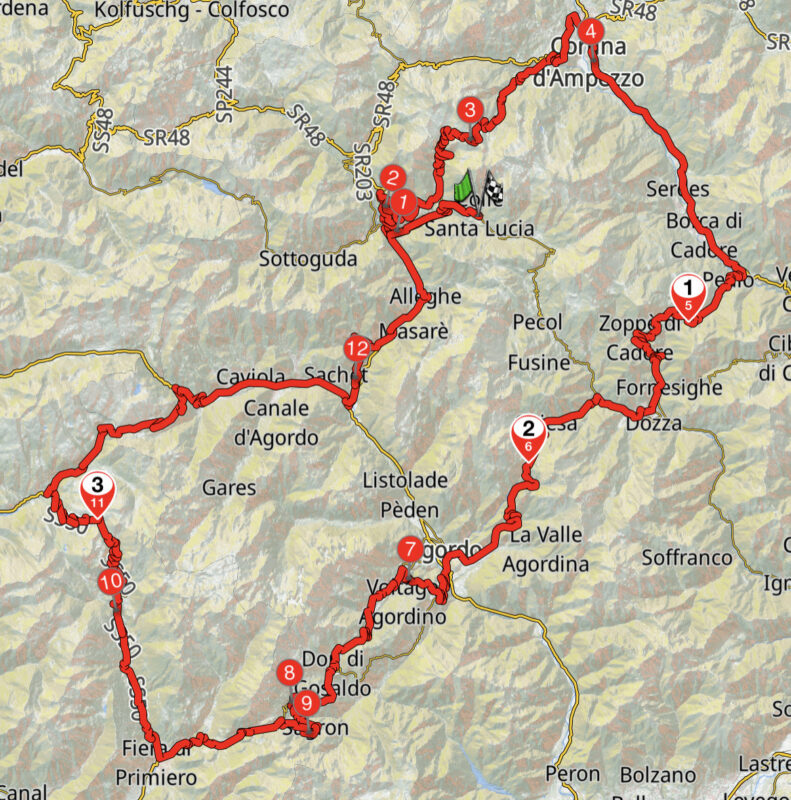
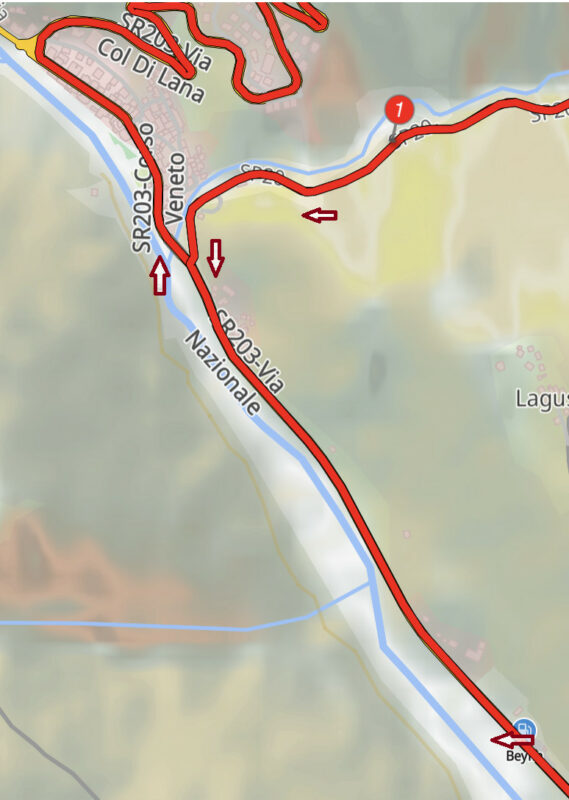
Coming from east the planned route would have taken me north. However I decided to go to the petrol station which was located on the route also, but at the end of the round trip.
As soon as I turned south-east Scenic reported "Not on route". If I remember correctly it did so until I reached the petrol station.
Then when I turned around there and went north-west again, Scenic re-joined the route and sent me back home, marking the three real stops as visited.
Conclusion:
It seems to me that Scenic does not take unvisited stops into account when re-joining the route in "do not recalculate" mode.
Should re-joining the route not be restricted to the route section up to the next unvisited stop?
I do think so.
Best regards and thank you,
Martin

Quote from Guido on 27.06.2026, 06:12Yes. “Do not recalculate” is an exception to this indeed.
Like everything, implementing this would have advantages and disadvantages.
I understand your scenarios, where it would be better to not skip the stops.
Now imagine another scenario. You are running late, and deliberately take a shortcut, skipping a stop. Now you do want Scenic to skip it.
Or, you accidentally placed a stop, e.g. a gas station) a bit too far off the road (you don’t really reach it, although you stopped for gas).
Saying this, I guess in those scenarios you could manually skip those stops.
I like your idea about only monitoring the stretch between stops you are on.
I’ll add it to the list.
Yes. “Do not recalculate” is an exception to this indeed.
Like everything, implementing this would have advantages and disadvantages.
I understand your scenarios, where it would be better to not skip the stops.
Now imagine another scenario. You are running late, and deliberately take a shortcut, skipping a stop. Now you do want Scenic to skip it.
Or, you accidentally placed a stop, e.g. a gas station) a bit too far off the road (you don’t really reach it, although you stopped for gas).
Saying this, I guess in those scenarios you could manually skip those stops.
I like your idea about only monitoring the stretch between stops you are on.
I’ll add it to the list.

Quote from Middelfrangge on 27.06.2026, 10:02Hi,
I had a similar experience and wasn‘t sure if I made a mistake or if Scenic did. I always have „do not recalculate“ …..now I know it is really a scenic issue.
Thanks
Thomas
Hi,
I had a similar experience and wasn‘t sure if I made a mistake or if Scenic did. I always have „do not recalculate“ …..now I know it is really a scenic issue.
Thanks
Thomas


