
roadworks/close roads sometimes not visible

Quote from Middelfrangge on 25.05.2026, 09:51Hi,
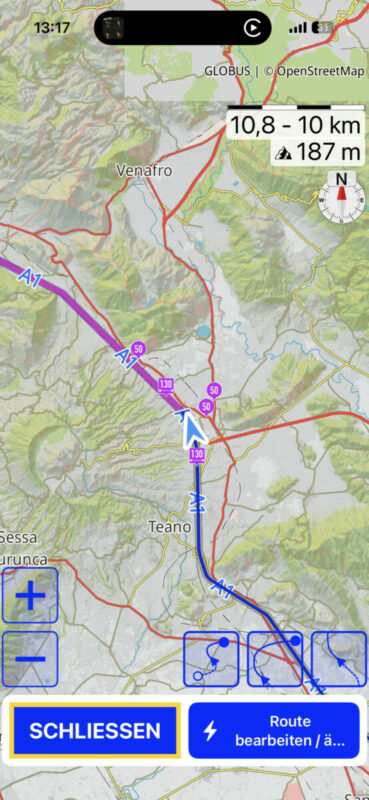
during my last trip I recognized that sometimes the closed roads or roadworks are gone and not anymore visible. I thought its because of the zoom level but its not. When changing the current route the symbols show up but as soon as I go out again the information is gone.
Any idea what could cause that issue?
BTW, is there a chance those symbols are not the final Overlay? I know I can change the size an colour but those symbols cover the arrow at some zoom levels and its difficult to see my position…..great would be a transpareny for those symbols like for the line itself
Thomas
Hi,
during my last trip I recognized that sometimes the closed roads or roadworks are gone and not anymore visible. I thought its because of the zoom level but its not. When changing the current route the symbols show up but as soon as I go out again the information is gone.
Any idea what could cause that issue?
BTW, is there a chance those symbols are not the final Overlay? I know I can change the size an colour but those symbols cover the arrow at some zoom levels and its difficult to see my position…..great would be a transpareny for those symbols like for the line itself
Thomas
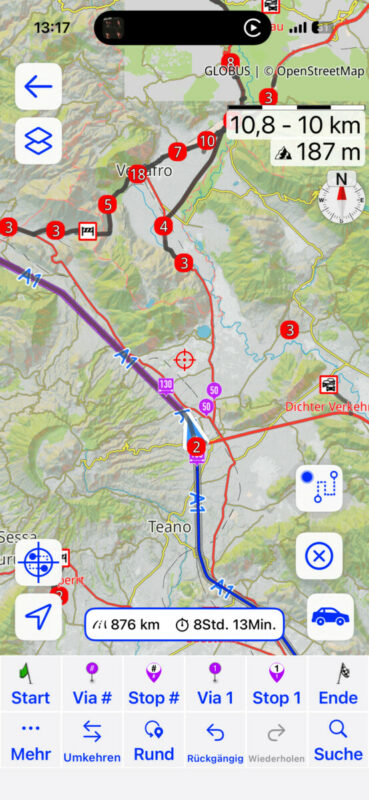

Quote from Guido on 25.05.2026, 10:12during my last trip I recognized that sometimes the closed roads or roadworks are gone and not anymore visible. I thought its because of the zoom level but its not. When changing the current route the symbols show up but as soon as I go out again the information is gone.
That sounds like a bug. When you start moving, do the symbols come back?
BTW, is there a chance those symbols are not the final Overlay? I know I can change the size an colour but those symbols cover the arrow at some zoom levels and its difficult to see my position…..great would be a transpareny for those symbols like for the line itself
Let me check if I can change their layer.
during my last trip I recognized that sometimes the closed roads or roadworks are gone and not anymore visible. I thought its because of the zoom level but its not. When changing the current route the symbols show up but as soon as I go out again the information is gone.
That sounds like a bug. When you start moving, do the symbols come back?
BTW, is there a chance those symbols are not the final Overlay? I know I can change the size an colour but those symbols cover the arrow at some zoom levels and its difficult to see my position…..great would be a transpareny for those symbols like for the line itself
Let me check if I can change their layer.
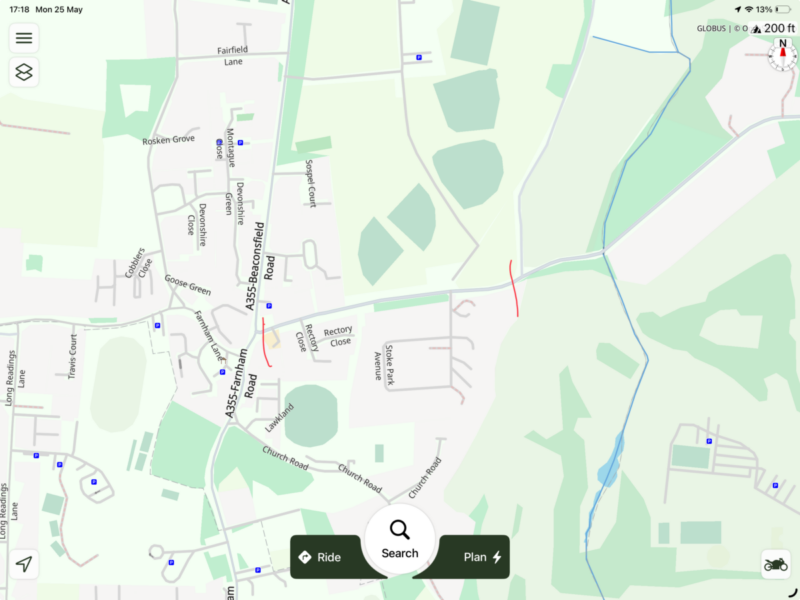
Quote from Bill W on 25.05.2026, 10:25I was just about to ask the same question. There is a six month road closure near us not shown on Scenic. It is however shown on Waze, TomTom and incorrectly
on MRA. I would really like to find that unicorn app that covers all my routing needs for bike & car. the closure is between the two red lines.
I was just about to ask the same question. There is a six month road closure near us not shown on Scenic. It is however shown on Waze, TomTom and incorrectly
on MRA. I would really like to find that unicorn app that covers all my routing needs for bike & car. the closure is between the two red lines.
Quote from Guido on 25.05.2026, 10:30Scenic's road closure data is coming from TomTom, so if it's showing there it should show in Scenic.
Maybe an obvious questions, but do you have the feature enabled in Settings > Navigation & Tracking, with the correct Incident Types enabled, and zoom level set to level you want? You can show the current zoom level of the map through Settings > Map Settings > Show scale + show zoom level enabled.
Scenic's road closure data is coming from TomTom, so if it's showing there it should show in Scenic.
Maybe an obvious questions, but do you have the feature enabled in Settings > Navigation & Tracking, with the correct Incident Types enabled, and zoom level set to level you want? You can show the current zoom level of the map through Settings > Map Settings > Show scale + show zoom level enabled.
Quote from Middelfrangge on 25.05.2026, 12:32Quote from Guido on 25.05.2026, 10:12That sounds like a bug. When you start moving, do the symbols come back?
No, it did not come back for several days. BTW, that was in Italy when it occurred and back home I have no problem with it.
Thomas
Quote from Guido on 25.05.2026, 10:12
That sounds like a bug. When you start moving, do the symbols come back?
No, it did not come back for several days. BTW, that was in Italy when it occurred and back home I have no problem with it.
Thomas
Quote from Guido on 25.05.2026, 12:42OK. That prompts another (maybe obvious) question. Did your device have internet access? Scenic needs to contact the TomTom API. When you are navigating it gets incidents in a 100km x 100km box around your current location. When you start moving, and you are close to going outside that box, it will contact TomTom again to get the updated incidents for the new radius.
Just double checking. Regardless of your answer it should show at least the incidents around your current location when navigating. (The incidents it is showing while planning).
OK. That prompts another (maybe obvious) question. Did your device have internet access? Scenic needs to contact the TomTom API. When you are navigating it gets incidents in a 100km x 100km box around your current location. When you start moving, and you are close to going outside that box, it will contact TomTom again to get the updated incidents for the new radius.
Just double checking. Regardless of your answer it should show at least the incidents around your current location when navigating. (The incidents it is showing while planning).
Quote from Middelfrangge on 25.05.2026, 13:25Hi Guido,
good point. I had internet connection, however I cannot remember if it was a good or bad connection, but roaming is for free in Europe, therefore I have internet all over Europe.
But lookimg at the two screenshots, the position was almost the same and as I wrote during adjustment of the route they were visible but after closing and went back to normal screen it was gone again. That was always at the same position and within seconds, therefore it would be strange if the internet connection got lost within seconds and when changing the route it recovered.
Thomas
Hi Guido,
good point. I had internet connection, however I cannot remember if it was a good or bad connection, but roaming is for free in Europe, therefore I have internet all over Europe.
But lookimg at the two screenshots, the position was almost the same and as I wrote during adjustment of the route they were visible but after closing and went back to normal screen it was gone again. That was always at the same position and within seconds, therefore it would be strange if the internet connection got lost within seconds and when changing the route it recovered.
Thomas
Quote from Guido on 25.05.2026, 13:30Yes. I agree at least the markers that show during planning should also show while navigating. I will investigate further. Thank you for the additional info.
Yes. I agree at least the markers that show during planning should also show while navigating. I will investigate further. Thank you for the additional info.


