
Roadrunner GPX files

Quote from jknight611 on 30.12.2023, 09:24Guido, please cancel this question, I got it figgered out! wow, obviously new to this gpx importing, what a powerful tool!
Hi all, I am a long time subscriber to the magazine Roadrunner and they have some cool rides available in gpx format. I have tried to transfer some of the files into Scenic, when I download the files (about 160kb) on my iPad I can’t seem to find a way to transfer to them Scenic. When I direct Scenic to the link on Roadrunner site the Roadrunner password seems to block me. Is there a workaround or am I missing something?
Thanks
Jay
Guido, please cancel this question, I got it figgered out! wow, obviously new to this gpx importing, what a powerful tool!
Hi all, I am a long time subscriber to the magazine Roadrunner and they have some cool rides available in gpx format. I have tried to transfer some of the files into Scenic, when I download the files (about 160kb) on my iPad I can’t seem to find a way to transfer to them Scenic. When I direct Scenic to the link on Roadrunner site the Roadrunner password seems to block me. Is there a workaround or am I missing something?
Thanks
Jay

Quote from Guido on 30.12.2023, 09:36Hi Jay,
There are multiple ways to get a GPX into scenic. Have a look here for the options: https://scenic.app/help/ways-sources-to-import/
Cheers,
Guido
Hi Jay,
There are multiple ways to get a GPX into scenic. Have a look here for the options: https://scenic.app/help/ways-sources-to-import/
Cheers,
Guido
Quote from jknight611 on 30.12.2023, 18:21Thank you very much, appreciate the excellent app, and the ultra support!
Thank you very much, appreciate the excellent app, and the ultra support!
Quote from Knuspermuesli on 26.05.2024, 09:55Quote from Guido on 30.12.2023, 09:36Hi Jay,
There are multiple ways to get a GPX into scenic. Have a look here for the options: https://scenic.app/help/ways-sources-to-import/
Cheers,
Guido
It would be great when it would work on MacOS as well.
The "iOS" app is working on my macbook but there is no way to import files from the hard disk.
I think it is more comfortable to plan routes on a macbook than on an iphone or ipad.For example my friend did some gpx exports and uploaded them to our google drive share.
There is no way to copy the URL with gpx ending.
Or is there a way to import the files?
The "local" path isn't working./Users/USERNAME/Downloads/Vorplanung Routen (gpx)/01 - Hinfahrt.gpx
Quote from Guido on 30.12.2023, 09:36Hi Jay,
There are multiple ways to get a GPX into scenic. Have a look here for the options: https://scenic.app/help/ways-sources-to-import/
Cheers,
Guido
It would be great when it would work on MacOS as well.
The "iOS" app is working on my macbook but there is no way to import files from the hard disk.
I think it is more comfortable to plan routes on a macbook than on an iphone or ipad.
For example my friend did some gpx exports and uploaded them to our google drive share.
There is no way to copy the URL with gpx ending.
Or is there a way to import the files?
The "local" path isn't working.
/Users/USERNAME/Downloads/Vorplanung Routen (gpx)/01 - Hinfahrt.gpx
Quote from Guido on 27.05.2024, 08:35From Find, do <ctrl>-click on the gpx file > Open With > Scenic.
Make sure Scenic is already running on your Mac when you do this.
From Find, do <ctrl>-click on the gpx file > Open With > Scenic.
Make sure Scenic is already running on your Mac when you do this.
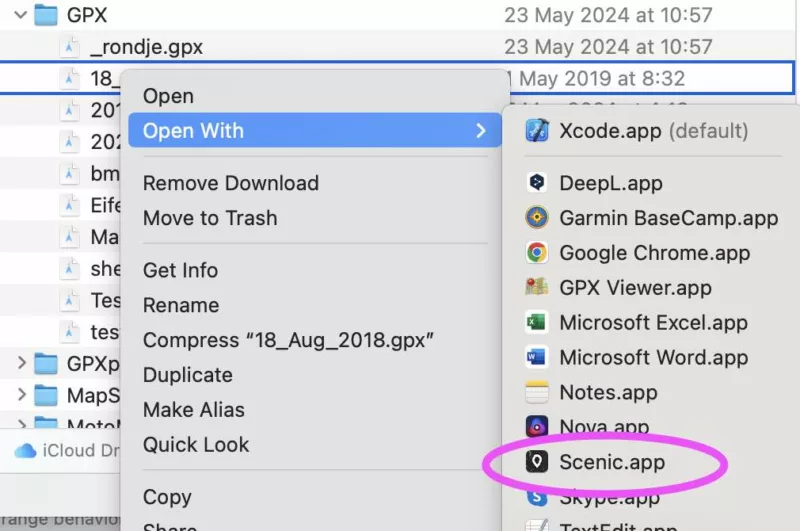
Quote from Knuspermuesli on 27.05.2024, 12:36Quote from Guido on 27.05.2024, 08:35From Find, do <ctrl>-click on the gpx file > Open With > Scenic.
Make sure Scenic is already running on your Mac when you do this.
Ah, there is my mistake.
Scenic didn't run and I tried that. Nothing happend.With running scenic it's working just great!
One last questions.
What is the difference between
"Routes" and "tracks"
In my example routes have 77 Points and Tracks 6336 Points.
Quote from Guido on 27.05.2024, 08:35From Find, do <ctrl>-click on the gpx file > Open With > Scenic.
Make sure Scenic is already running on your Mac when you do this.
Ah, there is my mistake.
Scenic didn't run and I tried that. Nothing happend.
With running scenic it's working just great!
One last questions.
What is the difference between
"Routes" and "tracks"
In my example routes have 77 Points and Tracks 6336 Points.
Quote from Guido on 27.05.2024, 12:37Have a look here: https://scenic.app/help/routes-vs-tracks-and-save-blue-line-as-track-during-import/
Have a look here: https://scenic.app/help/routes-vs-tracks-and-save-blue-line-as-track-during-import/


