
Problems with the URL route import

Quote from Bandit on 13.10.2024, 17:56Hi,
Im not very experienced when it comes to importing routes into Scenic that I have created in external map services. I have followed the "how to" videos on Scenic and used the URL method, i.e. route from Google Maps to Scenic
Unfortunately, I am having problems downloading the file that is in the import queue. It seams I always get this error message;
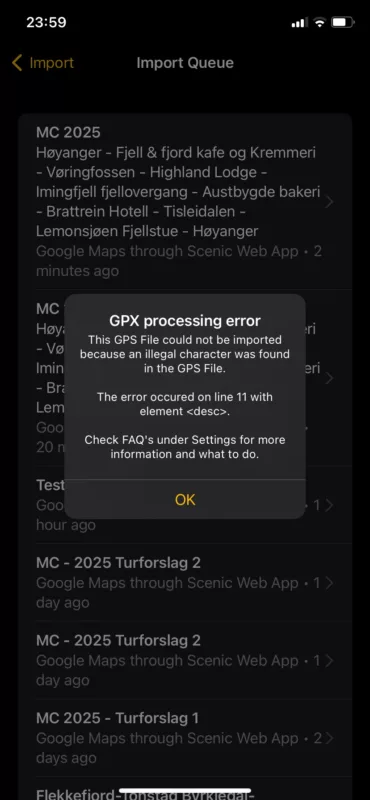
GPX processing error. This GPS File could not be imported because an illegal character was found in the GPS File. The error occured on line 11 with element <desc>.
(I have version 4.02. I had this both when creating the route, transfering the URL from web app to iPhone app and when i tried downloading the file)
On my serch through FAQ, I found many tips to try.. I tried the good old 'turn off and on again' but still the same result. Also tried changing point no. 11, changing the route partially, using both the original URL and the shortened URL provided from Google Maps Share, deleting and reinstalling the app on the iPhone but this error code always comes back.
Hope somebody can help me.
This is the URL`s from Google Maps, short and long:
https://maps.app.goo.gl/4gsV2MmfjVLLEdbJ8
https://www.google.com/maps/dir/61.2324359,6.1109998/Fjell+%26+fjord+kafe+og+Kremmeri/V%C3%B8ringfossen,+5785+Eidfjord/Highland+Lodge,+Lienvegen+11,+3580+Geilo/Imingfjell+fjellovergang/Austbygde+bakeri+AS/Brattrein+Hotell/60.8667117,9.211073/Lemonsj%C3%B8en+Fjellstue+%26+Hyttegrend/Dalevegen+42,+6993+H%C3%B8yanger/@60.6812351,5.2315058,480347m/data=!3m2!1e3!4b1!4m62!4m61!1m0!1m5!1m1!1s0x463e615fbf7642a1:0x682b69e1a443ce76!2m2!1d7.0702742!2d60.4664305!1m5!1m1!1s0x463e5fb3c511f01f:0x922df9ae6d08d909!2m2!1d7.2514658!2d60.4265721!1m5!1m1!1s0x463fbb234a9c7d51:0xdb9e5bf66bb2da2d!2m2!1d8.2125397!2d60.5345632!1m5!1m1!1s0x463f7b89ec8f0485:0xc39c7f0b5ad4eb96!2m2!1d8.618009!2d60.1529431!1m15!1m1!1s0x46409e1c9b279685:0xf3fbcf3461d4ab07!2m2!1d8.8282357!2d59.9952028!3m4!1m2!1d8.7986604!2d59.7509242!3s0x4640a7cbcfdb0355:0x1f2c24a412068eaf!3m4!1m2!1d9.1521875!2d59.5751324!3s0x4640b45b8c575e8d:0xe2a9a71e6cf6752c!1m5!1m1!1s0x4640ca8b5a9148b3:0xf1454acfaaf7971e!2m2!1d9.2792266!2d59.5533964!1m0!1m5!1m1!1s0x461520aaee038067:0xc35251b8cd6d8fd!2m2!1d9.074537!2d61.7590421!1m5!1m1!1s0x461620d68efaae3d:0x7da49004053d1ace!2m2!1d6.1107955!2d61.2325795!3e0?authuser=0&entry=ttu&g_ep=EgoyMDI0MTAwOS4wIKXMDSoASAFQAw%3D%3D
Error in the app;
Kjetil
Hi,
Im not very experienced when it comes to importing routes into Scenic that I have created in external map services. I have followed the "how to" videos on Scenic and used the URL method, i.e. route from Google Maps to Scenic
Unfortunately, I am having problems downloading the file that is in the import queue. It seams I always get this error message;
GPX processing error. This GPS File could not be imported because an illegal character was found in the GPS File. The error occured on line 11 with element <desc>.
(I have version 4.02. I had this both when creating the route, transfering the URL from web app to iPhone app and when i tried downloading the file)
On my serch through FAQ, I found many tips to try.. I tried the good old 'turn off and on again' but still the same result. Also tried changing point no. 11, changing the route partially, using both the original URL and the shortened URL provided from Google Maps Share, deleting and reinstalling the app on the iPhone but this error code always comes back.
Hope somebody can help me.
This is the URL`s from Google Maps, short and long:
https://maps.app.goo.gl/4gsV2MmfjVLLEdbJ8
Error in the app;
Kjetil

Quote from Guido on 14.10.2024, 09:37Hi Kjetil,
It looks like you are adding a description, which contains special characters. This is what is causing the error message. It's likely the ∅ character. Obviously this should not be a problem, so I'll fix that later. But, for now, try adding no description or without special characters.
When I tried this I ran into another problem. The map data is incorrect and the Scenic 4 provider doesn't know a way out of your neighborhood (try it... in Scenic, from your start point, put destination on the 55 road. You will get an error message. To solve this, I had to place your start and end point on the 55. This link will work:
I've already reported this to the map provider. If you run into other issues... you can report them like this: https://scenic.app/help/reporting-map-errors/
Hi Kjetil,
It looks like you are adding a description, which contains special characters. This is what is causing the error message. It's likely the ∅ character. Obviously this should not be a problem, so I'll fix that later. But, for now, try adding no description or without special characters.
When I tried this I ran into another problem. The map data is incorrect and the Scenic 4 provider doesn't know a way out of your neighborhood (try it... in Scenic, from your start point, put destination on the 55 road. You will get an error message. To solve this, I had to place your start and end point on the 55. This link will work:
I've already reported this to the map provider. If you run into other issues... you can report them like this: https://scenic.app/help/reporting-map-errors/
Quote from Bandit on 14.10.2024, 10:57Thanks,
This link works great! Ill make sure not to use any special Norwegian letters in the future 🙂
Planning the trip is half the fun and I really like Scenic! I especially like looking through the statistics I get from all registered rides.
Thanks,
This link works great! Ill make sure not to use any special Norwegian letters in the future 🙂
Planning the trip is half the fun and I really like Scenic! I especially like looking through the statistics I get from all registered rides.


