
Planned route amended by Scenic on the fly

Quote from PatB on 13.03.2025, 11:40I don't know if you're aware of this issue, but I recently wanted to follow a short route that I enjoy and that is stored on Scenic. I loaded the route in the usual manner and set off on the short loop, and the navigation worked perfectly. However, when I was around a third of the way around the loop, Scenic directed me from the usual path. As I could see the planned route returned to the expected path, I decided to follow Scenic's instructions expecting to be brought swiftly back to the planned route. Instead, I ended up riding along miles of single track roads - not at all what I had in mind. After twenty minutes or so, the revised route passed a village I knew. But it was halfway back home! I stayed on the route to the following town where I found a place to stop, take some screenshots and figure out what had gone wrong.
If you look at the attached screen shots you'll see that Scenic directed me to turn right at via point 7, in Campsea Ashe, where I should have followed the road round to the left. From that point on, Scenic seems to have created a new route going back to my start point and then back out to the original loop where I had been directed off the planned route.
I thought the routing problems had been resolved, and Scenic had worked fine the previous time I'd used it.
Is this a new bug or something that is going to be resolved soon?
Thank you for your attention.
The planned rounte.
This is the actual path I ended up taking.
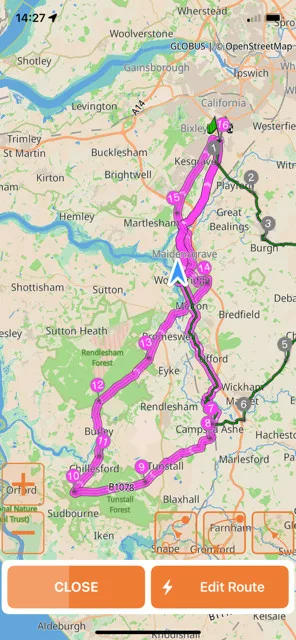
These shows the changed route. Looking again now, I notice that the via points 8, 9, etc appear to be as per the original route, and the final image indicates that Scenic was directing me back to my start point for some reason. I didn't notice this while riding as the roads were terrible and required my full attention.
One a completely differenct point. I don't know if anyone else has mentioned this, but from previous experience, I've found trying to delete missed via points while riding almost impossible as the trash can is tiny and trying to press it while riding effects the steering as my iPhone is mounted on the handlebars.
I don't know if you're aware of this issue, but I recently wanted to follow a short route that I enjoy and that is stored on Scenic. I loaded the route in the usual manner and set off on the short loop, and the navigation worked perfectly. However, when I was around a third of the way around the loop, Scenic directed me from the usual path. As I could see the planned route returned to the expected path, I decided to follow Scenic's instructions expecting to be brought swiftly back to the planned route. Instead, I ended up riding along miles of single track roads - not at all what I had in mind. After twenty minutes or so, the revised route passed a village I knew. But it was halfway back home! I stayed on the route to the following town where I found a place to stop, take some screenshots and figure out what had gone wrong.
If you look at the attached screen shots you'll see that Scenic directed me to turn right at via point 7, in Campsea Ashe, where I should have followed the road round to the left. From that point on, Scenic seems to have created a new route going back to my start point and then back out to the original loop where I had been directed off the planned route.
I thought the routing problems had been resolved, and Scenic had worked fine the previous time I'd used it.
Is this a new bug or something that is going to be resolved soon?
Thank you for your attention.
The planned rounte.
This is the actual path I ended up taking.
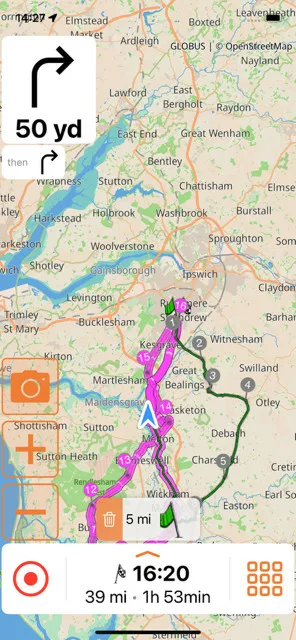
These shows the changed route. Looking again now, I notice that the via points 8, 9, etc appear to be as per the original route, and the final image indicates that Scenic was directing me back to my start point for some reason. I didn't notice this while riding as the roads were terrible and required my full attention.
One a completely differenct point. I don't know if anyone else has mentioned this, but from previous experience, I've found trying to delete missed via points while riding almost impossible as the trash can is tiny and trying to press it while riding effects the steering as my iPhone is mounted on the handlebars.

Quote from Guido on 13.03.2025, 12:55Hi Pat, that's a very weird issue. I'm not sure, why all of a sudden the start point was added back to the route. To be honest, I have not see that one before, but I'll investigate.
What version of Scenic are you running? I"m asking because I did make the "skip waypoint" button a bit taller in one of the latest updates. B.t.w you can tap anywhere on that button, not just the orange part with the trash can. Also, you could enable auto-skip via points (Settings > Nav & Tracking > Detour behaviour).
Hi Pat, that's a very weird issue. I'm not sure, why all of a sudden the start point was added back to the route. To be honest, I have not see that one before, but I'll investigate.
What version of Scenic are you running? I"m asking because I did make the "skip waypoint" button a bit taller in one of the latest updates. B.t.w you can tap anywhere on that button, not just the orange part with the trash can. Also, you could enable auto-skip via points (Settings > Nav & Tracking > Detour behaviour).

Quote from Binwaa on 13.03.2025, 22:49That is the same problem I had on my trip in Thailand, everyday.
See my post about ‘Emotions and facts’.
That is the same problem I had on my trip in Thailand, everyday.
See my post about ‘Emotions and facts’.
Quote from PatB on 14.03.2025, 09:00Hi Guido,
My Detour Behaviour "Auto-skip next Via" is set to ON, and if I leave the route it's set to "Guide me to the first unreached via point".
The version is v4.15; however, it updates automatically, so it could have been v4.14 when I rode this route on March 8th.
Binwaa has also had this problem.
TBH, I'm sure something like this happened once or twice before you were forced to change the map service, so it may not be related to recent changes.
Hi Guido,
My Detour Behaviour "Auto-skip next Via" is set to ON, and if I leave the route it's set to "Guide me to the first unreached via point".
The version is v4.15; however, it updates automatically, so it could have been v4.14 when I rode this route on March 8th.
Binwaa has also had this problem.
TBH, I'm sure something like this happened once or twice before you were forced to change the map service, so it may not be related to recent changes.
Quote from Guido on 14.03.2025, 10:00@binwaa Did you have this exact same problem where all of a sudden it started guiding you back to the route start, even though via points after the route start were already reached? That's not what I understood from your other topic.
@patb. Were the navigation instructions until you reached via 7 correct? Or was it trying to guide you back to the route start from the beginning?
@binwaa Did you have this exact same problem where all of a sudden it started guiding you back to the route start, even though via points after the route start were already reached? That's not what I understood from your other topic.
@patb. Were the navigation instructions until you reached via 7 correct? Or was it trying to guide you back to the route start from the beginning?
Quote from PatB on 14.03.2025, 10:09@guidomm The navigation was perfect until I reached via point 7. And as you can imagine by my comment regarding the trash can, I had no interaction with Scenic once the route was loaded and I'd requested to start the route.
@guidomm The navigation was perfect until I reached via point 7. And as you can imagine by my comment regarding the trash can, I had no interaction with Scenic once the route was loaded and I'd requested to start the route.
Quote from PatB on 30.03.2025, 10:09I tried the same route again today and may have found the cause of the amended routing.
Barely after leaving home, Scenic redirected me to take a turn I knew was wrong. I stopped at the roadside to see what had happened and noticed it was trying to redirect me back to the start. Zooming in, I saw that the start and finish markers were a few metres away from the road!
I don't recall being redirected taking my route last time, but perhaps I missed the alerts since I the first sections quite well. Perhaps if @binwaa could check his route as well, it would be possible to see if the cause is the same.
It's worth noting that when I created this circular route, it was using Scenic with the previous mapping.
Could the threshold for hitting a way point be too close?
I tried the same route again today and may have found the cause of the amended routing.
Barely after leaving home, Scenic redirected me to take a turn I knew was wrong. I stopped at the roadside to see what had happened and noticed it was trying to redirect me back to the start. Zooming in, I saw that the start and finish markers were a few metres away from the road!
I don't recall being redirected taking my route last time, but perhaps I missed the alerts since I the first sections quite well. Perhaps if @binwaa could check his route as well, it would be possible to see if the cause is the same.
It's worth noting that when I created this circular route, it was using Scenic with the previous mapping.
Could the threshold for hitting a way point be too close?
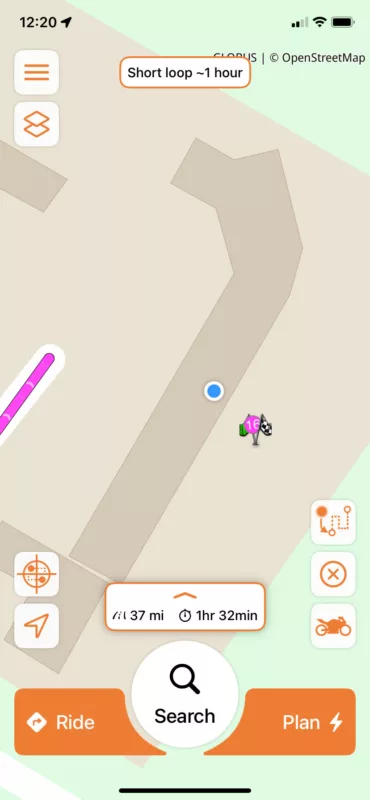

Quote from clarkml72 on 30.03.2025, 10:37This same thing happened to me last weekend, and I was on 4.16. The start was at the gas station, but on the building and not the parking lot. So when we left the park lot of that building it was saying turn around etc etc. I had to tell it to skip start and it corrected this. Not a bug per se, but the threshold for start feels like I have to run over a jelly bean 🙂
This same thing happened to me last weekend, and I was on 4.16. The start was at the gas station, but on the building and not the parking lot. So when we left the park lot of that building it was saying turn around etc etc. I had to tell it to skip start and it corrected this. Not a bug per se, but the threshold for start feels like I have to run over a jelly bean 🙂

Quote from MjK on 30.03.2025, 10:45In a post 2 weeks ago Guido posted in a very similar situation - https://scenic.app/forum/addpost/2721/?quote=11799
The start location of your recorded ride suggests that your location was at that point on the unpaved road (and not snapped to the route). In other words, you were further away than 40 meters from the route, so your location was not snapped to the route, and as a result, your raw location was logged. The only way this could have happened is because of GPS inaccuracy.
What I think happened is that, because of this inaccuracy, you never reached the start point either, and Scenic kept trying to guide you back to it.
What I recommend next time, is, when you start a route, to make sure that guidance to the route start point is not included. Here's how to do that: https://scenic.app/forum/topic/begin-at-a-certain-waypoint-stop/#postid-11477
When you do that, Scenic will not start navigation immediately. It will say "go to route". And only when you reach the route, the navigation will start. If you reach the route "behind" the start point, the start point will automatically be skipped without any screen interaction required.
In a post 2 weeks ago Guido posted in a very similar situation - https://scenic.app/forum/addpost/2721/?quote=11799
The start location of your recorded ride suggests that your location was at that point on the unpaved road (and not snapped to the route). In other words, you were further away than 40 meters from the route, so your location was not snapped to the route, and as a result, your raw location was logged. The only way this could have happened is because of GPS inaccuracy.
What I think happened is that, because of this inaccuracy, you never reached the start point either, and Scenic kept trying to guide you back to it.
What I recommend next time, is, when you start a route, to make sure that guidance to the route start point is not included. Here's how to do that: https://scenic.app/forum/topic/begin-at-a-certain-waypoint-stop/#postid-11477
When you do that, Scenic will not start navigation immediately. It will say "go to route". And only when you reach the route, the navigation will start. If you reach the route "behind" the start point, the start point will automatically be skipped without any screen interaction required.
Quote from Binwaa on 30.03.2025, 20:27I had the same behaviour so many times, even when restarting the entire route due to failure of Scenic.
Now, l know. Before I start riding, I always hit to skip the startpoint.
I had the same behaviour so many times, even when restarting the entire route due to failure of Scenic.
Now, l know. Before I start riding, I always hit to skip the startpoint.


