
Override Maps Language

Quote from blackhawk1618 on 09.11.2024, 13:55Hello Guido,
I would like to request to bring back the feature of Scenic Maps to choose the preferred language, as in version 3.5 under Maps Settings.
When navigating using Scenic 4.x and the latest v4.05 the street names displays in Arabic, even though my iPhone primary language is set to English. I have noticed that, when editing OpenStreetMaps, street names are in "Arabic" and have two or more Multilingual language names, but Scenic tends to default to Arabic during navigation.
It would be incredibly helpful to have control over the map language to display street names consistently in the preferred language during the navigation.
I am attaching the screenshot from OpenStreetMaps for the reference.
Hello Guido,
I would like to request to bring back the feature of Scenic Maps to choose the preferred language, as in version 3.5 under Maps Settings.
When navigating using Scenic 4.x and the latest v4.05 the street names displays in Arabic, even though my iPhone primary language is set to English. I have noticed that, when editing OpenStreetMaps, street names are in "Arabic" and have two or more Multilingual language names, but Scenic tends to default to Arabic during navigation.
It would be incredibly helpful to have control over the map language to display street names consistently in the preferred language during the navigation.
I am attaching the screenshot from OpenStreetMaps for the reference.


Quote from Guido on 09.11.2024, 13:59You have control through the language preference setting in iOS. Have a look at the faqs: https://scenic.app/scenic-4-faqs/. There is a faq on this with more info.
You have control through the language preference setting in iOS. Have a look at the faqs: https://scenic.app/scenic-4-faqs/. There is a faq on this with more info.
Quote from blackhawk1618 on 09.11.2024, 14:14Quote from Guido on 09.11.2024, 13:59You have control through the language preference setting in iOS. Have a look at the faqs: https://scenic.app/scenic-4-faqs/. There is a faq on this with more info.
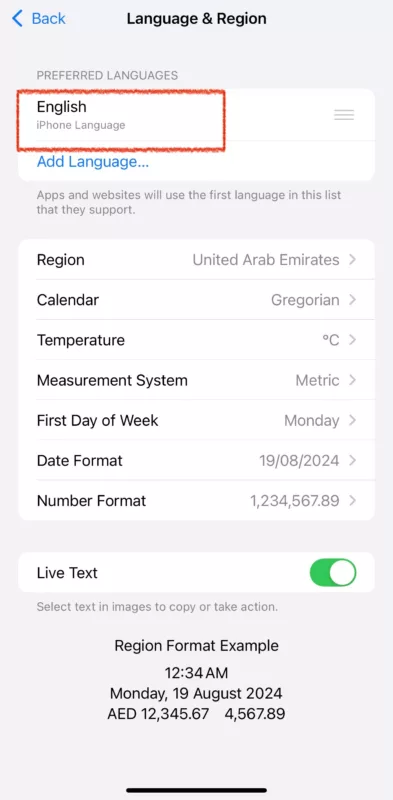
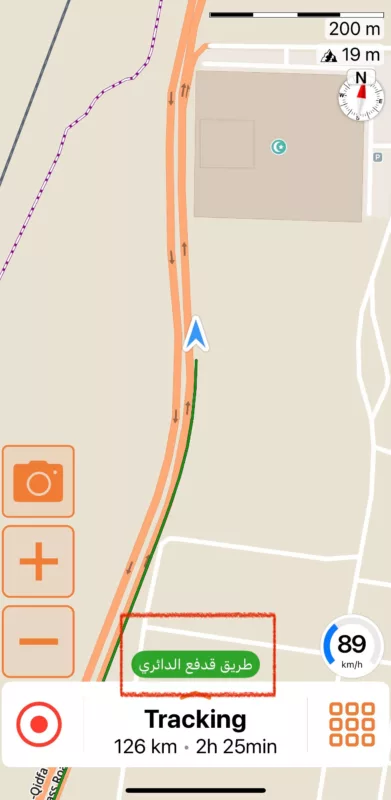
My iPhone Language is set to "English" only but the Street names in Scenic v4.x navigation still appears in "Arabic".
I have the screenshots attached for your reference.
Quote from Guido on 09.11.2024, 13:59You have control through the language preference setting in iOS. Have a look at the faqs: https://scenic.app/scenic-4-faqs/. There is a faq on this with more info.
My iPhone Language is set to "English" only but the Street names in Scenic v4.x navigation still appears in "Arabic".
I have the screenshots attached for your reference.
Quote from blackhawk1618 on 10.11.2024, 11:27Hello Guido,
Do you have any update and let me know if you need more information.
Hello Guido,
Do you have any update and let me know if you need more information.
Quote from Guido on 11.11.2024, 13:21I'm afraid, I can not fix this for now.
The name in the green bubble is provided but the map matching algorithm, which only provides the name in local language at the moment.
I'm afraid, I can not fix this for now.
The name in the green bubble is provided but the map matching algorithm, which only provides the name in local language at the moment.
Quote from blackhawk1618 on 11.11.2024, 14:00Quote from Guido on 11.11.2024, 13:21I'm afraid, I can not fix this for now.
The name in the green bubble is provided but the map matching algorithm, which only provides the name in local language at the moment.The OpenStreetMaps engine provides street and road names in multilingual languages as you can see in the screenshot below.
Quote from Guido on 11.11.2024, 13:21I'm afraid, I can not fix this for now.
The name in the green bubble is provided but the map matching algorithm, which only provides the name in local language at the moment.
The OpenStreetMaps engine provides street and road names in multilingual languages as you can see in the screenshot below.

Quote from Guido on 11.11.2024, 14:07Yes. I looked into this. Unfortunately, the Valhalla Map Matching algorithm (which Scenic uses to get the name of street you are currently on) only provides the "ref" and the upper level "name" field (the field you see at the top). I tried forcing to get a response in a certain language, but still I only get the "name" field.
Yes. I looked into this. Unfortunately, the Valhalla Map Matching algorithm (which Scenic uses to get the name of street you are currently on) only provides the "ref" and the upper level "name" field (the field you see at the top). I tried forcing to get a response in a certain language, but still I only get the "name" field.
Quote from blackhawk1618 on 11.11.2024, 15:29Quote from Guido on 11.11.2024, 14:07Yes. I looked into this. Unfortunately, the Valhalla Map Matching algorithm (which Scenic uses to get the name of street you are currently on) only provides the "ref" and the upper level "name" field (the field you see at the top). I tried forcing to get a response in a certain language, but still I only get the "name" field.
That’s quite unfortunate. It essentially defeats the whole purpose of using Scenic Maps for international tours.
If I plan to travel to places like Middle East, Indonesia or Japan, I will be lost without understanding the local language displayed by OpenStreetMaps. It’s a shame the Valhalla Map Matching algorithm can’t provide names in a preferred language. This really limits its usability of Scenic app for international travel.
Quote from Guido on 11.11.2024, 14:07Yes. I looked into this. Unfortunately, the Valhalla Map Matching algorithm (which Scenic uses to get the name of street you are currently on) only provides the "ref" and the upper level "name" field (the field you see at the top). I tried forcing to get a response in a certain language, but still I only get the "name" field.
That’s quite unfortunate. It essentially defeats the whole purpose of using Scenic Maps for international tours.
If I plan to travel to places like Middle East, Indonesia or Japan, I will be lost without understanding the local language displayed by OpenStreetMaps. It’s a shame the Valhalla Map Matching algorithm can’t provide names in a preferred language. This really limits its usability of Scenic app for international travel.
Quote from Guido on 11.11.2024, 15:34It’s not that extreme.
Only the name in the green “current street name” bubble is affected by this. Text on the map itself, visual turn instructions and audible turn instructions follow your preferred language setting and your voice language setting.
They don’t use the map matching alogiritm.
It’s not that extreme.
Only the name in the green “current street name” bubble is affected by this. Text on the map itself, visual turn instructions and audible turn instructions follow your preferred language setting and your voice language setting.
They don’t use the map matching alogiritm.
Quote from blackhawk1618 on 11.11.2024, 15:53Quote from Guido on 11.11.2024, 15:34It’s not that extreme.
Only the name in the green “current street name” bubble is affected by this. Text on the map itself, visual turn instructions and audible turn instructions follow your preferred language setting and your voice language setting.
They don’t use the map matching alogiritm.
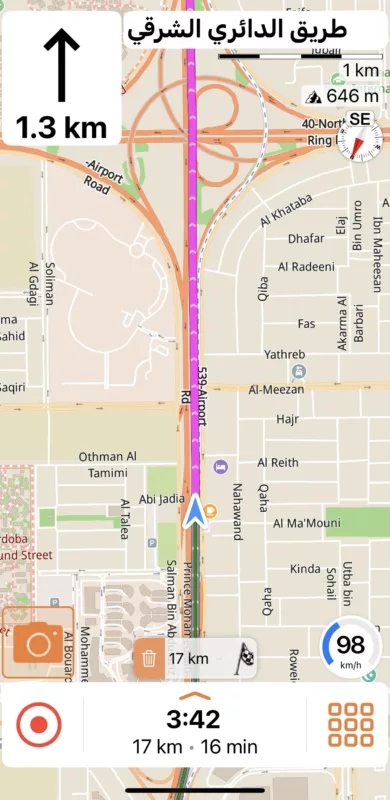
i disagree because most of the times, the direction text and instructions shows in the local language. Unfortunately I don’t use voice language settings because I don’t wear headphones while riding.
please see the picture below 🙁
Quote from Guido on 11.11.2024, 15:34It’s not that extreme.
Only the name in the green “current street name” bubble is affected by this. Text on the map itself, visual turn instructions and audible turn instructions follow your preferred language setting and your voice language setting.
They don’t use the map matching alogiritm.
i disagree because most of the times, the direction text and instructions shows in the local language. Unfortunately I don’t use voice language settings because I don’t wear headphones while riding.
please see the picture below 🙁
Quote from Guido on 11.11.2024, 16:11Hmm. That’s unexpected. I’ll have a deeper look this week.
Hmm. That’s unexpected. I’ll have a deeper look this week.
Quote from Guido on 11.11.2024, 19:15I've looked further into it. It's not good I'm afraid:
There are two scenarios:
- Some roads don't have an english name, like this one: https://www.openstreetmap.org/way/535677696#map=17/24.635193/46.802015
- Others do have an english name, but it's not returned (everywhere) by the routing engine (the routing engine is also responsible for generating the navigation instructions). Like this one: https://www.openstreetmap.org/way/784202300#map=16/24.70211/46.74826
- For on-screen instructions, only the local name is returned
- For voice instructions, a combination of the local and english name (local name 'comma' english name) is returned. For example, "Bear right onto طريق مكة المكرمة الفرعي, Holy Makkah.". However, speaking this sentence with an English voice presents another problem... it will say "Bear right onto arabic character ..., arabic character ...., arabic character ..., ... . Holy Makka"The truth is... I can't do anything about this directly.
For scenario 1, I can't "make up" names that don't exist in the data. The only thing you could do is report / correct this in the map data on a case per case basis: https://scenic.app/help/reporting-map-errors/
For scenario 2, this can't even be solved by the map provider. It needs to be addressed by the routing engine open-source project. The good news is that I found out there is an open issue report for this. The bad news is that this issue has been open for quite a while already.I might be able to find a workaround "hack" for these cases, but it will take some time and priority to do this. This is mostly a problem for travelers going through a country where the alphabet is different from their own alphabet. I.e. for you, when traveling in a country with an alphabet other than Latin.
Not the answer you were hoping for, I'm sure. But I hope it explains.
I've looked further into it. It's not good I'm afraid:
There are two scenarios:
- Some roads don't have an english name, like this one: https://www.openstreetmap.org/way/535677696#map=17/24.635193/46.802015
- Others do have an english name, but it's not returned (everywhere) by the routing engine (the routing engine is also responsible for generating the navigation instructions). Like this one: https://www.openstreetmap.org/way/784202300#map=16/24.70211/46.74826
- For on-screen instructions, only the local name is returned
- For voice instructions, a combination of the local and english name (local name 'comma' english name) is returned. For example, "Bear right onto طريق مكة المكرمة الفرعي, Holy Makkah.". However, speaking this sentence with an English voice presents another problem... it will say "Bear right onto arabic character ..., arabic character ...., arabic character ..., ... . Holy Makka"
The truth is... I can't do anything about this directly.
For scenario 1, I can't "make up" names that don't exist in the data. The only thing you could do is report / correct this in the map data on a case per case basis: https://scenic.app/help/reporting-map-errors/
For scenario 2, this can't even be solved by the map provider. It needs to be addressed by the routing engine open-source project. The good news is that I found out there is an open issue report for this. The bad news is that this issue has been open for quite a while already.
I might be able to find a workaround "hack" for these cases, but it will take some time and priority to do this. This is mostly a problem for travelers going through a country where the alphabet is different from their own alphabet. I.e. for you, when traveling in a country with an alphabet other than Latin.
Not the answer you were hoping for, I'm sure. But I hope it explains.
Quote from blackhawk1618 on 12.11.2024, 09:39Quote from Guido on 11.11.2024, 19:15I've looked further into it. It's not good I'm afraid:
There are two scenarios:
- Some roads don't have an english name, like this one: https://www.openstreetmap.org/way/535677696#map=17/24.635193/46.802015
- Others do have an english name, but it's not returned (everywhere) by the routing engine (the routing engine is also responsible for generating the navigation instructions). Like this one: https://www.openstreetmap.org/way/784202300#map=16/24.70211/46.74826
- For on-screen instructions, only the local name is returned
- For voice instructions, a combination of the local and english name (local name 'comma' english name) is returned. For example, "Bear right onto طريق مكة المكرمة الفرعي, Holy Makkah.". However, speaking this sentence with an English voice presents another problem... it will say "Bear right onto arabic character ..., arabic character ...., arabic character ..., ... . Holy Makka"The truth is... I can't do anything about this directly.
For scenario 1, I can't "make up" names that don't exist in the data. The only thing you could do is report / correct this in the map data on a case per case basis: https://scenic.app/help/reporting-map-errors/
For scenario 2, this can't even be solved by the map provider. It needs to be addressed by the routing engine open-source project. The good news is that I found out there is an open issue report for this. The bad news is that this issue has been open for quite a while already.I might be able to find a workaround "hack" for these cases, but it will take some time and priority to do this. This is mostly a problem for travelers going through a country where the alphabet is different from their own alphabet. I.e. for you, when traveling in a country with an alphabet other than Latin.
Not the answer you were hoping for, I'm sure. But I hope it explains.
It's quite sad to think that users are expected to spend their own time fixing the core functionality issues of the Scenic v4 routing engine of this open-source project. In scenic v3.5 we encountered similar issue, which was later resolved by adding an option to override the Map language (though I don't recall the exact feature name).
Now I feel that I cannot rely on the Scenic v4 maps routing engine for navigation when traveling international countries because it enforces local language ignoring my preferred language entirely, which definitely defeats the purpose of using the navigation. At this point, I may end up only using it for recording my rides instead.
Quote from Guido on 11.11.2024, 19:15I've looked further into it. It's not good I'm afraid:
There are two scenarios:
- Some roads don't have an english name, like this one: https://www.openstreetmap.org/way/535677696#map=17/24.635193/46.802015
- Others do have an english name, but it's not returned (everywhere) by the routing engine (the routing engine is also responsible for generating the navigation instructions). Like this one: https://www.openstreetmap.org/way/784202300#map=16/24.70211/46.74826
- For on-screen instructions, only the local name is returned
- For voice instructions, a combination of the local and english name (local name 'comma' english name) is returned. For example, "Bear right onto طريق مكة المكرمة الفرعي, Holy Makkah.". However, speaking this sentence with an English voice presents another problem... it will say "Bear right onto arabic character ..., arabic character ...., arabic character ..., ... . Holy Makka"The truth is... I can't do anything about this directly.
For scenario 1, I can't "make up" names that don't exist in the data. The only thing you could do is report / correct this in the map data on a case per case basis: https://scenic.app/help/reporting-map-errors/
For scenario 2, this can't even be solved by the map provider. It needs to be addressed by the routing engine open-source project. The good news is that I found out there is an open issue report for this. The bad news is that this issue has been open for quite a while already.I might be able to find a workaround "hack" for these cases, but it will take some time and priority to do this. This is mostly a problem for travelers going through a country where the alphabet is different from their own alphabet. I.e. for you, when traveling in a country with an alphabet other than Latin.
Not the answer you were hoping for, I'm sure. But I hope it explains.
It's quite sad to think that users are expected to spend their own time fixing the core functionality issues of the Scenic v4 routing engine of this open-source project. In scenic v3.5 we encountered similar issue, which was later resolved by adding an option to override the Map language (though I don't recall the exact feature name).
Now I feel that I cannot rely on the Scenic v4 maps routing engine for navigation when traveling international countries because it enforces local language ignoring my preferred language entirely, which definitely defeats the purpose of using the navigation. At this point, I may end up only using it for recording my rides instead.
Quote from Guido on 12.11.2024, 10:07Sorry. I can’t spend more time on this at the moment. Will revolve back and look for workaround solutions if all higher prio items have been addressed.
users are expected to spend their own time fixing the core functionality issues
Do you mean reporting map data issues? If so, this is not unique to open source maps (OSM). Scenic 3.5 also had a “report map data issues” feature. Even Google Maps and Waze depend on user feedback at some level.
Sorry. I can’t spend more time on this at the moment. Will revolve back and look for workaround solutions if all higher prio items have been addressed.
users are expected to spend their own time fixing the core functionality issues
Do you mean reporting map data issues? If so, this is not unique to open source maps (OSM). Scenic 3.5 also had a “report map data issues” feature. Even Google Maps and Waze depend on user feedback at some level.


