
Multi waypoint-different route setup

Quote from MarcoZ on 20.07.2026, 08:51Hi Guido,
when I go out on my motorcycle, even for just a one-day ride, I'm used to planning not only the waypoints but also the specific roads I want to travel, because otherwise the navigation system may choose one road instead of another.
It would therefore be very useful for me to be able to define the travel method between one waypoint and the next. For example, the section between waypoints 3 and 4 could be a transfer stage, where I would like to use highways or major roads, while between waypoints 4, 5, and 6 I might prefer secondary roads, and between waypoints 7 and 8 I may want to ride on unpaved roads.
Unfortunately, this is not currently possible, so I have to organize my trip into many small routes and use them one after another.
It's not a major issue and it works well enough, but I would really like to be able to define how the navigation should behave between individual waypoints.
Do you think this could be implemented?
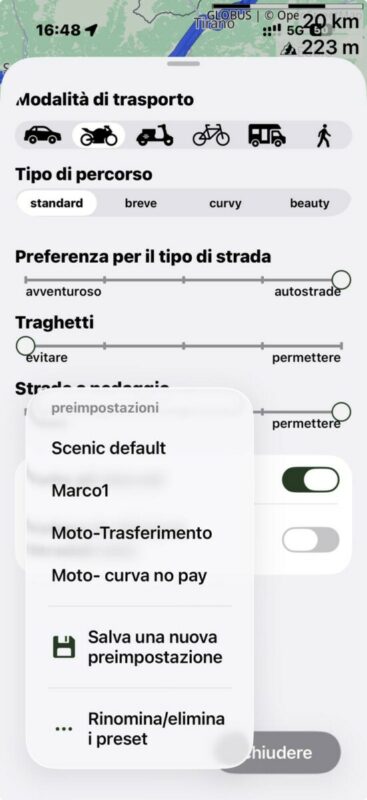
At the moment, I have created several transportation profiles, each with different settings, and I have to select the appropriate one either when creating the route or when starting navigation.
Would it be possible to consider adding this functionality?
In addition, when I have many sub-routes for the same day, the folder management system doesn't really help.
Thank you,
Marco
Hi Guido,
when I go out on my motorcycle, even for just a one-day ride, I'm used to planning not only the waypoints but also the specific roads I want to travel, because otherwise the navigation system may choose one road instead of another.
It would therefore be very useful for me to be able to define the travel method between one waypoint and the next. For example, the section between waypoints 3 and 4 could be a transfer stage, where I would like to use highways or major roads, while between waypoints 4, 5, and 6 I might prefer secondary roads, and between waypoints 7 and 8 I may want to ride on unpaved roads.
Unfortunately, this is not currently possible, so I have to organize my trip into many small routes and use them one after another.
It's not a major issue and it works well enough, but I would really like to be able to define how the navigation should behave between individual waypoints.
Do you think this could be implemented?
At the moment, I have created several transportation profiles, each with different settings, and I have to select the appropriate one either when creating the route or when starting navigation.
Would it be possible to consider adding this functionality?
In addition, when I have many sub-routes for the same day, the folder management system doesn't really help.
Thank you,
Marco

Quote from Guido on 20.07.2026, 12:29Hi Marco,
Unfortunately this is not possible at the moment. Our routing provider does not support multiple routing modes per route. It is on our list to add this in the future, but it will be quite some time before we have time for this.
There are two workaround for this:
1) Create multiple routes (this is what you are doing now) or
2) Create the entire route using the routing mode that fits best, and then use via points to force the route to take the roads you want.Best regards,
Guido
Hi Marco,
Unfortunately this is not possible at the moment. Our routing provider does not support multiple routing modes per route. It is on our list to add this in the future, but it will be quite some time before we have time for this.
There are two workaround for this:
1) Create multiple routes (this is what you are doing now) or
2) Create the entire route using the routing mode that fits best, and then use via points to force the route to take the roads you want.
Best regards,
Guido

Quote from MartinW on 21.07.2026, 14:08Quote from MarcoZ on 20.07.2026, 08:51It would therefore be very useful for me to be able to define the travel method between one waypoint and the next. For example, the section between waypoints 3 and 4 could be a transfer stage, where I would like to use highways or major roads, while between waypoints 4, 5, and 6 I might prefer secondary roads, and between waypoints 7 and 8 I may want to ride on unpaved roads.
If you want to create a route with a highway section at the beginning and the remaining part curvy (that's a scenario I often want to achieve), here's another workaround:
Step one: Create the fun part; make sure to set an additional waypoint close to the starting point. Modify the route to your liking; in this example, I only use the start, the additional waypoint, and the end.
Step two: Switch to curvy mode; make sure "Avoid highways" is disabled. Make additional adjustments or repeat steps one and two until the route fits your needs.
Step three: Replace your start point to where you actually want to start your ride - this will create the "highway section" without altering the rest of your route.
Hope this is useful!
Quote from MarcoZ on 20.07.2026, 08:51It would therefore be very useful for me to be able to define the travel method between one waypoint and the next. For example, the section between waypoints 3 and 4 could be a transfer stage, where I would like to use highways or major roads, while between waypoints 4, 5, and 6 I might prefer secondary roads, and between waypoints 7 and 8 I may want to ride on unpaved roads.
If you want to create a route with a highway section at the beginning and the remaining part curvy (that's a scenario I often want to achieve), here's another workaround:
Step one: Create the fun part; make sure to set an additional waypoint close to the starting point. Modify the route to your liking; in this example, I only use the start, the additional waypoint, and the end.
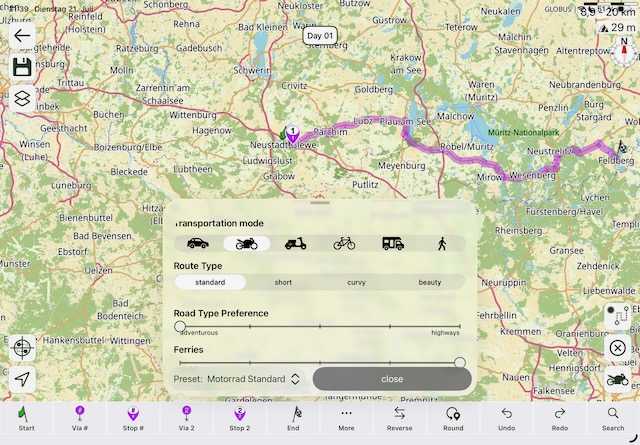
Step two: Switch to curvy mode; make sure "Avoid highways" is disabled. Make additional adjustments or repeat steps one and two until the route fits your needs.
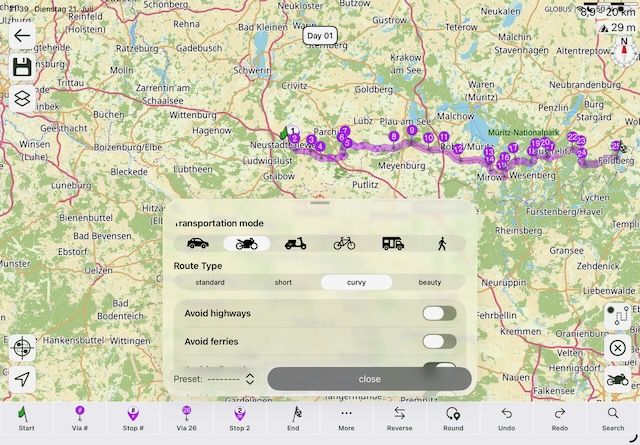
Step three: Replace your start point to where you actually want to start your ride - this will create the "highway section" without altering the rest of your route.
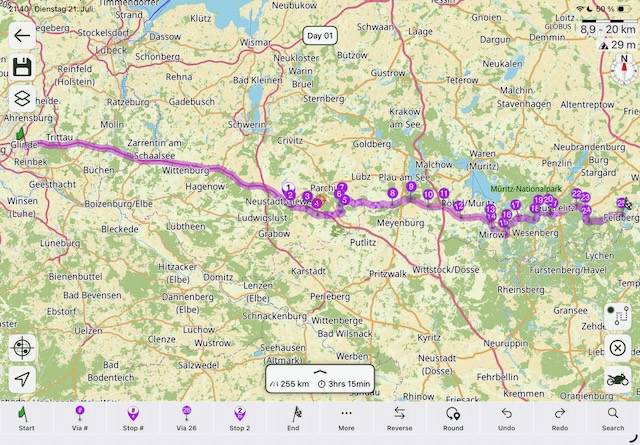
Hope this is useful!
Quote from LaszloK on 22.07.2026, 10:05Ich kontrolliere - insbesondere wenn ich voraus fahre - eine geplante Route detailliert auf allfällige falsche Abzweigungen / Umwege, aufgrund von falsch/ungenau gesetzten Wegpunkten, auf dem Bildschirm. ziel ist dabei logischerweise, dass die Route am Ende meinen Vorstellungen entspricht.
Wenn ich, egal ob am Anfang oder unterwegs, zwingend auf einer Autobahn/Autostrasse/Umfahrungsstrasse bleiben will, setze ich entsprechende Wegpunkte auf diesen Strassen. Auf der Autobahn genügt es an den Stellen, wo man auf der Autobahn bleiben will, jeweils zwischen der Ausfahrt und der Einfahrt einen Wegpunkt zu setzen. Der Aufwand ist aus meiner Sicht, selbst in der Schweiz mit teilweise nur wenigen Kilometern zwischen den Autobahnausfahrten, zu vernachlässigen.
Ich kontrolliere - insbesondere wenn ich voraus fahre - eine geplante Route detailliert auf allfällige falsche Abzweigungen / Umwege, aufgrund von falsch/ungenau gesetzten Wegpunkten, auf dem Bildschirm. ziel ist dabei logischerweise, dass die Route am Ende meinen Vorstellungen entspricht.
Wenn ich, egal ob am Anfang oder unterwegs, zwingend auf einer Autobahn/Autostrasse/Umfahrungsstrasse bleiben will, setze ich entsprechende Wegpunkte auf diesen Strassen. Auf der Autobahn genügt es an den Stellen, wo man auf der Autobahn bleiben will, jeweils zwischen der Ausfahrt und der Einfahrt einen Wegpunkt zu setzen. Der Aufwand ist aus meiner Sicht, selbst in der Schweiz mit teilweise nur wenigen Kilometern zwischen den Autobahnausfahrten, zu vernachlässigen.

Quote from SabrielaHong on 25.08.2026, 05:29If you want different routes between waypoints, try splitting the trip into separate legs and setting the route for each leg individually. That usually gives you more control than letting the app optimize the whole trip at once.
If you want different routes between waypoints, try splitting the trip into separate legs and setting the route for each leg individually. That usually gives you more control than letting the app optimize the whole trip at once.


