
Motive Monkey Button Allocation

Quote from KM on 31.05.2026, 11:31The Motive Monkey web page suggests you can access the actions screen from the MM controller and navigate this screen and selections with the buttons.
I cannot seem to set this up at all.
The Handlebar control page in Scenic allows an Option to "Open Motive Monkey Helper App" which I have never found - does this exist and what does it do ?
Kevin
The Motive Monkey web page suggests you can access the actions screen from the MM controller and navigate this screen and selections with the buttons.
I cannot seem to set this up at all.
The Handlebar control page in Scenic allows an Option to "Open Motive Monkey Helper App" which I have never found - does this exist and what does it do ?
Kevin
Quote from Middelfrangge on 31.05.2026, 12:52Hi Kevin,
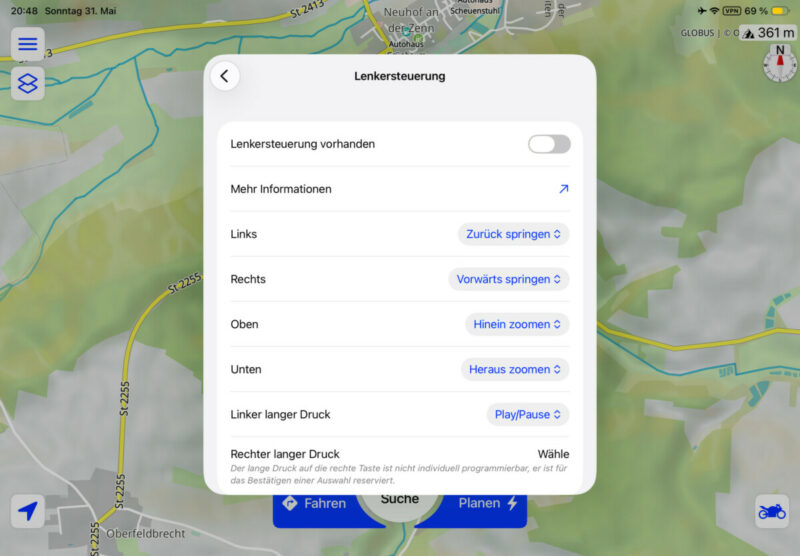
have you tried die adjustments for the controller? Sorry, my Screenshot is just in German but there are changes possible. You can select which button should be for zoom in and out or for jumping back and forwardor whtat is done when pressing long on right button.
Thomas
Hi Kevin,
have you tried die adjustments for the controller? Sorry, my Screenshot is just in German but there are changes possible. You can select which button should be for zoom in and out or for jumping back and forwardor whtat is done when pressing long on right button.
Thomas
Quote from KM on 31.05.2026, 15:43I have adjusted these in the past and was hoping to access the multifunction screen from the main route screen. I'm due to ride for a service tomorrow so I'll try a long push on the right hand button and let you know.
Kevin
I have adjusted these in the past and was hoping to access the multifunction screen from the main route screen. I'm due to ride for a service tomorrow so I'll try a long push on the right hand button and let you know.
Kevin

Quote from johansw on 01.06.2026, 03:15Hi Kevin. The MM Helper is found on App Store. It gives you the option to access your shortcuts on the iPhone. I have e.g. a shortcut for making me a route straight home, calling my familily, a weather page, sending my last picture by sms and Log Location. You can make some 11 shortcuts, Weather Map is default as no 12. This feature on MM really boosts the usefulnes of MM!
Regards Johan, MM employee
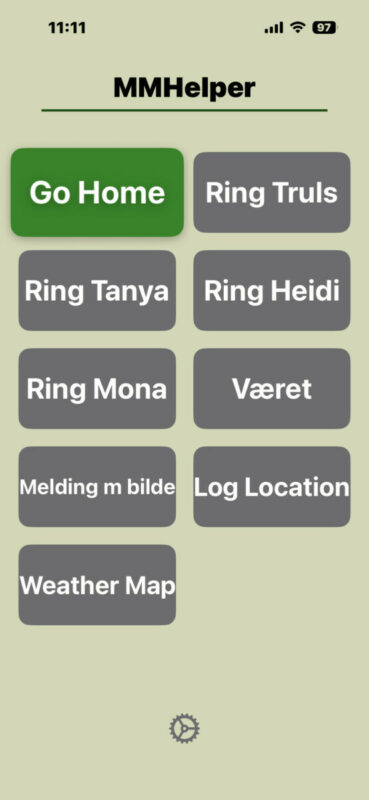
Hi Kevin. The MM Helper is found on App Store. It gives you the option to access your shortcuts on the iPhone. I have e.g. a shortcut for making me a route straight home, calling my familily, a weather page, sending my last picture by sms and Log Location. You can make some 11 shortcuts, Weather Map is default as no 12. This feature on MM really boosts the usefulnes of MM!
Regards Johan, MM employee
Quote from KM on 01.06.2026, 03:40How do you search for it ? In response to your message I tried MMHelper but not found it. I’ve tried various combinations of Motive Monkey.
How can I find it !
How do you search for it ? In response to your message I tried MMHelper but not found it. I’ve tried various combinations of Motive Monkey.
How can I find it !
Quote from johansw on 01.06.2026, 04:35Very good! And we will be back on this page too with additional information in short 🙂
Johan MM team
Very good! And we will be back on this page too with additional information in short 🙂
Johan MM team
Quote from johansw on 01.06.2026, 07:41Hi Kevin.
Here is our soon-to-be-published link for MM Helper: https://motivemonkey.com/mmhelper-app/
Please observe that the mail address for Help and support is now info@motivemonkey.com
Johan, MM team
Hi Kevin.
Here is our soon-to-be-published link for MM Helper: https://motivemonkey.com/mmhelper-app/
Please observe that the mail address for Help and support is now info@motivemonkey.com
Johan, MM team
Quote from KM on 02.06.2026, 11:57Thanks for this. Accessing additional shortcuts would be great if only I could understand the Apple shortcut programming !
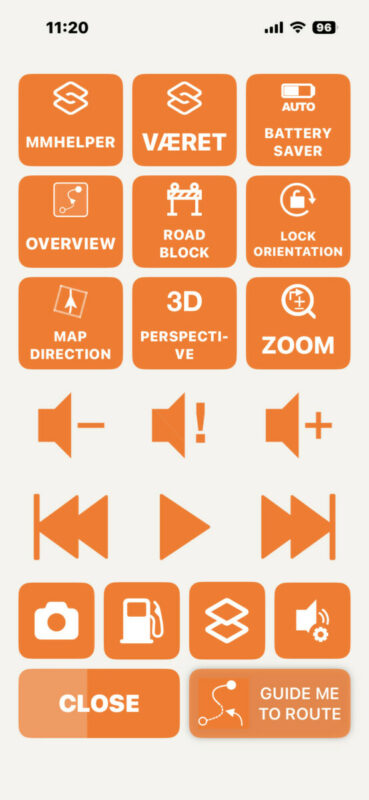
I've sussed out the buttons through trial and error but navigating the actions screen is a little tricky as the directional navigation buttons miss some of the potential actions.
Thanks for your help
Kevin
Thanks for this. Accessing additional shortcuts would be great if only I could understand the Apple shortcut programming !
I've sussed out the buttons through trial and error but navigating the actions screen is a little tricky as the directional navigation buttons miss some of the potential actions.
Thanks for your help
Kevin


