
I am lost

Quote from bohemio on 05.12.2021, 02:49I am a truck driver, I make a living navigating the unknown, I have a good sense of direction and I am fairly technological savvy, but I have hit a wall trying to figure out this whole motorcycle navigation dilemma.
I do own an older Garmin DEZL 560 trucking GPS that I paid $500 for it, and I taught I could use on the motorcycle if I could only figure out how to import my own custom routes into that GPS, but I can't figure out how to do that.
So, looking for motorcycles navigation solutions I came into this app, and I don't find it very intuitive, I feel so lost.Last weekend, while I was waiting for my new to me motorcycle to be prep at the dealer, I just didn't want to drive home, I wanted to create a route to take me exploring while I made my way home. I used the 9 points on Google maps to create a custom route, it all looked perfect, although I couldn't find a way to save the route, so before I could start navigating, I lost all of my points, had to start all over from scratch, I finally I was on the road with my new bike following a Google custom route. Eventually Google decided now to follow my points and started to take me wherever it wanted to, finally had to just quite Google Maps and find my own way home. Frustrating.Then I learn about Google MyMaps and importing that route into the Scenic App so Scenic can give me the turn-by-turn directions...Sounded simple, how difficult could that be... Design the route on MyMaps, copy the URL link into Scenic, upload it to my account, download the route on my iPhone and, Walaa Scenic will provide the turn-by-turn directions... No so fast Gonzales....The version of the app I got is not that intuitive, a whole bunch of icons scatter throughout the interface which very little explanation of what they do, second, it seems that every one of those icon that I touch to see what they do, I can't use because I am not premium, so the whole trial thing is kind of useless. I wish we could get a week of full access so we can really see what this thing can do unleashed.So, here I am, looking for help, a tutorial, someone to hold my hand and take me through my first route import and execution, I don't mind paying the $25/Year, but before I do, I want to make sure this is something that I can use.So, anyone willing to show me?
I am a truck driver, I make a living navigating the unknown, I have a good sense of direction and I am fairly technological savvy, but I have hit a wall trying to figure out this whole motorcycle navigation dilemma.
I do own an older Garmin DEZL 560 trucking GPS that I paid $500 for it, and I taught I could use on the motorcycle if I could only figure out how to import my own custom routes into that GPS, but I can't figure out how to do that.

Quote from Guido on 05.12.2021, 02:56There is a full tutorial video available for Scenic version 2: https://scenic.app/help/scenic-detailed-tutorial-video/A lot of features are the same between Scenic 2 and Scenic 3. A Scenic 3 tutorial video is in the making.Every new user gets 20 free credits to try out the premium features. You’ll get the pop-up, but by ‘sacrificing’ a credit you can continue. Here’s more info: https://scenic.app/help/paid-features-and-prices/
Quote from bohemio on 05.12.2021, 05:41
Okay, so I sent into Google My Maps and created a route, copied the URL, uploaded to Scenic Web, downloaded to Scenic app on iPhone, imported the route, it is displaying on my screen, now what, how do I get it to navigate, anything that I can follow every turn? What button do I press to mean Go...? Go navigate now?
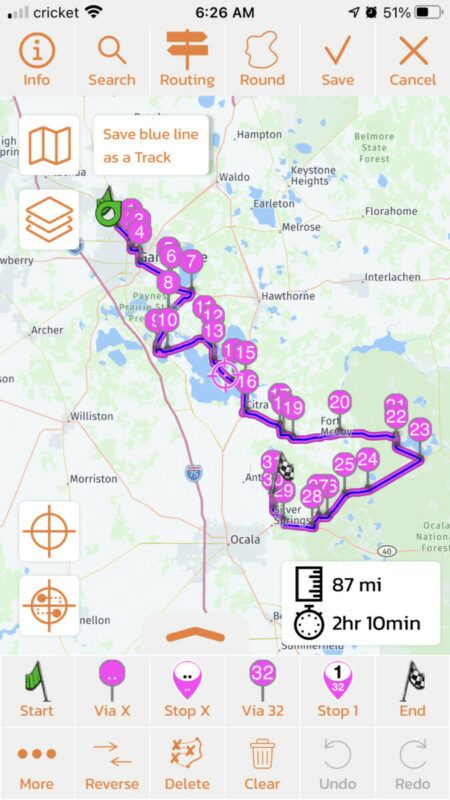
Okay, so I sent into Google My Maps and created a route, copied the URL, uploaded to Scenic Web, downloaded to Scenic app on iPhone, imported the route, it is displaying on my screen, now what, how do I get it to navigate, anything that I can follow every turn? What button do I press to mean Go...? Go navigate now?
Quote from bohemio on 05.12.2021, 05:52Quote from Guido on 05.12.2021, 02:56There is a full tutorial video available for Scenic version 2: https://scenic.app/help/scenic-detailed-tutorial-video/A lot of features are the same between Scenic 2 and Scenic 3. A Scenic 3 tutorial video is in the making.Every new user gets 20 free credits to try out the premium features. You’ll get the pop-up, but by ‘sacrificing’ a credit you can continue. Here’s more info: https://scenic.app/help/paid-features-and-prices/Yeah, I found the tutorial but that is hard to watch. I am trying to find out how to get a route started and the guy on that tutorial is stuck on how he doesn't like the dark display mode, who cares what color display he likes, but if I advance the video, then I miss something important, so there is no happy medium on that tutorial. It needs to be more to the point, about navigation now, I can customize the look of the app later.With regard the point system, that is a hard hook to swallow. When you first try an app, you just want to see if it works, that is the bait, let's see how quickly I can make a route and navigate, if it is easy, then I be willing to pay whatever for it. But if every button I press while trying to learn the interface, I get a pop up about me not being premium enough, that is not a very pleasant experience and positive first impression.I went through all the trouble to create a route, upload it, download it, import it, now where is the Go button to see it in action?
Quote from Guido on 05.12.2021, 02:56There is a full tutorial video available for Scenic version 2: https://scenic.app/help/scenic-detailed-tutorial-video/A lot of features are the same between Scenic 2 and Scenic 3. A Scenic 3 tutorial video is in the making.Every new user gets 20 free credits to try out the premium features. You’ll get the pop-up, but by ‘sacrificing’ a credit you can continue. Here’s more info: https://scenic.app/help/paid-features-and-prices/
Quote from Guido on 05.12.2021, 07:17Quote from bohemio on 05.12.2021, 05:41
Okay, so I sent into Google My Maps and created a route, copied the URL, uploaded to Scenic Web, downloaded to Scenic app on iPhone, imported the route, it is displaying on my screen, now what, how do I get it to navigate, anything that I can follow every turn? What button do I press to mean Go...? Go navigate now?
- From this screen, tap the ‘Save’ button. Now the route is saved to your routes list.
- Now hot the back button top left a couple of times and then open the side menu and select map. You are back in the main screen.
- Now tap ‘Where to’ and select the route you just saved.
- Hit the ‘Start Navigating’ button
Quote from bohemio on 05.12.2021, 05:41
Okay, so I sent into Google My Maps and created a route, copied the URL, uploaded to Scenic Web, downloaded to Scenic app on iPhone, imported the route, it is displaying on my screen, now what, how do I get it to navigate, anything that I can follow every turn? What button do I press to mean Go...? Go navigate now?
- From this screen, tap the ‘Save’ button. Now the route is saved to your routes list.
- Now hot the back button top left a couple of times and then open the side menu and select map. You are back in the main screen.
- Now tap ‘Where to’ and select the route you just saved.
- Hit the ‘Start Navigating’ button
Quote from Guido on 05.12.2021, 07:20Quote from bohemio on 05.12.2021, 05:52Quote from Guido on 05.12.2021, 02:56There is a full tutorial video available for Scenic version 2: https://scenic.app/help/scenic-detailed-tutorial-video/A lot of features are the same between Scenic 2 and Scenic 3. A Scenic 3 tutorial video is in the making.Every new user gets 20 free credits to try out the premium features. You’ll get the pop-up, but by ‘sacrificing’ a credit you can continue. Here’s more info: https://scenic.app/help/paid-features-and-prices/Yeah, I found the tutorial but that is hard to watch. I am trying to find out how to get a route started and the guy on that tutorial is stuck on how he doesn't like the dark display mode, who cares what color display he likes, but if I advance the video, then I miss something important, so there is no happy medium on that tutorial. It needs to be more to the point, about navigation now, I can customize the look of the app later.With regard the point system, that is a hard hook to swallow. When you first try an app, you just want to see if it works, that is the bait, let's see how quickly I can make a route and navigate, if it is easy, then I be willing to pay whatever for it. But if every button I press while trying to learn the interface, I get a pop up about me not being premium enough, that is not a very pleasant experience and positive first impression.I went through all the trouble to create a route, upload it, download it, import it, now where is the Go button to see it in action?I understand. For Scenic 3 there will be a similar long video (it is divided in topics though and below the video you will find shortcuts to those topics).
Additionally smaller ‘topic based’ tutorial videos will be released over time.
It’s going to take some time before these are out though. Until that time, the big Scenic 2 tutorial video is all there is. I’ll be happy to answer any specific question you might have here.
Quote from bohemio on 05.12.2021, 05:52Quote from Guido on 05.12.2021, 02:56There is a full tutorial video available for Scenic version 2: https://scenic.app/help/scenic-detailed-tutorial-video/A lot of features are the same between Scenic 2 and Scenic 3. A Scenic 3 tutorial video is in the making.Every new user gets 20 free credits to try out the premium features. You’ll get the pop-up, but by ‘sacrificing’ a credit you can continue. Here’s more info: https://scenic.app/help/paid-features-and-prices/Yeah, I found the tutorial but that is hard to watch. I am trying to find out how to get a route started and the guy on that tutorial is stuck on how he doesn't like the dark display mode, who cares what color display he likes, but if I advance the video, then I miss something important, so there is no happy medium on that tutorial. It needs to be more to the point, about navigation now, I can customize the look of the app later.With regard the point system, that is a hard hook to swallow. When you first try an app, you just want to see if it works, that is the bait, let's see how quickly I can make a route and navigate, if it is easy, then I be willing to pay whatever for it. But if every button I press while trying to learn the interface, I get a pop up about me not being premium enough, that is not a very pleasant experience and positive first impression.I went through all the trouble to create a route, upload it, download it, import it, now where is the Go button to see it in action?
I understand. For Scenic 3 there will be a similar long video (it is divided in topics though and below the video you will find shortcuts to those topics).
Additionally smaller ‘topic based’ tutorial videos will be released over time.
It’s going to take some time before these are out though. Until that time, the big Scenic 2 tutorial video is all there is. I’ll be happy to answer any specific question you might have here.

Quote from Joerg400 on 05.12.2021, 07:31Hi bohemio,
(I had at the beginning using Scenic also some problems. But Scenic has so many posibilities that its necessary to try many buttons.)
Starting a route navigation (and sorry I have "german" as language on my iPhone):
When you start Scenic the the start screen will be shown. If you are in an other menu you have to go back to the start screen (tipping left above, than tipping first topic with the Scenic logo.
Then tipp the magnifier (perhaps named "where"?), choose the flag "routes"(?) and then you can choose your saved route.
Hi bohemio,
(I had at the beginning using Scenic also some problems. But Scenic has so many posibilities that its necessary to try many buttons.)
Starting a route navigation (and sorry I have "german" as language on my iPhone):
When you start Scenic the the start screen will be shown. If you are in an other menu you have to go back to the start screen (tipping left above, than tipping first topic with the Scenic logo.
Then tipp the magnifier (perhaps named "where"?), choose the flag "routes"(?) and then you can choose your saved route.
Quote from PeteRT on 05.12.2021, 08:17I find Scenic very easy to use but then over the years I have tried every app out there. I can totally see if you are completely new to navigation apps that the interface can be quite daunting. Scenic features are increasing all the time and it's getting more complex. However if you have managed to plan a route in MyMaps and import it into Scenic you are doing rather well. Just keep playing with the app. Press everything and look at menus and see what's available. It will get easier.
I find Scenic very easy to use but then over the years I have tried every app out there. I can totally see if you are completely new to navigation apps that the interface can be quite daunting. Scenic features are increasing all the time and it's getting more complex. However if you have managed to plan a route in MyMaps and import it into Scenic you are doing rather well. Just keep playing with the app. Press everything and look at menus and see what's available. It will get easier.
Quote from Joerg400 on 05.12.2021, 10:09Hi Peter,
I changed in summer from TomTom Rider (2013) to Scenic. Therefore I had also to change from android to iOS. This was every else then easy. Sometimes I asked me having made a fault. With my TomTom I navigated mor than 62,000 kms and I knew each "corner" in it and each weekness. And when someone asks me whats the best to navigate may be I answered always: "This one you know using".
Meantime I "played" often with Scenic and I navigated more than 6,500 kms. When now someone asks me my answer is: "First Scenic, then this one you know using".
Hi Peter,
I changed in summer from TomTom Rider (2013) to Scenic. Therefore I had also to change from android to iOS. This was every else then easy. Sometimes I asked me having made a fault. With my TomTom I navigated mor than 62,000 kms and I knew each "corner" in it and each weekness. And when someone asks me whats the best to navigate may be I answered always: "This one you know using".
Meantime I "played" often with Scenic and I navigated more than 6,500 kms. When now someone asks me my answer is: "First Scenic, then this one you know using".
Quote from bohemio on 05.12.2021, 10:44Thank you so much to everyone who replied, thank you so much Guido for your quick responses, involvement and commitment to this product.
I am sold, am buying this GPS application, I like the community here, the commitment from the users and the developer, this is great, I am sure I will learn more as I go.
Please be patient with my questions, all the help is greatly appreciated.
I will report my experiences on the road with Scenic after I complete my first route design.
Take care everyone.
Thank you so much to everyone who replied, thank you so much Guido for your quick responses, involvement and commitment to this product.
I am sold, am buying this GPS application, I like the community here, the commitment from the users and the developer, this is great, I am sure I will learn more as I go.
Please be patient with my questions, all the help is greatly appreciated.
I will report my experiences on the road with Scenic after I complete my first route design.
Take care everyone.
Quote from Joerg400 on 05.12.2021, 14:36Quote from bohemio on 05.12.2021, 10:44Please be patient with my questions, all the help is greatly appreciated.
I will report my experiences on the road with Scenic after I complete my first route design.
Take care everyone.
Hi behemio,
try the "power-planer" in Scenic. At the beginning it's not easy to use. But when you several time "worked" with it, you can create tours as fast as with google-maps, but with more options for fine-tuning. And there is no more "send to ... store to ...". (Last time I made a larger ride to test at that time the new version of Scenic, I broke my test and created with a few clicks - meanwhile I have many "locations" stored - a super return trip.)
In this forum are many members knowing Scenic much better than I. If you have Questions post them.
Cheers
Jörg
Quote from bohemio on 05.12.2021, 10:44Please be patient with my questions, all the help is greatly appreciated.
I will report my experiences on the road with Scenic after I complete my first route design.
Take care everyone.
Hi behemio,
try the "power-planer" in Scenic. At the beginning it's not easy to use. But when you several time "worked" with it, you can create tours as fast as with google-maps, but with more options for fine-tuning. And there is no more "send to ... store to ...". (Last time I made a larger ride to test at that time the new version of Scenic, I broke my test and created with a few clicks - meanwhile I have many "locations" stored - a super return trip.)
In this forum are many members knowing Scenic much better than I. If you have Questions post them.
Cheers
Jörg
Quote from bohemio on 06.12.2021, 09:59Quote from bohemio on 05.12.2021, 05:41
Okay, so I sent into Google My Maps and created a route, copied the URL, uploaded to Scenic Web, downloaded to Scenic app on iPhone, imported the route, it is displaying on my screen, now what, how do I get it to navigate, anything that I can follow every turn? What button do I press to mean Go...? Go navigate now?
I designed the above route, a loop route with two halves, going south to a state park in Ocala the next town south, the other half coming back home to Alachua via a different way.
well, today I find myself in Ocala, the town south of me, and I just want to use my go south route to go up, pick it up at my nearest point, reverse the route, and navigate north to go back home, how do I do that?
How to intercept hijack the route half way through it, and follow it from there in reverse order ?
Quote from bohemio on 05.12.2021, 05:41
Okay, so I sent into Google My Maps and created a route, copied the URL, uploaded to Scenic Web, downloaded to Scenic app on iPhone, imported the route, it is displaying on my screen, now what, how do I get it to navigate, anything that I can follow every turn? What button do I press to mean Go...? Go navigate now?
I designed the above route, a loop route with two halves, going south to a state park in Ocala the next town south, the other half coming back home to Alachua via a different way.
well, today I find myself in Ocala, the town south of me, and I just want to use my go south route to go up, pick it up at my nearest point, reverse the route, and navigate north to go back home, how do I do that?
How to intercept hijack the route half way through it, and follow it from there in reverse order ?
Quote from Guido on 06.12.2021, 10:09See my answer here: https://scenic.app/forum/topic/start-route-midway/
(no need to ask same question in two topics... I get a notification about every post 🙂)
See my answer here: https://scenic.app/forum/topic/start-route-midway/
(no need to ask same question in two topics... I get a notification about every post 🙂)


