
Feedback on new version and sound volume issues

Quote from Maxodo on 01.05.2024, 00:22Hi Guido, not been on for a long time as I've been off the bikes but picked up a GS yesterday and had a superb 160 mile cross country ride.
The new features, mapping and function are really superb now Guido, thanks for all your efforts.
I only had one issue and suspect it's me - try as I might I could not get good voice volume - I pretty sure I have all settings on MAX (on app and iphone 6S) but must be missing something - music volume is fine it's just voice instructions no good. They were louder on 'send as voice call' but very poor quality this way.
Hi Guido, not been on for a long time as I've been off the bikes but picked up a GS yesterday and had a superb 160 mile cross country ride.
The new features, mapping and function are really superb now Guido, thanks for all your efforts.
I only had one issue and suspect it's me - try as I might I could not get good voice volume - I pretty sure I have all settings on MAX (on app and iphone 6S) but must be missing something - music volume is fine it's just voice instructions no good. They were louder on 'send as voice call' but very poor quality this way.

Quote from Guido on 01.05.2024, 09:09Have you tried the "Device Default" sound output? Indeed the "as voice call (HFP)" protocol is bad sound quality (i can not change that), and the voice volume settings do not have any effect when using "as voice call".
Have you tried the "Device Default" sound output? Indeed the "as voice call (HFP)" protocol is bad sound quality (i can not change that), and the voice volume settings do not have any effect when using "as voice call".

Quote from Mex on 01.05.2024, 11:17Hi Maxodo,
i had this issue too, today. And it happens to me really often.
We did a stop at a lake. As we continued our ride sound volume of scenic anouncements was very poor. I checked my iphone 11pro, was at maximum volume.
Setup:
Scenic 3.59
IOS 17.4.1
Cardo Packtalk Black latest update, happend with the Bold as well.
My workaround is: listen to music, in my case spotify or apple music and you here the announements loud and clear, even when you pause music.
We had a mesh group with 4 people, music was playing and announcements were really clear to hear.
I have no idea what effects the volume to be that low. Maybe the headset, maybe Scenic, … I had this since i use Scenic, cant remember if this happened with Navigon Cruiser too.
Give it try. Maybe it helps.
Regards, Mex
Hi Maxodo,
i had this issue too, today. And it happens to me really often.
We did a stop at a lake. As we continued our ride sound volume of scenic anouncements was very poor. I checked my iphone 11pro, was at maximum volume.
Setup:
Scenic 3.59
IOS 17.4.1
Cardo Packtalk Black latest update, happend with the Bold as well.
My workaround is: listen to music, in my case spotify or apple music and you here the announements loud and clear, even when you pause music.
We had a mesh group with 4 people, music was playing and announcements were really clear to hear.
I have no idea what effects the volume to be that low. Maybe the headset, maybe Scenic, … I had this since i use Scenic, cant remember if this happened with Navigon Cruiser too.
Give it try. Maybe it helps.
Regards, Mex
Quote from NH Wing on 01.05.2024, 11:26I had the same issue with my iphone/ Cardo/Carplay. My fix was going into the Cardo app and turning the volumes to max. I also turned iphone volume to max. then control the volume settings with Carplay. This seems to have cured my low volume issues. I am also running "Device Default".
I had the same issue with my iphone/ Cardo/Carplay. My fix was going into the Cardo app and turning the volumes to max. I also turned iphone volume to max. then control the volume settings with Carplay. This seems to have cured my low volume issues. I am also running "Device Default".
Quote from Mex on 01.05.2024, 13:14Hi Wing.
Thanks for the hint. I never checked the Cardo App settings. Will try this next ride.
Regards, Mex
Hi Wing.
Thanks for the hint. I never checked the Cardo App settings. Will try this next ride.
Regards, Mex
Quote from Maxodo on 02.05.2024, 01:51Quote from Guido on 01.05.2024, 09:09Have you tried the "Device Default" sound output? Indeed the "as voice call (HFP)" protocol is bad sound quality (i can not change that), and the voice volume settings do not have any effect when using "as voice call".
Hi Guido - yes, always used that but as above volume is just too low hence I tried phone call setting but quality is mostly unusable - any ideas as from above seems I'm not the only one having these issues with Scenic?
Quote from Guido on 01.05.2024, 09:09Have you tried the "Device Default" sound output? Indeed the "as voice call (HFP)" protocol is bad sound quality (i can not change that), and the voice volume settings do not have any effect when using "as voice call".
Hi Guido - yes, always used that but as above volume is just too low hence I tried phone call setting but quality is mostly unusable - any ideas as from above seems I'm not the only one having these issues with Scenic?
Quote from Guido on 02.05.2024, 03:22I don’t believe this is a Scenic issue to be honest. With Voice Volume on loudest Scenic plays the voice instructions at 1.5 times the volume of the iPhone Music volume.
Like @nh-wing mentioned, some com systems, and also most CarPlay systems, have separate volume settings for music, navigation and overall volume.
If not already done so, also try changing the voice mode in Scenic, as this affects how your CarPlay system interprets the voice instruction (as music or as navigation). Here is how you can change that: https://scenic.app/help/low-voice-volume/
I don’t believe this is a Scenic issue to be honest. With Voice Volume on loudest Scenic plays the voice instructions at 1.5 times the volume of the iPhone Music volume.
Like @nh-wing mentioned, some com systems, and also most CarPlay systems, have separate volume settings for music, navigation and overall volume.
If not already done so, also try changing the voice mode in Scenic, as this affects how your CarPlay system interprets the voice instruction (as music or as navigation). Here is how you can change that: https://scenic.app/help/low-voice-volume/
Quote from Maxodo on 02.05.2024, 04:33Thanks as always for the response Guido.
Just to say though nothing has changed my end! And I have not had this issue before with previous Scenic versions - I have the exact same Sena comms unit, same iPhone 6S and same helmet speakers - all settings are volume/voice are maxxed out...
Thanks as always for the response Guido.
Just to say though nothing has changed my end! And I have not had this issue before with previous Scenic versions - I have the exact same Sena comms unit, same iPhone 6S and same helmet speakers - all settings are volume/voice are maxxed out...
Quote from Guido on 02.05.2024, 05:04There is a big difference between Scenic <3.5 and Scenic 3.5.
The previous Scenic version used pre-recorded sound files for the instructions.
Scenic 3.5 uses the iOS Text-to-Speech engine, which turns written instruction into spoken text. That's also why Scenic 3.5 can now speak road names.
Because of that, I also changed and modernized the entire audio engine. Most importantly, the voice mode setting is completely new. The voice mode setting categorizes the spoken instructions as "Audio" or as "Voice" (navigation instructions). Newer com sets and carplay systems also know about these categories and will apply their own (volume) settings to it (and do other things as well like duck the system radio volume if a voice instruction comes in).
I added this setting so that Scenic could be compatible with more com sets and CarPlay systems. Not all CarPlay systems and com sets can differentiate between the two categories. And some simply have implemented it wrong all together.
So, even though your setup did not change, it's possible that your CarPlay system works better with one of the two settings "Play as Audio" or "Play as Voice". Scenic <3.5 was always "Play as Audio" while the default for Scenic 3.5 is "Play as Voice".
Typically (for most newer CarPlay systems and com sets) you would want this on "Play as Voice", but I would definitely try the other setting too if you are experiencing problems.
There is a big difference between Scenic <3.5 and Scenic 3.5.
The previous Scenic version used pre-recorded sound files for the instructions.
Scenic 3.5 uses the iOS Text-to-Speech engine, which turns written instruction into spoken text. That's also why Scenic 3.5 can now speak road names.
Because of that, I also changed and modernized the entire audio engine. Most importantly, the voice mode setting is completely new. The voice mode setting categorizes the spoken instructions as "Audio" or as "Voice" (navigation instructions). Newer com sets and carplay systems also know about these categories and will apply their own (volume) settings to it (and do other things as well like duck the system radio volume if a voice instruction comes in).
I added this setting so that Scenic could be compatible with more com sets and CarPlay systems. Not all CarPlay systems and com sets can differentiate between the two categories. And some simply have implemented it wrong all together.
So, even though your setup did not change, it's possible that your CarPlay system works better with one of the two settings "Play as Audio" or "Play as Voice". Scenic <3.5 was always "Play as Audio" while the default for Scenic 3.5 is "Play as Voice".
Typically (for most newer CarPlay systems and com sets) you would want this on "Play as Voice", but I would definitely try the other setting too if you are experiencing problems.
Quote from Maxodo on 02.05.2024, 06:12Just double checked everything again Guido and sadly the same - HFP is pretty much unintelligible as the quality is too bad and device default is too faint to be heard.
Therefore I have a nav system that does not have a usable audio function which for me makes it much more difficult and less practical to use.
Is there going to be a fix for this please?
Just double checked everything again Guido and sadly the same - HFP is pretty much unintelligible as the quality is too bad and device default is too faint to be heard.
Therefore I have a nav system that does not have a usable audio function which for me makes it much more difficult and less practical to use.
Is there going to be a fix for this please?
Quote from Guido on 02.05.2024, 06:15Did you try several combinations of voice mode and voice volume?
Did you try several combinations of voice mode and voice volume?
Quote from Guido on 02.05.2024, 06:18voice output needs to be in device default for all these settings to work. HFP ignores all the other settings.
voice output needs to be in device default for all these settings to work. HFP ignores all the other settings.
Quote from Guido on 02.05.2024, 08:42I have had one user that experienced difficulty with the Premium Quality voices. The regular and enhanced voices should be fine. I personally prefer the female voices (but that might be just me). They typically have a bit higher pitch which makes it easier for me to understand the speech through the wind noice.
I have had one user that experienced difficulty with the Premium Quality voices. The regular and enhanced voices should be fine. I personally prefer the female voices (but that might be just me). They typically have a bit higher pitch which makes it easier for me to understand the speech through the wind noice.
Quote from Maxodo on 02.05.2024, 15:33Just to add as you and others have mentioned CarPlay a lot - I do not use this or have it at all. I just use Scenic with an iPhone 6S and a Sena helmet unit. No other apps; Sena or otherwise are used.
Just to add as you and others have mentioned CarPlay a lot - I do not use this or have it at all. I just use Scenic with an iPhone 6S and a Sena helmet unit. No other apps; Sena or otherwise are used.

Quote from WilkoHD on 03.05.2024, 04:17I just thought I'd chime in here to say I've had the same issue. I just did a trip a week ago which was the first time I had used Scenic for navigation in some time. The sound was so low and poor that I had to rely on visual navigation only for the entire trip. I tried different settings, even reinstalled the app but to no improvement. I tested the hardware with Google etc, and was working fine (deafening by comparison). On my next trip I'll try different voices to see if that helps.
I just thought I'd chime in here to say I've had the same issue. I just did a trip a week ago which was the first time I had used Scenic for navigation in some time. The sound was so low and poor that I had to rely on visual navigation only for the entire trip. I tried different settings, even reinstalled the app but to no improvement. I tested the hardware with Google etc, and was working fine (deafening by comparison). On my next trip I'll try different voices to see if that helps.
Quote from Maxodo on 03.05.2024, 05:28Yes - same here now having checked; different voices, different settings - Scenic on loudest is a whisper, Google Maps comes through loud and clear.
Seeing as there are a few of us and it has been fine for the years before I used the exact same set up this must be a Scenic issue - sorry Guido!
Yes - same here now having checked; different voices, different settings - Scenic on loudest is a whisper, Google Maps comes through loud and clear.
Seeing as there are a few of us and it has been fine for the years before I used the exact same set up this must be a Scenic issue - sorry Guido!
Quote from Guido on 03.05.2024, 09:25I apologize for the volume issues you're facing. I've dedicated a significant amount of time to fine-tuning the audio engine to cater to all users and hardware combinations. I thought I had it all sorted, as I hadn't received any feedback for a while, until your messages came in.
I'm not ruling out that there could be an issue with Scenic, but before I dive into this (again), I want to make absolutely sure that this can not be resolved with a setting (either a Scenic setting or a headset setting).
So, a few more questions to both of you ( @maxodo & @wilkohd ) if you don't mind:
1 - Did you try all 6 options (combination of Scenic Settings) below?
Voice output and Voice volume can be changed in Settings > Sound & Haptics.
To change the Voice mode, see here: https://scenic.app/help/low-voice-volume/2 - What hardware are you using: Headset (make and model), iPhone (model and iOS version)
3 - How are the connections? I.e. headset directly "bluetoothed" to iPhone? Or is there a CarPlay unit involved and if so, how do the connections run?
4 - Are you using the headset intercom feature? If so, is the intercom always on? If so, what are the "priority" settings of your headset?
Lastly, Google Maps volume being OK tells me that it is possible, so that's good. I just want to make sure that making any changes to fix this for you doesn't break the audio for someone else / another combination of hardware and software. At this moment, I have it dialed in for what seems to be the vast majority of users. Otherwise, I would have received way more feedback. So I don't want to make any changes, with the risk of breaking it for someone else, unless absolutely necessary. Hence my questions above and my persistence to check all setting combinations. Hope you understand.
@maxodo... I realize that it was working with the previous version of Scenic for you, but that version had pre-recorded audio files, while the new Scenic uses text-to-speech. Meaning, I can't go back to that audio engine. Meaning, it might be necessary to change some settings in Scenic and/or your Headset.
I know this is a very annoying issue, and I hope I can resolve it for you. Either by changing the code in Scenic, or pointing you to a setting that will work.
I apologize for the volume issues you're facing. I've dedicated a significant amount of time to fine-tuning the audio engine to cater to all users and hardware combinations. I thought I had it all sorted, as I hadn't received any feedback for a while, until your messages came in.
I'm not ruling out that there could be an issue with Scenic, but before I dive into this (again), I want to make absolutely sure that this can not be resolved with a setting (either a Scenic setting or a headset setting).
So, a few more questions to both of you ( @maxodo & @wilkohd ) if you don't mind:
1 - Did you try all 6 options (combination of Scenic Settings) below?
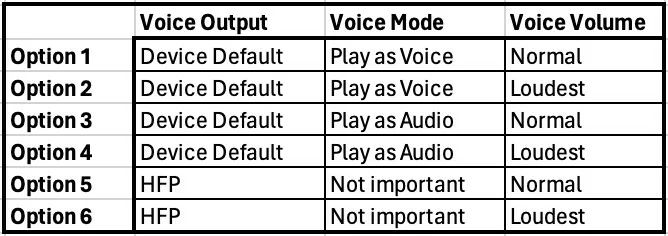
Voice output and Voice volume can be changed in Settings > Sound & Haptics.
To change the Voice mode, see here: https://scenic.app/help/low-voice-volume/
2 - What hardware are you using: Headset (make and model), iPhone (model and iOS version)
3 - How are the connections? I.e. headset directly "bluetoothed" to iPhone? Or is there a CarPlay unit involved and if so, how do the connections run?
4 - Are you using the headset intercom feature? If so, is the intercom always on? If so, what are the "priority" settings of your headset?
Lastly, Google Maps volume being OK tells me that it is possible, so that's good. I just want to make sure that making any changes to fix this for you doesn't break the audio for someone else / another combination of hardware and software. At this moment, I have it dialed in for what seems to be the vast majority of users. Otherwise, I would have received way more feedback. So I don't want to make any changes, with the risk of breaking it for someone else, unless absolutely necessary. Hence my questions above and my persistence to check all setting combinations. Hope you understand.
@maxodo... I realize that it was working with the previous version of Scenic for you, but that version had pre-recorded audio files, while the new Scenic uses text-to-speech. Meaning, I can't go back to that audio engine. Meaning, it might be necessary to change some settings in Scenic and/or your Headset.
I know this is a very annoying issue, and I hope I can resolve it for you. Either by changing the code in Scenic, or pointing you to a setting that will work.
Quote from Guido on 03.05.2024, 09:41Forgot one more question: is the volume of the beep-before-instruction and route recalculation sound also low? Or just the voice?
Forgot one more question: is the volume of the beep-before-instruction and route recalculation sound also low? Or just the voice?
Quote from Maxodo on 03.05.2024, 13:37Guido, as always over many years your dedication to this app and service is second to none. Always impressive and appreciated. I will go over everything this weekend and update you ASAP.
Guido, as always over many years your dedication to this app and service is second to none. Always impressive and appreciated. I will go over everything this weekend and update you ASAP.
Quote from WilkoHD on 04.05.2024, 04:49Thank you Guido for your response. Well, as it turns out I wasn't aware of the voice mode option nor how to access it. I have changed it to Play as Audio and I think this has resolved it (for me at least). Admittedly this was just by standing by the window in my living room, but it's as loud as Google now. I'm working all weekend so it will be a while before I can trial it out on the road but I'm pretty sure it's back to how it was. Many thanks for your assistance!
Thank you Guido for your response. Well, as it turns out I wasn't aware of the voice mode option nor how to access it. I have changed it to Play as Audio and I think this has resolved it (for me at least). Admittedly this was just by standing by the window in my living room, but it's as loud as Google now. I'm working all weekend so it will be a while before I can trial it out on the road but I'm pretty sure it's back to how it was. Many thanks for your assistance!
Quote from Maxodo on 06.05.2024, 05:45Hi Guido - this is the best I can do at present as it's pouring down so all done experimenting at my desk!
It is confusing so must be a nightmare for you to sort out!
1 - Did you try all 6 options (combination of Scenic Settings) below?
Option 1/2 - from softest (95% inaudible) gets slightly louder as you go up to loudest but even this being still very quiet
Option 3/4 - works fine - gets quieter or louder as selected.
Option 5/6 - softer is quieter for sure but I think normal/louder/loudest come across as all the same volume
Voice output and Voice volume can be changed in Settings > Sound & Haptics.
To change the Voice mode, see here: https://scenic.app/help/low-voice-volume/2 - What hardware are you using: Headset (make and model), iPhone (model and iOS version) - Sena SMH5, iPhone 6S Plus - latest iOS.
3 - How are the connections? I.e. headset directly "bluetoothed" to iPhone? Or is there a CarPlay unit involved and if so, how do the connections run? BT headset direct to phone
4 - Are you using the headset intercom feature? If so, is the intercom always on? If so, what are the "priority" settings of your headset? Intercom volume is fine, with the SMH5 I switch between nav and comms mode manually (it's just a single press on the jog wheel with this unit).
Notes in summary:
- Play as VOICE = loud on HFP (for voice instructions and also beep before, route recalculation alert), quiet on device default (for voice instructions and also beep before, route recalculation alert)
- Play as AUDIO = loud on HFP, loud on device default
- Sound effects (engine sound, keyboard clicks) are very low in ALL combinations) - I am not sure if they always were this quiet - I think not in earlier versions?
- The 'play as audio or voice' option seems to be the critical one but this is only available as a switchable option tucked away while in actual navigation - it needs to be available in the general sound options of the settings menu too I think.
So in summary it seems that having 'play as audio' selected in nav mode does make a work around and allow device default (and the clearer voice) to be ok volume wise.
Hi Guido - this is the best I can do at present as it's pouring down so all done experimenting at my desk!
It is confusing so must be a nightmare for you to sort out!
1 - Did you try all 6 options (combination of Scenic Settings) below?
Option 1/2 - from softest (95% inaudible) gets slightly louder as you go up to loudest but even this being still very quiet
Option 3/4 - works fine - gets quieter or louder as selected.
Option 5/6 - softer is quieter for sure but I think normal/louder/loudest come across as all the same volume
Voice output and Voice volume can be changed in Settings > Sound & Haptics.
To change the Voice mode, see here: https://scenic.app/help/low-voice-volume/
2 - What hardware are you using: Headset (make and model), iPhone (model and iOS version) - Sena SMH5, iPhone 6S Plus - latest iOS.
3 - How are the connections? I.e. headset directly "bluetoothed" to iPhone? Or is there a CarPlay unit involved and if so, how do the connections run? BT headset direct to phone
4 - Are you using the headset intercom feature? If so, is the intercom always on? If so, what are the "priority" settings of your headset? Intercom volume is fine, with the SMH5 I switch between nav and comms mode manually (it's just a single press on the jog wheel with this unit).
Notes in summary:
- Play as VOICE = loud on HFP (for voice instructions and also beep before, route recalculation alert), quiet on device default (for voice instructions and also beep before, route recalculation alert)
- Play as AUDIO = loud on HFP, loud on device default
- Sound effects (engine sound, keyboard clicks) are very low in ALL combinations) - I am not sure if they always were this quiet - I think not in earlier versions?
- The 'play as audio or voice' option seems to be the critical one but this is only available as a switchable option tucked away while in actual navigation - it needs to be available in the general sound options of the settings menu too I think.
So in summary it seems that having 'play as audio' selected in nav mode does make a work around and allow device default (and the clearer voice) to be ok volume wise.
Quote from Guido on 06.05.2024, 09:37Hi guys,
Thanks for your analysis and for trying out the different scenarios. So, it seems that "Play as Audio" is the solution for your setups, and no changes in the current audio engine are required at this point. Is my conclusion correct?
@maxodo. You are right that not having the "Voice Mode" setting with the other settings is confusing. My reasoning behind this was that you want to be able to change this easily while you are navigating. Why? Because quite some users use Scenic in more than one vehicle/scenario, where "Play as Voice" might work better for one vehicle/setup, "Play as Audio" might work better on your other vehicle/setup. And so you need to be able to switch between these easily and while navigating. Having said that, I guess it does not hurt to also add the "Voice Mode" setting to the Sound & Haptics section in settings. I'll add that for the next update.
HFP output is a special case. It's really only a backup case for people using older/cheaper com sets or car systems that don't have the option to change priorities. Example: Someone has a com set and has the intercom ON all the time. Some com sets give the intercom a higher priority than phone audio (music), and thus, the phone audio can never get through. For that scenario the HFP output works well, because that plays the instructions as a phone call... and phone calls typically have a higher priority in com systems than the intercom.
The system sounds (engine start, keyboard clicks, etc.) are not played through the audio engine. This is standard iOS. I did not change anything regarding that, so it's probably that these were always low in volume.
Thanks again and best regards,
Guido
Hi guys,
Thanks for your analysis and for trying out the different scenarios. So, it seems that "Play as Audio" is the solution for your setups, and no changes in the current audio engine are required at this point. Is my conclusion correct?
@maxodo. You are right that not having the "Voice Mode" setting with the other settings is confusing. My reasoning behind this was that you want to be able to change this easily while you are navigating. Why? Because quite some users use Scenic in more than one vehicle/scenario, where "Play as Voice" might work better for one vehicle/setup, "Play as Audio" might work better on your other vehicle/setup. And so you need to be able to switch between these easily and while navigating. Having said that, I guess it does not hurt to also add the "Voice Mode" setting to the Sound & Haptics section in settings. I'll add that for the next update.
HFP output is a special case. It's really only a backup case for people using older/cheaper com sets or car systems that don't have the option to change priorities. Example: Someone has a com set and has the intercom ON all the time. Some com sets give the intercom a higher priority than phone audio (music), and thus, the phone audio can never get through. For that scenario the HFP output works well, because that plays the instructions as a phone call... and phone calls typically have a higher priority in com systems than the intercom.
The system sounds (engine start, keyboard clicks, etc.) are not played through the audio engine. This is standard iOS. I did not change anything regarding that, so it's probably that these were always low in volume.
Thanks again and best regards,
Guido
Quote from Maxodo on 06.05.2024, 10:48Quote from Guido on 06.05.2024, 09:37Hi guys,
Thanks for your analysis and for trying out the different scenarios. So, it seems that "Play as Audio" is the solution for your setups, and no changes in the current audio engine are required at this point. Is my conclusion correct?
Having said that, I guess it does not hurt to also add the "Voice Mode" setting to the Sound & Haptics section in settings. I'll add that for the next update.
Yes, hopefully - I need to try it 'on the road' though. I think the setting chosen (via nav mode) remains 'remembered' after the app is closed?
Adding it to the options would be a great idea.
Thanks again Guido.
Quote from Guido on 06.05.2024, 09:37Hi guys,
Thanks for your analysis and for trying out the different scenarios. So, it seems that "Play as Audio" is the solution for your setups, and no changes in the current audio engine are required at this point. Is my conclusion correct?
Having said that, I guess it does not hurt to also add the "Voice Mode" setting to the Sound & Haptics section in settings. I'll add that for the next update.
Yes, hopefully - I need to try it 'on the road' though. I think the setting chosen (via nav mode) remains 'remembered' after the app is closed?
Adding it to the options would be a great idea.
Thanks again Guido.
Quote from Guido on 06.05.2024, 10:57I think the setting chosen (via nav mode) remains 'remembered' after the app is closed?
Yes. The setting is remembered.
I think the setting chosen (via nav mode) remains 'remembered' after the app is closed?
Yes. The setting is remembered.
Quote from Lehmanhill on 06.05.2024, 18:23Hello Guido,
Unfortunately, I am having this issue. I using an iPhone SE (2nd gen) with Scenic v3.59 connected directly to a Cardo Freecom 4X communicator. Voice mode is set to "Voice ON" and the only other choices I see are "Voice Alerts" and "Voice Off". Voice Output is set to "device default" although HPF perceived volume is the same. Voice volume is set to "Loudest". The Cardo is set for full volume, also the iPhone "buttons" and the volume on the big button page are both max.
I also have a radar detector with a Taotronics Bluetooth transmitter paired with the Cardo. I don't play music, talk on the phone, or intercom with other riders. I can hear the radar detector just fine. I can hear the pre-announcement beep and the recalculation sound almost as loud as the radar. I can just barely hear that there is a voice, but it is way too soft to understand. Scenic <3.5 was loud enough, same helmet, same Cardo, same motorcycle.
Verbal route directions are not useful at this point. Is there is any way to go back to <3.5 until resolved? I wish I had tested this earlier as I a trip coming up fast, but that's on me. Thanks in advance for your help.
I forgot to mention that I don't have CarPlay on my phone, so I don't see "Play as Audio" as a choice anywhere. My phone uses iOS 17.4.1 I wonder how the sound engine defaults if there isn't any CarPlay?
Regards,
Jac
Hello Guido,
Unfortunately, I am having this issue. I using an iPhone SE (2nd gen) with Scenic v3.59 connected directly to a Cardo Freecom 4X communicator. Voice mode is set to "Voice ON" and the only other choices I see are "Voice Alerts" and "Voice Off". Voice Output is set to "device default" although HPF perceived volume is the same. Voice volume is set to "Loudest". The Cardo is set for full volume, also the iPhone "buttons" and the volume on the big button page are both max.
I also have a radar detector with a Taotronics Bluetooth transmitter paired with the Cardo. I don't play music, talk on the phone, or intercom with other riders. I can hear the radar detector just fine. I can hear the pre-announcement beep and the recalculation sound almost as loud as the radar. I can just barely hear that there is a voice, but it is way too soft to understand. Scenic <3.5 was loud enough, same helmet, same Cardo, same motorcycle.
Verbal route directions are not useful at this point. Is there is any way to go back to <3.5 until resolved? I wish I had tested this earlier as I a trip coming up fast, but that's on me. Thanks in advance for your help.
I forgot to mention that I don't have CarPlay on my phone, so I don't see "Play as Audio" as a choice anywhere. My phone uses iOS 17.4.1 I wonder how the sound engine defaults if there isn't any CarPlay?
Regards,
Jac
Quote from Guido on 06.05.2024, 18:44Have you tried changing the voice MODE (the setting that you can't find in settings 🙂). See here: https://scenic.app/help/low-voice-volume/
Have you tried changing the voice MODE (the setting that you can't find in settings 🙂). See here: https://scenic.app/help/low-voice-volume/
Quote from Lehmanhill on 07.05.2024, 09:48Audio in the voice mode section was not helpful. The volume was the same and sounds were distorted. The issue I had was that I was turning down volume in the big button screen because my phone orientation made it look like I was increasing volume. That's on me.
Once correctly adjusting to maximum volume, the voice is soft, but can be understood at speeds of less than 90 kph. At highway speeds, I can't understand the instructions. In my opinion, the "Loudest" volume should be loud enough that I need to adjust my headset volume down to optimum volume. Maybe we need an "Even Louder than Loudest" setting. I think the you need at least twice or 3 dB louder than the current loudest setting. 6 dB might even be considered.
As background, I am tall enough that my helmet is always in the wind. To manage the wind noise, I always use ear plugs. I assume that people who listen to music don't use ear plugs. For me, how loud route instructions are compared to music is irrelevant. Past gps have always been able to be loud enough to work with earplugs. I will give you a further report after my trip.
Thank you for your help.
Audio in the voice mode section was not helpful. The volume was the same and sounds were distorted. The issue I had was that I was turning down volume in the big button screen because my phone orientation made it look like I was increasing volume. That's on me.
Once correctly adjusting to maximum volume, the voice is soft, but can be understood at speeds of less than 90 kph. At highway speeds, I can't understand the instructions. In my opinion, the "Loudest" volume should be loud enough that I need to adjust my headset volume down to optimum volume. Maybe we need an "Even Louder than Loudest" setting. I think the you need at least twice or 3 dB louder than the current loudest setting. 6 dB might even be considered.
As background, I am tall enough that my helmet is always in the wind. To manage the wind noise, I always use ear plugs. I assume that people who listen to music don't use ear plugs. For me, how loud route instructions are compared to music is irrelevant. Past gps have always been able to be loud enough to work with earplugs. I will give you a further report after my trip.
Thank you for your help.
Quote from Guido on 07.05.2024, 11:33OK. Let me try increasing the volume gain a bit more for the next update.
The side effect will be that the voice might start to sound distorted, but perhaps a little clarity can be "sacrificed" for more volume.
OK. Let me try increasing the volume gain a bit more for the next update.
The side effect will be that the voice might start to sound distorted, but perhaps a little clarity can be "sacrificed" for more volume.
Quote from Lehmanhill on 07.05.2024, 11:42Thank you.
If it's any help, the radar detector announces the radar band by voice and it is easily twice as loud without distortion. I'm not a programmer, but I imagine that any distortion would come from the conversion from digital to analog which is in the helmet communicator, so different models might have a problem, but if that's the case, it's easy for the rider to turn down the volume.
Thanks again.
Thank you.
If it's any help, the radar detector announces the radar band by voice and it is easily twice as loud without distortion. I'm not a programmer, but I imagine that any distortion would come from the conversion from digital to analog which is in the helmet communicator, so different models might have a problem, but if that's the case, it's easy for the rider to turn down the volume.
Thanks again.
Quote from Guido on 07.05.2024, 11:49The problem is the way that Scenic produces the voice instructions. It uses the iOS built in Text-to-speech engine. The max volume of this speech engine is equal to the music volume that your device is set too. In other words, the voice can never play louder than the music volume that your iPhone is set too. To get around that, I've added a post-processing equalizer that increases the gain (volume). That equilizer can sometimes cause distortion. It doesn't happen on all speakers though. For example on the iPhone speaker itself it sounds find, but on some (not all) helmet com speakers it can sound distorted. I don't know how your radar detector voice works. Might be pre-recorded voice files.
In any case, I'm hoping to release the Scenic update before the weekend. Let me know how the new levels are for you after you were able to try them.
The problem is the way that Scenic produces the voice instructions. It uses the iOS built in Text-to-speech engine. The max volume of this speech engine is equal to the music volume that your device is set too. In other words, the voice can never play louder than the music volume that your iPhone is set too. To get around that, I've added a post-processing equalizer that increases the gain (volume). That equilizer can sometimes cause distortion. It doesn't happen on all speakers though. For example on the iPhone speaker itself it sounds find, but on some (not all) helmet com speakers it can sound distorted. I don't know how your radar detector voice works. Might be pre-recorded voice files.
In any case, I'm hoping to release the Scenic update before the weekend. Let me know how the new levels are for you after you were able to try them.
Quote from Maxodo on 08.05.2024, 07:26Hi Guido - quick follow on having done a Scenic ride today - volume is good as per the settings noted, in fact I put it down one to Loud as Loudest was distorting a little. But still good with ear plugs.
Have you considered having a more linear volume so sliding from 10% to 100% instead of four (soft to loudest etc)?
Hi Guido - quick follow on having done a Scenic ride today - volume is good as per the settings noted, in fact I put it down one to Loud as Loudest was distorting a little. But still good with ear plugs.
Have you considered having a more linear volume so sliding from 10% to 100% instead of four (soft to loudest etc)?
Quote from Lehmanhill on 08.05.2024, 09:31@Maxodo,
I'm just curious, is your helmet "in the wind" or are you protected by a fairing/windshield? I have good hearing and a relatively quiet helmet, but I find Scenic to be on the soft side with everything max. I have never been able to listen to music as it's barely audible. I'm just curious different I am from the norm.
@Guido,
Yes, my radar detector must certainly be pre-recorded voice. I look forward to trying your update and thank you.
I'm just curious, is your helmet "in the wind" or are you protected by a fairing/windshield? I have good hearing and a relatively quiet helmet, but I find Scenic to be on the soft side with everything max. I have never been able to listen to music as it's barely audible. I'm just curious different I am from the norm.
@Guido,
Yes, my radar detector must certainly be pre-recorded voice. I look forward to trying your update and thank you.
Quote from Maxodo on 08.05.2024, 09:43I have good earplugs (like many I learnt the hard way - tinnitus in one ear from not wearing them...), I have a windshield but all bikes/helmets/tolerances are different of course. Before the solution Guido posted it was too low but now is OK. On the 'old' Scenic it was OK too.
Listening to music is something I would never do as I want 100% concentration but that is personal of course.
I would try the experiments Guido has posted above to see if you can find a setting that works for you.
I have good earplugs (like many I learnt the hard way - tinnitus in one ear from not wearing them...), I have a windshield but all bikes/helmets/tolerances are different of course. Before the solution Guido posted it was too low but now is OK. On the 'old' Scenic it was OK too.
Listening to music is something I would never do as I want 100% concentration but that is personal of course.
I would try the experiments Guido has posted above to see if you can find a setting that works for you.
Quote from Guido on 08.05.2024, 10:05@lehmanhill
If music from your iPhone is barely audible too, then it's probably an overall volume setting. Maybe the iPhone volume itself. Try increasing the volume with the volume buttons in the navigation (big button) menu. Also check your com set configuraiton. Perhaps it's ducking the music and/or there is a seperate volume setting for sound coming from your phone.
If music from your iPhone is barely audible too, then it's probably an overall volume setting. Maybe the iPhone volume itself. Try increasing the volume with the volume buttons in the navigation (big button) menu. Also check your com set configuraiton. Perhaps it's ducking the music and/or there is a seperate volume setting for sound coming from your phone.
Quote from Guido on 08.05.2024, 10:05Have you considered having a more linear volume so sliding from 10% to 100% instead of four (soft to loudest etc)?
I wanted to keep it simple 🙂. I'll add it to the list.
Have you considered having a more linear volume so sliding from 10% to 100% instead of four (soft to loudest etc)?
I wanted to keep it simple 🙂. I'll add it to the list.
Quote from Lehmanhill on 08.05.2024, 16:48Considering that Maxodo had enough volume with earplugs and your suggestion to check com set volume again, I went looking. Long story, but to keep it short, there is a Cardo app that was not on the phone I am using with Scenic. Buried 3 layers deep in that app are "Advanced Audio Settings" and one of those settings had the volume set had a default setting of about 2/3 volume. I'm guessing, but I think the com set defaulted to 2/3 volume when not connected to the Cardo app.
For normal use with everything at maximum including the Cardo app, the route directions on normal roads are loud enough. On the highway at 120 - 125 km/h, I can hear it but it is a little soft. This is a large improvement over my last attempt. Although I would like to have a little more volume for the highway, I can work with this.
Thank you again for your responsiveness and patience. I'm sure I was a pain in a topic where you have already spent much time.
Considering that Maxodo had enough volume with earplugs and your suggestion to check com set volume again, I went looking. Long story, but to keep it short, there is a Cardo app that was not on the phone I am using with Scenic. Buried 3 layers deep in that app are "Advanced Audio Settings" and one of those settings had the volume set had a default setting of about 2/3 volume. I'm guessing, but I think the com set defaulted to 2/3 volume when not connected to the Cardo app.
For normal use with everything at maximum including the Cardo app, the route directions on normal roads are loud enough. On the highway at 120 - 125 km/h, I can hear it but it is a little soft. This is a large improvement over my last attempt. Although I would like to have a little more volume for the highway, I can work with this.
Thank you again for your responsiveness and patience. I'm sure I was a pain in a topic where you have already spent much time.
Quote from Guido on 08.05.2024, 17:22In Scenic version 3.60 (will likely be released before the weekend) I have increased the volume gain for louder and loudest a bit.
In Scenic version 3.60 (will likely be released before the weekend) I have increased the volume gain for louder and loudest a bit.
Quote from Mex on 08.05.2024, 22:56Hi folks,
what Lehmannhill wrote explains the issues i had.
And even why my workaround dit it.
I checked my Cardo app today and in the sound settings you can set every source to your preferred volume:
Sorry, couldn’t change to english.
While the music volume is high the anouncements are clear and loud, even when you pause music, because you dont want to listen to music.
Maybe someone can confirm that the settings at Sena or BlueBike are the same? It isn‘t a Scenic issue i guess.
Today i“ll try without music channel and give you a feedback.
Regards Mex
Hi folks,
what Lehmannhill wrote explains the issues i had.
And even why my workaround dit it.
I checked my Cardo app today and in the sound settings you can set every source to your preferred volume:
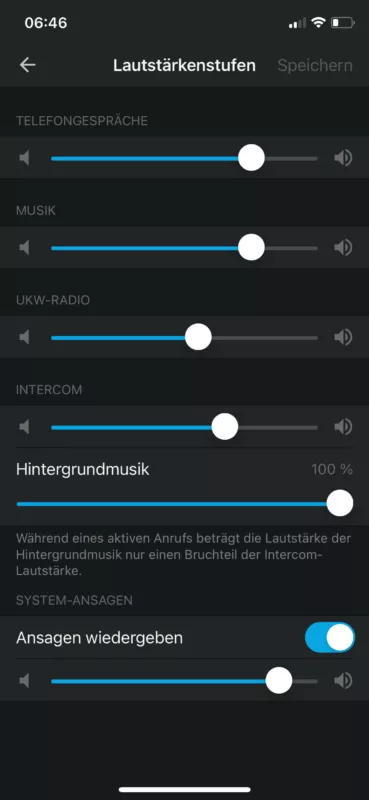
Sorry, couldn’t change to english.
While the music volume is high the anouncements are clear and loud, even when you pause music, because you dont want to listen to music.
Maybe someone can confirm that the settings at Sena or BlueBike are the same? It isn‘t a Scenic issue i guess.
Today i“ll try without music channel and give you a feedback.
Regards Mex
Quote from Mex on 09.05.2024, 23:17Hi folks.
Nothing changed yet. Without music the volume of the instructions is still low.
We had a mesh-group of 3. Priority was intercom first. I use the Cardo almost daily between march and october, works fine when i just use the bluetooth intercom function. Loudness is perfect. And really clear to understand.
Yesterday i started without music and i barely undestood the instructions. Increasing volume, increased intercom and instructions but still not loud enough.
Today we go for another ride for 3 days. I set the settings in the app like shown below. Maybe i did a mistake and someone may give me a hint.
I set the intercom volume up. Lets see…
I“ll report.
Regards, Mex
Hi folks.
Nothing changed yet. Without music the volume of the instructions is still low.
We had a mesh-group of 3. Priority was intercom first. I use the Cardo almost daily between march and october, works fine when i just use the bluetooth intercom function. Loudness is perfect. And really clear to understand.
Yesterday i started without music and i barely undestood the instructions. Increasing volume, increased intercom and instructions but still not loud enough.
Today we go for another ride for 3 days. I set the settings in the app like shown below. Maybe i did a mistake and someone may give me a hint.
I set the intercom volume up. Lets see…
I“ll report.
Regards, Mex
Quote from Guido on 10.05.2024, 05:59@mex, Have you tried changing the voice MODE in Scenic? (the setting that you can't find in settings 🙂). See here: https://scenic.app/help/low-voice-volume/
@mex, Have you tried changing the voice MODE in Scenic? (the setting that you can't find in settings 🙂). See here: https://scenic.app/help/low-voice-volume/
Quote from Lehmanhill on 10.05.2024, 06:54It wasn't clear to me which slider was really controlling Scenic route announcements. It wasn't clear whether the "Play announcements" slider was for Cardo announcements only or would include Scenic announcements. Was Scenic considered music, intercom,?? Since I don't use intercom or music, I put all sliders to maximum and it helped. Given your situation, you will have to experiment to find an acceptable balance.
I'm wishing you the best of luck.
It wasn't clear to me which slider was really controlling Scenic route announcements. It wasn't clear whether the "Play announcements" slider was for Cardo announcements only or would include Scenic announcements. Was Scenic considered music, intercom,?? Since I don't use intercom or music, I put all sliders to maximum and it helped. Given your situation, you will have to experiment to find an acceptable balance.
I'm wishing you the best of luck.
Quote from Mex on 12.05.2024, 09:43Hi Guido.
I am back from my 3 days trip to Boxberg. Bosch‘s Driving area. Been there at Motorrad Action Team. Great experience.
We went there yesterday morning. I tried to use Scenic without music. Poor loudness. In the evening, back at our hotel, i updated to 3.60. This morning as we started, without music, anouncements were pretty clear up to 65 miles / 100 kilometers per hour.Did the check for 60 kilometers. After a short break i continued with music, as i did for the last 3 years. Now instructions been even louder as the music.
When i change volume of the music, instructions change as well, of course.
Changes in the „big button menue“ changes the volume of the instructions in relation to the music. Louder as, or lower as the actual sound volume.
Yesterday i had no music at all. Training day. Going back to the hotel all anouncements were clear to understand, but we haven‘t been too fast.
Going back home today we drove up to 147 km/h (dont tell my lady). Even with loudest settings intructions are hard to hear. Music on, volume up, all fine.
I recognize that it works better, but it should not depend on music volume settings.
In case you need it (loud bike, loud helmet, etc..) Scenic should blow your ears.
Regards, Mex
Hi Guido.
I am back from my 3 days trip to Boxberg. Bosch‘s Driving area. Been there at Motorrad Action Team. Great experience.
We went there yesterday morning. I tried to use Scenic without music. Poor loudness. In the evening, back at our hotel, i updated to 3.60. This morning as we started, without music, anouncements were pretty clear up to 65 miles / 100 kilometers per hour.
Did the check for 60 kilometers. After a short break i continued with music, as i did for the last 3 years. Now instructions been even louder as the music.
When i change volume of the music, instructions change as well, of course.
Changes in the „big button menue“ changes the volume of the instructions in relation to the music. Louder as, or lower as the actual sound volume.
Yesterday i had no music at all. Training day. Going back to the hotel all anouncements were clear to understand, but we haven‘t been too fast.
Going back home today we drove up to 147 km/h (dont tell my lady). Even with loudest settings intructions are hard to hear. Music on, volume up, all fine.
I recognize that it works better, but it should not depend on music volume settings.
In case you need it (loud bike, loud helmet, etc..) Scenic should blow your ears.
Regards, Mex
Quote from Mex on 12.05.2024, 09:55I was allowed to track the day.
Here is the result. The great oval has a speed limit of 160 km/h at two points. Rest of the oval is: „All you can drive“
On the upper lane (of 3) you need to go at least 130 km/h to hold the lane. I am running into: Off topic 😜
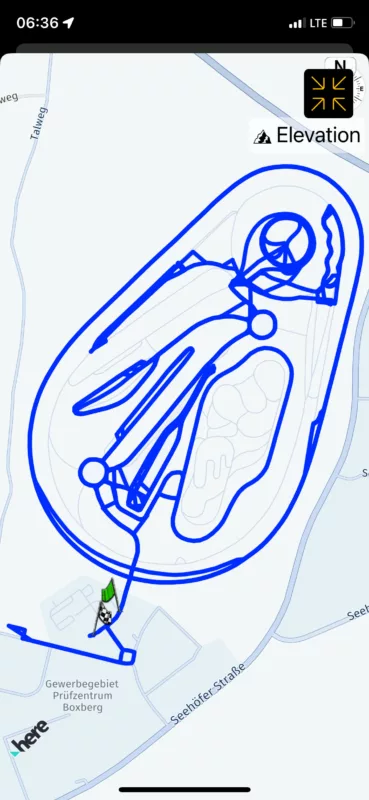
I was allowed to track the day.
Here is the result. The great oval has a speed limit of 160 km/h at two points. Rest of the oval is: „All you can drive“
On the upper lane (of 3) you need to go at least 130 km/h to hold the lane. I am running into: Off topic 😜
Quote from Guido on 12.05.2024, 13:23Hi @mex,
I tried to use Scenic without music. Poor loudness.
Was this with voice mode set to "Play as Audio"? (see post 41 above)
When i change volume of the music, instructions change as well, of course. Changes in the „big button menue“ changes the volume of the instructions in relation to the music. Louder as, or lower as the actual sound volume.
The volume buttons in the big button do exactly the same as the hardware volume buttons IF music is playing. If music is NOT playing, the hardware volume buttons DO NOT change the music volume, but they change the "system" volume (sound of the phone ringer and other system sounds). The volume buttons in the navigation menu ALWAYS change the music volume. If voice mode is set to "play as audio" the voice instruction volume is relative to the music volume. If the voice mode is set to "Play as Voice" and there is a com set or carplay system connected, then the volume is not related to the music volume. It's only determined by the voice volume setting in Scenic Settings and the volume of the connected helmet com set and/or carplay system.
I recognize that it works better, but it should not depend on music volume settings.
Again the question... Was this with voice mode set to "Play as Audio"? (see post 41 above)
Hi @mex,
I tried to use Scenic without music. Poor loudness.
Was this with voice mode set to "Play as Audio"? (see post 41 above)
When i change volume of the music, instructions change as well, of course. Changes in the „big button menue“ changes the volume of the instructions in relation to the music. Louder as, or lower as the actual sound volume.
The volume buttons in the big button do exactly the same as the hardware volume buttons IF music is playing. If music is NOT playing, the hardware volume buttons DO NOT change the music volume, but they change the "system" volume (sound of the phone ringer and other system sounds). The volume buttons in the navigation menu ALWAYS change the music volume. If voice mode is set to "play as audio" the voice instruction volume is relative to the music volume. If the voice mode is set to "Play as Voice" and there is a com set or carplay system connected, then the volume is not related to the music volume. It's only determined by the voice volume setting in Scenic Settings and the volume of the connected helmet com set and/or carplay system.
I recognize that it works better, but it should not depend on music volume settings.
Again the question... Was this with voice mode set to "Play as Audio"? (see post 41 above)
Quote from Guido on 12.05.2024, 13:24Quote from Mex on 12.05.2024, 09:55I was allowed to track the day.
Here is the result. The great oval has a speed limit of 160 km/h at two points. Rest of the oval is: „All you can drive“
On the upper lane (of 3) you need to go at least 130 km/h to hold the lane. I am running into: Off topic
Very nice 🙂

Quote from Mex on 12.05.2024, 09:55I was allowed to track the day.
Here is the result. The great oval has a speed limit of 160 km/h at two points. Rest of the oval is: „All you can drive“
On the upper lane (of 3) you need to go at least 130 km/h to hold the lane. I am running into: Off topic
Very nice 🙂
Quote from Mex on 14.05.2024, 14:38Hi Guido.
Sorry for the late reply. I did something wrong on sunday. While coming back home i just tapped the center button between lower and higher volume. I read the instructions on the help-page but didnt recognize to HOLD long.
Yesterday i did another try with my instructors headset, so i could use it in my car (no carplay). Nothing changed.
Today i checked all options and the tutorial again. Ok, my fault, press LONG. I will check the options later. 10.30 p.m. here and i need to get up early.
I did a short test with my headset, but need to do a real one on the bike. Looks like its already really loud enough. Maybe i am able to test at 20th of may, weather should be fine around here.
Loaded the update some hours ago. Amazing how fast you update the app. Thanks for your work.
Hi Guido.
Sorry for the late reply. I did something wrong on sunday. While coming back home i just tapped the center button between lower and higher volume. I read the instructions on the help-page but didnt recognize to HOLD long.
Yesterday i did another try with my instructors headset, so i could use it in my car (no carplay). Nothing changed.
Today i checked all options and the tutorial again. Ok, my fault, press LONG. I will check the options later. 10.30 p.m. here and i need to get up early.
I did a short test with my headset, but need to do a real one on the bike. Looks like its already really loud enough. Maybe i am able to test at 20th of may, weather should be fine around here.
Loaded the update some hours ago. Amazing how fast you update the app. Thanks for your work.
Quote from Mex on 15.05.2024, 08:27Hi Guido.
I did another test this morning.
Used my car with bluetooth media connection.
Speaker button pressed long, of course 😂.
Play as audio: all fine with music (spotify) in backround.
Play as voice: Volume of announcement increases slowly, so you hear just the last 2 or 3 words. At the end its loud enough to understand everything, but volume up takes too long.
On monday we do another ride with the bikes and i“ll try my setting on the bike.
May be an issue with VW‘s bluethooth media connection.
Let you know who it worked.
Regards, Mex
Hi Guido.
I did another test this morning.
Used my car with bluetooth media connection.
Speaker button pressed long, of course 😂.
Play as audio: all fine with music (spotify) in backround.
Play as voice: Volume of announcement increases slowly, so you hear just the last 2 or 3 words. At the end its loud enough to understand everything, but volume up takes too long.
On monday we do another ride with the bikes and i“ll try my setting on the bike.
May be an issue with VW‘s bluethooth media connection.
Let you know who it worked.
Regards, Mex
Quote from Mex on 20.05.2024, 23:25Hi folks, hi Guido.
Yesterday i did a new test with my setup:
Scenic latest version and iPhone 17.5 , of course, and my Cardo Packtalk Black Version 5.11.
I started as always, first stop gasoline station. Had music off and played instructions: as voice.
I dont know what changed but all instructions were loud and clear. A bit too loud, needed to reduce volume.
Even at 120 km/h i could hear everything clear enough.
Nothing been cut off and the volume didnt increase while the instruction were spoken, like it happened at the last test in my car.
No it works perfect with my setup.
Thanks Guido.
Hi folks, hi Guido.
Yesterday i did a new test with my setup:
Scenic latest version and iPhone 17.5 , of course, and my Cardo Packtalk Black Version 5.11.
I started as always, first stop gasoline station. Had music off and played instructions: as voice.
I dont know what changed but all instructions were loud and clear. A bit too loud, needed to reduce volume.
Even at 120 km/h i could hear everything clear enough.
Nothing been cut off and the volume didnt increase while the instruction were spoken, like it happened at the last test in my car.
No it works perfect with my setup.
Thanks Guido.


