
ETA inaccurate

Quote from Kev450 on 21.07.2025, 16:55I did a ride last Saturday (July 19th 2025), one that I edited on July 17th to modify the planning, I didn't notice it when I edited it but the ETA was longer than what we actually did. Can't give you all the specifics but that is the day I noticed the problem.
Now if I go back in the rides I created, all recent ones automatically have their ETA's adjusted to be way longer than it actually is. To find when the problem started I went to all the created rides until I got to one that I created on July 12th 2025 and this one has the normal ETA but if I edit it, it will give it the "new" ETA which is far longer than the actual time it takes, around 1 hour extra in this case. I did a ride today that had a 4 hour estimate and it took 3 hours... So this problem started after July 12th 2025, now any ride I create will have this way overestimated ETA. According to the apple store, scenic had an update about 2 weeks ago so the problem may be from there.

I did a ride last Saturday (July 19th 2025), one that I edited on July 17th to modify the planning, I didn't notice it when I edited it but the ETA was longer than what we actually did. Can't give you all the specifics but that is the day I noticed the problem.
Now if I go back in the rides I created, all recent ones automatically have their ETA's adjusted to be way longer than it actually is. To find when the problem started I went to all the created rides until I got to one that I created on July 12th 2025 and this one has the normal ETA but if I edit it, it will give it the "new" ETA which is far longer than the actual time it takes, around 1 hour extra in this case. I did a ride today that had a 4 hour estimate and it took 3 hours... So this problem started after July 12th 2025, now any ride I create will have this way overestimated ETA. According to the apple store, scenic had an update about 2 weeks ago so the problem may be from there.


Quote from Guido on 22.07.2025, 02:00Yes...this is weird. The only possible explanation I can think of is that the datae for the duration calculation changed with the most recent map update. I've asked the map provider if they changed something, and will report back once I receive a response.
Yes...this is weird. The only possible explanation I can think of is that the datae for the duration calculation changed with the most recent map update. I've asked the map provider if they changed something, and will report back once I receive a response.
Quote from Kev450 on 24.07.2025, 15:29Quote from Guido on 22.07.2025, 02:00Yes...this is weird. The only possible explanation I can think of is that the datae for the duration calculation changed with the most recent map update. I've asked the map provider if they changed something, and will report back once I receive a response.
Any way for me to send you a private message? I created an itinerary for my weekend ride and detailed the comparison with the timeframe from Google Maps for example, might help to investigate, this one is almost 2 hours off..
Quote from Guido on 22.07.2025, 02:00Yes...this is weird. The only possible explanation I can think of is that the datae for the duration calculation changed with the most recent map update. I've asked the map provider if they changed something, and will report back once I receive a response.
Any way for me to send you a private message? I created an itinerary for my weekend ride and detailed the comparison with the timeframe from Google Maps for example, might help to investigate, this one is almost 2 hours off..
Quote from Kev450 on 20.09.2025, 13:07problem persists even in version 4.24 , just got back from a ride, Scenic ETA after creating the itinerary, 5 hours 49 minutes round trip, actual recorded time 4 hours 50 minutes, a full hour off in this case, that is horrible for planning!!
problem persists even in version 4.24 , just got back from a ride, Scenic ETA after creating the itinerary, 5 hours 49 minutes round trip, actual recorded time 4 hours 50 minutes, a full hour off in this case, that is horrible for planning!!
Quote from Kev450 on 03.06.2026, 09:45Quote from Guido on 22.07.2025, 02:00Yes...this is weird. The only possible explanation I can think of is that the datae for the duration calculation changed with the most recent map update. I've asked the map provider if they changed something, and will report back once I receive a response.
Still an issue in latest version. I have to mention I noticed the new map often lacks speed zones, which would make sense as to why the ETA is off. OSM isn't accurate here in Eastern Canada, gas stations, restaurants and etc. are often closed down or completely missing from OSM. I get that this is costing Scenic a lot less as OSM is free but it comes with a huge sacrifice, which I've been really frustrated with as a ride planner. From my experience sticking with Scenic, OSM is as bad as HERE was. Google maps is unbeatable in all aspects of planning prior and on the go.
Quote from Guido on 22.07.2025, 02:00Yes...this is weird. The only possible explanation I can think of is that the datae for the duration calculation changed with the most recent map update. I've asked the map provider if they changed something, and will report back once I receive a response.
Still an issue in latest version. I have to mention I noticed the new map often lacks speed zones, which would make sense as to why the ETA is off. OSM isn't accurate here in Eastern Canada, gas stations, restaurants and etc. are often closed down or completely missing from OSM. I get that this is costing Scenic a lot less as OSM is free but it comes with a huge sacrifice, which I've been really frustrated with as a ride planner. From my experience sticking with Scenic, OSM is as bad as HERE was. Google maps is unbeatable in all aspects of planning prior and on the go.

Quote from Foxthorn on 05.06.2026, 16:43@guidomm I've seen this as well - on every ride I do I cannot trust the arrival times.
I have a theory ... I also noticed that on a lot of roads that the speed limit shown by Scenic maps is not the same as the posted speed.. I noticed one time it said it was 25MPH when it was actuall 55MPH. It is wrong so often that I just don't pay attention to both the speed limit and the estimated times. I'm thinking that becuase the raod speeds are wong this translates into wrong time estimates as well.
@guidomm I've seen this as well - on every ride I do I cannot trust the arrival times.
I have a theory ... I also noticed that on a lot of roads that the speed limit shown by Scenic maps is not the same as the posted speed.. I noticed one time it said it was 25MPH when it was actuall 55MPH. It is wrong so often that I just don't pay attention to both the speed limit and the estimated times. I'm thinking that becuase the raod speeds are wong this translates into wrong time estimates as well.
Quote from Kev450 on 06.06.2026, 09:10@foxthorn i forgot to mention it but you are correct, not only does the speed limit often is missing but even when Scenic is showing a speed limit it is often the wrong speed.. this is directly linked to using OSM as it is free and open source so it takes people like you and me to improve by correcting OSM, this is horrible tbh. As a paying premium member I really wish Google Maps or at least Apple Maps would be used as these are a lot more accurate! I’ve seen other navigation apps implement Google Maps as a “layer” option along with OSM and others so the user can decide which map to use. I can’t plan anything with OSM alone as most of it’s info is inaccurate, gas stations restaurants and etc. I need to use Google Maps alongside which defeats the purpose… @guidomm
@foxthorn i forgot to mention it but you are correct, not only does the speed limit often is missing but even when Scenic is showing a speed limit it is often the wrong speed.. this is directly linked to using OSM as it is free and open source so it takes people like you and me to improve by correcting OSM, this is horrible tbh. As a paying premium member I really wish Google Maps or at least Apple Maps would be used as these are a lot more accurate! I’ve seen other navigation apps implement Google Maps as a “layer” option along with OSM and others so the user can decide which map to use. I can’t plan anything with OSM alone as most of it’s info is inaccurate, gas stations restaurants and etc. I need to use Google Maps alongside which defeats the purpose… @guidomm
Quote from Guido on 06.06.2026, 10:12Our map provider is working on improving ETA by using real life data from rides.
I’d love to use Google Map, but (1) Google Maps does not offer all features to 3rd party developers. (2). It’s too expensive.
This is also the reason why Scenic had to move away from HERE maps. If you haven’t read the story behind that, here it is: https://scenic.app/scenic-4-the-whole-story/
The prices mentioned there would be similar for Google Maps.
Our map provider is working on improving ETA by using real life data from rides.
I’d love to use Google Map, but (1) Google Maps does not offer all features to 3rd party developers. (2). It’s too expensive.
This is also the reason why Scenic had to move away from HERE maps. If you haven’t read the story behind that, here it is: https://scenic.app/scenic-4-the-whole-story/
The prices mentioned there would be similar for Google Maps.
Quote from Kev450 on 06.06.2026, 10:35Quote from Guido on 06.06.2026, 10:12Our map provider is working on improving ETA by using real life data from rides.
I’d love to use Google Map, but (1) Google Maps does not offer all features to 3rd party developers. (2). It’s too expensive.
This is also the reason why Scenic had to move away from HERE maps. If you haven’t read the story behind that, here it is: https://scenic.app/scenic-4-the-whole-story/
The prices mentioned there would be similar for Google Maps.
@guidomm Map provider? OSM is free and open source.
Sad to see you’re not open to alternatives, as stated there’s other apps (MyRoute app for example) using Google Maps as a “layer” without issues so I’m not sure what “features” you speak of. Apple Maps would already be a step up and I think I once read it was free.
I really love Scenic’s planning layout, the best I’ve experienced so far but the map is what is holding it back. It’s frustrating, I cannot rely on the map for anything regarding planning except roads and even that I've ran into issues although a lot less frequent than gas stations, restaurants and etc. OSM's data is simply not accurate and that’s when its not missing entirely… again defying the purpose of the app entirely as I have to rely on other apps for a complete package.
Quote from Guido on 06.06.2026, 10:12Our map provider is working on improving ETA by using real life data from rides.
I’d love to use Google Map, but (1) Google Maps does not offer all features to 3rd party developers. (2). It’s too expensive.
This is also the reason why Scenic had to move away from HERE maps. If you haven’t read the story behind that, here it is: https://scenic.app/scenic-4-the-whole-story/
The prices mentioned there would be similar for Google Maps.
@guidomm Map provider? OSM is free and open source.
Sad to see you’re not open to alternatives, as stated there’s other apps (MyRoute app for example) using Google Maps as a “layer” without issues so I’m not sure what “features” you speak of. Apple Maps would already be a step up and I think I once read it was free.
I really love Scenic’s planning layout, the best I’ve experienced so far but the map is what is holding it back. It’s frustrating, I cannot rely on the map for anything regarding planning except roads and even that I've ran into issues although a lot less frequent than gas stations, restaurants and etc. OSM's data is simply not accurate and that’s when its not missing entirely… again defying the purpose of the app entirely as I have to rely on other apps for a complete package.
Quote from Guido on 06.06.2026, 15:52Hi @kev450,
I understand your point of view. You clearly know what you are talking about, but I don’t think you have the full picture though.
OSM is free, yes. But that’s just the raw data. You have to convert that data to be able to display the map on screen, have code that actually takes that data and makes it into screen graphics, you have to convert the data to a searchable database for POI and address search, and you have to convert the data for routing engine purposes, and then have code to do the actual route calculations.
There are open source projects around this, but even with those projects, it takes time and effort to setup, run and maintain all this. At Scenic, we have a very small team, so we use a 3rd party provider that does all this.
In the future we might make an effort to do more of this in-house, to get more control on new features, add more data quality, more development speed, enrich from other sources, etc. I’m not counting that out.
As for displaying Google Maps as a layer… that’s not something I’m willing to do indeed. Why? Cost is an important factor, but also important is that it would cause a discrepancy between the road network that is shown and the road network that is used for route calculation (which would still be OSM based, with OSM ETA’s as Google simply doesn’t offer the routing options that Scenic needs). Also it would take effort (it’s not simple to do this). Effort that I want/need to spend on other feature request and improvements we have on our roadmap.
So it’s not that I’m not open to alternatives, it’s a deliberate decision.
Hope this explains a bit further, and I hope you understand.
Best regards,
Guido
Hi @kev450,
I understand your point of view. You clearly know what you are talking about, but I don’t think you have the full picture though.
OSM is free, yes. But that’s just the raw data. You have to convert that data to be able to display the map on screen, have code that actually takes that data and makes it into screen graphics, you have to convert the data to a searchable database for POI and address search, and you have to convert the data for routing engine purposes, and then have code to do the actual route calculations.
There are open source projects around this, but even with those projects, it takes time and effort to setup, run and maintain all this. At Scenic, we have a very small team, so we use a 3rd party provider that does all this.
In the future we might make an effort to do more of this in-house, to get more control on new features, add more data quality, more development speed, enrich from other sources, etc. I’m not counting that out.
As for displaying Google Maps as a layer… that’s not something I’m willing to do indeed. Why? Cost is an important factor, but also important is that it would cause a discrepancy between the road network that is shown and the road network that is used for route calculation (which would still be OSM based, with OSM ETA’s as Google simply doesn’t offer the routing options that Scenic needs). Also it would take effort (it’s not simple to do this). Effort that I want/need to spend on other feature request and improvements we have on our roadmap.
So it’s not that I’m not open to alternatives, it’s a deliberate decision.
Hope this explains a bit further, and I hope you understand.
Best regards,
Guido
Quote from Kev450 on 08.06.2026, 20:07@guidomm, thanks for the detailed reply. Don't get me wrong I'm aware of the challenges and hard work it takes to put something like this together, I hope I didn't make you feel otherwise! Y'all have a great working app overall, I love Scenic which is why I take the time to participate in the forum but as a route planner Scenic's only holdback for me is it's map data like gas stations, restaurants, shops, businesses and etc., HERE maps is outdated just like OSM is, not as bad with Apple Maps but we all know Google Maps is the leader in this category, so I keep using Google Maps alongside and I must say I don't know how many times I mistakenly closed the Scenic app mid-route trying to find a last minute gas station for someone who didn't listen about arriving with a full tank at start lol, anyway i'm just trying to help make Scenic better 😉
You said Google Maps as a layer would cause a discrepancy between the road network that is shown and the road network that is used for route calculation. It may not be as complicated as we think, please have a look at this, it’s a short read https://support.myrouteapp.com/en/support/solutions/articles/12000074551-manual-map-layers-
@guidomm, thanks for the detailed reply. Don't get me wrong I'm aware of the challenges and hard work it takes to put something like this together, I hope I didn't make you feel otherwise! Y'all have a great working app overall, I love Scenic which is why I take the time to participate in the forum but as a route planner Scenic's only holdback for me is it's map data like gas stations, restaurants, shops, businesses and etc., HERE maps is outdated just like OSM is, not as bad with Apple Maps but we all know Google Maps is the leader in this category, so I keep using Google Maps alongside and I must say I don't know how many times I mistakenly closed the Scenic app mid-route trying to find a last minute gas station for someone who didn't listen about arriving with a full tank at start lol, anyway i'm just trying to help make Scenic better 😉
You said Google Maps as a layer would cause a discrepancy between the road network that is shown and the road network that is used for route calculation. It may not be as complicated as we think, please have a look at this, it’s a short read https://support.myrouteapp.com/en/support/solutions/articles/12000074551-manual-map-layers-
Quote from Guido on 08.06.2026, 20:38Hi @kev450,
MRA mentions more or less what I’m saying: “Map layers have no influence on the route calculation. This is exclusively determined by the basic map.”
So, they basically accepted those differences between what’s visually shown and the route calculation using different map data.
Maybe you already saw, but in case you didn’t. Although Scenic doesn’t show Google Maps, you can search with Google (which would be the solution for the scenario you mentioned.
If you search in Scenic, you get Apple Maps and Offline Maps search results by default. If you then scroll down to the bottom of the list with search results you’ll see a “Didn’t find what you were looking for?” text followed by a “Search with Google” button. So in the scenario mentioned above you don’t really need to leave Scenic.
Perhaps that helps?
Hi @kev450,
MRA mentions more or less what I’m saying: “Map layers have no influence on the route calculation. This is exclusively determined by the basic map.”
So, they basically accepted those differences between what’s visually shown and the route calculation using different map data.
Maybe you already saw, but in case you didn’t. Although Scenic doesn’t show Google Maps, you can search with Google (which would be the solution for the scenario you mentioned.
If you search in Scenic, you get Apple Maps and Offline Maps search results by default. If you then scroll down to the bottom of the list with search results you’ll see a “Didn’t find what you were looking for?” text followed by a “Search with Google” button. So in the scenario mentioned above you don’t really need to leave Scenic.
Perhaps that helps?
Quote from Kev450 on 08.06.2026, 20:57@guidomm thanks for the quick reply. I keep forgetting about Scenic’s search feature you are mentioning as it is “buried deep” lol but from experience it does not work well when you choose your own search words instead of the predefined “fuel”, “eating & drinking” and etc, i just trued it now and does the same thing, the google search results are worse and a lot farther than wherever Scenic pulls its own search, the difference is night and day, that is one of the reasons I keep using Google Maps alongside, mainly for POI’s and traffic
@guidomm thanks for the quick reply. I keep forgetting about Scenic’s search feature you are mentioning as it is “buried deep” lol but from experience it does not work well when you choose your own search words instead of the predefined “fuel”, “eating & drinking” and etc, i just trued it now and does the same thing, the google search results are worse and a lot farther than wherever Scenic pulls its own search, the difference is night and day, that is one of the reasons I keep using Google Maps alongside, mainly for POI’s and traffic
Quote from Guido on 09.06.2026, 08:30Ok. I’ll have a look at that.
Ok. I’ll have a look at that.

Quote from DRTBYK on 09.06.2026, 10:34There definitely is something odd with the Search algorithm. I'm in Western Washington State and had the map viewing area with ~15mi radius. I did a search for Gas Stations "near me" (which was a search option). I got three out of the half-dozen that are within 5mi of me and then the rest of the results went, in order, Switzerland, Ontario-Canada and Main-US. Perplexing...
There definitely is something odd with the Search algorithm. I'm in Western Washington State and had the map viewing area with ~15mi radius. I did a search for Gas Stations "near me" (which was a search option). I got three out of the half-dozen that are within 5mi of me and then the rest of the results went, in order, Switzerland, Ontario-Canada and Main-US. Perplexing...
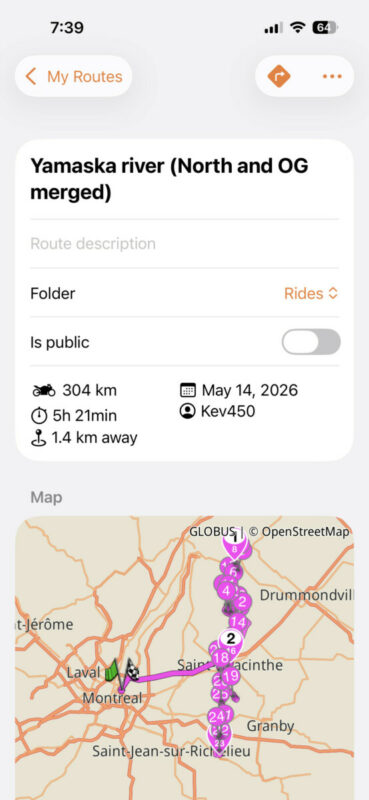
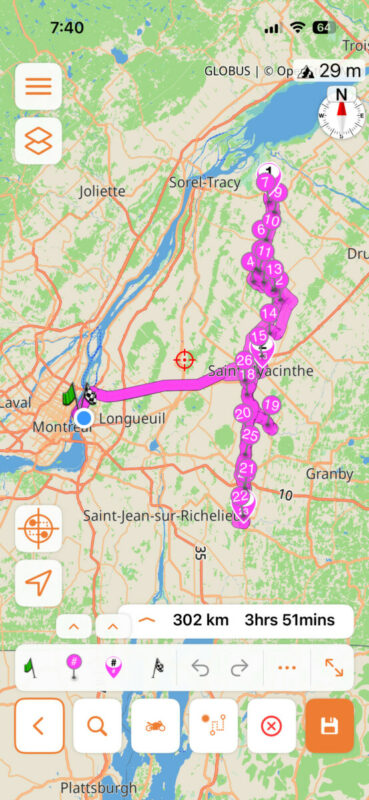
Quote from Kev450 on 06.09.2026, 08:34@guidomm ETA issues again.. As shown in screenshots, I went in a previous ride I had saved to check on some stops/waypoints but noticed it went from 5 hours and 21 minutes down to 3 hours and 51 minutes, that’s a 1 hour and 30 minutes difference on a 300km roundtrip without changing anything, I doubled checked to make sure the itinerary is identical and it is despite showing a 2km difference. These inaccurate ETA issues make it hard to plan, I don’t mind when I’m riding solo but it gives a bad image when bringing a group along, it makes me look like a noob…
@guidomm ETA issues again.. As shown in screenshots, I went in a previous ride I had saved to check on some stops/waypoints but noticed it went from 5 hours and 21 minutes down to 3 hours and 51 minutes, that’s a 1 hour and 30 minutes difference on a 300km roundtrip without changing anything, I doubled checked to make sure the itinerary is identical and it is despite showing a 2km difference. These inaccurate ETA issues make it hard to plan, I don’t mind when I’m riding solo but it gives a bad image when bringing a group along, it makes me look like a noob…
Quote from Guido on 06.09.2026, 08:45In the time between when you created the route (May) and now, our map provider did quite some effort to get more accurate, real world, durations.
Your first screenshot shows the duration as it was calculated when you saved the route. When you open the route for editing it’s recalculated with the new duration calculation.
So, I’d say the 3h51 is more correct. Without knowing the exact roads your route is taking that also sounds more realistic for a 300km route.
In the time between when you created the route (May) and now, our map provider did quite some effort to get more accurate, real world, durations.
Your first screenshot shows the duration as it was calculated when you saved the route. When you open the route for editing it’s recalculated with the new duration calculation.
So, I’d say the 3h51 is more correct. Without knowing the exact roads your route is taking that also sounds more realistic for a 300km route.


