
Detours into private properties during ride, and strange generated route

Quote from loverofgood on 17.10.2024, 20:44Thank you for a great app! I realize that version 4 still has issues, so I want to help by reporting what I see on my rides. Please let me know if there is another system where I have to log issues. I am using version 4.02.
Issue #1: On a ride earlier today it happened 3 times that it wanted me to turn into private properties (a school, somebody's house, then a business) along the route and then immediately exit and continue on the route. I was using a route auto-generated using the "Round" option in the planner. I have the route saved, so I was planning on riding the same route tomorrow to see if gives me the same issue.
Issue #2: The auto-generated route mentioned above includes a section where it wants me to turn right at a T-junction, go down the road for a little bit, then make a U-turn and continue past the point where I turned right. It could have just made me turn left.
Thank you.
Thank you for a great app! I realize that version 4 still has issues, so I want to help by reporting what I see on my rides. Please let me know if there is another system where I have to log issues. I am using version 4.02.
Issue #1: On a ride earlier today it happened 3 times that it wanted me to turn into private properties (a school, somebody's house, then a business) along the route and then immediately exit and continue on the route. I was using a route auto-generated using the "Round" option in the planner. I have the route saved, so I was planning on riding the same route tomorrow to see if gives me the same issue.
Issue #2: The auto-generated route mentioned above includes a section where it wants me to turn right at a T-junction, go down the road for a little bit, then make a U-turn and continue past the point where I turned right. It could have just made me turn left.
Thank you.

Quote from Guido on 17.10.2024, 21:34Would you mind sharing the link to this route with me? To do that, select the route from your route list > 3 dots button top right > share link.
If you prefer to keep it private, you can use the email button at the bottom of the help page to mail me directly.
Would you mind sharing the link to this route with me? To do that, select the route from your route list > 3 dots button top right > share link.
If you prefer to keep it private, you can use the email button at the bottom of the help page to mail me directly.
Quote from loverofgood on 18.10.2024, 09:12Quote from Guido on 17.10.2024, 21:34Would you mind sharing the link to this route with me? To do that, select the route from your route list > 3 dots button top right > share link.
If you prefer to keep it private, you can use the email button at the bottom of the help page to mail me directly.I have sent the link in email, thanks.
Quote from Guido on 17.10.2024, 21:34Would you mind sharing the link to this route with me? To do that, select the route from your route list > 3 dots button top right > share link.
If you prefer to keep it private, you can use the email button at the bottom of the help page to mail me directly.
I have sent the link in email, thanks.
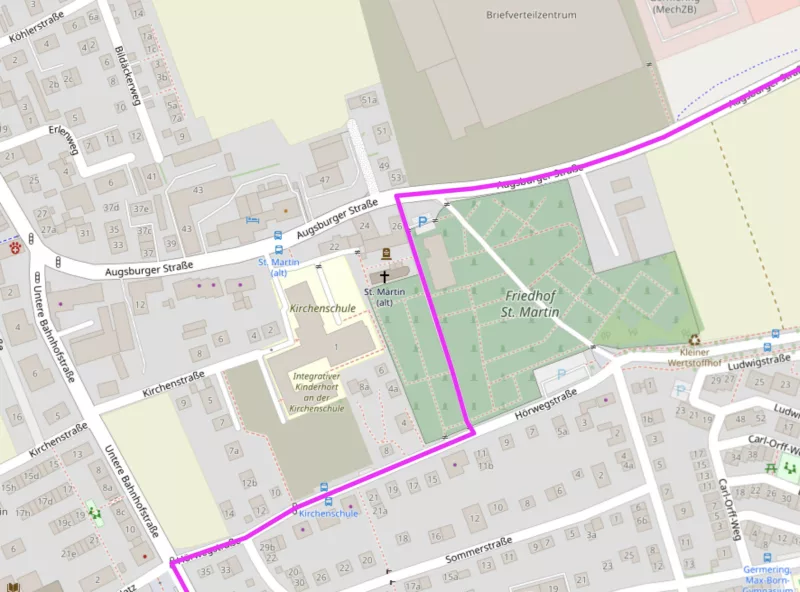
Quote from loverofgood on 18.10.2024, 09:15Quote from Thi Lo on 17.10.2024, 22:02I had the same phenomenon yesterday (see Germering Cemetery).
Hi Thi-Lo, thanks for that link. I think my issue is slightly different because my route does not include those private properties - it is only when I start riding that it wants me to turn into those properties (which are along the route).
Quote from Thi Lo on 17.10.2024, 22:02I had the same phenomenon yesterday (see Germering Cemetery).
Hi Thi-Lo, thanks for that link. I think my issue is slightly different because my route does not include those private properties - it is only when I start riding that it wants me to turn into those properties (which are along the route).
Quote from BigjayPE on 18.10.2024, 20:53I have had the same issue where it directs me to a spot and then makes a u-turn to continue.
Also, the new maps don’t seem to know roads that are not through roads so will generate a route which ends up in a dead end. I’ll send you the route @guidomm
I have had the same issue where it directs me to a spot and then makes a u-turn to continue.
Also, the new maps don’t seem to know roads that are not through roads so will generate a route which ends up in a dead end. I’ll send you the route @guidomm
Quote from Guido on 18.10.2024, 22:21Thanks guys. I have received your links. Just so you know… an update (v4.03) is currently awaiting Apple approval. With a bit of luck they approve tomorrow, otherwise Monday probably.
A fix for these issues is not yet in that update. Next week I’ll investigate this with the help of your routes. I’ll report back here. Thank you!
Thanks guys. I have received your links. Just so you know… an update (v4.03) is currently awaiting Apple approval. With a bit of luck they approve tomorrow, otherwise Monday probably.
A fix for these issues is not yet in that update. Next week I’ll investigate this with the help of your routes. I’ll report back here. Thank you!
Quote from Guido on 23.10.2024, 14:50I have taken a look at your routes.
There are actually 3 different things going on:From @loverofgood and @bigjaype:
Issue #1: On a ride earlier today it happened 3 times that it wanted me to turn into private properties (a school, somebody's house, then a business) along the route and then immediately exit and continue on the route. I was using a route auto-generated using the "Round" option in the planner. I have the route saved, so I was planning on riding the same route tomorrow to see if gives me the same issue.
This is a combination of two bugs:
1) It's sending you down these private roads so you can turn around and head back to a "missed" waypoint. You didn't actually miss this waypoint, but due to a bug, it wasn't marked as reached, and thus, Scenic kept trying to send you back to it. This bug was partially resolved in v4.03 and will (hopefully) be fully resolved in the next version.
2) It shouldn't use these private roads to send you back / turn you around. In the next update, I'll increase the 'penalty' for using these roads so that the routing is more inclinden to use a 'normal' turnaround point (an allowed u-turn or a quick circle around the block).From @loverofgood:
Issue #2: The auto-generated route mentioned above includes a section where it wants me to turn right at a T-junction, go down the road for a little bit, then make a U-turn and continue past the point where I turned right. It could have just made me turn left.
This is not so much a bug, but a thing that can't really be resolved for all cases. You see... generating a round trip, or a curvy route, is contacting Kurviger, and then importing the route that Kurviger sends. Because Kurviger uses a different routing algorithm the route that Scenic calculates might become a bit different. So, the T-juntion where it sends you right towards via point 8 (behind via point 15) is a different route interpretation. Probably Kurviger wanted you to arrive to 8 from a different direction. It's explained in more details here: https://scenic.app/help/strange-loops/ I'll try and improve this a bit if possible. Typically, it's recommended to quickly check a generated round trip for these things, and then make some adjustments if necessary (in this case removing via 8).
From @thi-lo: sending you over a cemetery:
This is an error in the map data. This road did not have any access limitation. I've added that now. If you run into something like that again, you can report (or correct) the errors: https://scenic.app/help/reporting-map-errors/
I have taken a look at your routes.
There are actually 3 different things going on:
From @loverofgood and @bigjaype:
Issue #1: On a ride earlier today it happened 3 times that it wanted me to turn into private properties (a school, somebody's house, then a business) along the route and then immediately exit and continue on the route. I was using a route auto-generated using the "Round" option in the planner. I have the route saved, so I was planning on riding the same route tomorrow to see if gives me the same issue.
This is a combination of two bugs:
1) It's sending you down these private roads so you can turn around and head back to a "missed" waypoint. You didn't actually miss this waypoint, but due to a bug, it wasn't marked as reached, and thus, Scenic kept trying to send you back to it. This bug was partially resolved in v4.03 and will (hopefully) be fully resolved in the next version.
2) It shouldn't use these private roads to send you back / turn you around. In the next update, I'll increase the 'penalty' for using these roads so that the routing is more inclinden to use a 'normal' turnaround point (an allowed u-turn or a quick circle around the block).
From @loverofgood:
Issue #2: The auto-generated route mentioned above includes a section where it wants me to turn right at a T-junction, go down the road for a little bit, then make a U-turn and continue past the point where I turned right. It could have just made me turn left.
This is not so much a bug, but a thing that can't really be resolved for all cases. You see... generating a round trip, or a curvy route, is contacting Kurviger, and then importing the route that Kurviger sends. Because Kurviger uses a different routing algorithm the route that Scenic calculates might become a bit different. So, the T-juntion where it sends you right towards via point 8 (behind via point 15) is a different route interpretation. Probably Kurviger wanted you to arrive to 8 from a different direction. It's explained in more details here: https://scenic.app/help/strange-loops/ I'll try and improve this a bit if possible. Typically, it's recommended to quickly check a generated round trip for these things, and then make some adjustments if necessary (in this case removing via 8).
From @thi-lo: sending you over a cemetery:
This is an error in the map data. This road did not have any access limitation. I've added that now. If you run into something like that again, you can report (or correct) the errors: https://scenic.app/help/reporting-map-errors/
Quote from loverofgood on 24.10.2024, 19:09Thank you Guido, much appreciated.
Thank you Guido, much appreciated.
Quote from loverofgood on 29.10.2024, 20:06
On a recent ride I noticed that I had missed a waypoint when I made a turn - see screenshot. Is there a way to set how sensitive it is to hitting the exact waypoint?
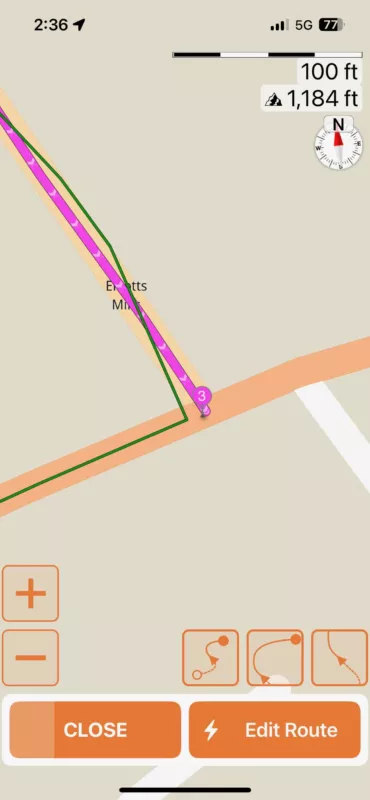
On a recent ride I noticed that I had missed a waypoint when I made a turn - see screenshot. Is there a way to set how sensitive it is to hitting the exact waypoint?
Quote from Guido on 30.10.2024, 07:48Waypoint are marked as 'reached' not when you get close to them (because that would give problems if the route overlapped itself), but rather based on distance travelled along the route and the distance along the route the waypoint is.
It looks like your progress along the route stopped tracking before this point already. The progress along the route is shown by the route line turning gray behind you. I'll have a look.
Waypoint are marked as 'reached' not when you get close to them (because that would give problems if the route overlapped itself), but rather based on distance travelled along the route and the distance along the route the waypoint is.
It looks like your progress along the route stopped tracking before this point already. The progress along the route is shown by the route line turning gray behind you. I'll have a look.


