
Curvy roads not so curvy (always main roads)

Quote from MotorTenere on 26.09.2026, 13:12Hi,
I’m wondering if I’m using the app the right way. Been a user for quite some time but I do find that the planning is becoming tiresome.
Whenever I select “curvy” with multiple stops it always focuses on adding main roads (N roads in the Netherlands for example).
I did not notice but I’m actually using Kurviger for making a route for over a year now, which seems to work great and then import in Scenic.
But suddenly I’m wondering why I should keep using Scenic at all. Is there something I’m missing when creating a route in Scenic? I can remember being a option to avoid main roads..
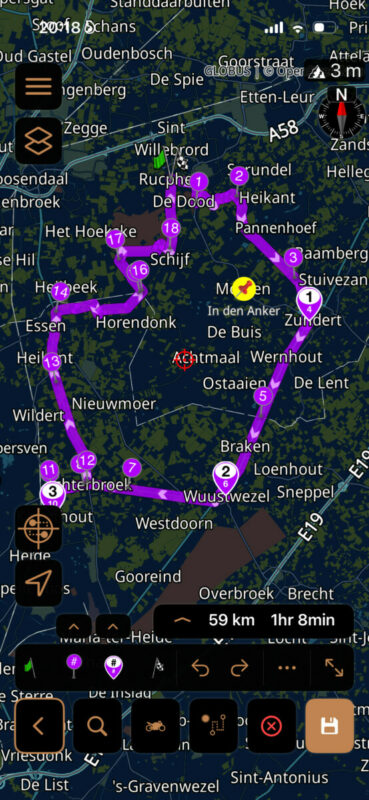
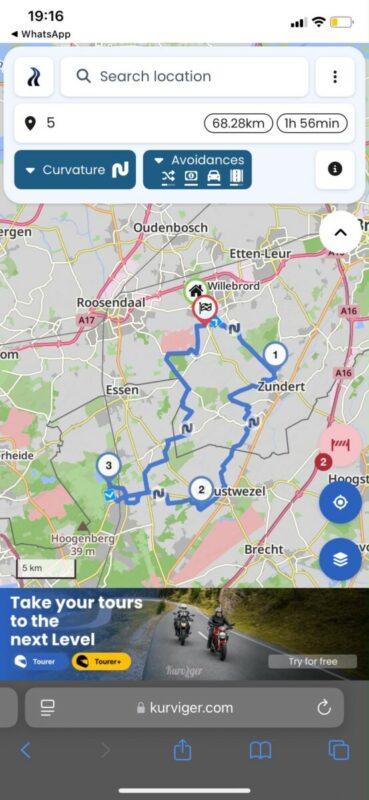
I attach some screenshots from the same route made in Scenic and Kurviger. Using the same stops.
Hi,
I’m wondering if I’m using the app the right way. Been a user for quite some time but I do find that the planning is becoming tiresome.
Whenever I select “curvy” with multiple stops it always focuses on adding main roads (N roads in the Netherlands for example).
I did not notice but I’m actually using Kurviger for making a route for over a year now, which seems to work great and then import in Scenic.
But suddenly I’m wondering why I should keep using Scenic at all. Is there something I’m missing when creating a route in Scenic? I can remember being a option to avoid main roads..
I attach some screenshots from the same route made in Scenic and Kurviger. Using the same stops.

Quote from johansw on 26.09.2026, 14:23Your choice to avoid main roads in Motorcycle transportation mode is to select one of the two far left chioces on Road Type Preferences. This works quite well but not perfect. I really woul like to have the option Avoid highways in Standard Route type, not having to switch to Curvy or Car Transportation mode.
My wet dream is to have the option to choose which road level should be chosen (preferred) as highest level where possible, comprizing Lvl 1 to Lvl 5. And where not possible, Scenic should prioritize the next level up. As it is now, I have given the various level roads different colours on my maps, and mostly choose manually the blue (Lvl 4) and green (Lvl 5) roads, which normally and more often than not gives me scenic and curvy roads without beeing known in the area at all.
Your choice to avoid main roads in Motorcycle transportation mode is to select one of the two far left chioces on Road Type Preferences. This works quite well but not perfect. I really woul like to have the option Avoid highways in Standard Route type, not having to switch to Curvy or Car Transportation mode.
My wet dream is to have the option to choose which road level should be chosen (preferred) as highest level where possible, comprizing Lvl 1 to Lvl 5. And where not possible, Scenic should prioritize the next level up. As it is now, I have given the various level roads different colours on my maps, and mostly choose manually the blue (Lvl 4) and green (Lvl 5) roads, which normally and more often than not gives me scenic and curvy roads without beeing known in the area at all.
Quote from MotorTenere on 27.09.2026, 02:20No, sliding the slider all the way to left won’t ignore main roads. Highways yes, but main roads keep coming back. (N-roads, B-roads and such)
Kurviger even has the option to ignore main roads.
I can swear that Scenic had this option as well. Hopefully they will add this again
No, sliding the slider all the way to left won’t ignore main roads. Highways yes, but main roads keep coming back. (N-roads, B-roads and such)
Kurviger even has the option to ignore main roads.
I can swear that Scenic had this option as well. Hopefully they will add this again


