
CARPLAY - Which Waypoint is Active?

Quote from RichL on 03.07.2026, 13:18Hello, I've been testing CARPLAY out in my car because I am considering buying a Carpuride unit for my bike. When navigating an active route on the phone, it shows which waypoint or stop is actively being navigated to and you can also bring up the list of stops to check the order / progress.
It appears that with CARPLAY, there is no way to know what the active waypoint or stop is, or to bring up the list of stops. I find that difficult to use with that lacking. I did a couple local routes that I am familiar with for testing and I found it confusing to the point that it would not be safe to use on a motorcycle. I am not trying to be overdramatic, just to state that if there's a re-route or missed waypoint, or you just forgot where you are in your route, it's extremely difficult to recover at a glance.
Does anyone else feel this way? Are there improvements in the works? I'd just like to hear other's opinions. At this point, I absolutely would continue to use Scenic, but not via CARPLAY.
Hello, I've been testing CARPLAY out in my car because I am considering buying a Carpuride unit for my bike. When navigating an active route on the phone, it shows which waypoint or stop is actively being navigated to and you can also bring up the list of stops to check the order / progress.
It appears that with CARPLAY, there is no way to know what the active waypoint or stop is, or to bring up the list of stops. I find that difficult to use with that lacking. I did a couple local routes that I am familiar with for testing and I found it confusing to the point that it would not be safe to use on a motorcycle. I am not trying to be overdramatic, just to state that if there's a re-route or missed waypoint, or you just forgot where you are in your route, it's extremely difficult to recover at a glance.
Does anyone else feel this way? Are there improvements in the works? I'd just like to hear other's opinions. At this point, I absolutely would continue to use Scenic, but not via CARPLAY.

Quote from Guido on 06.07.2026, 11:34CarPlay forces apps to use templates, which are limited in the user interface. So, CarPlay will always be more or less limited in what we can display there. Having said that, I think I can add a number in the skip waypoint button that would show you the number of the next waypoint.
The list of upcoming waypoints (the route timeline) is probably also possible but would require some more work.
I'll add both to the list, giving priority to showing the number in the skip waypoint button.
CarPlay forces apps to use templates, which are limited in the user interface. So, CarPlay will always be more or less limited in what we can display there. Having said that, I think I can add a number in the skip waypoint button that would show you the number of the next waypoint.
The list of upcoming waypoints (the route timeline) is probably also possible but would require some more work.
I'll add both to the list, giving priority to showing the number in the skip waypoint button.

Quote from MLH on 06.07.2026, 23:40Quote from Guido on 06.07.2026, 11:34I think I can add a number in the skip waypoint button that would show you the number of the next waypoint.
Excellent. When on a trip recently, I realised I had made a navigation error & needed to skip several waypoints to get back on course. I managed that by pressing skip until Scenic’s route was straight on from where I was. If I’d been able to see the via # I was skipping, that’d have been well useful 👍
Quote from Guido on 06.07.2026, 11:34I think I can add a number in the skip waypoint button that would show you the number of the next waypoint.
Excellent. When on a trip recently, I realised I had made a navigation error & needed to skip several waypoints to get back on course. I managed that by pressing skip until Scenic’s route was straight on from where I was. If I’d been able to see the via # I was skipping, that’d have been well useful 👍

Quote from Mex on 07.07.2026, 23:50Hi MLH.
While navigating, press the „big button menu“. Select „overview“ there you will see your waypoints. So just delete those ones you need to delete. In case of traffic jam or deviations.
Regards, Mex
Hi MLH.
While navigating, press the „big button menu“. Select „overview“ there you will see your waypoints. So just delete those ones you need to delete. In case of traffic jam or deviations.
Regards, Mex
Quote from MLH on 08.07.2026, 00:40Thanks Mex. Unfortunately it’s not always that simple. I use route up guidance, for a start. Secondly, I don’t want to be getting my iPhone out to look at the route on there and my (portrait) CarPlay unit doesn’t display the route and visa quite like your screenshot. Skipping a via may mean stopping, taking gloves off, getting iPhone out, turning off CarPlay unit, opening Scenic on iPhone, zooming out some way, looking for the errant via and skipping it / them.
If the ‘skip via’ button said something like ‘skip via 43’ or the label remained the same but the via number was on the button, it would probably make that easier. I have occasionally spent a lot of time tracking down missed vias and then get back in the bike. It’s a PITA.
Thanks Mex. Unfortunately it’s not always that simple. I use route up guidance, for a start. Secondly, I don’t want to be getting my iPhone out to look at the route on there and my (portrait) CarPlay unit doesn’t display the route and visa quite like your screenshot. Skipping a via may mean stopping, taking gloves off, getting iPhone out, turning off CarPlay unit, opening Scenic on iPhone, zooming out some way, looking for the errant via and skipping it / them.
If the ‘skip via’ button said something like ‘skip via 43’ or the label remained the same but the via number was on the button, it would probably make that easier. I have occasionally spent a lot of time tracking down missed vias and then get back in the bike. It’s a PITA.
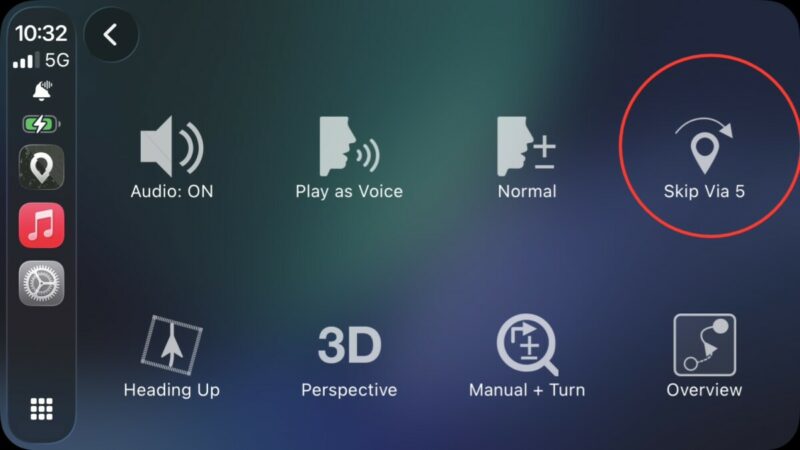
Quote from Dae on 12.07.2026, 10:24Simple way to see active waypoint - press the menu button (6 little boxes in bottom right). Your active waypoint is displayed:
Simple way to see active waypoint - press the menu button (6 little boxes in bottom right). Your active waypoint is displayed:
Quote from smoekedoekenoeff on 09.08.2026, 07:03Maybe we can talk about such functionality a bit more:
Sometimes a planned route for a complete day with many Vias (and Stops) does not work as planned, due to traffic, construction zones, or even a longer Stop than expected.
In those cases, it would be really cool to have the option to get an overview of all Vias and Stops in a list within Carplay (as already mentioned by Guido under the name „route timeline“). Here you would be able to see the already passed Vias and Stops and the upcoming ones until the final destination (in best case all Points with distance and Arrival time).
When the original plan has to be changed (e.g. by skipping one or more Waypoints), it would be cool to just use this list and just select the Via/Stop which should be the next, and all previous Waypoints will be skipped. With this, you get the new final distance and arrival time. Also, more for convenient checking the possible outcome of those skipped Waypoints, it would be really nice to be able to restore previously skipped Waypoints so that you can revert your plan to skip one or more waypoints easily during driving. Otherwise, you have to stop, select another app in Carplay, and change the route plan on your phone, which costs time you already do not have enough of due to external influences.
To make it a bit more easy to understand:
I would really like to see the route timeline in Carplay and just select the next Via/Stop which will be the next on the tour (without deleting already passed or skipped Vias. Also, here it would be really cool to be able to just select an already passed or skipped Via to (re)activate the routing of the whole route from this point on.
I hope you get the idea.
Maybe we can talk about such functionality a bit more:
Sometimes a planned route for a complete day with many Vias (and Stops) does not work as planned, due to traffic, construction zones, or even a longer Stop than expected.
In those cases, it would be really cool to have the option to get an overview of all Vias and Stops in a list within Carplay (as already mentioned by Guido under the name „route timeline“). Here you would be able to see the already passed Vias and Stops and the upcoming ones until the final destination (in best case all Points with distance and Arrival time).
When the original plan has to be changed (e.g. by skipping one or more Waypoints), it would be cool to just use this list and just select the Via/Stop which should be the next, and all previous Waypoints will be skipped. With this, you get the new final distance and arrival time. Also, more for convenient checking the possible outcome of those skipped Waypoints, it would be really nice to be able to restore previously skipped Waypoints so that you can revert your plan to skip one or more waypoints easily during driving. Otherwise, you have to stop, select another app in Carplay, and change the route plan on your phone, which costs time you already do not have enough of due to external influences.
To make it a bit more easy to understand:
I would really like to see the route timeline in Carplay and just select the next Via/Stop which will be the next on the tour (without deleting already passed or skipped Vias. Also, here it would be really cool to be able to just select an already passed or skipped Via to (re)activate the routing of the whole route from this point on.
I hope you get the idea.


