
CarPlay - Stop Point Timeline and Point Selection

Quote from johnsondvr on 19.04.2026, 01:29It would be really useful to be able to see the Timeline screen as you can on the phone in CarPlay:
Useful if I could also select a Stop point to advance to from this screen if I need to skip a part of the route. As an example, in the screenshot I am ravelling to Channel Tunnel and may need to skip the ‘visit’ if traffic is causing me to run behind schedule. I know I can manually skip but this includes skipping through all shaping points as well. Not aware of a way to just skip to the next Stop point in the route but I may have missed something - both on the phone and in CarPlay.
It would be really useful to be able to see the Timeline screen as you can on the phone in CarPlay:
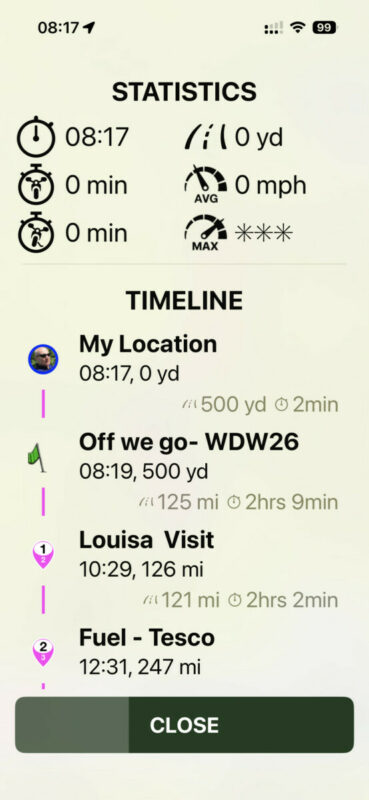
Useful if I could also select a Stop point to advance to from this screen if I need to skip a part of the route. As an example, in the screenshot I am ravelling to Channel Tunnel and may need to skip the ‘visit’ if traffic is causing me to run behind schedule. I know I can manually skip but this includes skipping through all shaping points as well. Not aware of a way to just skip to the next Stop point in the route but I may have missed something - both on the phone and in CarPlay.

Quote from johansw on 19.04.2026, 02:01Usig the Motive Monkey controller ( https://motivemonkey.com/ ) you have an easy access to Skip next via :
Go to: Settings / Handlebar Controller / assign "Skip next Via/stop" to your chosen button (I use short press left button).
Johan - involved in MotiveMonkey
Usig the Motive Monkey controller ( https://motivemonkey.com/ ) you have an easy access to Skip next via :
Go to: Settings / Handlebar Controller / assign "Skip next Via/stop" to your chosen button (I use short press left button).
Johan - involved in MotiveMonkey
Quote from johnsondvr on 19.04.2026, 03:52@johansw. Thank you. I have assigned that action on my Remotek One but the skip cycles through all the via waypoints and there does not seem to be a quick way to cycle through stop points only.
@johansw. Thank you. I have assigned that action on my Remotek One but the skip cycles through all the via waypoints and there does not seem to be a quick way to cycle through stop points only.


