
carplay roadworks and traffic information not visible

Quote from Middelfrangge on 06.09.2026, 12:54Hi Guido,
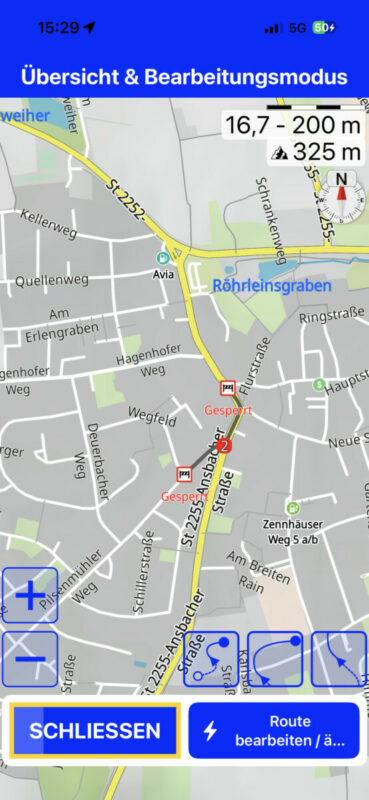
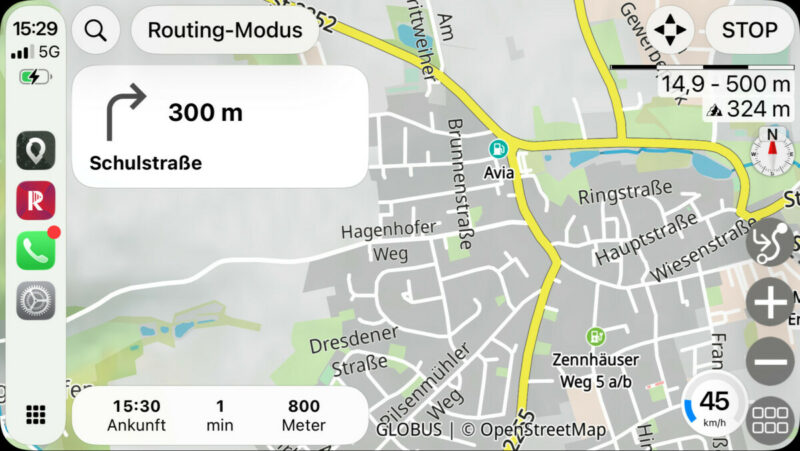
I think we already had that topic but I do not find it anymore. This weekend, I recognized that traffic informations like Road works, traffic jams etc. are not always visible in carplay. I thought it is because of my internet connection but then I recognized that it shows up in carplay for just some seconds and when its gone it is still visible when switching off carplay…..something seems to be wrong and has nothing to do with the setup of zoom levels.
regards Thomas
[caption id="attachment_11122" align="alignnone" width="787"]
Screenshot[/caption]
Hi Guido,
I think we already had that topic but I do not find it anymore. This weekend, I recognized that traffic informations like Road works, traffic jams etc. are not always visible in carplay. I thought it is because of my internet connection but then I recognized that it shows up in carplay for just some seconds and when its gone it is still visible when switching off carplay…..something seems to be wrong and has nothing to do with the setup of zoom levels.
regards Thomas
[caption id="attachment_11122" align="alignnone" width="787"] Screenshot[/caption]

Quote from Guido on 07.09.2026, 10:01Hi Thomas,
Yes, I remember. However so far I have not been able to reproduce this and I think it might be a zoom setting issue.
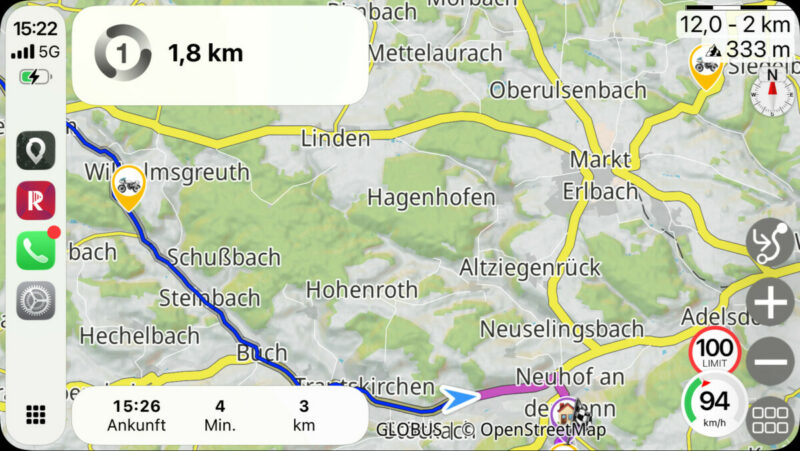
Incidents only show on the map if the zoom level is higher than the value you set in Settings > Navigation & Tracking > Road Closures & Incidents > Minimum Zoom Level. Check your value there and then check the zoom levels while using Scenic. I see you have that activated so you can see the zoom level the map is on top right. (It's 16.7 in your iPhone screenshot and 14,9 and 12 in your CarPlay screenshots.
Now... one more thing to know (which I think might explain what you are seeing). When the map zoom level changes, Scenic waits about 1 second to draw (or remove) the incidents on/from the map. This is to increase performance as this is an expensive operation. If the zoom level changes again in that second, it does nothing and waits until the zoom level is stable. So, what this means is if you zoom out to a level that no longer displays the incidents, it can take a second for them to disappear. Same thing for zooming in.
Please let me know if you still think something is wrong, now knowing what I described above.
Hi Thomas,
Yes, I remember. However so far I have not been able to reproduce this and I think it might be a zoom setting issue.
Incidents only show on the map if the zoom level is higher than the value you set in Settings > Navigation & Tracking > Road Closures & Incidents > Minimum Zoom Level. Check your value there and then check the zoom levels while using Scenic. I see you have that activated so you can see the zoom level the map is on top right. (It's 16.7 in your iPhone screenshot and 14,9 and 12 in your CarPlay screenshots.
Now... one more thing to know (which I think might explain what you are seeing). When the map zoom level changes, Scenic waits about 1 second to draw (or remove) the incidents on/from the map. This is to increase performance as this is an expensive operation. If the zoom level changes again in that second, it does nothing and waits until the zoom level is stable. So, what this means is if you zoom out to a level that no longer displays the incidents, it can take a second for them to disappear. Same thing for zooming in.
Please let me know if you still think something is wrong, now knowing what I described above.
Quote from Middelfrangge on 07.09.2026, 13:19Hello Guido,
thank you for your explanation, now I recognized my failure. I thought when switching off carplay, the zoom level stays the same but it does not. Due to the different screen size I use a zoom smaller than my limit for road works on my carplay screen and when it was visible for just a short time, that was the drag…..Just tested that again and now I changed my settings because I use 99% Carplay, Just for the planning I use my phone or Ipad.
Sorry for that and thanks for the explanation.
Regards
Thomas
Hello Guido,
thank you for your explanation, now I recognized my failure. I thought when switching off carplay, the zoom level stays the same but it does not. Due to the different screen size I use a zoom smaller than my limit for road works on my carplay screen and when it was visible for just a short time, that was the drag…..Just tested that again and now I changed my settings because I use 99% Carplay, Just for the planning I use my phone or Ipad.
Sorry for that and thanks for the explanation.
Regards
Thomas


