
CarPlay iOS 27.1 display issues

Quote from Djwpe on 17.11.2026, 22:26I’m a new user using CarPlay on iOS 27.1, I notice that the menu button, search button, and zoom buttons obscure the speed and speed limit widgets on the bottom right of the screen on both the Chigee (top) and my Land Rover (bottom)
is there any way to move or turn off?
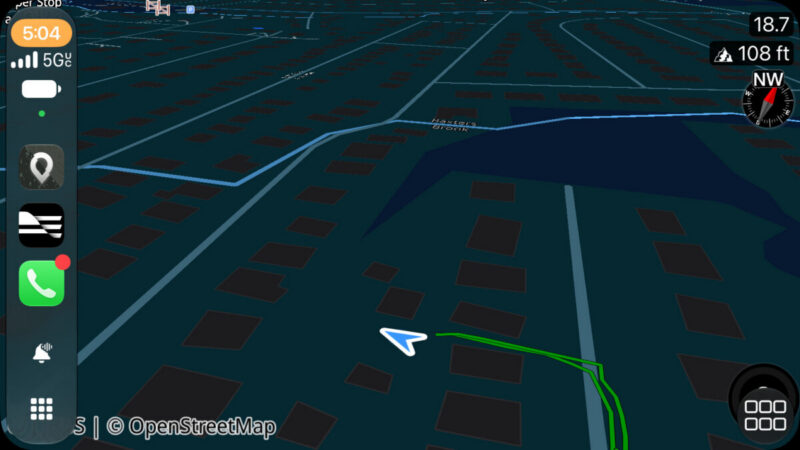
I’m a new user using CarPlay on iOS 27.1, I notice that the menu button, search button, and zoom buttons obscure the speed and speed limit widgets on the bottom right of the screen on both the Chigee (top) and my Land Rover (bottom)
is there any way to move or turn off? 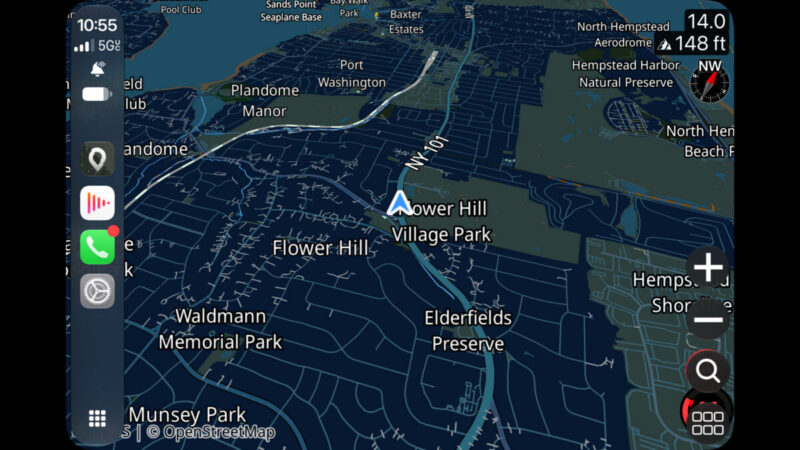

Quote from Guido on 18.11.2026, 09:23That's weird. I haven't received any other reports on this so far. I also just tried myself, and the speedometer is to the left of these buttons. I am on iOS27.2 though. Could you try updating to iOS27.2 to see if that makes any difference?
It's not just the speedo. Also the attribution text on the left side is falling behind the toolbar. That shouldn't happen either. So, it's as if the placement of these elements is ignoring the "safe areas" left and right.
To turn off the speedo: Settings > Navigation & Tracking > Show Speedometer.
That's weird. I haven't received any other reports on this so far. I also just tried myself, and the speedometer is to the left of these buttons. I am on iOS27.2 though. Could you try updating to iOS27.2 to see if that makes any difference?
It's not just the speedo. Also the attribution text on the left side is falling behind the toolbar. That shouldn't happen either. So, it's as if the placement of these elements is ignoring the "safe areas" left and right.
To turn off the speedo: Settings > Navigation & Tracking > Show Speedometer.
Quote from Guido on 18.11.2026, 09:40Also, make sure you are on latest Scenic version: https://apps.apple.com/app/id1089668246
Also, make sure you are on latest Scenic version: https://apps.apple.com/app/id1089668246
Quote from Djwpe on 18.11.2026, 12:51I was mistaken on the iOS version. I’m on 27.2.1.
I am on the latest app version. I’m on an iPhone Duo, so maybe that has something to do with it. I’ll try my old 15 pro max and see if it’s any different.
I was mistaken on the iOS version. I’m on 27.2.1.
I am on the latest app version. I’m on an iPhone Duo, so maybe that has something to do with it. I’ll try my old 15 pro max and see if it’s any different.
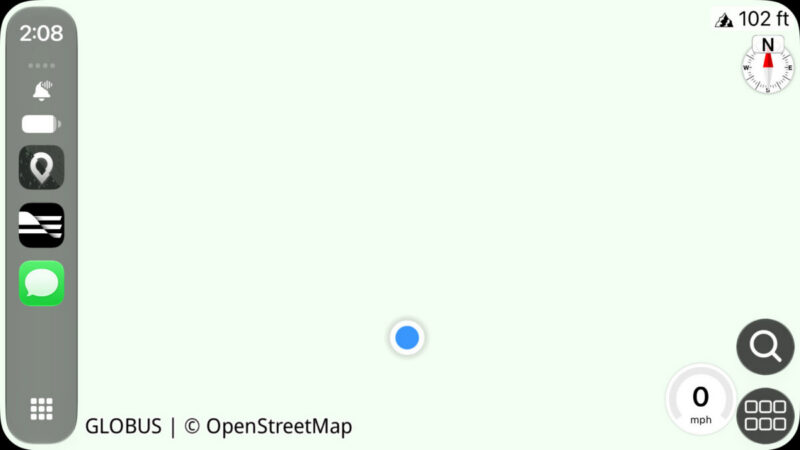
Quote from Guido on 18.11.2026, 13:46OK. that's good to know. Thanks for updating me.
In the past I've seen iOS beta versions (and even new non-beta iOS versions) mess with CarPlay layout and appearance which is then corrected in later iOS versions. I guess what I'm saying is that CarPlay testing is low on Apple's priority list.Although the Duo uses iOS, some of its iOS software still needs tweaking. Probably Apple will notice and correct this bug in one of their future iOS updates.
OK. that's good to know. Thanks for updating me.
In the past I've seen iOS beta versions (and even new non-beta iOS versions) mess with CarPlay layout and appearance which is then corrected in later iOS versions. I guess what I'm saying is that CarPlay testing is low on Apple's priority list.
Although the Duo uses iOS, some of its iOS software still needs tweaking. Probably Apple will notice and correct this bug in one of their future iOS updates.


