
Carplay display bug

Quote from massi on 03.06.2026, 10:57Hi,
when using Scenic 4.37 with Carplay, sometimes when selecting the functions menu (right lower corner the 9 squares), the display is dark and in sunlight it is nearly impossible to read something. This happens almost every time in route mode, but not every time.
I add two pictures, one with normal display and one with the darkened display.
(Shot it with iphone so there some interferences, but I think you can see what the problem is.)
Regards
Marc-Antón
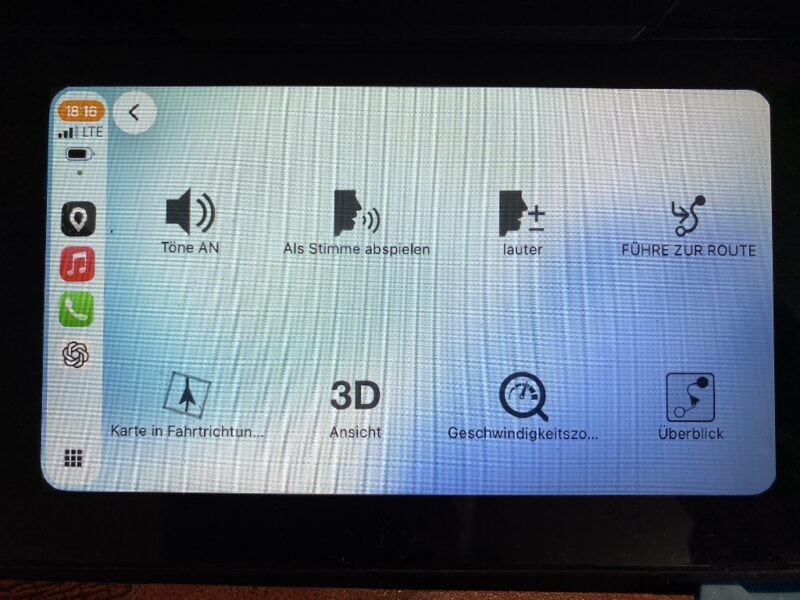
Hi,
when using Scenic 4.37 with Carplay, sometimes when selecting the functions menu (right lower corner the 9 squares), the display is dark and in sunlight it is nearly impossible to read something. This happens almost every time in route mode, but not every time.
I add two pictures, one with normal display and one with the darkened display.
(Shot it with iphone so there some interferences, but I think you can see what the problem is.)
Regards
Marc-Antón
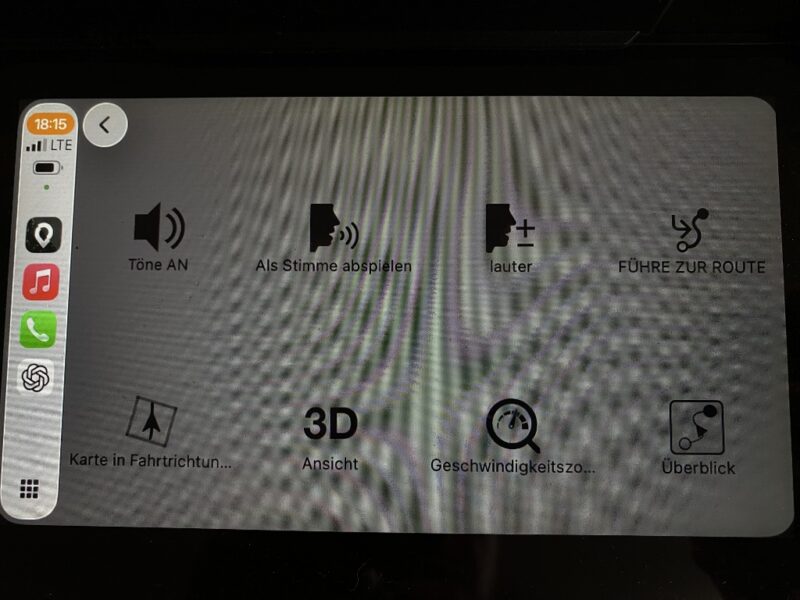

Quote from Guido on 03.06.2026, 11:49That's weird. I'll have a look at that.
That's weird. I'll have a look at that.
Quote from Guido on 03.06.2026, 12:34Hi Marc-Anton,
I have a theory, but want to check with you first before making a fix.
It's a bit hard to see on the picture, so a question. The background of the CarPlay menu is always a bit translucent (i.e. the background shines through). My theory is that in the first picture the map behind the menu is light mode, and in the 2nd picture the map behind the menu is in dark mode. Do you think that's true? Could that explain the "sometimes"?
Cheers,
Guido
Hi Marc-Anton,
I have a theory, but want to check with you first before making a fix.
It's a bit hard to see on the picture, so a question. The background of the CarPlay menu is always a bit translucent (i.e. the background shines through). My theory is that in the first picture the map behind the menu is light mode, and in the 2nd picture the map behind the menu is in dark mode. Do you think that's true? Could that explain the "sometimes"?
Cheers,
Guido
Quote from massi on 03.06.2026, 14:30Hi Guido,
Do you think that's true?
No, I fear that's not true, the second screenshot is in light mode, too.
Hi Guido,
Do you think that's true?
No, I fear that's not true, the second screenshot is in light mode, too.
Quote from Guido on 04.06.2026, 11:00I did some more research on this, but, honestly, I can not explain it. It's not a dark mode / light mode thing, because in dark mode the background is black and icons are white. It's almost as if there is a black transparent layer positioned over the grid menu (but not over the CarPlay toolbar nor the back button). This grid is a CarPlay template. Apps don't control the background.
What I did find out is that your CarPlay wallpaper shines through a bit. When I select a dark wallpaper, the grid menu background seems darker too. But, this doesn't explain why sometimes it's light and sometimes it's gray though.
So, not really sure, and have not been able to reproduce nor any other reports on this.
If you find any reproducible way / login behind when it's dark and when it's light, could you let me know? With that I can further investigate.
I did some more research on this, but, honestly, I can not explain it. It's not a dark mode / light mode thing, because in dark mode the background is black and icons are white. It's almost as if there is a black transparent layer positioned over the grid menu (but not over the CarPlay toolbar nor the back button). This grid is a CarPlay template. Apps don't control the background.
What I did find out is that your CarPlay wallpaper shines through a bit. When I select a dark wallpaper, the grid menu background seems darker too. But, this doesn't explain why sometimes it's light and sometimes it's gray though.
So, not really sure, and have not been able to reproduce nor any other reports on this.
If you find any reproducible way / login behind when it's dark and when it's light, could you let me know? With that I can further investigate.
Quote from massi on 04.06.2026, 11:27O.K., I will have an eye on it and report it, perhaps it has something to do with the carplay device?
O.K., I will have an eye on it and report it, perhaps it has something to do with the carplay device?
Quote from Guido on 04.06.2026, 11:31Could be. I would first check your wallpaper on CarPlay settings. Perhaps it’s dynamic or something.
Could be. I would first check your wallpaper on CarPlay settings. Perhaps it’s dynamic or something.


