
Car play help

Quote from GB on 19.07.2026, 06:55Hi everyone, I’ve been using scenic and my phone only controlling it with a WunderLINQ and the wheel on my BMW. Now I have invested in a CarPlay unit for it, anyone got any tips on using scenic with CarPlay? The screen layout is obviously different to the phone with less information, I think??
Hi everyone, I’ve been using scenic and my phone only controlling it with a WunderLINQ and the wheel on my BMW. Now I have invested in a CarPlay unit for it, anyone got any tips on using scenic with CarPlay? The screen layout is obviously different to the phone with less information, I think??

Quote from Dae on 19.07.2026, 07:06I have over 10,000 miles on CarPlay. There’s not really anything to “tip” you about - it just works!
There are a couple of things though that may help:
- The “manual plus turn” zoom setting is brilliant. I never really find myself having to mess with zoom levels
- On the phone there’s an icon in the bottom right to choose if you’re navigated to the start of the route or not. You don’t get that on CarPlay. Instead, when you start a route it’ll prompt you to ask if you want to be navigated to the route start
- When you finish a ride on the phone, you get to choose which folder to save the recorded ride in. CarPlay doesn’t do this; it gets saved in the last folder you saved a ride to. That can lead to confusion and you thinking a ride wasn’t recorded, when in fact it’s just in a different folder to what you thought
- Consider using the map customiser to make a view with higher contrast and fewer details as some of the CarPlay screens don’t have as high of a contrast ratio as a phone screen. I have the Chigee 6 and it’s one of the best screens with high brightness and contrast, but some of the cheaper units by other brands are quite poor
There’s not really anything more I can add that springs to mind. That’s a good thing, as it means it just works and Scenic disappears from your conscious thought. Other apps I’ve tried haven’t been as good and have led to constantly trying to figure out what they’re doing.
I originally had Scenic with Wunderlinq, but when I moved to CarPlay I sold the Wunderlinq. I’ve not missed it, and phone battery life is so much better, as there’s no need for the screen to be on all the time.
I have over 10,000 miles on CarPlay. There’s not really anything to “tip” you about - it just works!
There are a couple of things though that may help:
- The “manual plus turn” zoom setting is brilliant. I never really find myself having to mess with zoom levels
- On the phone there’s an icon in the bottom right to choose if you’re navigated to the start of the route or not. You don’t get that on CarPlay. Instead, when you start a route it’ll prompt you to ask if you want to be navigated to the route start
- When you finish a ride on the phone, you get to choose which folder to save the recorded ride in. CarPlay doesn’t do this; it gets saved in the last folder you saved a ride to. That can lead to confusion and you thinking a ride wasn’t recorded, when in fact it’s just in a different folder to what you thought
- Consider using the map customiser to make a view with higher contrast and fewer details as some of the CarPlay screens don’t have as high of a contrast ratio as a phone screen. I have the Chigee 6 and it’s one of the best screens with high brightness and contrast, but some of the cheaper units by other brands are quite poor
There’s not really anything more I can add that springs to mind. That’s a good thing, as it means it just works and Scenic disappears from your conscious thought. Other apps I’ve tried haven’t been as good and have led to constantly trying to figure out what they’re doing.
I originally had Scenic with Wunderlinq, but when I moved to CarPlay I sold the Wunderlinq. I’ve not missed it, and phone battery life is so much better, as there’s no need for the screen to be on all the time.

Quote from Guido on 19.07.2026, 09:32If you like to continue to use the WunderLINQ with CarPlay… this is possible but it’s limited. Here is more information on that: https://scenic.app/help/handlebar-controllers/
If you like to continue to use the WunderLINQ with CarPlay… this is possible but it’s limited. Here is more information on that: https://scenic.app/help/handlebar-controllers/
Quote from Middelfrangge on 20.07.2026, 22:54Quote from GB on 19.07.2026, 06:55Hi everyone, I’ve been using scenic and my phone only controlling it with a WunderLINQ and the wheel on my BMW. Now I have invested in a CarPlay unit for it, anyone got any tips on using scenic with CarPlay? The screen layout is obviously different to the phone with less information, I think??
Hi,
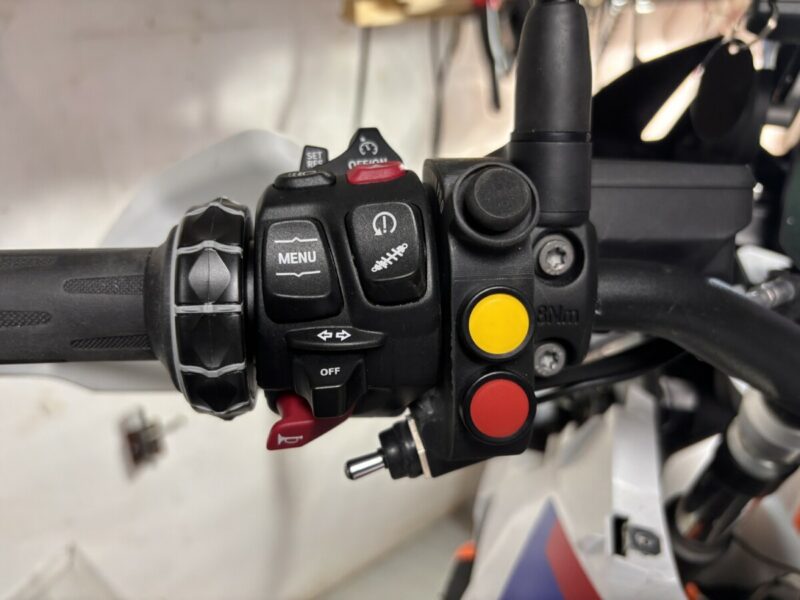
as far as I have understood, the Wunderlinq is using the NAV with the menue button (pressing up to switch from TFT to NAV) and therefore you cannot use e.g. Carpuride 502/602/702 BS which is using the same function for using the Multicontroller to jump through the Carplay functions. In that case the sticht from TFT to NAV would not know which one to use, Wunderlinq or Carpuride.
I use a Carpuride 702BS and use a Navcomm Pro controller in addition to the Multicontroller from BMW. That allows to control the TFT and the carplay at the same time. The Navcomm pro is working well with Scenic although not mentioned. There a special firmware to change the lever to be the zoom function and thats very practicable. Similar to the Barbuttons there are 6 Functions in total because panning works with a joystick.
In general the Carplay display is more „clean“ compared to the phone version of Scenic. There are some functions on the second screen which you reach by pressing the 6 squares in the lower right corner. That brings you to the voice control, overview or map direction (north up) . In case you want to change your route, you need to get out of carplay and use your phone. In case you have a BT controller attached like Motive monkey oder Navcomm pro, you will not have a keyboard on your phone because the controller is a BT keyboard. Unfortunately on the BMW the power supply for the Navigation keeps the power on some minutes when switching of the ignition, that is sometimes a bit annoying when you need a keyboard to type.
You also might have to adjust your map style for carplay, thats depending on the carplay device. I use a compromise because I have 3 Carplay devices (2 cars and my motorcycle) and there is a slight difference between them in regards to width of roads at different zoom levels.
regards
Thomas
Quote from GB on 19.07.2026, 06:55Hi everyone, I’ve been using scenic and my phone only controlling it with a WunderLINQ and the wheel on my BMW. Now I have invested in a CarPlay unit for it, anyone got any tips on using scenic with CarPlay? The screen layout is obviously different to the phone with less information, I think??
Hi,
as far as I have understood, the Wunderlinq is using the NAV with the menue button (pressing up to switch from TFT to NAV) and therefore you cannot use e.g. Carpuride 502/602/702 BS which is using the same function for using the Multicontroller to jump through the Carplay functions. In that case the sticht from TFT to NAV would not know which one to use, Wunderlinq or Carpuride.
I use a Carpuride 702BS and use a Navcomm Pro controller in addition to the Multicontroller from BMW. That allows to control the TFT and the carplay at the same time. The Navcomm pro is working well with Scenic although not mentioned. There a special firmware to change the lever to be the zoom function and thats very practicable. Similar to the Barbuttons there are 6 Functions in total because panning works with a joystick.
In general the Carplay display is more „clean“ compared to the phone version of Scenic. There are some functions on the second screen which you reach by pressing the 6 squares in the lower right corner. That brings you to the voice control, overview or map direction (north up) . In case you want to change your route, you need to get out of carplay and use your phone. In case you have a BT controller attached like Motive monkey oder Navcomm pro, you will not have a keyboard on your phone because the controller is a BT keyboard. Unfortunately on the BMW the power supply for the Navigation keeps the power on some minutes when switching of the ignition, that is sometimes a bit annoying when you need a keyboard to type.
You also might have to adjust your map style for carplay, thats depending on the carplay device. I use a compromise because I have 3 Carplay devices (2 cars and my motorcycle) and there is a slight difference between them in regards to width of roads at different zoom levels.
regards
Thomas


