
Can’t store routes

Quote from R1200CL on 26.04.2026, 14:28I’m on 2 week trail. I can’t store routes. Is this a limitation. If yes, what are the limitations? It also seems like my iPad and iPhone isn’t syncing
How can I force to skip the free trail ?
I’m on 2 week trail. I can’t store routes. Is this a limitation. If yes, what are the limitations? It also seems like my iPad and iPhone isn’t syncing
How can I force to skip the free trail ?

Quote from Guido on 26.04.2026, 15:56Are you using a VPN by any chance? Some VPNs can prevent the Scenic server from being reached.
Regardless you should be able to save routes. Are you getting an error message? Or, what’s happening exactly?
Are you using a VPN by any chance? Some VPNs can prevent the Scenic server from being reached.
Regardless you should be able to save routes. Are you getting an error message? Or, what’s happening exactly?
Quote from R1200CL on 27.04.2026, 02:10Well, suddenly I’m able to save routes. However routs isn’t possible to sync to iPhone from my iPad. No VPN in use.
Shouldn’t the routs sync quite immediately?Edit: Now I’m not able to save a route I just made on my iPad. So there must be a bug somewhere. I have created two favorites. One is home, the other is the destination. I make plan the route using a preset curved option, and route is planned between those two favorites, and Scenic have autogenerated almost 70 waypoints. I’m told saved successfully, but route does not show up in my routes.
I also discovered other bugs. The delete waypoints in a route (roundtrip function) isn’t possible. (But did work on the one I can’t save).
When loading a route (from a saved autogenerated round trip), I’ve got an error when trying to edit, and route does not show.Also, I’ve noticed it’s not possible to create favorites directly when you’re planning a route, and the search function when you like to create a new favorite seems not to work properly when you want to create a new favorite. I noticed I can go to Google Maps, but I can’t then mark the position there, so not so helpful that option.
Well, suddenly I’m able to save routes. However routs isn’t possible to sync to iPhone from my iPad. No VPN in use.
Shouldn’t the routs sync quite immediately?
Edit: Now I’m not able to save a route I just made on my iPad. So there must be a bug somewhere. I have created two favorites. One is home, the other is the destination. I make plan the route using a preset curved option, and route is planned between those two favorites, and Scenic have autogenerated almost 70 waypoints. I’m told saved successfully, but route does not show up in my routes.
I also discovered other bugs. The delete waypoints in a route (roundtrip function) isn’t possible. (But did work on the one I can’t save).
When loading a route (from a saved autogenerated round trip), I’ve got an error when trying to edit, and route does not show.
Also, I’ve noticed it’s not possible to create favorites directly when you’re planning a route, and the search function when you like to create a new favorite seems not to work properly when you want to create a new favorite. I noticed I can go to Google Maps, but I can’t then mark the position there, so not so helpful that option.
Quote from Guido on 27.04.2026, 10:54Well, suddenly I’m able to save routes. However routs isn’t possible to sync to iPhone from my iPad. No VPN in use.
Shouldn’t the routs sync quite immediately?Edit: Now I’m not able to save a route I just made on my iPad. So there must be a bug somewhere. I have created two favorites. One is home, the other is the destination. I make plan the route using a preset curved option, and route is planned between those two favorites, and Scenic have autogenerated almost 70 waypoints. I’m told saved successfully, but route does not show up in my routes.
Sometimes, especially if Scenic if opened on both devices at the same time, a "pull-to-refresh" might be required in the My Routes list.
I also discovered other bugs. The delete waypoints in a route (roundtrip function) isn’t possible. (But did work on the one I can’t save).
When loading a route (from a saved autogenerated round trip), I’ve got an error when trying to edit, and route does not show.I was not able to reproduce this problem. After generating a round trip, or creating a route, etc. Simply tap on the marker of the waypoint you want to remove and then tap the "delete" button.
Are you doing something differently? Or is the waypoint not being removed? What's happening exactly for you?
Also, I’ve noticed it’s not possible to create favorites directly when you’re planning a route, and the search function when you like to create a new favorite seems not to work properly when you want to create a new favorite. I noticed I can go to Google Maps, but I can’t then mark the position there, so not so helpful that option.
The easiest way to save a location is to long press on the map, and then select "save" in the callout bubble.
Or, if you want to search for a location, tap search in the main screen, do your search, select the search result, and tap the save button in the callout bubble. Important... .this only works in the MAIN screen. If you are in planning mode, the save button won't appear.
Hope this helps/explains. If not, please let me know if you have other questions. Happy to help.
Best regards and ride safe,
Guido
Well, suddenly I’m able to save routes. However routs isn’t possible to sync to iPhone from my iPad. No VPN in use.
Shouldn’t the routs sync quite immediately?Edit: Now I’m not able to save a route I just made on my iPad. So there must be a bug somewhere. I have created two favorites. One is home, the other is the destination. I make plan the route using a preset curved option, and route is planned between those two favorites, and Scenic have autogenerated almost 70 waypoints. I’m told saved successfully, but route does not show up in my routes.
Sometimes, especially if Scenic if opened on both devices at the same time, a "pull-to-refresh" might be required in the My Routes list.
I also discovered other bugs. The delete waypoints in a route (roundtrip function) isn’t possible. (But did work on the one I can’t save).
When loading a route (from a saved autogenerated round trip), I’ve got an error when trying to edit, and route does not show.
I was not able to reproduce this problem. After generating a round trip, or creating a route, etc. Simply tap on the marker of the waypoint you want to remove and then tap the "delete" button.
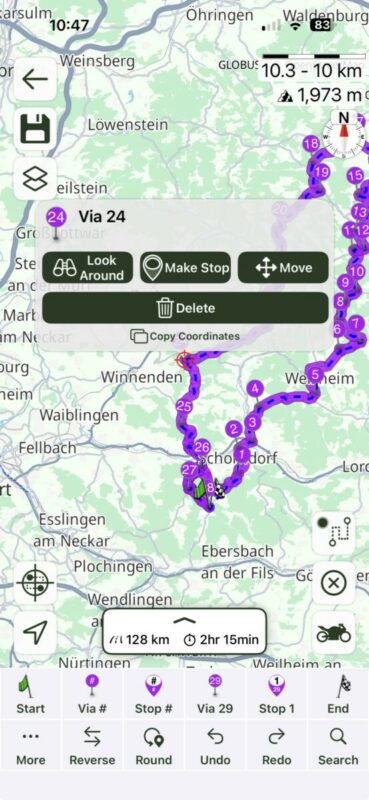
Are you doing something differently? Or is the waypoint not being removed? What's happening exactly for you?
Also, I’ve noticed it’s not possible to create favorites directly when you’re planning a route, and the search function when you like to create a new favorite seems not to work properly when you want to create a new favorite. I noticed I can go to Google Maps, but I can’t then mark the position there, so not so helpful that option.
The easiest way to save a location is to long press on the map, and then select "save" in the callout bubble.
Or, if you want to search for a location, tap search in the main screen, do your search, select the search result, and tap the save button in the callout bubble. Important... .this only works in the MAIN screen. If you are in planning mode, the save button won't appear.
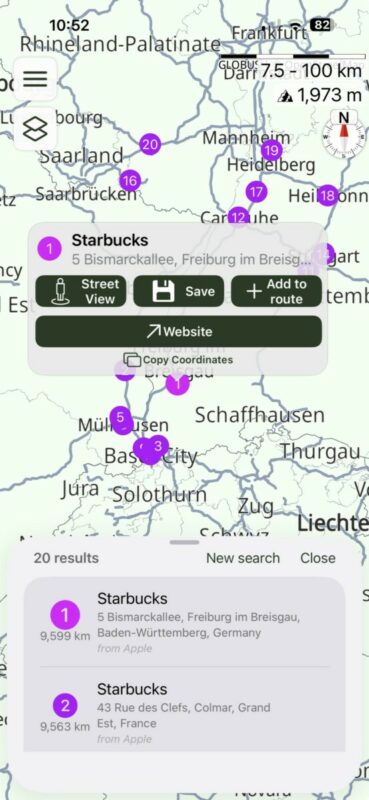
Hope this helps/explains. If not, please let me know if you have other questions. Happy to help.
Best regards and ride safe,
Guido


