Hi Guido, wanted to put a bug on your radar, if not already. Noticed that sometimes when trying to save a new Location the keyboard cannot be reduced, blocking the "Save" button at the bottom of the screen, meaning there is no way to save the Location I am trying to create. There is no "Done" button near the top of the keyboard as there usually is that enables you to hide the keyboard.
Doing a little bit of testing, it looks like this happens primarily (exclusively?) when trying to save a Location WHILE IN THE MIDDLE OF RECORDING A TRIP. When I tried testing a few scenarios, the problem doesn't seem to appear when saving a new Location when simply in the basemap/planning view. But replicated it everytime when trying to save a new Location while recording a route.
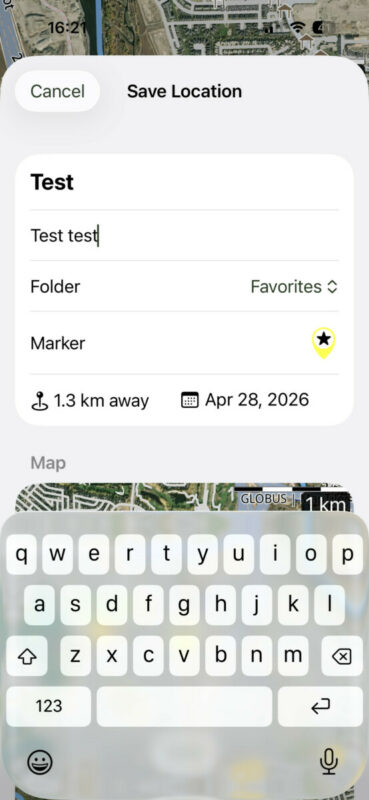
Hi Guido, wanted to put a bug on your radar, if not already. Noticed that sometimes when trying to save a new Location the keyboard cannot be reduced, blocking the "Save" button at the bottom of the screen, meaning there is no way to save the Location I am trying to create. There is no "Done" button near the top of the keyboard as there usually is that enables you to hide the keyboard.
Doing a little bit of testing, it looks like this happens primarily (exclusively?) when trying to save a Location WHILE IN THE MIDDLE OF RECORDING A TRIP. When I tried testing a few scenarios, the problem doesn't seem to appear when saving a new Location when simply in the basemap/planning view. But replicated it everytime when trying to save a new Location while recording a route.
Old Man Emu has reacted to this post.


